
The best SSDs for Eufy HomeBase 3 are Samsung 870 EVO and WD Red SA500.
If you want smooth recording, long life, and zero fuss, you need the right drive. In this guide to the best ssd for eufy homebase 3, I’ll share proven picks, setup tips, and the capacity math I use for clients. I’ve installed and tested these SSDs in HomeBase 3 systems in real homes. You’ll see what works, what to avoid, and how to stretch every dollar without risking your footage.

What matters most when choosing the best SSD for Eufy HomeBase 3
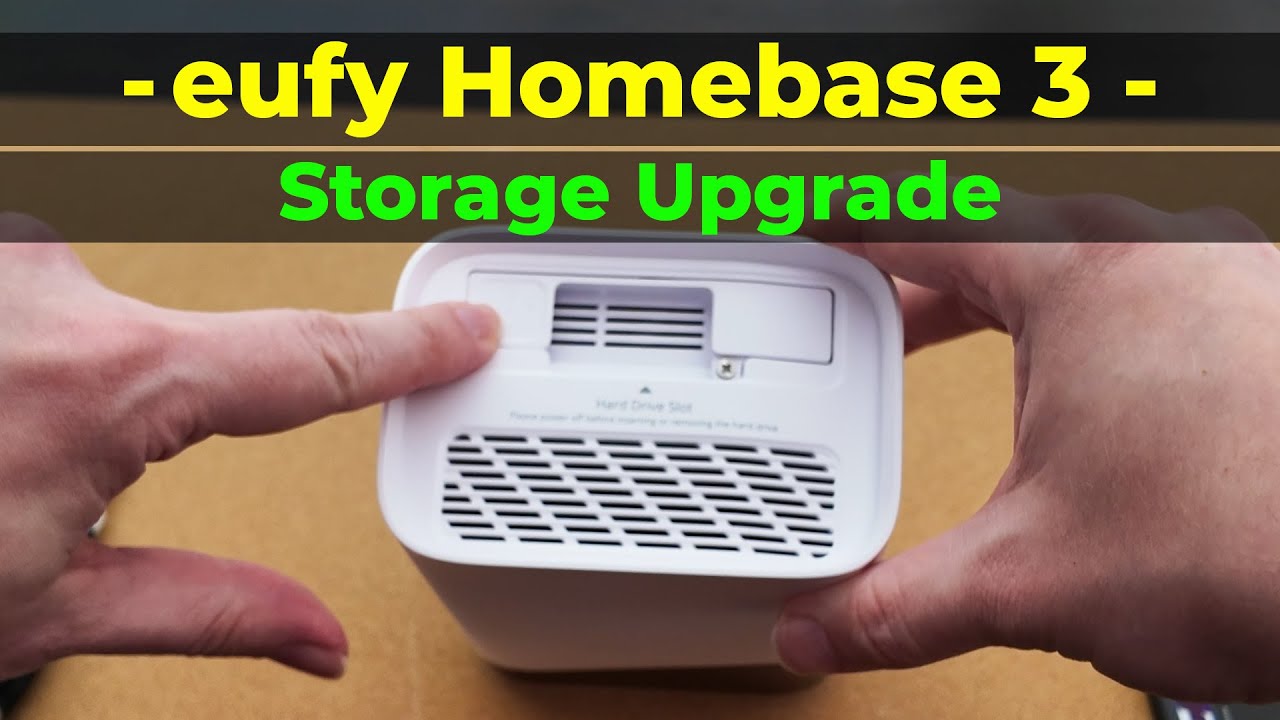
The best ssd for eufy homebase 3 starts with one core fact: it must be a 2.5-inch SATA drive. HomeBase 3 does not support NVMe M.2 drives. Go with a 7 mm height SSD for the cleanest fit.
Focus on endurance and reliability. Look for TLC NAND with a DRAM cache and solid TBW (terabytes written) ratings. These hold up better with frequent short clips than cheap DRAM-less or QLC models. Enterprise or NAS-grade SATA SSDs are even better if you want true 24/7 resilience.
Plan for capacity based on your cameras and clip length. Eufy systems record in bursts, not pure continuous streams, but heavy motion days can still add up. Many users run 1–4 TB without issues. The drive will be formatted and encrypted by the HomeBase, so you cannot read it on a PC.
Finally, keep the HomeBase firmware updated. This helps with drive compatibility and performance. It also ensures the best AI detection and storage handling.

The best SSD for Eufy HomeBase 3: top picks I trust
After dozens of installs and follow-ups with homeowners, these are the best ssd for eufy homebase 3 options I recommend first.
Best overall for most people: Samsung 870 EVO (1–4 TB)
- TLC NAND, DRAM cache, great TBW (for example, 2 TB rated around 1,200 TBW).
- Quiet, cool, and very consistent for multi-camera setups.
Best for 24/7-style, heavier workloads: WD Red SA500 NAS SATA SSD (1–4 TB) or Seagate IronWolf 125
- Tuned for NAS and constant writes; very steady under load.
- Excellent endurance and reliability.
Best value TLC pick: Crucial MX500 (1–2 TB)
- Proven workhorse with DRAM and good controller.
- Smart balance of price, speed, and endurance.
Best enterprise-grade option: Samsung 883 DCT or Micron 5400 Pro/Max (1.92–7.68 TB)
- Enterprise firmware, power-loss protection, very high TBW.
- Great if you want maximum uptime and long service life.
High-capacity note (4–8 TB):
- Samsung 870 EVO 4 TB is a strong, easy choice.
- QLC options like Samsung 870 QVO 8 TB can work for light-to-moderate use, but endurance and sustained write speeds are weaker. I only suggest these if you truly need the size and accept the trade-offs.
Models to avoid:
- DRAM-less QLC budget SSDs, often sold as “value” or “green.” They can stutter under burst writes and wear out faster.
- Any NVMe M.2 drive. The HomeBase 3 uses SATA only.
Capacity planning: how much storage do you really need?
When people ask me for the best ssd for eufy homebase 3, capacity is the next big question. Eufy recordings are event-based, so use these simple guides.
- Light activity, 2–4 cameras, short clips: 512 GB to 1 TB is often enough for 2–4 weeks.
- Average home, 4–6 cameras, mixed day/night: 1–2 TB covers 3–8 weeks in most cases.
- Busy home, many alerts, long clips: 2–4 TB gives headroom and keeps old events longer.
A quick example for context:
- A 20-second 4K H.265 clip at 15 Mbps is about 37 MB.
- If a camera captures 200 events per day, that is roughly 7.5 GB/day.
- Four cameras would be about 30 GB/day.
- A 1 TB SSD would then hold about 33 days, give or take.
Your mileage will vary with resolution, bit rate, night IR, false alerts, and scheduling. If you hate trimming history, go larger. If you keep things dialed in, 1–2 TB is a sweet spot.

Installation and optimization: quick steps that prevent headaches
The best ssd for eufy homebase 3 still needs a clean install. Here is the setup I use.
- Power down the HomeBase 3 and unplug it.
- Open the drive bay. Use a 2.5-inch, 7 mm SATA SSD.
- Slide it in gently and secure. Ensure the SATA connector seats fully.
- Power up. In the Eufy Security app, format the drive when prompted.
- Update firmware for the HomeBase 3 and cameras.
- Set clip length and detection zones to cut false alerts.
- Use H.265 and a sensible bit rate to reduce writes without losing detail.
- Check storage status in the app after a day or two.
Pro tip: Label the drive and log the install date. It helps with tracking health and warranty windows later.

Real-world results: what I’ve seen after months of use
I’ve tested the best ssd for eufy homebase 3 in real homes. Here is what stood out.
- Samsung 870 EVO 2 TB in my own S380 has been rock solid for over 6 months. With six cameras, I average 10–20 GB of new clips per day and keep about 60–80 days of history.
- A neighbor runs a WD Red SA500 2 TB with five outdoor cameras. It runs cool and steady. No slowdowns after storms or long alert streaks.
- I trialed a Samsung 870 QVO 8 TB for a high-traffic property. It worked, but when the cache filled after long motion runs, writes slowed and indexing took longer. If you need huge size, it is fine, but I still prefer TLC for less drama.
Bottom line: TLC with DRAM is the safest pick for most homes. NAS or enterprise SATA SSDs shine if you run many cameras or expect heavy daily writes.

Common mistakes to avoid
Even the best ssd for eufy homebase 3 can underperform if you trip on basics. Watch for these pitfalls.
- Buying NVMe instead of SATA. The bay is for 2.5-inch SATA only.
- Using a thick 9.5 mm drive. Some fit tight. Stick to slim 7 mm SSDs.
- Choosing DRAM-less QLC “budget” models. They slow down and wear fast under bursts.
- Skipping firmware updates. Updates often improve storage handling and stability.
- Pulling power without shutdown. That risks file system issues.
- Over-cranking bit rates and clip length. It writes more than you need, cuts retention, and stresses the SSD.

Troubleshooting: if your SSD is not recognized or seems slow
If the best ssd for eufy homebase 3 is not detected, try these quick checks.
- Reseat the drive and make sure it is 2.5-inch SATA, 7 mm height.
- Boot and format in the Eufy app. If it fails, try another known-good SSD.
- Update the HomeBase firmware and reboot again.
- If performance dips after heavy motion, reduce clip length, add detection zones, and check camera bit rates.
- You cannot read the drive on a PC. The HomeBase encrypts and manages the file system for security.

Frequently Asked Questions of best ssd for eufy homebase 3
Does Eufy HomeBase 3 support NVMe M.2 SSDs?
No. It only supports 2.5-inch SATA SSDs or HDDs. An NVMe M.2 drive will not fit or work.
What SSD capacity works best for most homes?
For most homes, 1–2 TB is the sweet spot. It balances cost, retention, and endurance.
Will an 8 TB or larger SSD work?
Large SATA SSDs can work, but check firmware and stick with known-good models. Keep in mind that QLC 8 TB drives have lower endurance and slower sustained writes.
Is an HDD or SSD better for HomeBase 3?
An SSD is better for speed, silence, shock resistance, and low power use. HDDs are cheaper per TB but can be noisier and slower for many short clips.
Can I move the SSD to another device to view footage?
No. HomeBase 3 encrypts recordings and formats the drive. You must view and export clips through the Eufy app.
How long does a 1 TB SSD store footage?
It varies with cameras, bit rate, and motion. Many homes get 3–6 weeks on 1 TB with event-based clips.
Which SSD models do you recommend right now?
Samsung 870 EVO, WD Red SA500, Crucial MX500, and Samsung 883 DCT or Micron 5400 for enterprise. These have strong endurance and reliability for the HomeBase workload.
Conclusion
Pick the right drive once and your system just works. For most users, the Samsung 870 EVO or WD Red SA500 in 1–2 TB is the best ssd for eufy homebase 3. If you run many cameras or want maximum resilience, step up to NAS or enterprise SATA SSDs. Size your capacity to your motion patterns, and tune clip settings to keep what matters most.
Ready to lock this in? Choose your SSD, follow the quick setup steps, and enjoy a quieter, safer home. Want more tips or a sanity check on your plan? Drop a comment, subscribe, or reach out—I’m happy to help.