
Because drive makers use decimal terabytes, but your OS shows binary gibibytes.
If you’ve ever wondered why is my 1tb ssd only 931gb, you’re not alone. I’ve set up thousands of drives, and this question comes up every week. In this guide, I’ll break down the real math, show how Windows, macOS, and Linux measure storage, and share hands-on tips to check, verify, and fix common space issues. Stick with me, and you’ll never stress about where those “missing” gigabytes went.
The real reason your 1TB SSD shows 931 GB
Let’s start with definitions. Storage vendors use decimal units: 1 TB equals 1,000,000,000,000 bytes. Your operating system often reports storage in binary units: 1 GiB equals 1,073,741,824 bytes.
Do the math: 1,000,000,000,000 bytes divided by 1,073,741,824 bytes per GiB is about 931.32 GiB. That is why your screen reads about 931 GB. So when you ask why is my 1tb ssd only 931gb, it’s the same drive—just two different yardsticks.
Think of it like miles vs kilometers. The road didn’t get shorter. You changed how you count it.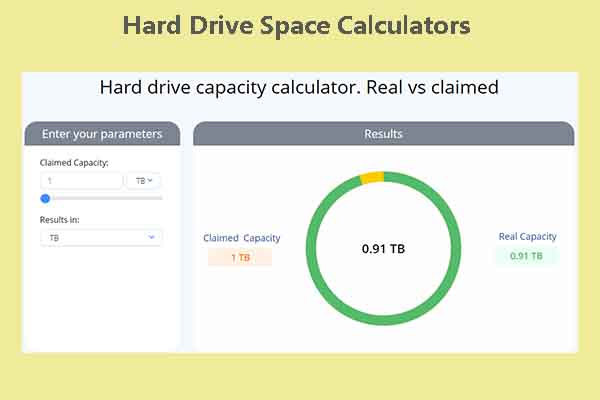
How operating systems report storage
Windows usually labels binary sizes with the letters GB, even though it means GiB. That is why you see 931 GB for a 1 TB SSD. It is not a loss. It is a label.
macOS shows decimal units in Finder. A “1 TB” drive looks closer to 1 TB in general use. Disk Utility can show more detail. Linux tools vary. df -h shows binary (base-2) by default, while df -H shows decimal.
This is why is my 1tb ssd only 931gb keeps coming up online. Different systems, different rules, same bytes underneath.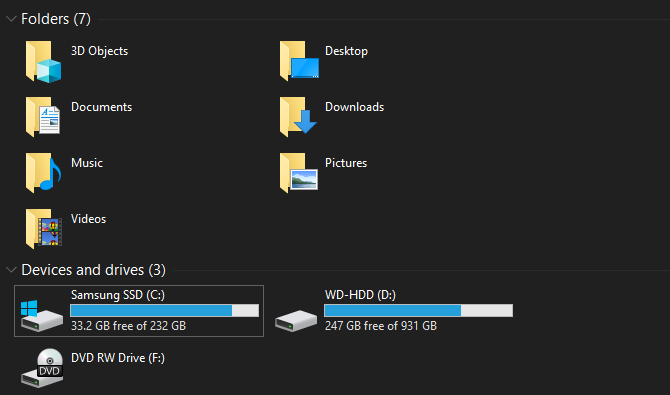
File system overhead and reserved space
A bit more space goes to structure and safety. Every file system stores metadata. NTFS, APFS, and ext4 all use a chunk of space for tables and journals. This is normal and small.
Your system may also create hidden partitions. These include recovery tools and boot helpers. On Windows, you might see a recovery partition and EFI partition. They can take hundreds of megabytes, or even a few gigabytes on OEM builds.
These parts do not mean you lost your drive. They are there to keep your system safe and fast. If you ask why is my 1tb ssd only 931gb and also notice less free space, this extra overhead explains the gap.
Over-provisioning, firmware, and spare area on SSDs
SSDs keep spare blocks for wear leveling and performance. This is called over-provisioning. It helps your drive stay fast and last longer. Vendors design this into the drive.
You can also set user over-provisioning in some tools. That gives the controller more spare area. The tradeoff is less user space shown in the OS.
If you worry why is my 1tb ssd only 931gb, know that spare area is doing good work. It keeps writes smooth and reduces slowdowns over time.
Formatting and choices that affect what you see
A fresh SSD needs a partition table and format. GPT is standard today. MBR still works but has limits. The partition style does not change the 931 GiB math. It just sets how your system maps space.
Allocation unit size, also called cluster size, can change how free space behaves. Many small files can waste space in large clusters. This does not change total capacity. It only alters how free space goes up or down as you store data.
Sector size, like 512e vs 4Kn, can change compatibility. But it rarely changes the number you see in a big way.
Real-world examples and tips from the bench
I once helped a photographer move to a 1 TB NVMe SSD. He asked me, why is my 1tb ssd only 931gb, did the shop scam me? We checked Disk Management. It showed 931 GiB. We then opened the box specs. It matched the rated capacity in bytes. Problem solved.
A second client cloned a 500 GB drive to a 1 TB SSD. The OS still showed about 465 GB total. We found unallocated space on the new drive. One minute later, we extended the main partition. Now it read 931 GiB. That fixed it fast.
Here is my simple playbook when you see a mismatch:
- Confirm the drive’s rated size in bytes on the box or spec sheet.
- Open your OS disk tool and check partitions and unallocated space.
- Verify the file system and any hidden recovery partitions.
- Run a quick health check to rule out firmware or cable issues.

Source: reddit.com
How to check and verify your 1TB SSD health and capacity
Windows
- Press Win+X, open Disk Management. Look for your 1 TB SSD. Check total size and partitions.
- Open Settings > System > Storage to see used vs free space.
- Optional: Open PowerShell as admin and run Get-PhysicalDisk for model and health.
macOS
- Open Disk Utility. Select the SSD. View Capacity and Partition Map.
- Go to Apple menu > About This Mac > More Info > Storage for a simple view.
- In Terminal, run diskutil list to see all partitions.
Linux
- Run lsblk -o NAME,SIZE,TYPE,MOUNTPOINT to see devices and sizes.
- Run df -h for binary units or df -H for decimal units.
- Use smartctl -a /dev/nvme0n1 (or your device) to check SMART health.
If you came here asking why is my 1tb ssd only 931gb, these checks prove it is normal and help spot real faults.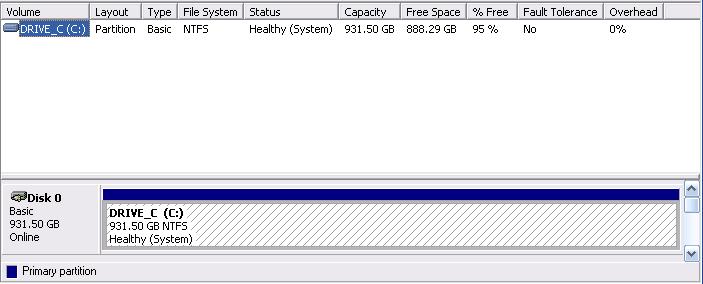
Can you reclaim any of that space?
You cannot beat math. You cannot turn 931 GiB into 1,000 GiB in your OS. But you can recover space lost to setup quirks.
Try these safe options:
- Remove old OEM recovery partitions if you have full backups.
- On Windows, disable hibernation (powercfg /h off) if you do not use it. That deletes hiberfil.sys.
- Tune the pagefile size if you know your workload.
- Clean up shadow copies and system restore points with built-in tools.
Avoid risky moves:
- Do not flash odd firmware to fake more space.
- Do not change sector sizes unless you have a clear need.
- Do not delete the EFI System Partition or current recovery partition unless you have boot media and know the risks.
These steps will not change the famous 931 GiB figure. But they can free real, usable space today. That is the practical answer behind why is my 1tb ssd only 931gb.
When the drive shows far less than 931 GB: red flags
If your 1 TB SSD shows 465 GB total, your main partition may be too small. This often happens after cloning from a 500 GB drive. Use your disk tool to extend the partition into unallocated space.
If it shows 223 GB or some odd size, check the model. Make sure it is truly a 1 TB unit. Counterfeit or mislabeled drives exist in the market. Check the serial in your OS against the box. Check SMART data for Total LBAs. If it is wrong, return the drive.
Some USB enclosures can misreport size. Update the bridge firmware or test the SSD on a direct SATA or NVMe slot. If you still ask why is my 1tb ssd only 931gb after these checks, call support with your test notes ready.
Frequently Asked Questions of why is my 1tb ssd only 931gb
Is data missing from my 1 TB SSD?
No. The bytes are all there. Your OS is showing binary units, which reads as about 931 GiB.
Can I format my drive to get back to 1 TB shown?
No. The 1 TB label is decimal. Your OS reports in binary. Reformatting will not change that math.
Why does macOS show closer to 1 TB than Windows?
Finder uses decimal units. Windows shows binary units but labels them as GB. They are both correct in context.
Does over-provisioning take away from my 931 GB?
Vendor over-provisioning is built-in. User over-provisioning reduces visible capacity by design to improve performance and endurance.
I cloned a smaller drive and still see the old size. What now?
Open your disk tool and extend the main partition into the unallocated space. After that, you should see about 931 GiB.
Do file systems like NTFS or APFS change my total capacity?
They take a little space for metadata and journals. The impact is small and expected.
How much space do recovery and EFI partitions use?
Often from a few hundred megabytes to a few gigabytes. OEM images can use more, but they are helpful for repairs.
Conclusion
Now you know why is my 1tb ssd only 931gb keeps popping up. It is the decimal vs binary story, plus a bit for file systems and recovery tools. The drive is fine, and the number is honest once you know how it is counted.
Use the steps above to verify capacity, check health, and fix sizing after a clone. Keep good backups, and only remove partitions when you are sure. Want more tips like this? Subscribe, ask a question in the comments, or share your own storage win so others can learn from it.