

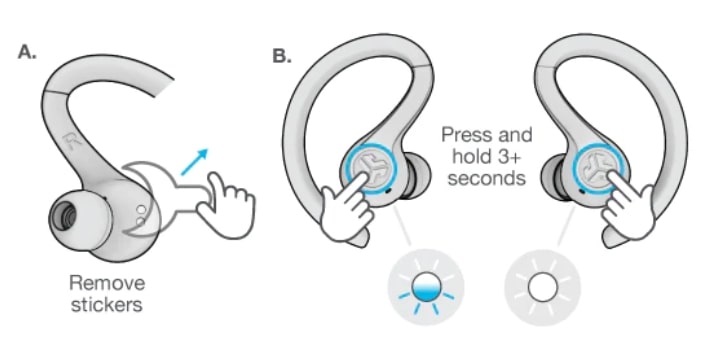
To turn on JLab earbuds without a case, press and hold each earbud’s button or touch sensor for three seconds.
If your JLab earbuds still have battery power, you can usually turn them on by hand, even when the charging case is missing or unavailable. The exact control varies by model, so this guide explains the safest steps for JLab Go Air Pop, JBuds Air, Epic Air, and other popular earbuds, along with fixes for pairing and power problems.
How to turn on JLab earbuds without case
Most JLab earbuds have a manual power control. It may be a physical button or a touch sensor on the outside of the earbud.
Follow these steps:
- Remove both earbuds from the case, if the case is available.
- Place the earbuds in your ears or hold them in your hand.
- Press and hold the button or touch area on each earbud.
- Keep holding for about three seconds.
- Listen for a “power on” sound or watch for the LED light to flash.
- Open Bluetooth settings on your phone.
- Select your JLab earbuds from the available devices.
This is the main answer to how to turn on JLab earbuds without case. The earbuds must have enough battery power, and each earbud may need to be turned on separately.
On many JLab models, the left and right earbuds use touch controls. Press the center of the outer panel, not the small microphone opening. On models with real buttons, press the button until you feel a click.
Step-by-step instructions for manual power-on
The following method works for most JLab wireless earbuds with touch controls or physical buttons.
Step 1: Find the control area
Look at the outer face of the earbud. The control is usually located where the JLab logo appears.
Do not press the ear tip or the charging contacts. The correct area is normally the flat outer panel that faces away from your ear.
Step 2: Press and hold
Press and hold the control for three seconds. A short tap may pause music or start playback, while a longer press normally controls power.
If nothing happens, hold the control for five seconds. Some JLab models respond more slowly when they have been unused for several hours.
Step 3: Check the indicator
A working earbud may show one of these signs:
• A blue or white LED flashes
• A voice prompt says “power on”
• The earbud enters pairing mode
• Your phone shows the earbuds in its Bluetooth list
LED colors can differ by model. A red light often means low battery, while a blue or white light usually indicates power or pairing activity. Check your model’s user guide if the color seems unclear.
Step 4: Turn on the second earbud
If you are using both earbuds, repeat the same process on the other side. Some JLab earbuds turn on together, but others may remain off until you manually activate them.
This is one of the most common reasons people think their JLab earbuds are broken. One earbud may be on while the other is still powered off.

How to turn on JLab earbuds without case by model
jlab has released many earbud families over the years. Their controls are similar, but timing and LED behavior can differ.
JLab Go Air Pop
To manually power on a Go Air Pop earbud, touch and hold the outside control for about three seconds. Repeat the process for the other earbud if needed.
These earbuds normally power on when removed from the charging case. Without the case, the touch control is the best way to start them manually.
JLab Go Air and Go Air Sport
Press and hold the touch sensor on each earbud for roughly three seconds. Wait for the LED to flash or for the power prompt.
If the earbuds do not respond, charge them as soon as possible. A nearly empty battery may not provide enough power for the touch system to respond.
JLab JBuds Air
JBuds Air models often use a physical button on each earbud. Press and hold the button for about three seconds to power on the earbud.
Avoid holding the button for 15 seconds unless you intend to reset the earbuds. A long reset hold can erase the current pairing information.
JLab JBuds Mini
Hold the outer touch panel on each earbud for several seconds. The small size can make the control area hard to locate, so press the flat outer surface rather than the silicone ear tip.
After power-on, open Bluetooth settings and select the JLab device name shown on your phone.
JLab Epic Air
Epic Air models may use buttons or touch controls, depending on the version. Hold the main control for three to five seconds, then check for an LED or voice prompt.
The Epic Air series can have more control features than basic JLab models. If the normal power command fails, use the model-specific guide before attempting a reset.
What to do if JLab earbuds do not turn on
If holding the button does nothing, the most likely cause is a drained battery. Wireless earbuds use small batteries, and they can discharge even when you have not used them recently.
Try these checks:
• Hold the button for five seconds instead of three.
• Try the other earbud to see whether the issue affects both sides.
• Clean the touch panel with a dry, soft cloth.
• Check for visible moisture or dirt.
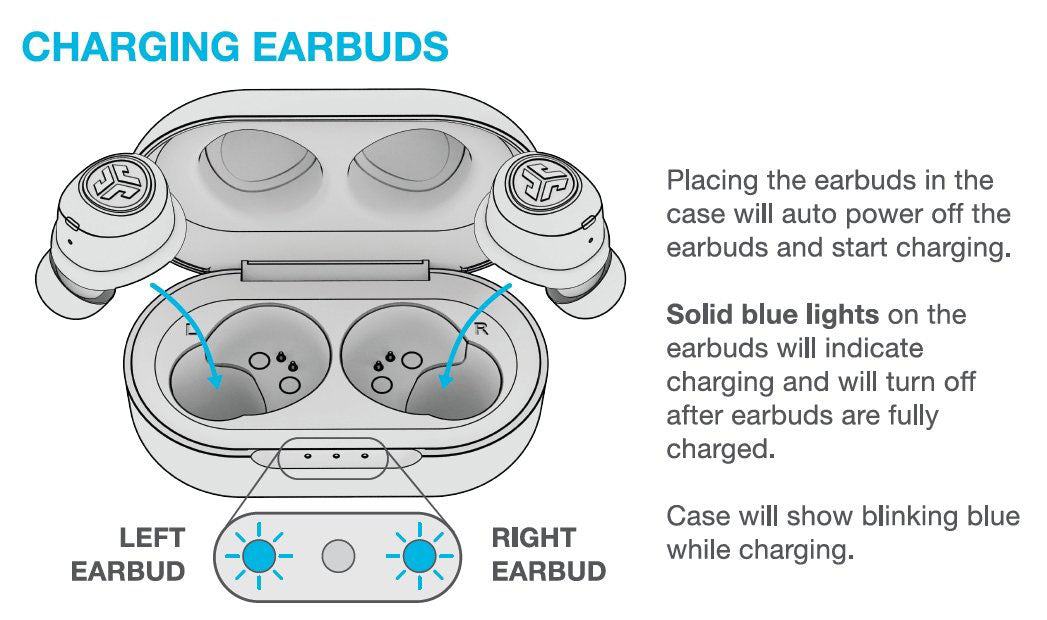
• Place the earbuds in the case if you can access it later.
• Charge the case and earbuds for at least 30 minutes.
• Remove the earbuds from your phone’s Bluetooth list and pair them again.
If the earbuds were left unused for weeks, their battery may be deeply discharged. In that state, the LED may not light right away. Charging for one to two hours may be necessary before the earbuds respond.
Do not use metal objects to press the controls or scrape the charging contacts. That can damage the earbuds or create a short circuit.

How to turn on JLab earbuds without case when they are unpaired
Turning on the earbuds and pairing them are two different steps. The earbuds can power on successfully but still fail to connect to your phone.
To pair them without the case:
- Turn on both earbuds manually.
- Open your phone’s Settings app.
- Select Bluetooth.
- Remove any old JLab entry if it appears as disconnected.
- Wait for the JLab earbuds to appear under available devices.
- Tap the correct JLab name.
- Accept the pairing request if your phone displays one.
If the earbuds connect to another device nearby, turn Bluetooth off on that device. For example, your earbuds may automatically connect to a tablet, laptop, or a family member’s phone before your phone can find them.
Some JLab models enter pairing mode automatically after manual power-on. If they do not, press and hold the control for a little longer until the LED flashes blue and white or another pairing pattern described in the model guide appears.
Can you turn on JLab earbuds with a phone?
No, a phone cannot usually power on JLab earbuds that are completely switched off. Bluetooth works only after the earbuds have enough power and their wireless system is active.
Your phone can wake the connection when the earbuds are already on. It cannot replace the physical button or touch command needed to start most JLab earbuds.
This limitation is important when learning how to turn on JLab earbuds without case. The phone helps with pairing, volume, and playback, but the earbud itself must first receive a power command.

How to turn on JLab earbuds without case after a reset
A reset does not normally turn the earbuds on by itself. It clears pairing data and returns the earbuds to a setup state.
For many JLab models, a reset involves holding a button or touch sensor for around 15 seconds. However, the exact process depends on the product family. Resetting too soon can make the earbuds harder to connect, so use this option only after basic power and charging checks fail.
After a successful reset:
- Turn on both earbuds.
- Forget the old JLab entry on your phone.
- Turn Bluetooth off, then back on.
- Search for nearby devices.
- Select the JLab earbuds.
- Test audio in both earbuds.
A reset is useful when one earbud connects and the other does not, or when the earbuds repeatedly connect to the wrong device. It will not repair a damaged battery or broken control.

Common mistakes to avoid
Many problems come from using the wrong control or holding it for the wrong amount of time.
Avoid these mistakes:
• Tapping once when the earbud needs a long press
• Holding only one earbud and expecting both to start
• Pressing the ear tip instead of the outer touch panel
• Trying to pair before the earbuds are powered on
• Resetting the earbuds before checking the battery
• Leaving Bluetooth enabled on another nearby device
• Charging wet earbuds or using a damaged cable
A useful real-world test is to hold one earbud in your hand while watching its LED. This is easier than trying to see the light while the earbud is in your ear. It also helps you confirm whether the control is responding.
Another practical lesson is to avoid guessing the reset command. I have seen users hold the control for 15 seconds when they only needed a three-second power press. That mistake can erase the connection and create a second problem.
How to keep JLab earbuds powered without the case
The charging case is more than a storage box. It usually charges the earbuds and helps control their automatic power state. Without it, you must manage power manually.
Use these habits:
• Turn the earbuds off after listening.
• Store them in a clean, dry container.
• Avoid leaving them in direct sun or a hot car.
• Keep the charging case available for regular charging.
• Charge the case before the earbuds reach zero percent.
• Keep the touch controls free of sweat and dirt.
Most true wireless earbuds are designed to work with their charging case. Manual power-on is useful, but it does not replace the case’s charging function. If the case is lost, purchasing a compatible replacement case may be the most reliable long-term solution.
Do not assume that any JLab case will work with any JLab earbuds. Charging contacts, firmware, shape, and electrical design can vary between models. Match the replacement case to the exact model name printed on the earbuds or original packaging.
When to contact JLab support
Contact JLab support if the earbuds do not respond after a full charge, manual power attempt, and model-specific reset.
Support may help with:
• Warranty questions
• Replacement charging cases
• Battery problems
• One-earbud connection failures
• Firmware or model instructions
• Physical button or touch sensor damage
Stop using the earbuds if they become unusually hot, swell, smell burnt, or show signs of liquid damage. A damaged lithium-ion battery can be unsafe, so do not open the earbud or try to replace the battery yourself.
The safest approach is to document the model, purchase date, symptoms, and steps you have already tried. This helps support staff give a faster and more accurate answer.
Frequently Asked Questions
Can I turn on JLab earbuds without the charging case?
Yes, most JLab earbuds can be turned on manually by holding the button or touch sensor for about three seconds. This works only if the earbuds have enough battery power.
Why will my JLab earbuds not turn on without the case?
The battery may be empty, or you may be pressing the wrong area. Charge the earbuds when possible, then hold the outer button or touch panel for three to five seconds.
How do I turn on one JLab earbud?
Hold the control on that earbud for about three seconds. Some models let you use one earbud alone, but the first setup may require both earbuds to be reset and paired together.
Can I charge JLab earbuds without the case?
Usually, no. Most JLab true wireless earbuds charge through the contacts inside their matching case, not through a cable connected directly to each earbud.
How long should I hold the JLab earbud button?
Start with three seconds for power-on. Avoid holding it for 15 seconds unless you are following the correct reset instructions for your model.
Why do my JLab earbuds turn off when I remove them from my ears?
Some models use auto-pause or inactivity features, while others may have a low battery or poor connection. Check the battery level, clean the controls, and reconnect the earbuds through Bluetooth.
Will a different JLab charging case turn on my earbuds?
Not always. JLab charging cases are not universally compatible, so use a case designed for the exact earbud model.
Conclusion
You can usually turn on JLab earbuds without case by pressing and holding the outer button or touch sensor for about three seconds. Turn on both earbuds, watch for an LED or voice prompt, and then connect them through your phone’s Bluetooth settings.
If nothing happens, check the battery, clean the controls, avoid nearby Bluetooth devices, and use a reset only when necessary. Once you identify your exact JLab model, the process becomes much easier and more reliable. Save this guide for later, check JLab’s official support resources, and share your model or troubleshooting result in the comments.
