

To use JLab earbuds, charge them, pair them with Bluetooth, fit them well, and learn their touch controls.
Learning how to use JLab earbuds is simple once you understand pairing, charging, controls, sound modes, and the JLab app. This guide explains the full setup in clear steps, covers common problems, and shares practical tips that help your earbuds work well for calls, music, workouts, and travel.

How to Use JLab Earbuds for the First Time
JLab makes several earbud lines, including GO Air, JBuds, Epic Air, and Open Sport models. The exact button controls may differ, but the basic setup is much the same.
Follow these steps to get started:
Charge the earbuds and case. Place both earbuds in the charging case. Connect the case to power with the included cable. New earbuds may arrive with a small protective film on the charging contacts. Remove it before charging.
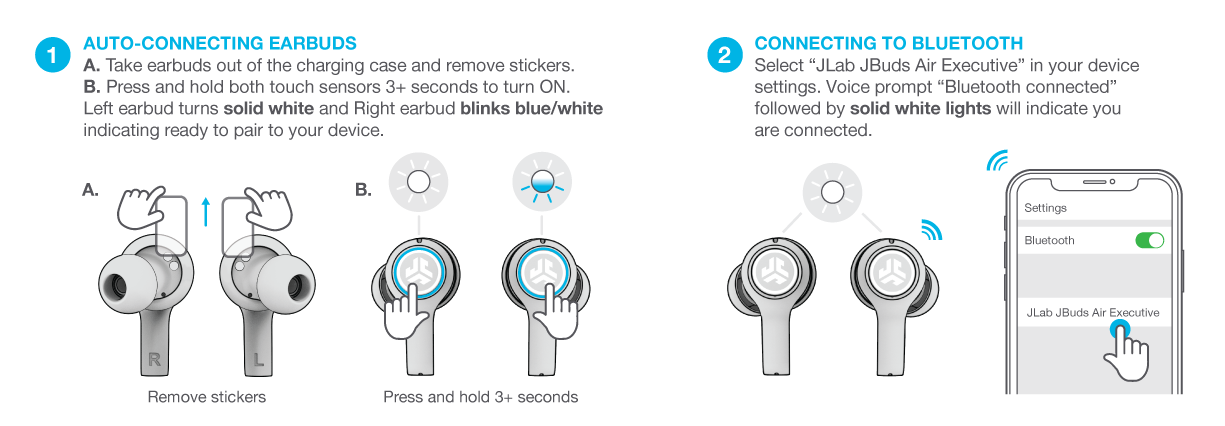
Open the charging case. Keep both earbuds inside the case during the first setup. Many JLab models enter pairing mode automatically when removed from the case.
Turn on Bluetooth. On an iPhone, open Settings, then Bluetooth. On an Android phone, open Settings, then Connected devices or Bluetooth.
Choose your JLab earbuds. Look for a name such as “JLab JBuds,” “JLab GO Air,” or the model listed on the box.
Accept the pairing request. When the status says Connected, play a song or video to test the sound.
Adjust the fit. Twist each earbud gently until it feels secure. A good seal improves bass and helps block outside noise.
If the earbuds do not appear, place them back in the case, close the lid, and try again. Keep the earbuds close to your phone during setup. Bluetooth pairing works best when there are few nearby wireless devices competing for the connection.
How to Pair JLab Earbuds With an iPhone or Android Phone
The first Bluetooth connection creates a link between your earbuds and phone. After that, most JLab earbuds reconnect automatically when you remove them from the case.
Pairing with an iPhone
- Open the iPhone’s Settings app.
- Tap Bluetooth.
- Turn Bluetooth on.
- Open the JLab charging case.
- Tap the JLab model name under Other Devices.
- Wait for the word Connected to appear.
If you see several JLab devices, choose the one that matches your model. Do not pair with a nearby friend’s earbuds by mistake.
Pairing with an Android phone
- Open Settings.
- Tap Connected devices, Connections, or Bluetooth.
- Turn Bluetooth on.
- Select Pair new device if needed.
- Open the JLab charging case.
- Tap the JLab earbuds in the available device list.
Android menus vary by phone brand. Samsung, Google Pixel, Motorola, and OnePlus phones may use slightly different menu names, but the Bluetooth process remains similar.
Pairing with a computer
To use JLab earbuds with a Windows PC:
- Open Settings.
- Select Bluetooth & devices.
- Turn Bluetooth on.
- Click Add device.
- Choose Bluetooth.
- Select your JLab earbuds.
On a Mac, open System Settings, choose Bluetooth, and select the JLab model. If the earbuds connect but you hear no sound, select them as the computer’s output device in Sound settings.
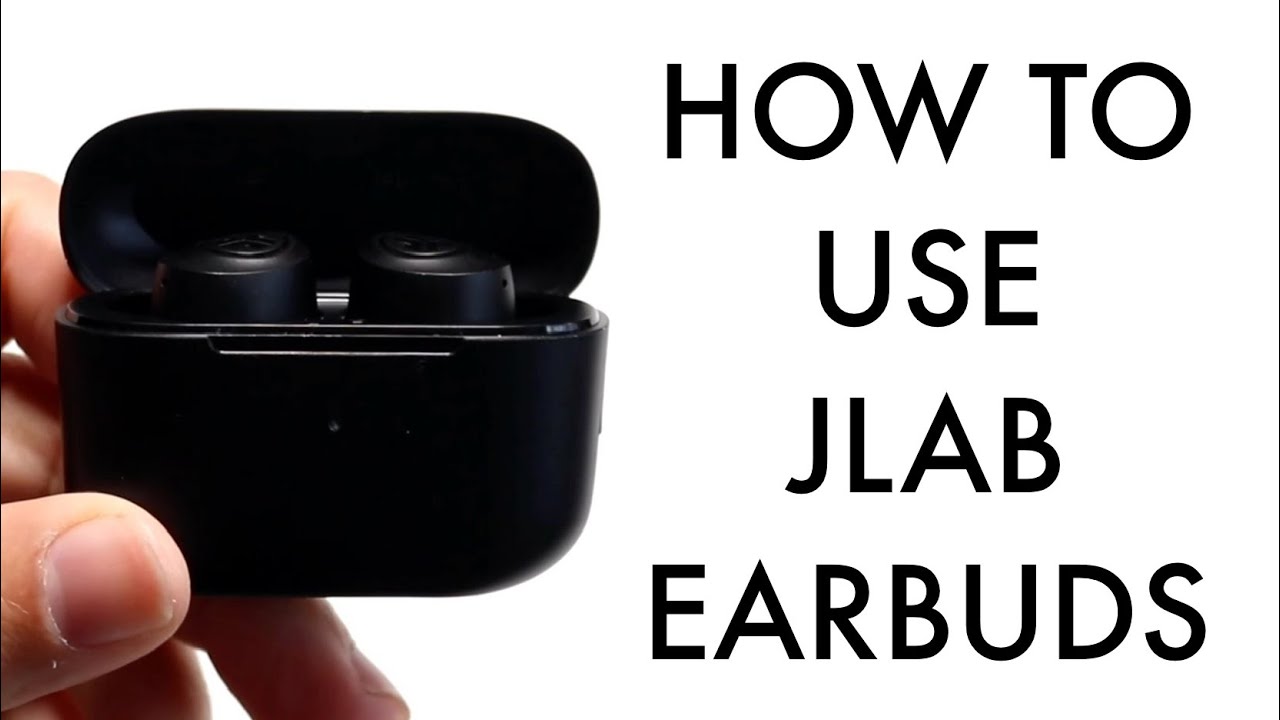
How to Use JLab Earbuds Controls
JLab earbuds usually use touch controls or physical buttons. These controls may manage music, calls, volume, voice assistants, and sound modes.
The control layout depends on the model. Check the quick-start guide for your earbuds if a command does not work as expected.
Common controls include:
• Play or pause: Tap one earbud once.
• Answer a call: Tap one earbud once when the phone rings.
• End a call: Tap one earbud once during the call.
• Reject a call: Press and hold the touch area or button.
• Skip a track: Tap or press the right earbud, depending on the model.
• Return to the previous track: Tap or press the left earbud.
• Change volume: Use the assigned left or right earbud control, if supported.
• Activate your voice assistant: Press and hold the correct earbud.
• Change sound modes: Use the earbud control or the JLab app.
Touch controls can feel sensitive at first. Tap the center of the touch panel rather than the outer edge. With button-style earbuds, press firmly but do not push the earbud deeper into your ear.
One common mistake is tapping too quickly. Some models read two or three taps as different commands. Pause briefly between taps until you learn the timing.
How to Use the JLab App
The JLab app can add more control to compatible earbuds. It may allow you to adjust the equalizer, change touch actions, update firmware, and locate your earbuds.
To use the app:
- Download the official JLab app from the Apple App Store or Google Play.
- Turn on Bluetooth.
- Open the app.
- Select your JLab earbuds.
- Follow the setup instructions.
- Install available firmware updates when your phone and earbuds have enough battery.
Features vary by model. Some earbuds offer a full equalizer, while others only include preset options such as Signature, Balanced, and Bass Boost.
A simple sound guide can help:
• Balanced: Good for podcasts, calls, and most music.
• Bass Boost: Useful for hip-hop, electronic music, and action films.
• Vocal or speech mode: Helpful for podcasts and spoken content.
• Custom EQ: Best when you want to fine-tune bass, mids, and treble.
Do not change many settings at once. Test one adjustment with a familiar song or podcast. This makes it easier to understand what changed.
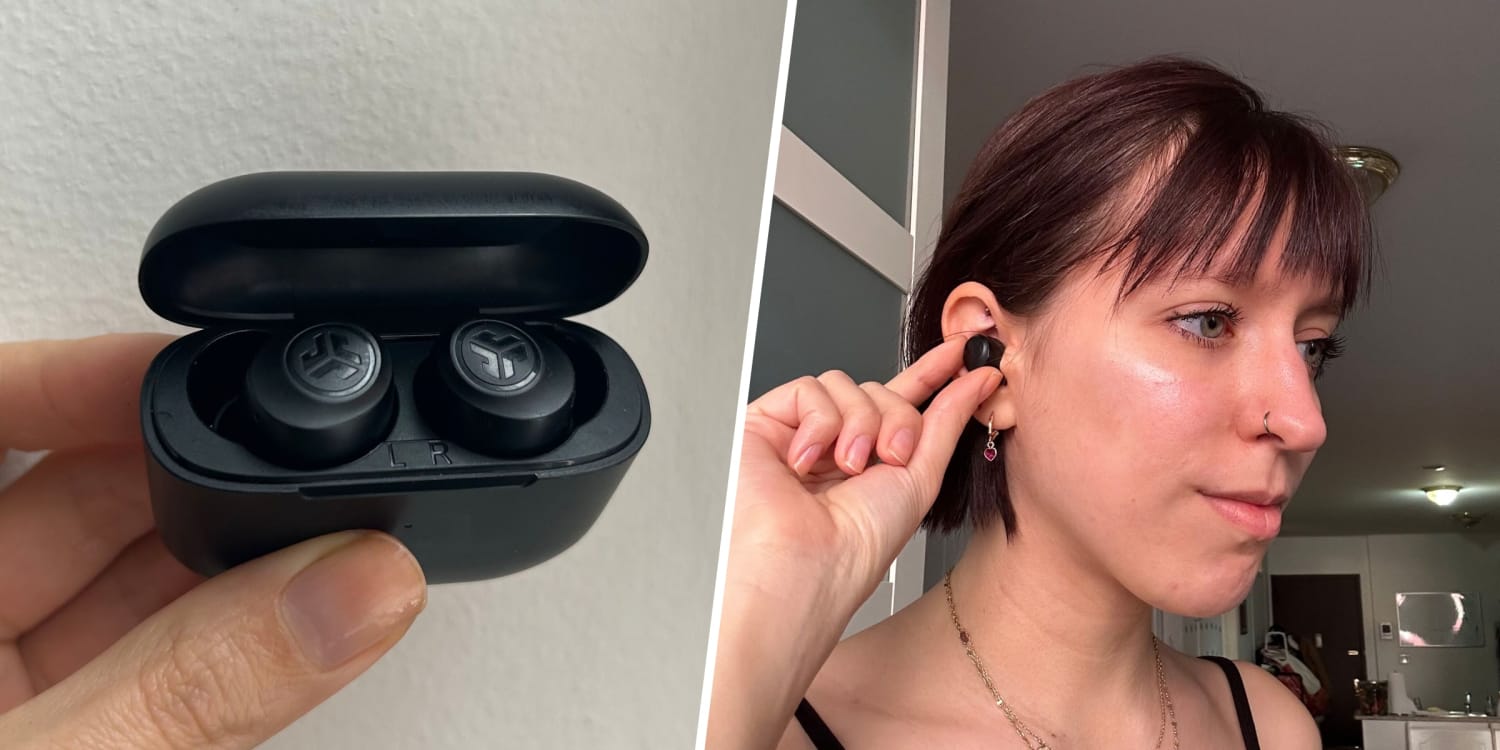
How to Charge JLab Earbuds and the Case
Charging is a key part of learning how to use JLab earbuds. The earbuds charge inside the case, while the case charges through a USB cable or, on some models, a wireless charging pad.
Use this routine:
- Place the left earbud in the left slot.
- Place the right earbud in the right slot.
- Check that the charging lights turn on.
- Close the case.
- Connect the case to power when its battery is low.
If an earbud does not charge, remove it and check the small metal contacts. Sweat, dust, and pocket lint can block the connection. Clean the contacts with a dry cotton swab. Avoid water, alcohol, and sharp tools unless the manufacturer specifically permits them.
Keep the case charged before a long trip or workout. Many JLab models provide several hours of listening per charge, but battery life depends on volume, Bluetooth use, calls, and features such as noise cancellation. Manufacturer battery estimates are usually measured under controlled conditions, so real-world time may be lower.
Avoid leaving the case in a hot car. High heat can reduce battery performance over time. Lithium-ion batteries also tend to last longer when they are not regularly exposed to extreme heat or fully drained.
How to Wear JLab Earbuds Correctly
Proper fit affects comfort, sound quality, and microphone performance. If the ear tips do not seal your ear canal, music may sound thin and outside noise may seem too loud.
Try these steps:
• Choose the ear tip that feels snug without pressure.
• Insert the earbud gently.
• Twist it slightly until it locks into place.
• Walk or shake your head lightly to test stability.
• Try a different tip size if the earbud slips or feels painful.
A larger tip may improve the seal, but bigger is not always better. If your ears feel sore after a few minutes, try a smaller tip or adjust the angle.
For sports, use a model designed for exercise and check its water-resistance rating. Water resistance does not always mean waterproof protection. Do not wear standard earbuds in heavy rain, while swimming, or in the shower unless the product is specifically rated for those conditions.
Keep the volume safe. A useful rule is to listen at the lowest level that lets you hear clearly. The World Health Organization warns that loud sound over time can harm hearing, so take breaks during long listening sessions.

How to Use JLab Earbuds for Calls
JLab earbuds can work as a wireless headset for phone calls, video meetings, and voice messages. The microphones are usually placed on the outside of the earbuds, so keep them clear of hair, clothing, and heavy wind.
Before an important call:
- Confirm that both earbuds are connected.
- Check that your phone uses the JLab earbuds for audio.
- Test the microphone with a short voice recording.
- Move to a quieter area.
- Keep the phone within normal Bluetooth range.
If the other person cannot hear you, check the microphone permission for the phone or meeting app. Also confirm that the app has not selected the phone’s built-in microphone or another Bluetooth device.
Wind can create more trouble than ordinary background sound. If you are outside, turn away from strong wind or use one earbud in a sheltered position. For work calls, a dedicated headset may still offer clearer microphone quality than compact earbuds.
How to Use One JLab Earbud at a Time
Many JLab models support single-earbud use. This can help you stay aware of traffic, coworkers, or announcements while saving battery.
To use one earbud:
- Put the unused earbud in the charging case.
- Remove the earbud you want to use.
- Wait for it to connect.
- Play audio and adjust the volume.
Some models support either the left or right earbud alone. Others may require a specific side. If one earbud will not work by itself, check the model’s manual or reset the pair.
Single-earbud mode is useful for calls and short listening sessions. It may not provide the same stereo sound or control options as using both earbuds.
How to Reset JLab Earbuds
A reset can solve connection problems, uneven sound, delayed audio, or earbuds that connect to the wrong device. It removes the current pairing information, so you will need to pair the earbuds again.
The exact reset method changes by model. A common process is:
- Forget or remove the JLab earbuds from your phone’s Bluetooth list.
- Turn Bluetooth off on nearby devices.
- Place both earbuds in the charging case.
- Use the touch controls or buttons as described in the model guide.
- Wait for the indicator lights to flash.
- Close and reopen the case.
- Turn Bluetooth back on.
- Pair the earbuds again.
Do not guess the reset command if your model uses a different process. JLab GO Air, JBuds, and Epic Air models may use different tap or button patterns.
Resetting should be a second step, not the first. Start by checking the battery, Bluetooth setting, and charging contacts. A reset cannot repair physical damage or a worn-out battery.

How to Fix Common JLab Earbud Problems
JLab earbuds will not connect
First, charge the earbuds and case. Then remove the old JLab entry from your phone’s Bluetooth settings and pair them again.
Move away from other phones, tablets, laptops, and smartwatches that may connect automatically. Bluetooth devices can remember old connections and create confusion.
Only one earbud works
Place both earbuds in the case and make sure each one charges. Clean the contacts, reset the earbuds if needed, and pair them again.
If one side still remains silent, check the phone’s audio balance. On an iPhone, look under Accessibility and Audio/Visual. Android phones may place the balance setting under Accessibility.
The sound is too quiet
Check the volume on both the phone and earbuds. Then inspect the speaker mesh for wax, dust, or debris.
Use a dry, soft brush to clean the mesh gently. Never press dirt into the speaker or soak the earbud.
The earbuds keep disconnecting
Keep your phone close and remove obstacles between the phone and earbuds. Turn off Bluetooth on devices that are not in use.
Outdated firmware, low battery, crowded wireless areas, and physical damage can also cause dropouts. Update the earbuds through the JLab app when an update is available.
The earbuds feel uncomfortable
Try another ear tip size and change the angle slightly. Ear shape differs from person to person, so a fit that works for a friend may not work for you.
Take breaks during long listening sessions. Stop using the earbuds if you feel pain, irritation, or pressure that does not improve.
How to Keep JLab Earbuds Clean and Safe
Clean earbuds sound better and feel more comfortable. They also collect skin oil, sweat, dust, and earwax during normal use.
Use these care habits:
• Wipe the outer surface with a soft, dry cloth.
• Clean the speaker mesh with a dry, soft brush.
• Keep the charging contacts free of dirt.
• Store the earbuds in the case when you are not using them.
• Keep the case closed in a pocket or bag.
• Do not share earbuds without cleaning them first.
• Keep liquids away from the charging port.
Avoid sharp objects, strong cleaners, and compressed air. These can damage the mesh, seals, or internal parts. If the earbuds become wet, dry them fully before placing them in the case or charging them.
Clean the case as well. Dirt inside the charging slots can prevent the earbuds from making contact. Small maintenance steps often prevent larger connection and charging problems.
Tips for Better Battery Life and Sound
A few small changes can make daily use easier:
- Keep the firmware current when the JLab app offers an update.
- Store the earbuds in the case after every use.
- Avoid maximum volume unless necessary.
- Turn off features you do not need.
- Keep the phone within a reasonable Bluetooth range.
- Charge the case before travel.
- Use the right ear tips for a full seal.
- Clean the earbuds once or twice each week.
High volume can reduce listening time because the earbuds use more power. Frequent calls, gaming, and active noise cancellation may also shorten battery life.
Sound quality depends on more than the earbuds. The audio file, streaming service, phone settings, ear-tip seal, and room noise all matter. If music sounds weak, test the fit before assuming the earbuds are defective.
One practical lesson is to make changes in a set order: battery, fit, Bluetooth, app settings, and reset. This approach saves time and helps you identify the real cause.
Frequently Asked Questions About How to Use JLab Earbuds
How do I turn on JLab earbuds?
Remove the earbuds from the charging case. Most JLab models turn on automatically, while placing them back in the case usually turns them off and starts charging.
How do I put JLab earbuds into pairing mode?
Open the case and remove the earbuds. If they do not enter pairing mode, place them back in the case, forget the old Bluetooth connection, and follow the pairing steps for your specific model.
Why are my JLab earbuds not showing on Bluetooth?
Charge both earbuds and keep them near your phone. If they still do not appear, turn Bluetooth off and on, remove the old pairing, and reset the earbuds according to the model guide.
Can I use only one JLab earbud?
Many JLab models support single-earbud use. Put the other earbud in the case and connect the earbud you want to use, but check your model’s instructions because features can vary.
How do I increase the volume on JLab earbuds?
Use the earbud volume control if your model supports it, or adjust volume on your phone. If the sound remains low, check the earbud fit and clean the speaker mesh.
How do I reset JLab earbuds?
Remove the earbuds from your phone’s Bluetooth list, place both earbuds in the case, and use the model-specific reset command. Pair them again after the indicator lights show that the reset is complete.
Are JLab earbuds waterproof?
Water resistance differs by model. Check the rating before using the earbuds during exercise or rain, and never assume that water-resistant earbuds are safe for swimming or showering.
Conclusion
Once you know how to use JLab earbuds, daily listening becomes quick and reliable. Charge the case, pair the earbuds correctly, learn the controls, choose the right ear tips, and keep the charging contacts clean.
When problems occur, check the battery, fit, Bluetooth settings, and app before resetting the earbuds. Start with these steps today, then explore your model’s manual and JLab app for extra controls and sound options. Share your favorite JLab tips or setup experience in the comments.
