

To reset JLab earbuds, forget them from Bluetooth, place them in the case, and tap each earbud seven times.
Knowing how to reset JLab earbuds can solve many common problems, including failed pairing, one earbud staying silent, random disconnections, and audio that cuts out. I have found that most reset issues come from skipping one small step, such as leaving the earbuds saved in your phone’s Bluetooth list.
This guide explains how to reset JLab earbuds safely across popular models, what the LED lights mean, and what to try if the standard reset does not work.
When You Should Reset JLab Earbuds
A reset clears the earbuds’ stored connection data. It gives both earbuds a fresh start, much like restarting a phone that has become slow or confused.
You may need to reset JLab earbuds when:
• Only one earbud produces sound.
• Your phone cannot find the earbuds.
• The earbuds connect to the wrong device.
• Bluetooth keeps disconnecting.
• The left and right earbuds do not sync.
• The earbuds connect but do not play audio.
• You want to pair the earbuds with a new phone.
A reset is different from simply turning the earbuds off and on. Power cycling may fix a small glitch, but resetting removes the old pairing information and rebuilds the connection.
In my experience, resetting works best when you first remove every old Bluetooth connection. If you reset the earbuds but leave an old entry on your phone, the phone may keep trying to use the same faulty connection.

How to Reset JLab Earbuds
The seven-tap method works on many popular JLab models, including several Go Air, JBuds, and Epic Air versions. The exact light pattern may vary by model, so treat the LED behavior as a guide rather than the only sign of success.
Follow these steps to reset JLab earbuds:
Put both earbuds inside the charging case.
Leave the case open so you can reach the touch controls.
On your phone, tablet, or computer, open Bluetooth settings.
Find your JLab earbuds in the list of saved devices.
Select the earbuds and choose Forget, Remove, or Unpair this device.
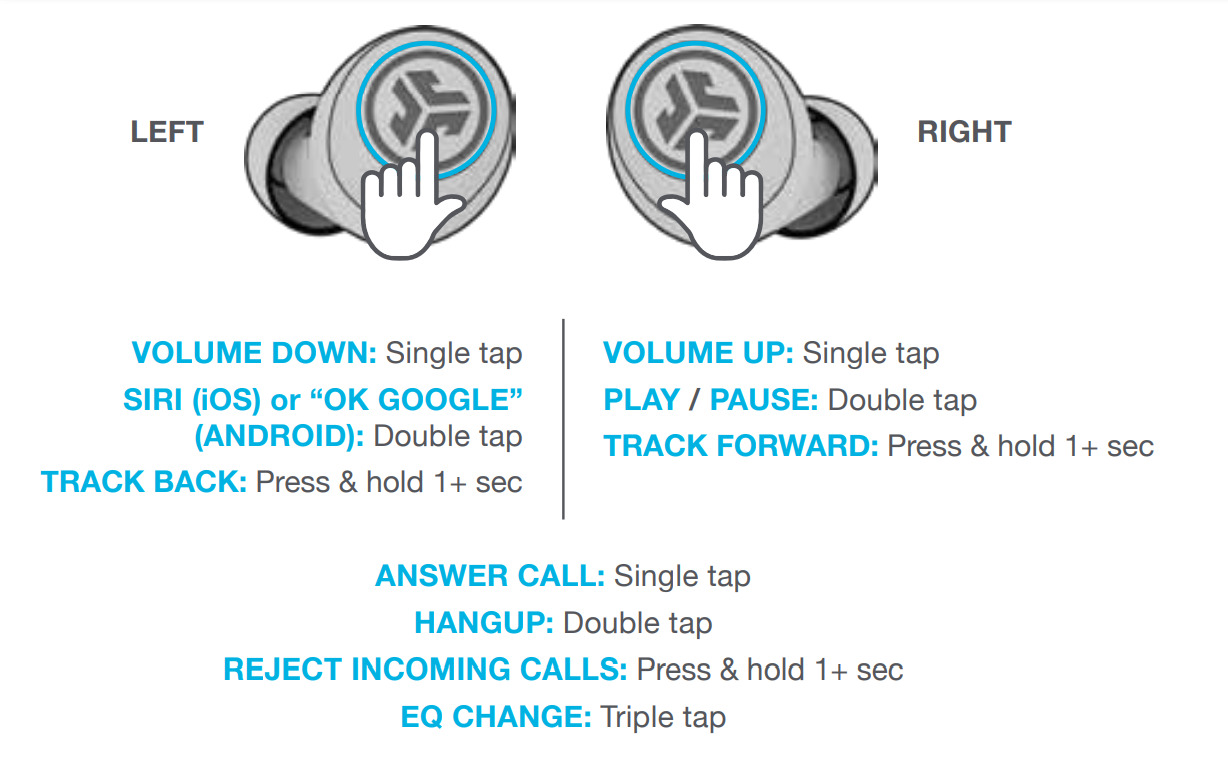
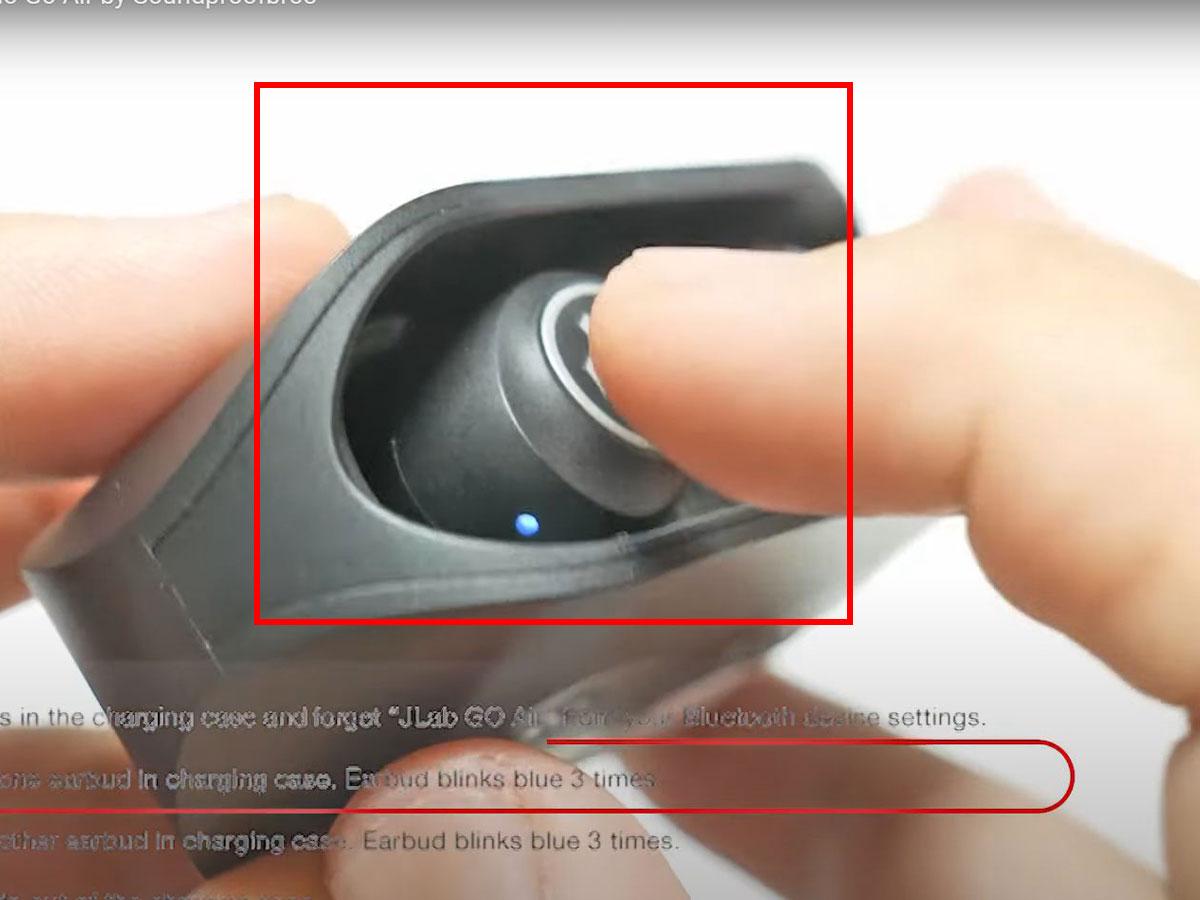
Tap the touch sensor on one earbud seven times.
Tap the touch sensor on the other earbud seven times.
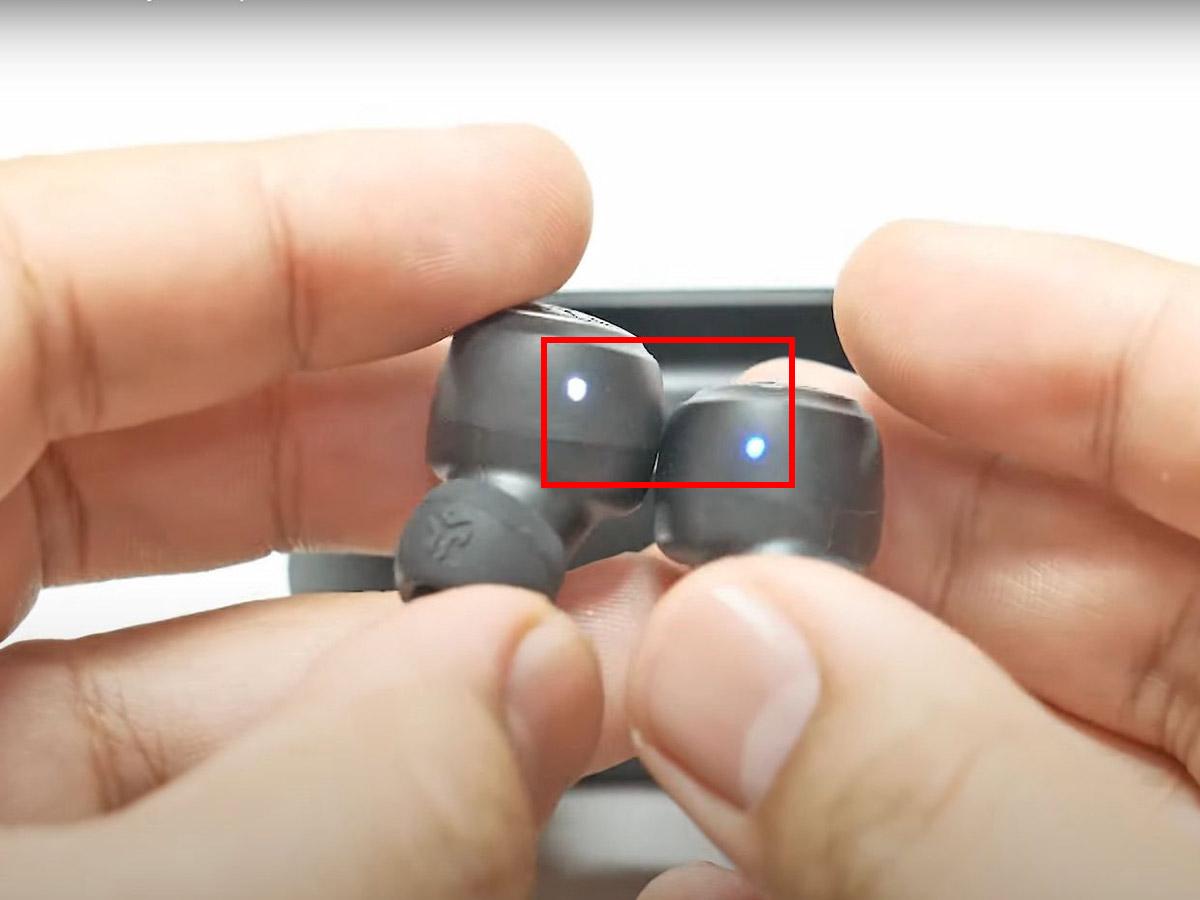
Watch for the LED light to flash several times. On many models, the light flashes blue four times.
Close the case for a few seconds.
Remove both earbuds and wait for them to enter pairing mode.
Open Bluetooth settings again and select your JLab earbuds.
The most important part of how to reset JLab earbuds is tapping the correct area. On touch models, tap the flat outer panel. Do not tap the ear tip, charging contact, or physical edge of the earbud.
Some JLab models use a button instead of a touch panel. Press the button seven times with the earbud seated in the case. If nothing happens, check the manual for your specific model because JLab has released many earbud designs.

How to Reset JLab Go Air Pop Earbuds
The JLab Go Air Pop is one of the most common models. Its reset process is simple, but both earbuds must be reset separately.
Reset steps for Go Air Pop
Remove both earbuds from your phone’s Bluetooth list.
Place the earbuds in the charging case.
Keep the case lid open.
Tap the left earbud seven times.
Tap the right earbud seven times.
Look for the LED to flash blue four times on each earbud.
Remove both earbuds from the case.
Wait for the left and right earbuds to connect to each other.
Select JLab Go Air Pop in your phone’s Bluetooth menu.
If only one earbud connects after the reset, place both earbuds back in the case and repeat the seven-tap process. Make sure each earbud has enough battery power. A nearly empty earbud may not save the reset command.
When testing how to reset JLab earbuds, I have noticed that users often tap too quickly or tap the case instead of the earbud. Use firm, even taps. A steady rhythm works better than frantic tapping.

How to Reset JLab JBuds Air Earbuds
JLab JBuds Air models may use touch controls or physical buttons, depending on the version. The general reset process remains similar.
Reset steps for JBuds Air
Open your device’s Bluetooth settings.
Forget every saved entry related to the JBuds Air.
Turn off Bluetooth on your phone.
Put both earbuds in the charging case.
Leave the case open.
Tap one earbud seven times.
Tap the other earbud seven times.
Wait for the LED lights to respond.
Turn Bluetooth back on.
Remove the earbuds and choose the JBuds Air name from the device list.
If the earbuds do not respond, charge the case for at least 15 to 30 minutes. Then clean the metal charging contacts with a dry cotton swab. Dirt on the contacts can make the earbud appear to be in the case when it is not charging.
This is a useful lesson when learning how to reset JLab earbuds: a reset cannot repair a dead battery, blocked charging contact, or damaged control panel. Always rule out basic power problems first.

How to Reset JLab Epic Air and Other Models
JLab has released several Epic Air, JBuds Mini, Go Air Sport, and Work Buds models. Most newer true wireless models follow a similar reset pattern, but not every product uses the same controls.
Start with the standard process:
• Forget the earbuds from every nearby device.
• Place both earbuds in the case.
• Keep the lid open.
• Tap or press each earbud seven times.
• Wait for the confirmation light.
• Pair the earbuds again.
Some models may require the earbuds to be removed from the case before you tap them. Others may use a physical button rather than a touch sensor. If seven taps do not work, look for the model name printed inside the case, under the lid, or on the packaging.
The official product guide is the best source for model-specific steps. This matters because JLab changes control layouts and LED signals between product generations. A method that works for Go Air Pop may not work exactly the same way for a Work Buds or Epic Air model.

How to Pair JLab Earbuds After a Reset
Resetting JLab earbuds does not finish the process. You must pair them again with your device.
Use this pairing process:
Turn off Bluetooth on devices that have used the earbuds before.
Remove the earbuds from the charging case.
Wait a few seconds for them to enter pairing mode.
Open Bluetooth settings on your phone.
Look under Available Devices.
Tap the JLab product name.
Wait until the status says Connected.
Play music in both ears to confirm the connection.
If several JLab entries appear, choose the main product name rather than an entry that says “LE” unless the manual tells you otherwise. The “LE” listing may refer to a low-energy service and may not provide normal audio.
After you reset JLab earbuds, pair them with only one device at first. Once the connection works, turn Bluetooth back on for your other devices. This prevents a nearby laptop, tablet, or smart TV from taking control during setup.

What the JLab LED Lights Mean
LED colors can help you understand whether the reset worked, but signals differ between models. Use them as clues rather than strict rules.
Common JLab LED signals include:
• Blue flashing light: The earbud may be ready to pair or may be connecting.
• Red light: The earbud may be charging or have a low battery.
• White light: The earbud may be charging, connected, or showing case status.
• Blue flashes after repeated taps: The reset command may have been accepted.
• No light: The earbud may be out of power, not seated correctly, or not making contact with the case.
If one earbud shows a light and the other does not, remove both and clean the charging points. Then return them to the case and check whether both begin charging.
A light pattern alone cannot prove that you successfully reset JLab earbuds. The best test is to forget the old Bluetooth entry, complete the reset, and pair the earbuds again from the beginning.
JLab Earbuds Reset Troubleshooting
If the normal process fails, work through these fixes in order. Avoid repeating random button combinations because that can make it harder to know which step helped.
Charge everything
Charge the case and both earbuds. A low battery can stop the touch controls from responding.
Clean the charging contacts
Use a clean, dry cotton swab. Do not pour liquid into the case or scrape the contacts with a metal object.
Forget old Bluetooth connections
Remove the JLab earbuds from every device nearby, including phones, tablets, laptops, and smart TVs. A second device may reconnect before your phone does.
Restart your phone
Restarting clears temporary Bluetooth errors. It is a simple step, but it often helps after you reset JLab earbuds.
Try another device
Pair the earbuds with a different phone or tablet. If they work there, the issue may be with the original device’s Bluetooth settings.
Update the JLab app
Some compatible models can be managed through the JLab app. If the app supports your earbuds, check for firmware updates. Keep the earbuds charged during any update.
Reset network settings as a last resort
On some phones, resetting network settings clears Bluetooth problems. This can also erase saved Wi-Fi networks, so use it only after trying the easier steps.
Do not use water, sharp tools, or heat around the earbuds. If an earbud remains dead after charging and cleaning, the problem may be hardware-related rather than a pairing error.
Common Mistakes to Avoid
Many failed resets come from small setup errors. These mistakes are easy to avoid once you know what to watch for.
• Do not reset only one earbud. Reset both sides so they can rebuild their left-right connection.
• Do not leave the old Bluetooth entry saved. Forget the device before pairing again.
• Do not tap the wrong surface. Use the touch panel or button listed for your model.
• Do not close the case too soon. Wait for the LED response after the seven taps.
• Do not assume all JLab models work identically. Check the model name and guide.
• Do not test with one earbud in another room. Keep both earbuds close to each other during setup.
• Do not use a wet cloth on the charging case. Moisture can damage the contacts.
One mistake I see often is pressing the earbud firmly into the case while trying to tap it. That can interrupt charging or move the earbud away from the contact points. Keep it seated, but use light, controlled taps.
How Long Does a JLab Earbud Reset Take?
A normal reset takes about two to five minutes. This includes forgetting the old Bluetooth connection, tapping both earbuds, and pairing them again.
It may take longer if the earbuds need charging, the case needs cleaning, or several devices are trying to connect. If the earbuds still fail after two or three careful attempts, stop repeating the reset and check the model-specific instructions.
A reset should not erase music files because JLab earbuds do not store your music. It does clear Bluetooth pairing information and some saved connection data.
Frequently Asked Questions About How to Reset JLab Earbuds
How do I reset JLab earbuds when only one side works?
Forget the earbuds from your phone, place both earbuds in the case, and tap each earbud seven times. Then remove both earbuds together and pair them again.
Why will my JLab earbuds not reset?
The earbuds may have low power, dirty charging contacts, or a control method that differs from the standard seven-tap process. Charge the case, clean the contacts, and confirm the instructions for your exact model.
Do I need to forget JLab earbuds before resetting them?
Yes, forgetting the old Bluetooth entry is strongly recommended. It prevents your phone from using an outdated pairing record after the reset.
Will resetting JLab earbuds delete the app or firmware?
No. A normal reset clears pairing data, but it does not usually remove the JLab app or installed firmware. You may need to pair the earbuds with the app again.
Can I reset JLab earbuds without a charging case?
Usually, no. Many JLab reset methods require the earbuds to be seated in their charging case. If the case is lost or damaged, contact JLab support for model-specific options.
How do I know if my JLab earbuds reset successfully?
After the reset, the earbuds should appear as a new available Bluetooth device. Pair them again and test both sides with music or a phone call.
Conclusion
Learning how to reset JLab earbuds can fix pairing failures, one-sided audio, connection drops, and many everyday Bluetooth glitches. In most cases, forget the old device, charge and seat both earbuds, tap each one seven times, and pair them again.
Keep the earbuds and case clean, reset both sides together, and check the exact model when the standard method does not work. Try these steps now, and share your model and results in the comments if you need help with a more specific JLab reset.
