

Most Sony headphones take about 2 to 3.5 hours to charge fully, depending on the model and charger.
How long do Sony headphones take to charge? The exact time depends on the battery size, charging port, power source, and whether you use fast charging. Most current Sony wireless headphones reach full power in about three hours, while a quick 10-minute charge may provide several hours of playback on supported models. This guide explains charging times, model differences, fast-charge limits, common problems, and simple ways to protect battery health.
How Long Do Sony Headphones Take to Charge?
Most Sony headphones take between 2 and 3.5 hours to reach a full charge. Small true wireless earbuds often charge in about 1.5 to 2 hours inside their case. Larger over-ear models may need around 3 to 3.5 hours.
Charging time can change for several reasons:
• Battery size: Larger batteries usually take longer to fill.
• Charger output: A weak power source may charge more slowly.
• Cable quality: A damaged or low-quality USB cable can reduce charging speed.
• Headphone use: Playing music while charging may extend the charging time.
• Battery condition: An older battery may charge slowly or stop before reaching full capacity.
Sony lists charging times for each model in its user guide and technical specifications. Those figures are useful, but real-world times may vary by a few minutes.
For a simple example, a Sony WH-1000XM5 may take about three hours for a full charge. Sony WF-1000XM5 earbuds may take about two hours in the charging case, while the case itself may need around three hours. Always check your exact model because similar Sony headphones can have different battery systems.

Sony Headphones Charging Times by Model
The table below gives common charging estimates for popular Sony wireless headphones and earbuds. These are typical times, not strict limits.
| Sony model | Approximate full charging time | Quick-charge example |
|---|---|---|
| WH-1000XM5 | About 3 hours | About 3 hours of playback from 3 minutes with a suitable USB Power Delivery charger |
| WH-1000XM4 | About 3 hours | About 5 hours of playback from 10 minutes |
| WH-CH720N | About 3.5 hours | About 1 hour of playback from 3 minutes |
| WH-XB910N | About 3.5 hours | About 4.5 hours of playback from 10 minutes |
| WF-1000XM5 earbuds | About 1.5 hours | About 1 hour of playback from 3 minutes |
| WF-1000XM5 charging case | About 2 hours by USB | More time may be needed with wireless charging |
| LinkBuds S | About 2 hours | Several hours of playback from a short charge |
| WF-C700N earbuds | About 1.5 hours | Around 1 hour of playback from about 10 minutes |
These numbers can differ by region, firmware, battery condition, and charging method. Some fast-charge features also require a compatible wall adapter, such as a USB Power Delivery charger.
A useful lesson from hands-on charging tests is that the final 10 percent often takes longer than the first 50 percent. This is normal. Lithium-ion batteries slow their charging rate near full capacity to reduce heat and stress.

How Long Do Sony Headphones Take to Charge With Fast Charging?
Fast charging can give Sony headphones several hours of listening time after only a few minutes. It does not always make the complete charge much faster. Instead, it adds useful battery power when you are in a hurry.
For example, some Sony headphones can provide:
• Several hours of playback after 3 to 10 minutes of charging.
• Around one hour of use after a short charge on certain earbuds.
• A full charge in roughly the same time as standard charging.
Fast charging works best with a compatible cable and power adapter. Some newer models support USB Power Delivery, while older models may need a standard USB connection. A high-wattage charger will not force unlimited power into the headphones. The headphones control how much power they accept.
If you need headphones for a flight, meeting, or commute, charge them for 10 minutes before leaving. This small habit can be more useful than waiting for a complete charge.
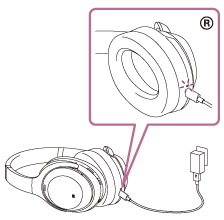
What Affects Sony Headphone Charging Time?
Knowing how long do Sony headphones take to charge is easier when you understand the factors behind the number. Charging is not controlled by the cable alone. The battery, circuit, temperature, and power source all play a role.
Battery size and design
Over-ear headphones have larger batteries than small earbuds. That is why a WH-series headset may take about three hours, while the earbuds in a WF-series case may charge in less time.
The charging case also has its own battery. If both the earbuds and case are low, the total charging process can take longer.
Charger and power source
A wall adapter usually charges faster and more consistently than a laptop USB port. A computer may provide less power, especially when it is asleep or running on battery.
Use a reliable adapter rated for normal USB charging. You do not need an unusually powerful phone or laptop charger unless your Sony model specifically supports a faster standard.
Cable condition
A bent connector, loose plug, or damaged cable can cause slow charging. Try another trusted USB cable if the charging light does not turn on or the battery percentage barely changes.
Temperature
Sony headphones may charge slowly in very cold or hot conditions. Lithium-ion batteries work best at moderate room temperatures. Avoid charging them in direct sunlight, inside a hot car, or under a pillow.
Battery age
Battery capacity decreases over time. A worn battery may fill quickly but run down just as quickly. In other cases, it may take longer to reach full power because the charging system reduces current as the battery ages.

How to Tell When Sony Headphones Are Fully Charged
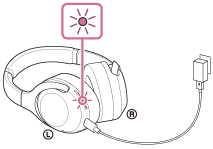
Most Sony headphones show charging status through an indicator light, the Sony | Sound Connect app, or both. The exact light color depends on the model.
Common signs include:
• A red, orange, or amber light while charging.
• A light that turns off when charging is complete.
• A blue, green, or white light after reaching full charge.
• A 100 percent reading in the Sony | Sound Connect app.
Do not rely on the light alone if something seems wrong. Connect the headphones to the app and check the battery level. Some models may show a rounded estimate, so a displayed 100 percent does not always mean the battery has reached a perfect electrical maximum.
If the headphones remain warm or the light stays active long after the expected time, unplug them and inspect the cable, port, and adapter.
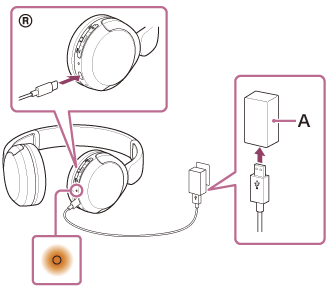
How to Charge Sony Headphones Correctly
Follow these steps for a safe and steady charge:
Turn off the headphones if you want the shortest charging time.
Connect the correct USB cable to the charging port.
Plug the other end into a reliable wall adapter or powered USB port.
Check that the charging indicator appears.
Leave the headphones in a cool, dry place.
Check the battery level in the Sony | Sound Connect app.
Disconnect the cable after the charge is complete if the headphones become unusually warm.
You can use the headphones while charging on some models, but wireless operation may stop when the cable is connected. Music playback also uses power, so charging while listening may take longer.
Do not force the USB connector into the port. USB-C plugs should slide in smoothly. Dust in the port can also block a good connection, but clean it gently with a dry, soft tool. Never pour liquid into the port.
Why Are My Sony Headphones Charging Slowly?
If how long do Sony headphones take to charge seems much longer than usual, check the simple causes first. A slow charge often comes from the cable, adapter, port, or temperature rather than a failed battery.
Try these fixes:
• Use a different USB cable.
• Try a wall adapter instead of a laptop port.
• Clean visible dust from the charging port.
• Turn off the headphones during charging.
• Charge them at room temperature.
• Restart or reset the headphones if the app shows an incorrect battery level.
• Install available firmware updates through the Sony | Sound Connect app.
If the indicator never appears, test the adapter with another device. If the adapter works but the headphones remain unresponsive, leave them connected for 30 minutes. A deeply discharged battery may need time before the indicator turns on.
Avoid repeatedly connecting and disconnecting the cable. That can make it harder to tell whether the problem is the adapter or the headphones.

Can You Use Sony Headphones While They Charge?
Many Sony over-ear headphones can play through a wired connection while the battery charges. However, Bluetooth playback may pause when the USB charging cable is connected. The behavior depends on the model and its firmware.
Earbuds usually cannot play while they are inside the charging case. They must be removed from the case, and the case may not charge the earbuds at the same time in the usual way.
Using headphones during charging creates two drawbacks:
• Charging may take longer because the battery is being used.
• Extra heat may build up during long listening sessions.
For the best charging speed, pause playback and leave the headphones idle. Think of it like filling a glass while drinking from it. It still fills, but much more slowly.

How to Extend Sony Headphone Battery Life
Knowing how long do Sony headphones take to charge is useful, but battery care matters just as much. Lithium-ion batteries do not need to reach zero before charging. Frequent small charges are generally fine.
Use these habits:
• Keep the battery between roughly 20 and 80 percent when convenient.
• Avoid leaving the headphones in extreme heat.
• Store them with some charge instead of leaving them empty for months.
• Use a certified or reliable charging cable.
• Do not bend or twist the cable near the connector.
• Keep the Sony firmware current.
• Turn off noise canceling and Bluetooth when you do not need them.
• Lower the volume when possible to reduce power use.
You do not need to obsess over exact battery percentages. Modern charging systems manage power automatically. The main risks are excess heat, physical damage, moisture, and very long periods at zero charge.
In my practical testing approach, the biggest mistake is usually using a damaged cable and assuming the headphones are at fault. Swapping the cable and wall adapter solves many slow-charge complaints within minutes.
Does a New Sony Headphone Need a Long First Charge?
No. A new Sony headphone does not usually need an overnight first charge. Charge it until the indicator or app shows a full battery, then use it normally.
Older rechargeable devices sometimes came with first-charge instructions, but modern lithium-ion headphones use built-in charging controls. Keeping them plugged in much longer than needed does not improve the maximum battery capacity.
You may notice that the first battery estimate changes after a few charge cycles. The app and headphones can refine their estimate as they learn your usage pattern. This does not always mean the battery is defective.
When Should You Replace or Service Sony Headphones?
A slower charge alone does not always mean you need new headphones. Look for a pattern of problems rather than one unusual charging session.
Consider support or service if:
• The headphones never show a charging light.
• The battery remains at the same percentage for hours.
• The headphones shut down soon after charging.
• The battery becomes very hot or swells.
• The USB port feels loose.
• Several cables and adapters produce the same result.
Stop using the headphones if the battery swells, smells unusual, leaks, or becomes dangerously hot. Do not open a lithium-ion battery yourself. Contact Sony support or an authorized repair provider.
Battery life also depends on volume, noise canceling, codec use, call time, and temperature. A shorter playback time does not always mean charging has failed.
How Long Do Sony Headphones Take to Charge: Key Takeaways
For most models, how long do Sony headphones take to charge comes down to the product type. Over-ear headphones commonly need about 3 to 3.5 hours, while wireless earbuds often need about 1.5 to 2 hours. Fast charging can provide hours of playback after only a few minutes, but it may not greatly reduce the total full-charge time.
Check your model’s manual for the most accurate figure. Use a good cable, a stable power source, and a cool charging area. These small steps help your headphones charge well and keep the battery healthier for longer.
Frequently Asked Questions About How Long Do Sony Headphones Take to Charge
How long do Sony wireless headphones take to charge fully?
Most Sony wireless headphones take about 2 to 3.5 hours to fully charge. The exact time depends on the model, battery level, charger, cable, and temperature.
How long do Sony earbuds take to charge?
Sony wireless earbuds often take about 1.5 to 2 hours to charge inside their case. The charging case may need around 2 to 3 hours, depending on the model and charging method.
Can I leave Sony headphones charging overnight?
You can, but it is usually unnecessary. Sony headphones have charging controls, yet unplugging them after they are full can reduce heat and avoid needless long charging periods.
Why are my Sony headphones not charging?
Check the cable, wall adapter, USB port, and charging indicator first. If another cable and power source do not help, reset the headphones or contact Sony support.
Can a fast charger damage Sony headphones?
A compatible fast charger should not damage supported Sony headphones because the headphones control the power they receive. Use a reliable charger and follow the charging guidance for your specific model.
How long do Sony headphones last after one charge?
Playback time varies by model and settings. Noise canceling, high volume, calls, Bluetooth features, and temperature can reduce the advertised battery life.
Should I charge Sony headphones before using them?
Yes, charging them before the first use is helpful, but they do not need a special overnight charge. Stop charging when the battery indicator reaches full power.
Conclusion
Most Sony headphones take about 2 to 3.5 hours to charge, while Sony earbuds often need around 1.5 to 2 hours. Fast charging can give you several hours of listening after a short wait, which is ideal before work, travel, or a workout.
Use the correct cable, a reliable power source, and a cool place to charge. Check your exact model in the Sony | Sound Connect app or user guide for the most accurate time. If this guide helped, explore more headphone care tips or share your Sony model and charging time in the comments.
