

A gently bent headphone jack may be realigned, but severe bends usually need replacement or professional repair.
Learning how to fix bent headphone jack damage starts with finding the problem’s location. The metal plug may be bent, or the headphone port inside your phone, laptop, controller, or audio device may be damaged. This guide explains how to inspect both parts, make a safe repair, avoid common mistakes, and know when replacement is the smarter choice.
What a Bent Headphone Jack Means
The term “headphone jack” often refers to two different parts:
• The headphone plug is the metal tip attached to the cable.
• The headphone port is the socket built into your device.
A bent plug can cause crackling, one-sided sound, weak audio, or no sound at all. It may also feel loose when inserted. A damaged port can create the same symptoms, which makes careful testing important.
Most wired headphones use a 3.5 mm TRS or TRRS plug. TRS plugs usually carry left audio, right audio, and ground. TRRS plugs may also carry microphone input. A small bend can stop one of these contact areas from touching the matching spring inside the port.
Before you begin, unplug the headphones and turn off the device. This reduces the risk of shorting contacts or damaging the audio circuit. If the plug is cracked, badly twisted, or missing metal, replacement is safer than repair.

How to Tell Whether the Plug or Port Is Bent
The first step in learning how to fix bent headphone jack problems is identifying which part is damaged. Do not force the plug into another device until you inspect it.
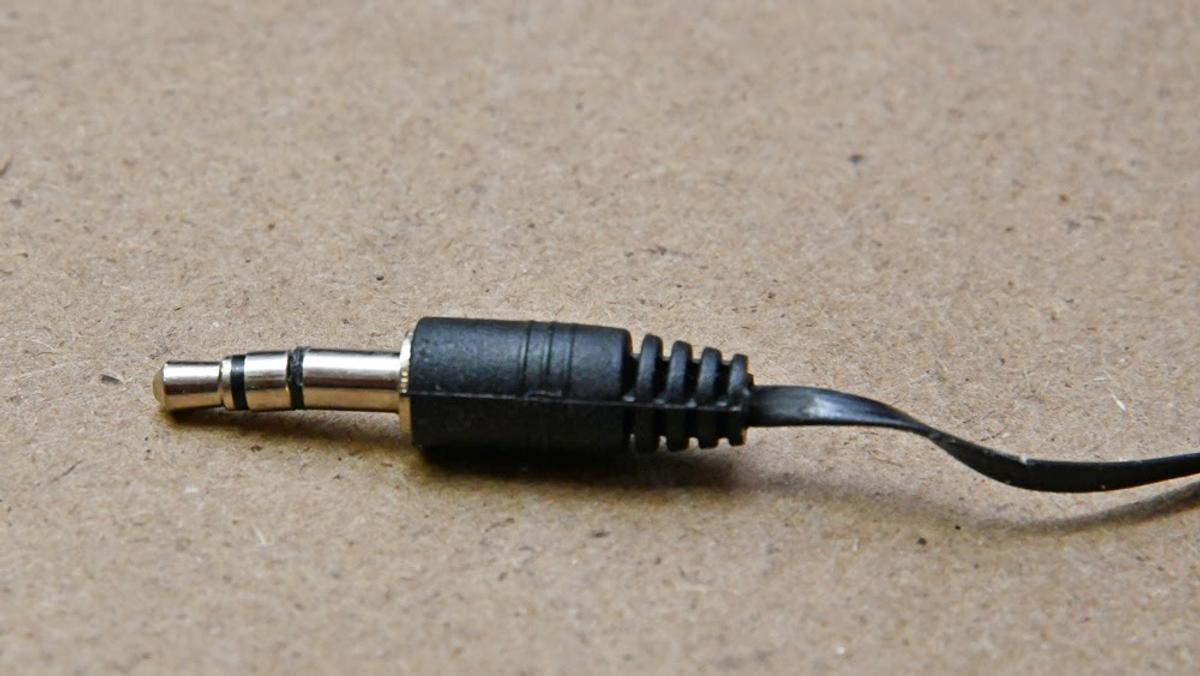
Use a bright lamp and examine the plug from several angles. A straight plug should form one clean line from the cable to the metal tip. Look for these signs:
• The metal shaft angles sharply to one side.
• The tip is oval instead of round.
• The metal sleeve has a deep dent.
• The plastic base is cracked.
• The cable spins freely near the plug.
Next, test the headphones with a different device. Use a known-good pair of headphones in the original device as well. This simple swap can tell you whether the fault follows the headphones or stays with the device.
If your headphones fail on several devices, the plug or cable is likely damaged. If several working headphones fail in one device, the port may be bent, clogged, loose, or electrically damaged.
A small amount of lint can also block full insertion. Remove loose debris with a wooden toothpick or a clean, soft brush. Never push metal into the port, and never use liquid cleaner inside it.
How to Fix Bent Headphone Jack on the Plug
If the plug is only slightly bent and the metal is still solid, you may be able to realign it. This process requires patience. Think of the plug as a thin metal stem, not a lever built to withstand force.
You will need:
• Small needle-nose pliers
• A clean cloth
• A bright light
• Another device for testing
Follow these steps:
Turn off the device and unplug the headphones.
Wrap the metal plug with a thin cloth. This helps prevent scratches from the pliers.
Hold the plug near its base, where the metal meets the plastic. Do not grip the cable.
Apply very light pressure in the opposite direction of the bend.
Stop after each small adjustment and inspect the plug.
Test the plug in a device only when it looks straight and smooth.
Do not bend the plug back and forth. Repeated movement weakens the metal and can break the internal cable connection. Make one small correction at a time.
If the plug has sharp creases, deep dents, or loose sections, do not try to make it perfect with force. A replacement plug or a new headphone cable is usually more reliable. This is one of the most important lessons when deciding how to fix bent headphone jack damage: a quick repair is not useful if it creates a hidden fault.

How to Fix Bent Headphone Jack Inside a Device
A bent headphone port is harder to repair than a bent plug. The port contains small spring contacts that must press against the plug in precise places. Bending them without opening the device can cause permanent damage.
Start with a gentle inspection:
• Turn off the device completely.
• Remove the case, if it blocks the port.
• Shine a light into the opening.
• Check for lint, dirt, or a visibly shifted contact.
• Try a known-good plug without forcing it.
If debris is present, remove it with a dry wooden toothpick or soft brush. Keep the tool near the edge of the port. Never scrape the center contacts with a pin, paper clip, or screwdriver.
When the port itself is visibly bent, repair options depend on the device. Some laptops and audio mixers use a replaceable port module. Many phones, tablets, and game controllers use a port soldered to the circuit board. Repairing those parts may require opening the device, desoldering the old jack, and installing an exact replacement.
Opening a device can void its warranty and may expose you to sharp edges, batteries, or delicate ribbon cables. If the device has a sealed battery, water resistance, or high repair value, a qualified technician is the safer choice. Knowing when not to attempt how to fix bent headphone jack damage is part of a good repair.
A Safe Step-by-Step Repair Method
For a mildly bent headphone plug, use this careful method:
Confirm the problem with a second device.
Clean the plug with a dry microfiber cloth.
Inspect the full plug, including the strain relief.
Protect the metal with a thin cloth.
Straighten the plug with small, controlled movements.
Check that the tip remains round.
Insert it gently into a test device.
Play audio at low volume.
Move the cable near the plug and listen for cutting out.
Replace the plug or headphones if the sound remains unstable.
Low volume matters because a damaged connection can create sudden noise. It also protects your ears while you test for crackling or channel loss.
If the audio works only when you hold the plug at an angle, the cable or internal solder joint may be broken. Straightening the visible metal will not fix that hidden damage. In this case, replacing the plug or the entire cable is the better answer to how to fix bent headphone jack issues.

Common Mistakes to Avoid
Many failed repairs happen because people use too much force. A headphone plug is small, but the parts inside it are even smaller.
Avoid these mistakes:
• Do not use heat to soften or reshape the metal.
• Do not twist the cable to straighten the plug.
• Do not clamp the metal tightly with large pliers.
• Do not spray oil, alcohol, or water into the port.
• Do not force a bent plug into a device.
• Do not test damaged headphones at high volume.
• Do not bend a plug repeatedly in both directions.
• Do not use a metal tool to clean the socket.
Heat can damage plastic insulation and internal solder joints. Oils can attract dust and leave a film on electrical contacts. Metal tools can scratch contacts or create a short circuit.
One common repair mistake is focusing only on the plug. I have seen many cases where the plug looked damaged, but the real problem was a loose cable connection near the strain relief. A gentle cable movement test often reveals this before unnecessary bending begins.
When You Should Replace the Headphones
Repair makes sense when the headphones are valuable, the plug has a minor bend, or the cable is easy to replace. Replacement is usually best when the damage is severe or the headphones are inexpensive.
Consider replacement if:
• The plug is cracked or missing a metal section.
• The cable cuts out when moved.
• The plastic strain relief is split.
• The headphones have water or corrosion damage.
• The plug becomes hot during use.
• The device reports a short or behaves strangely.
• Straightening the plug does not restore stable sound.
A replacement plug can work for people who know how to solder. You must match the connector type, cable wires, microphone support, and wiring layout. TRRS plugs are not always wired the same way, so copying a random diagram can create microphone or channel problems.
For most users, a new pair of headphones costs less than tools and repair time. The goal of how to fix bent headphone jack damage is not simply to save a few dollars. It is to restore safe, dependable audio.

How to Prevent Another Bent Headphone Jack
Prevention is easier than repair. Most bent plugs are damaged when the cable is pulled sideways while connected. This often happens when a phone sits in a pocket or when someone rolls over in bed with headphones plugged in.
Use these habits:
• Hold the plug, not the cable, when unplugging.
• Keep the device and cable aligned.
• Avoid sharp bends near the plug.
• Use a short extension cable when the port is under strain.
• Store headphones in a case instead of a pocket.
• Replace worn strain relief before the wire breaks.
• Do not leave a plug connected while carrying the device loosely.
A right-angle plug can reduce sideways pressure in some setups. However, it does not make the connection indestructible. The cable still needs enough slack to move naturally.
For phones and controllers, wireless headphones or a USB-C audio adapter may also reduce stress on the built-in port. Check compatibility before buying an adapter, because some USB-C ports support charging and data but not analog audio.

Repair Costs and Practical Alternatives
The cost of fixing a bent headphone jack depends on the damaged part. Straightening a slightly bent plug may cost nothing if you already have small pliers. Replacing a plug may require a soldering iron, solder, heat-shrink tubing, and a compatible connector.
A device port repair can cost more because the technician may need to disassemble the device and solder on a circuit board. A simple removable port may be inexpensive, while a board-level repair can approach the value of an older device.
Practical alternatives include:
• Use a USB-C or Lightning audio adapter.
• Connect through Bluetooth.
• Replace a detachable headphone cable.
• Use an extension cable to protect the original port.
• Take the device to an authorized repair center.
Adapters are useful, but they are not a cure for a physically damaged port. If the port is loose or shorted, stop using it until it is checked. Continued use can worsen the damage.

PAA-Style Questions About Bent Headphone Jacks
Can I bend a headphone jack back with my fingers?
You can try only if the bend is very slight, but fingers provide poor control. Small needle-nose pliers covered with a cloth allow more precise pressure and reduce the chance of twisting the cable.
Why does my headphone jack work only at an angle?
This usually points to a bent plug, worn port contact, broken cable wire, or loose solder joint. Test the headphones on another device to determine whether the problem follows the plug or stays with the original port.
Can rubbing alcohol fix a bent headphone jack?
Rubbing alcohol cannot straighten metal or repair broken wires. It may help clean external grime when used sparingly on a cloth, but do not pour it into the device port.
Frequently Asked Questions About How to Fix Bent Headphone Jack
How do I fix a slightly bent headphone plug?
Turn off the device, cover the plug with a thin cloth, and gently realign it with small needle-nose pliers. Stop if the metal cracks, the plug feels loose, or the audio remains unreliable.
Can a bent headphone jack damage my phone?
A bent plug can damage the spring contacts inside a phone’s port if you force it in. It may also cause intermittent contact, so stop using it when insertion feels tight or abnormal.
How do I know if the headphone port is damaged?
Test the headphones on another device, then test another working pair in the original device. If several headphones fail in one port, the port may be dirty, loose, bent, or electrically damaged.
Is it safe to straighten a headphone jack?
Straightening a mildly bent metal plug is usually low risk when the device is unplugged and you use gentle pressure. Do not attempt to reshape a cracked plug or bend contacts inside a sealed device.
Should I replace the plug or buy new headphones?
Replace the plug when the headphones are valuable, the cable is otherwise healthy, and you can make a proper solder repair. Buying new headphones is often better when the cable, strain relief, or internal wiring also shows damage.
Can I fix a bent headphone port without opening the device?
You may remove loose debris carefully with a wooden toothpick or soft brush, but a truly bent port usually needs internal repair. Forcing the contacts from outside can make the damage worse.
Conclusion
Fixing a bent headphone jack begins with a careful inspection. Find out whether the plug, cable, or device port is at fault. A slightly bent plug may be gently realigned, but cracked metal, broken wires, and damaged internal ports usually call for replacement or professional service.
Work slowly, use light pressure, and never force a plug into a device. If this guide helped you restore your audio, share it with someone who has a failing headphone connection or explore more practical device repair guides.
