
Use Disk Management or diskpart to delete wrong partitions, then repartition, update firmware, and run manufacturer tools.
I’ve fixed dozens of SSDs that showed the wrong storage capacity. I know the common causes and the safe steps to fix them. This guide explains why your drive reports the wrong size and gives clear, tested steps for how to fix ssd showing wrong storage capacity on Windows, macOS, and Linux. You’ll get quick checks, step-by-step fixes, advanced repair tips, recovery advice, and real-world lessons from my work repairing storage devices. Read on to save time and protect your data.
Why an SSD shows the wrong storage capacity
SSDs can report less or more space than expected. The issue can be simple or complex. Common causes include hidden partitions, leftover RAID metadata, firmware quirks, and altered partition tables. Some drives have Reserved Areas for overprovisioning. Others are victims of HPA/DCO locks or counterfeit capacity. Knowing the likely cause helps when you decide how to fix ssd showing wrong storage capacity.
Common causes and how they affect reported size
- Partition table errors
- A corrupted partition table can hide free space. The OS then reports the wrong capacity.
- Hidden or shadow partitions
- OEM tools or old installers can leave small partitions behind. They reduce visible space.
- HPA (Host Protected Area) or DCO (Device Configuration Overlay)
- These features limit reported capacity. They are sometimes set by firmware or malicious tools.
- RAID metadata or leftover metadata
- A drive once used in a RAID can keep metadata. That can confuse single-disk use.
- Fake or counterfeit SSDs
- Counterfeit drives report false sizes to software. They often fail under real use.
- Firmware bugs
- Outdated firmware can misreport capacity or mis-handle remapped sectors.

Quick checks before you start repairs
- Check the advertised capacity on the box or product page.
- Open Disk Management (Windows), Disk Utility (macOS), or lsblk/gparted (Linux).
- Look for unallocated space or mismatched sizes.
- Run a SMART check with a tool like smartctl to verify drive health.
- Confirm the drive is not in RAID mode in BIOS/UEFI.
These quick checks tell you if the problem is a partition issue or a deeper device issue. They guide how to fix ssd showing wrong storage capacity safely.

Step-by-step fixes for Windows
- Back up your data.
- Save important files to another drive or cloud.
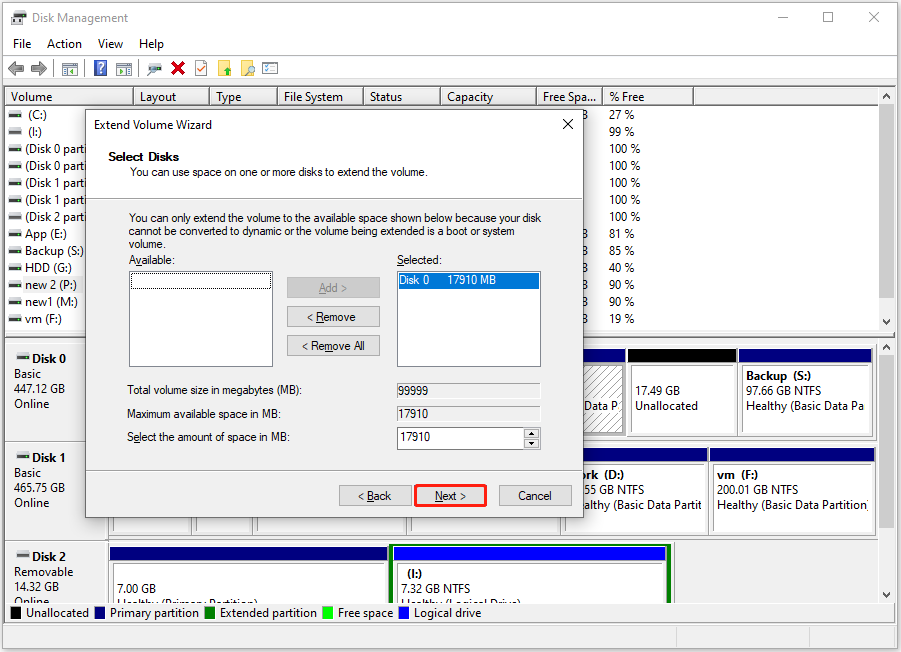
- Use Disk Management to inspect partitions.
- Right-click Start, choose Disk Management, and view volumes.
- Delete stray or OEM partitions if you don’t need them.
- Right-click the partition and choose Delete Volume.
- If Disk Management can’t remove the partition, use diskpart:
- Open Command Prompt as admin.
- Type:
diskpart - Then:
list diskandselect disk X(replace X). - Then:
cleanto remove partitions and metadata.
- Recreate the partition:
- In Disk Management, initialize the disk and create new partitions.
- Update SSD firmware and controller drivers.
- Use the manufacturer’s official tools for firmware updates.
If diskpart fails or the drive shows less space after clean, check for HPA/DCO or counterfeit signs next.

Step-by-step fixes for macOS and Linux
- macOS
- Use Disk Utility to erase and repartition the drive.
- If Disk Utility cannot fix the issue, use
diskutil listanddiskutil eraseDisk. - For stubborn cases, run Apple’s first aid and then try reformatting.
- Linux
- Use
lsblk,fdisk -l, orpartedto view partitions. - Use
sudo wipefs -a /dev/sdXto clear filesystem signatures. - Use
sudo dd if=/dev/zero of=/dev/sdX bs=1M count=100to clear the start of the drive, then recreate partitions. - Consider
gdiskfor GUID table repairs.
- Use
These steps handle partition-level issues and most metadata problems. They are key to how to fix ssd showing wrong storage capacity on non-Windows systems.
Advanced fixes: HPA, DCO, and counterfeit detection
- Detect HPA/DCO
- Some tools can check and remove HPA/DCO. On Windows, special utilities or Linux hdparm can inspect these areas.
- Use manufacturer tools
- Many SSD makers offer low-level tools. They can restore factory settings or run secure erase.
- Counterfeit detection
- Write a large file that fills the drive. If data repeats or fails, the drive may be fake.
- Use a hash check to validate written data. Counterfeit drives often show inconsistent hashes.
- Secure erase
- Use ATA Secure Erase only when data is backed up. It resets the drive to factory state and can clear hidden overlays.
- When to stop
- If firmware tools report hardware errors, stop and consider RMA or replacement.
These advanced steps are powerful. They can resolve deep issues that cause wrong capacity reports. They are central to a complete plan for how to fix ssd showing wrong storage capacity.

Data recovery and safety precautions
- Always back up before making changes.
- Partition changes and secure erase are destructive.
- If data is critical, use recovery software or professional services.
- Do not overwrite the drive if recovery is needed.
- Keep a disk image of the problematic drive.
- An image helps later recovery or analysis.
- Check SMART attributes before heavy writes.
- High reallocated sectors or pending sectors mean the drive is failing.
I once tried a full secure erase on a drive with pending sectors. The erase made recovery impossible. I had to explain that to the client. This experience taught me to always image drives first.
Preventive tips and best practices
- Buy from trusted sellers.
- Avoid low-cost unknown sellers that may supply counterfeit SSDs.
- Verify capacity on first use.
- Check with Disk Management, Disk Utility, or lsblk immediately.
- Keep firmware up to date.
- Firmware fixes bugs that can cause misreporting.
- Use manufacturer tools for maintenance.
- Official utilities are safer than third-party tools.
- Avoid sudden power loss during firmware updates.
- Power interruptions can corrupt firmware and lead to wrong capacity reports.
These steps reduce the chance you will need to figure out how to fix ssd showing wrong storage capacity later.
PAA-style questions
Q: What is the fastest way to fix an SSD reporting the wrong size?
A: Back up data, delete all partitions, then use diskpart (Windows) or diskutil/wipefs (macOS/Linux) to clean and re-create partitions. Update firmware if the size still looks wrong.
Q: Can secure erase restore the correct capacity?
A: Yes, secure erase often resets hidden overlays and metadata. Only use it after backing up data.
Q: Could the SSD be fake if capacity is wrong?
A: Yes. Counterfeit SSDs commonly report more space than they have. Unique write tests and hash checks can reveal fake drives.
Frequently Asked Questions of how to fix ssd showing wrong storage capacity
Why does my SSD show less storage than advertised?
Most often due to hidden partitions, partition table errors, or reserved overprovisioning. Firmware bugs and RAID metadata can also reduce reported space.
Will formatting fix the wrong capacity issue?
Formatting can fix partition-level problems. If the issue is HPA/DCO or firmware, formatting will not restore the full advertised size.
How can I check if my SSD is counterfeit?
Write large unique files across the drive and verify their hashes. If the files repeat or fail verification, the drive may be fake.
Is secure erase safe to use?
Secure erase is safe if you have a backup. It resets the drive to factory state and can clear hidden overlays, but it destroys data.
When should I contact the manufacturer or seek RMA?
If firmware updates fail, SMART shows hardware failures, or tools report a locked HPA/DCO, contact the manufacturer. Also seek RMA if the drive is counterfeit or fails diagnostics.
Conclusion
You can usually fix an SSD that shows the wrong storage capacity with careful checking and the right tools. Start by backing up your data. Then run simple checks in Disk Management, Disk Utility, or lsblk. Use diskpart, wipefs, or secure erase when needed. Update firmware and use manufacturer tools for deeper fixes. If the drive shows hardware errors or fake behavior, pursue RMA or replacement. Try these steps soon and protect your files. If this guide helped, leave a comment or subscribe for more storage tips.