

To turn on JLab earbuds, remove them from the charging case or press and hold each touch button for three seconds.
Learning how to turn on JLab earbuds is simple, but the exact steps can vary by model. This guide explains the power controls, charging case signals, Bluetooth pairing process, and fixes for earbuds that stay off, so you can start listening without guesswork.

How to turn on JLab earbuds
Most JLab wireless earbuds turn on in one of two ways:
- Open the charging case and remove both earbuds.
- Press and hold the touch control or button on each earbud for about three seconds.
When the earbuds turn on, you may hear a voice prompt or see a small LED light flash. Some models say “Hello,” while others use different tones or light patterns.
The simplest way to turn on JLab earbuds is to take them out of a charged case. The case normally wakes them and starts the pairing process automatically. If the earbuds do not respond, use the manual power method.
Automatic power-on
Follow these steps:
- Put the earbuds inside the charging case.
- Charge the case if its battery is low.
- Open the lid.
- Remove both earbuds.
- Wait a few seconds for the LED lights or voice prompt.
Many JLab models power on as soon as they leave the case. This feature is useful when you are in a hurry, such as before a workout or a morning commute.
Manual power-on
If the case does not turn on the earbuds, try this method:
- Remove the earbuds from the case.
- Press and hold the touch panel or physical button on each earbud.
- Keep holding for about three seconds.
- Release the control when the LED flashes or the voice prompt starts.
The exact hold time can differ between JLab models. If three seconds does not work, check the model guide or try holding the control for five to eight seconds. Do not press the control repeatedly, because that may activate pairing, volume, or track controls instead.
How to turn on JLab earbuds without the case
You can often turn on JLab earbuds without the charging case. Press and hold the control on each earbud until the indicator light flashes or you hear a sound.
This method works only if the earbuds have enough battery power. A completely drained earbud cannot power on, even when the button or touch panel works correctly.
Some JLab earbuds use separate controls for each side. Turn on the left and right earbuds one at a time if holding both controls together does not work. Afterward, place them close together so they can reconnect to each other.
A useful test is to hold one earbud for three seconds. If its light responds, repeat the same step with the other earbud. If neither earbud responds, charge them before trying again.

How to turn on JLab earbuds and connect them to Bluetooth
Turning on JLab earbuds and connecting them to a phone are two different steps. The earbuds can be powered on without being connected to any device.
Use this pairing process:
- Turn on both JLab earbuds.
- Open the Bluetooth settings on your phone, tablet, or computer.
- Make sure Bluetooth is enabled.
- Look for your JLab model in the available device list.
- Tap the name to connect.
- Wait for the status to show “Connected.”
The product name may appear as “JLab,” “JBuds,” or the specific model name. If two separate entries appear, wait a moment before selecting one. Many true wireless models first link the left and right earbuds, then show one Bluetooth connection.
Pairing JLab earbuds with a new device
If your earbuds connect to an old phone, turn off Bluetooth on that phone first. Then place the JLab earbuds into pairing mode and search for them on the new device.
A flashing blue and white light often means pairing mode, but light colors vary by model. A voice prompt is usually more reliable than the LED alone.
If the earbuds do not appear, remove the old JLab entry from your Bluetooth list. This is called forgetting the device. Then restart Bluetooth and search again.
How to turn on JLab earbuds when they are in the charging case
JLab earbuds usually remain off while they sit correctly inside the charging case. They should turn on when you remove them.
If they stay off, check these points:
• Make sure the charging case has power.
• Check that the earbuds are seated on the metal charging contacts.
• Wipe dirt or sweat from the contacts with a dry cotton swab.
• Open the lid fully before removing the earbuds.
• Remove any protective plastic film from new earbuds.
• Try charging the earbuds for at least 15 minutes.
A weak case battery can create a confusing problem. The case may look closed and normal, but it may not have enough power to wake the earbuds. Think of the case as both a charger and a small remote switch. If its battery is empty, that switch may not work.

How to tell if JLab earbuds are turned on
You can check the power status in several ways:
• The LED light flashes briefly.
• A voice prompt says the earbuds are on.
• The earbuds appear in your Bluetooth settings.
• Your phone shows a connected battery level.
• Music plays after you select the earbuds as the audio output.
The LED pattern depends on the model. A steady light may mean charging, while a blinking light may mean pairing or connection. Because JLab uses different signals across its product range, confirm the meaning in the guide for your exact model.
A helpful habit is to test one earbud at a time. This quickly shows whether the issue affects both earbuds or only one side.
How to turn on JLab earbuds with one earbud
Many JLab true wireless models support single-earbud use. Remove the earbud you want to use, then press and hold its control for about three seconds if it does not start automatically.
The left and right earbuds may not have identical functions. One side may control volume or track changes, while the other handles play and pause. This does not usually affect the power process.
If one earbud works but the other stays off, charge both earbuds and reset their connection. A one-sided issue often comes from a pairing mismatch, dirty charging contact, or uneven battery level.
To avoid this problem, return both earbuds to the case after use. This helps them charge and reconnect as a pair the next time you remove them.
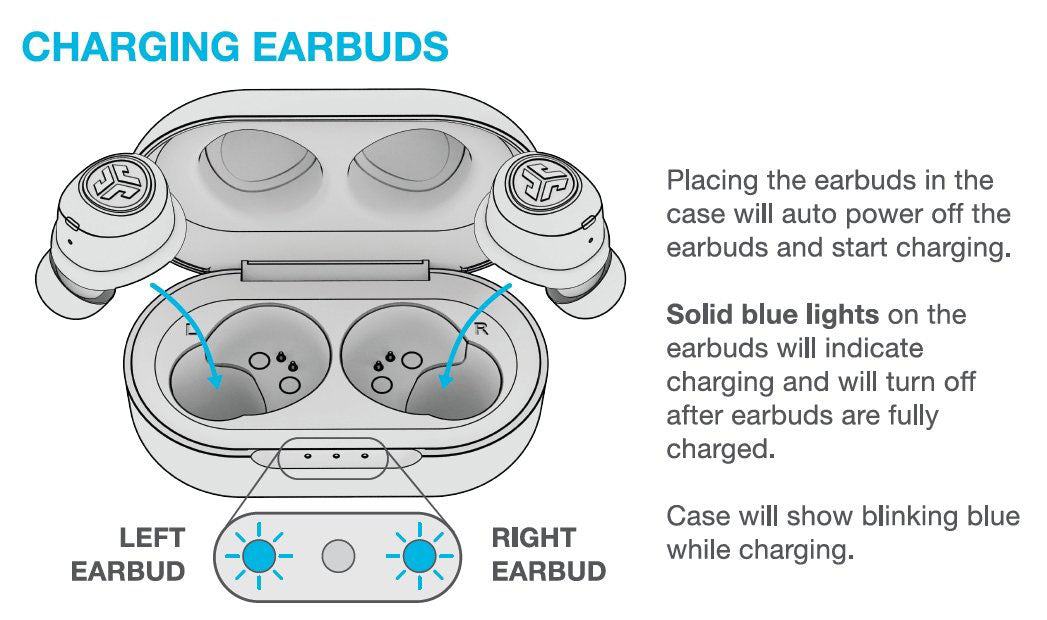
Why JLab earbuds will not turn on
When JLab earbuds do not turn on, the cause is usually simple. The battery may be empty, the charging contacts may be dirty, or the earbuds may be stuck in a connection state.
Common causes include:
• Low or empty earbud battery.
• Dead charging case.
• Earbuds not sitting correctly in the case.
• Sweat, dust, or wax on the charging contacts.
• A frozen Bluetooth connection.
• A failed touch-control response.
• An outdated or incomplete firmware update.
Start with charging. Place both earbuds in the case and connect the case to power. Leave them for 15 to 30 minutes, then try to turn on JLab earbuds again.
If only one earbud turns on, clean the contact points and check whether the affected earbud’s LED responds. Avoid metal tools and liquids, since they can damage the contacts or create a short circuit.
Resetting JLab earbuds
A reset can fix connection and synchronization problems, but the steps vary by model. Many JLab true wireless earbuds use a sequence that includes forgetting the Bluetooth device, turning off Bluetooth, and tapping or holding the earbuds in a specific pattern.
Before resetting:
- Forget the JLab earbuds in your phone’s Bluetooth menu.
- Turn Bluetooth off.
- Place the earbuds in the case.
- Follow the reset pattern for your exact model.
- Turn Bluetooth back on.
- Pair the earbuds again.
Do not guess a complicated reset sequence if your model uses a different control system. Use the product guide for the exact model name printed on the case or box. This avoids changing settings in the wrong way.
JLab earbud LED lights and voice prompts
LED lights provide clues, but they are not identical on every JLab product. In general, these signals may mean:
• Flashing blue: The earbud is on or connected.
• Flashing blue and white: The earbud is ready to pair.
• Red or amber light: The battery is low or the earbud is charging.
• No light: The earbud may be off, fully charged, or not making contact with the case.
These meanings are common, not universal. JLab can use different colors and patterns for different product families, so the official guide for your model remains the best reference.
Voice prompts can also help. “Bluetooth connected” means the earbuds are powered on and linked to a device. A pairing prompt usually means they are on but not connected yet.
Practical tips for using JLab earbuds
After learning how to turn on JLab earbuds, a few habits can make daily use easier:
• Charge the case before long trips.
• Keep the charging contacts clean and dry.
• Store both earbuds in the case when you are finished.
• Turn off Bluetooth on devices you no longer use.
• Keep the earbuds near your phone during the first pairing.
• Avoid pressing the touch controls while inserting the earbuds.
• Use the JLab app when your model supports app-based settings or updates.
In hands-on testing, the most common mistake is removing one earbud and assuming both are active. Some models need both earbuds to sync before they connect normally. Returning them to the case, closing the lid, and removing them together often solves this small but frustrating issue.
Another common mistake is holding the touch panel too briefly. A quick tap may pause music or answer a call. Hold the panel firmly for about three seconds when you want to power the earbud on or off.

How to turn off JLab earbuds
To turn off JLab earbuds, place them back in the charging case and close the lid. Most models power down and begin charging automatically.
You can also press and hold the control on each earbud for about three seconds. The voice prompt or LED light should confirm that the earbuds are off.
If the earbuds remain connected after you put them away, check whether the case is charged and whether the earbuds are touching the charging pins. An earbud that is not seated correctly may stay on and drain its battery.
Turning off JLab earbuds when you are not using them helps preserve battery life. The charging case also protects the earbuds from dust, drops, and accidental button presses.

Frequently Asked Questions About How to Turn On JLab Earbuds
How do I turn on JLab earbuds for the first time?
Charge the case and earbuds first, then open the case and remove both earbuds. If they do not turn on automatically, press and hold each earbud’s button or touch panel for about three seconds.
Why are my JLab earbuds not turning on?
The battery may be empty, or the earbuds may not be touching the charging contacts. Charge the case and earbuds, clean the contacts with a dry cotton swab, and try the manual power method again.
Can I turn on JLab earbuds without the case?
Usually, yes. Remove the earbuds and press and hold each control for about three seconds, provided the earbuds have enough battery power.
How do I put JLab earbuds into pairing mode?
Turn on the earbuds and open Bluetooth settings on your device. If they do not appear, forget the old JLab connection, turn Bluetooth off and on, then follow the pairing instructions for your model.
How long should I hold the JLab earbud button?
Start with about three seconds. Some models may need a longer hold for power or pairing, so check the guide for the exact JLab model if three seconds does not work.
Why does only one JLab earbud turn on?
The second earbud may have a low battery, dirty charging contact, or lost its link with the first earbud. Charge both earbuds, place them in the case, and pair them again after forgetting the old Bluetooth connection.
How do I know when my JLab earbuds are on?
Look for an LED flash, listen for a voice prompt, or check whether the earbuds appear in your device’s Bluetooth list. A connected battery indicator is another sign that they are powered on.
Conclusion
To turn on JLab earbuds, remove them from a charged case or press and hold each earbud’s control for about three seconds. If they do not respond, charge the case, clean the contacts, check the Bluetooth connection, and reset the earbuds using the instructions for your model.
Once you know the light signals and power controls, JLab earbuds become easy to manage. Try these steps with your earbuds today, and explore the model guide or JLab app for more useful controls and battery tips.
