

To pair Erazer earbuds, turn on Bluetooth, place both earbuds in pairing mode, then select them on your device.
Learning how to pair Erazer earbuds is usually simple, but the exact steps can vary by model. This guide explains the pairing process for phones, tablets, computers, and smart TVs, along with practical fixes for connection problems. It also covers reset steps, single-earbud use, and ways to keep your Bluetooth connection stable.
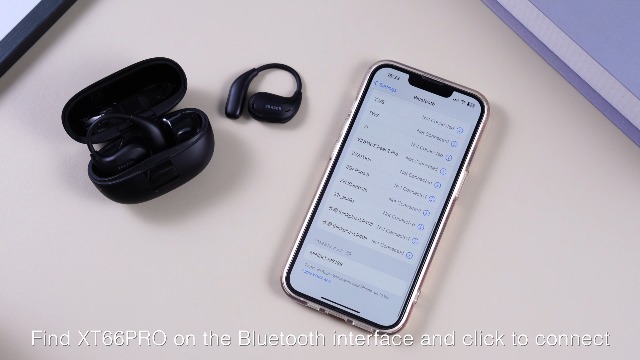
How to Pair Erazer Earbuds for the First Time
Most Erazer earbuds use standard Bluetooth pairing. Before you begin, charge the earbuds and the case. A low battery can stop the earbuds from entering pairing mode or cause the connection to drop.
Follow these steps:
- Open the charging case.
- Remove both Erazer earbuds.
- Check for flashing blue, white, or red-and-blue lights. These lights usually show that the earbuds are ready to pair.
- Open the Bluetooth settings on your device.
- Turn Bluetooth on.
- Look for a name such as “Erazer,” “Erazer Earbuds,” or a model number.
- Tap the earbud name.
- Wait for the message that says “Connected” or “Paired.”
If your earbuds do not appear, place them back in the case for a few seconds. Then remove them again. Some models enter pairing mode only when both earbuds are removed together.
A device may ask you to confirm pairing. Select “Pair” or “Connect.” You do not usually need a PIN, but some older devices may ask for one. If that happens, try 0000 or 1234, unless your manual lists a different code.

How to Pair Erazer Earbuds With an iPhone
The iPhone pairing process is quick because iOS shows nearby Bluetooth devices in one list. Keep the phone close to the earbuds during setup.
- Open the Erazer charging case.
- Remove both earbuds.
- Go to Settings on your iPhone.
- Tap Bluetooth.
- Turn Bluetooth on if it is off.
- Wait under “Other Devices.”
- Tap the Erazer earbud name.
- Check that it moves to “My Devices” and shows “Connected.”
If the earbuds connect to an old phone first, turn Bluetooth off on that phone. Bluetooth earbuds often reconnect to the last device they used. This can make it seem as if the earbuds are missing from the iPhone list.
On newer iPhones, the earbuds may appear as a connection notice if the model supports fast pairing. If no notice appears, use the regular Bluetooth menu. The standard Bluetooth method works with most Erazer models.
How to Pair Erazer Earbuds With an Android Phone
Android phones use a similar process, although menu names can differ by brand. You may see “Connected devices,” “Connections,” or “Bluetooth” in the Settings app.
- Open Settings.
- Tap Connected devices or Bluetooth.
- Select Pair new device if needed.
- Remove the Erazer earbuds from their case.
- Wait for the earbuds to appear in the available devices list.
- Tap the Erazer name.
- Confirm the pairing request.
Some Android phones show a pop-up called Fast Pair. If it appears, tap Connect. Keep the earbuds near the phone and make sure the phone has Bluetooth and location services enabled if the Fast Pair feature requires them.
If only one earbud appears, do not pair that earbud right away. Put both earbuds into the case, close the lid, and try again. Pairing one side first can sometimes separate the left and right earbuds.
How to Pair Erazer Earbuds With a Windows PC
You can pair Erazer earbuds with a Windows 10 or Windows 11 computer for music, calls, meetings, and games. The computer must have working Bluetooth. If it does not, a USB Bluetooth adapter may help.
Windows 11
- Open Settings.
- Select Bluetooth & devices.
- Turn Bluetooth on.
- Click Add device.
- Choose Bluetooth.
- Remove the Erazer earbuds from the charging case.
- Select the Erazer earbuds from the list.
- Click Done after the connection completes.
Windows 10
- Open Settings.
- Select Devices.
- Click Bluetooth & other devices.
- Turn Bluetooth on.
- Choose Add Bluetooth or other device.
- Select Bluetooth.
- Click the Erazer earbud name.
After pairing, choose the earbuds as the sound output device. Click the speaker icon near the clock and select Erazer. For calls, also check the microphone input in the app you use.
Windows may show two audio options, such as “Stereo” and “Hands-Free.” Stereo usually gives better music quality. Hands-Free may be needed for the earbud microphones during calls, but sound quality can decrease.
How to Pair Erazer Earbuds With a Mac
Pairing Erazer earbuds with a Mac takes only a few steps. First, disconnect them from your phone or another nearby device.
- Open the Apple menu.
- Select System Settings.
- Click Bluetooth.
- Turn Bluetooth on.
- Remove both earbuds from the case.
- Find the Erazer name under nearby devices.
- Click Connect.
On older macOS versions, open System Preferences and select Bluetooth instead. After the earbuds connect, open the Sound settings and select Erazer for output and input.
If the Mac connects but plays sound through its speakers, click the Control Center icon in the menu bar. Select Sound, then choose the Erazer earbuds. This small step solves many cases where the pairing works but the audio route does not change.
How to Pair Erazer Earbuds With a Smart TV
Many smart TVs support Bluetooth headphones, but not every TV does. Check the TV manual or its sound settings before trying to pair Erazer earbuds.
A typical process looks like this:
- Put the earbuds into pairing mode.
- Open the TV Settings menu.
- Select Sound or Audio.
- Choose Sound Output.
- Select Bluetooth Speaker List, Bluetooth Devices, or a similar option.
- Choose the Erazer earbuds.
- Confirm the connection.
Keep the earbuds within a few feet of the TV during setup. A TV may also disconnect a wireless soundbar or remote when you connect Bluetooth earbuds. This behavior depends on the TV model.
Bluetooth audio can have a small delay on some TVs. This delay may be noticeable when watching movies or playing games. Look for an audio sync setting if the voices and lip movement do not match.
What the Indicator Lights Mean
Indicator lights help show what the earbuds are doing. The exact colors can differ between Erazer models, so the product manual remains the best reference.
Common light patterns include:
• Flashing blue or white: The earbuds are searching for a device.
• Alternating red and blue: The earbuds are often in pairing mode.
• Solid light: The earbuds may be connected or charging.
• No light: The earbuds may be switched off, out of power, or seated incorrectly in the case.
• Flashing red: The battery may be low or the earbuds may need to charge.
Some charging cases show their own battery light. That light does not always show the Bluetooth status of the earbuds. Look at the earbuds themselves when possible.
How to Pair Erazer Earbuds Again After the First Setup
Once Erazer earbuds pair with a device, they often reconnect automatically. Turn on Bluetooth, open the case, and remove the earbuds. They should connect to the last compatible device that is available.
Automatic reconnection may fail when:
• The earbuds are connected to another nearby device.
• Bluetooth is turned off.
• The earbuds have a low battery.
• The device has removed the saved pairing.
• The earbuds were reset.
To reconnect manually, open the Bluetooth menu and tap the saved Erazer name. If the status says “Not Connected,” tap it once and wait.
In my experience helping with wireless audio setup, the most common mistake is leaving Bluetooth active on a second phone. The earbuds are not broken; they are simply connecting to the device they remember first. Turning Bluetooth off on the older device usually fixes the issue within seconds.
How to Pair Only One Erazer Earbud
Many Erazer models support single-earbud use. This feature is useful when you need to hear traffic, talk with someone, or save battery.
Try this method:
- Put both earbuds into the charging case.
- Close the lid for several seconds.
- Remove only the left or right earbud.
- Open Bluetooth settings on your phone.
- Select the Erazer name.
- Test the audio.
Some models require the unused earbud to remain in the case. Other models let you use either side independently. If one earbud does not work alone, the model may use a primary-earbud design.
Single-earbud mode may provide mono sound rather than stereo sound. That is normal. Your phone may combine the left and right channels into one channel, depending on its accessibility and audio settings.
How to Fix Erazer Earbuds That Will Not Pair
If your Erazer earbuds do not connect, work through the problem in order. Start with simple checks before resetting anything.
Check the battery
Charge the earbuds and case for at least 15 to 30 minutes. Make sure the charging contacts are clean and that each earbud sits correctly in its slot.
Turn Bluetooth off and on
Open your device settings and switch Bluetooth off. Wait about 10 seconds, then turn it on again. This refreshes the Bluetooth scan.
Move closer
Keep the earbuds within a few feet of the phone or computer. Walls, metal objects, and other wireless devices can reduce the signal.
Disconnect other devices
Turn Bluetooth off on phones, tablets, laptops, and TVs that have used the earbuds before. The earbuds may be connecting to one of them without showing an obvious message.
Forget the old pairing
On your phone or computer, select the Erazer earbuds and choose Forget, Remove Device, or Unpair. Then restart the pairing process.
Restart both devices
Place the earbuds in the case, restart the phone or computer, and try again. A restart can clear a temporary Bluetooth error.
These steps follow common Bluetooth troubleshooting practice. They also reduce the risk of changing settings that were not causing the problem.
How to Reset Erazer Earbuds
A reset removes old pairing information and puts the earbuds back into a fresh setup state. The reset method differs by model, so check the included guide when possible.
A common reset process is:
- Remove the Erazer earbuds from your device’s Bluetooth list.
- Put both earbuds into the charging case.
- Leave the case open.
- Press and hold the touch controls or case button for about 10 to 15 seconds.
- Watch for a change in the indicator lights.
- Close the case, wait a few seconds, and open it again.
- Remove both earbuds and pair them again.
Some models reset when you tap each earbud several times. Others use a physical case button. Do not assume every Erazer product uses the same reset gesture.
Resetting is useful when the earbuds connect separately, one side has no sound, or the earbuds refuse to enter pairing mode. It will not repair damaged hardware or a failed battery.
How to Fix One Erazer Earbud Not Working
One silent earbud can result from poor charging, a blocked speaker grille, or a lost connection between the two earbuds. First, check the easy causes.
• Confirm that both earbuds show a charging light in the case.
• Clean the metal charging contacts with a dry, soft cloth.
• Check the phone’s left and right audio balance.
• Make sure mono audio is not changing the sound behavior.
• Forget the Erazer pairing and pair both earbuds again.
• Reset the earbuds if the problem continues.
Earwax and dust can reduce volume, even when an earbud is technically connected. Clean the speaker mesh gently. Do not push a sharp object into the grille or use liquid near the charging contacts.
If one side remains dead after a full charge and reset, the issue may be a battery or hardware fault. Contact the seller or manufacturer while the warranty still applies.
How to Improve the Bluetooth Connection
Bluetooth works best when the signal has a clear path. Keep your phone on the same side of your body as the earbud when possible. Your body can weaken a small wireless signal, especially in crowded places.
For a more stable connection:
• Keep the phone close during setup.
• Avoid crowded Wi-Fi and Bluetooth areas when pairing.
• Update your phone, computer, or TV software.
• Keep the earbuds and case charged.
• Do not cover the earbuds with a thick case during setup.
• Use one main source device at a time.
Bluetooth earbuds are designed for short-range use. They may work across a room, but walls and interference can reduce range. This is a normal limitation of wireless audio, not always a fault with the Erazer earbuds.
Common Pairing Mistakes to Avoid
Many pairing problems come from small setup errors. Avoid these mistakes when learning how to pair Erazer earbuds:
• Selecting a nearby device with a similar name.
• Pairing only one earbud before both earbuds are linked.
• Leaving the earbuds connected to an old phone.
• Trying to pair while the battery is empty.
• Skipping the “Forget Device” step after repeated failures.
• Holding the touch controls too briefly during a reset.
• Assuming the charging case light shows the Bluetooth status.
I once saw a setup fail because the earbuds were still sealed in their protective shipping film. The case showed power, but the charging contacts could not work correctly. Removing the film and cleaning the contacts solved the issue immediately.
How to Keep Erazer Earbuds Connected
After you learn how to pair Erazer earbuds, a few habits can improve daily use. Keep the earbuds in the case when you are not using them. This protects them and helps maintain their charge.
Avoid storing the case in extreme heat or cold. High heat can shorten battery life, while moisture may damage charging contacts. Do not charge the case near water or use wet earbuds in the case.
Keep your device software updated. Updates can improve Bluetooth performance, though they may also change menu names or connection behavior. If an update creates a new issue, remove the old pairing and connect the earbuds again.
Frequently Asked Questions About How to Pair Erazer Earbuds
How do I put Erazer earbuds into pairing mode?
Open the charging case and remove both earbuds. Most models flash a blue, white, or red-and-blue light when they are ready to pair.
Why are my Erazer earbuds not showing in Bluetooth?
Charge the earbuds, turn Bluetooth off and on, and move the earbuds close to your device. If they still do not appear, forget any old Erazer pairing and reset the earbuds.
Can I pair Erazer earbuds with an iPhone?
Yes, most Erazer earbuds work with iPhones through the standard Bluetooth menu. Open Settings, tap Bluetooth, and select the Erazer name under available devices.
Can I pair Erazer earbuds with a Windows computer?
Yes, if the computer has Bluetooth. Open Bluetooth settings, choose Add device, select Bluetooth, and then choose the Erazer earbuds.
How do I reset Erazer earbuds?
The reset method depends on the model. A common method is to place both earbuds in the case and hold the touch controls or case button for 10 to 15 seconds.
Why does only one Erazer earbud connect?
The earbuds may have lost their link with each other, or one side may not be charging. Forget the Bluetooth pairing, place both earbuds in the case, reset them, and pair both sides again.
Conclusion
Learning how to pair Erazer earbuds usually takes only a few minutes. Charge both earbuds, place them in pairing mode, select the correct Erazer name, and keep other Bluetooth devices disconnected during setup.
If the connection fails, start with the battery, Bluetooth refresh, and old-device checks. A reset can solve separate-earbud and repeated pairing problems, but model-specific instructions should always take priority.
Try the steps above with your earbuds, then share your model and results in the comments. You can also explore your device’s Bluetooth guide for more ways to improve wireless audio performance.
