

Use Samsung Find or Galaxy Wearable to view the last location and ring nearby Samsung earbuds.
Learning how to find Samsung earbuds is usually simple once you know which Samsung app to open and what each tracking option can do. I have found that most people lose earbuds in familiar places, such as a sofa, car, backpack, or bedside table. This guide explains how to find Samsung earbuds with clear steps, practical checks, and honest limits, including what to do when the earbuds are out of battery or offline.
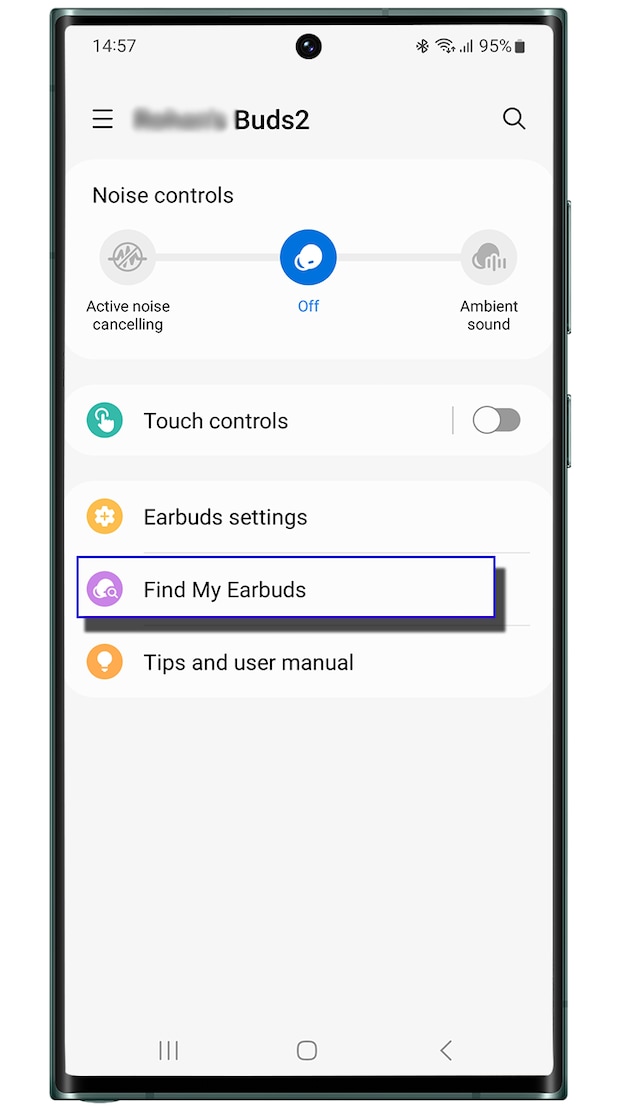
How to Find Samsung Earbuds With Galaxy Wearable
The Galaxy Wearable app is often the fastest way to find Samsung earbuds that are still near your phone. It works best when the earbuds are charged, connected, and inside Bluetooth range.
Follow these steps:
- Open the Galaxy Wearable app on your Samsung phone.
- Tap your connected earbuds.
- Select Find My Earbuds or Find My Earbuds through the device menu.
- Tap Start.
- Listen for the earbuds to play a repeated sound.
- Follow the sound and tap Stop when you find them.
The exact menu name may vary by model and software version. Galaxy Buds3, Buds2 Pro, Buds Pro, Buds2, Buds Live, and older models may show slightly different options.
Keep the volume low if the earbuds are close to your ears. Never place an earbud in your ear while the search sound is active. The tone can be sharp, especially in a quiet room.

How to Find Samsung Earbuds With Samsung Find
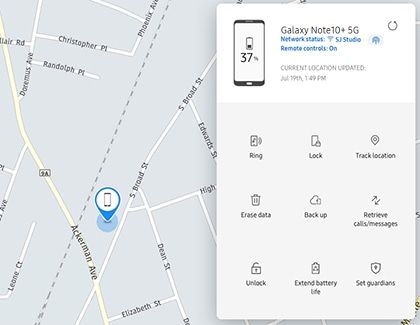
Samsung Find can help you locate compatible Galaxy Buds on a map. It may show the current position, the last known location, or an approximate area where the earbuds were detected.
To use Samsung Find:
- Open the Samsung Find app.
- Sign in to the Samsung account linked to your earbuds.
- Choose the Devices tab.
- Select your Galaxy Buds.
- Check the map for the current or last known location.
- Use Search nearby if that option appears.
- Tap Ring when you are close enough to hear the earbuds.
You can also access Samsung Find through a web browser on another device in some cases. This can help if your phone is missing or your battery is low.
The map is not always exact. A location pin may cover a home, office, parking lot, or large store. Treat it as a clue rather than a perfect address.

How to Find Samsung Earbuds When They Are Nearby
When the map points to your home or another familiar place, search in a calm and planned way. Random searching often makes the process harder.
Use this order:
- Stand still and check the app for a connection.
- Play the ringing sound.
- Walk slowly through the room.
- Check soft surfaces first.
- Look under furniture and inside bags.
- Use a flashlight at a low angle.
- Check pockets, coat sleeves, and laundry.
- Search the last place where you removed the earbuds.
A phone flashlight can reveal the glossy edge of an earbud under a couch or bed. The charging case may blend into dark fabric, so search for its shape rather than its color.
I have learned that retracing your actions works better than relying on memory. Ask yourself where you last used the earbuds, where you placed your phone, and whether you changed clothes afterward. Small details often solve the mystery.
How to Find Samsung Earbuds in the Case
Finding Samsung earbuds inside their charging case can be more difficult. The case may not ring like an individual earbud, and some tracking functions depend on the model and battery status.
Try these steps:
• Check Samsung Find for the case or the last recorded location.
• Open Galaxy Wearable and look for the last connection.
• Search near chargers, desks, nightstands, and bags.
• Check the car cup holder, center console, and door pockets.
• Look inside gym bags, laptop bags, and coat pockets.
• Retrace the last trip when you remember using the earbuds.
If the case is closed, the earbuds may not connect or produce a sound. Some newer Galaxy Buds models support improved location features, but performance still depends on battery power, software, and nearby devices.
For future protection, attach the case to a small pouch or use a case with a built-in loop. A bright case can also make the earbuds easier to spot.

How to Find Samsung Earbuds When They Are Offline
Offline finding may still show a last known location, but it cannot guarantee a live position. The earbuds may be offline because they are out of battery, inside a closed case, out of range, or disconnected from the Samsung account.
Try the following:
- Open Samsung Find and review the last known location.
- Visit that location if it is safe and practical.
- Look for the earbuds near the last place they connected.
- Charge your phone and refresh the app.
- Check whether the earbuds reconnect when you get close.
- Search rooms, bags, vehicles, and clothing from that location.
Some compatible Galaxy Buds can use a Bluetooth-based community finding network. This feature can help when nearby Galaxy devices detect the earbuds. It depends on model support, settings, network access, and the presence of nearby devices.
Offline tracking is helpful, but it is not the same as GPS tracking. Samsung earbuds do not work like a tiny live GPS beacon. Their location may update only when the earbuds connect to your phone or are detected by a supported nearby device.
How to Find Samsung Earbuds Without a Phone
You may still find Samsung earbuds without your main phone, but your options are more limited. Use another device to sign in to your Samsung account and open Samsung Find if web access is available.
You can also:
• Borrow a compatible Galaxy phone.
• Use a tablet linked to your Samsung account.
• Check the last location from Samsung Find.
• Search the place where the earbuds last connected.
• Ask someone nearby to call your phone while you search.
If the earbuds are close, another Galaxy device may detect them. However, you usually need a phone, tablet, or web browser to view the map and control the tracking tools.
This is why setting up Samsung Find before losing the earbuds matters. Tracking features cannot always be enabled after the device has disappeared.

How to Find Samsung Earbuds That Are Dead
When the earbuds or case battery is fully dead, you cannot make them ring. You may still see their last recorded location in Samsung Find, but the map cannot show their current position.
Start with the last location shown in the app. Then search the area carefully, focusing on places where the earbuds could have fallen or been covered.
Pay special attention to:
• Couch cushions and blankets
• Bed sheets and pillows
• Pants and jacket pockets
• Backpacks and gym bags
• Car seats and floor mats
• Desk drawers and charging areas
• Laundry baskets and washing machine spaces
If you often run out of battery, charge the case at the same time each day. A small charging routine is easier to remember than waiting until the earbuds are nearly empty.

How to Find Samsung Earbuds in a Car
Cars are common hiding places because earbuds can slide under seats or into narrow gaps. Park safely before searching, and do not search while driving.
Use a flashlight and check:
- Between the seat and center console.
- Under both front seats.
- Inside door pockets.
- Under floor mats.
- In the glove box.
- Inside cup holders.
- In the center console.
- In child seats or seat-back pockets.
If Samsung Find shows the car as the last location, open the doors and check whether the earbuds reconnect. If they reconnect, use the ringing feature through Galaxy Wearable or Samsung Find.
Avoid moving the seats quickly. An earbud can slide farther into a gap or become trapped under a rail.

How to Set Up Samsung Earbuds Tracking Before You Lose Them
The best way to learn how to find Samsung earbuds is to prepare before they go missing. Setup takes only a few minutes and can save a long search later.
Use this checklist:
• Pair the earbuds with the Galaxy Wearable app.
• Sign in to your Samsung account.
• Add the earbuds to Samsung Find.
• Turn on location services when required.
• Enable offline finding if your model supports it.
• Keep Galaxy Wearable and Samsung Find updated.
• Allow notifications and nearby-device permissions.
• Test the Ring feature while the earbuds are nearby.
Permissions can change after a phone update. If tracking stops working, review the app permissions and account settings. The menu names may differ between One UI versions.
It is also smart to label the case with a phone number or email address. Avoid printing sensitive personal details. A simple contact method can help if someone finds the case.
Common Problems When Finding Samsung Earbuds
Tracking tools are useful, but they are not perfect. Knowing the limits can prevent frustration.
The earbuds show an old location
This usually means the earbuds have not connected recently. They may be dead, closed in the case, or outside the finding network.
The Ring button does not work
The earbuds may be too far away, offline, inside a closed case, or out of battery. Move closer and refresh the app.
Only one earbud appears
One earbud may have a different battery level or connection status. Search for both, but focus first on the location shown by the app.
The app cannot find the earbuds
Check that you are using the correct Samsung account. Then confirm Bluetooth, location access, internet access, and app permissions.
The map points to the wrong place
Location data can be approximate. Indoor signals, crowded buildings, and delayed updates may reduce accuracy. Use the map with physical clues from your routine.
A common mistake is assuming that a location pin proves the earbuds are still there. It only shows the last available signal or detection. Always compare it with the time and place shown in the app.
Tips to Avoid Losing Samsung Earbuds Again
Once you find Samsung earbuds, make the next search easier. Small habits work better than expensive accessories alone.
Try these habits:
• Keep the charging case in one regular spot at home.
• Return the earbuds to the case after each use.
• Use a bright or unusual case cover.
• Attach the case to a bag when traveling.
• Avoid placing loose earbuds on beds or sofas.
• Check the battery before leaving home.
• Turn on Samsung Find and offline finding.
• Use a small tray near your door or desk.
Think of the case as the earbuds’ home. If the earbuds always return to the same place, they are far less likely to disappear.
When traveling, check the airplane seat pocket, hotel nightstand, bathroom counter, and rideshare seat before leaving. These quick checks take seconds and can prevent a costly replacement.
Are Samsung Earbuds Trackable Like a Phone?
Samsung earbuds are trackable through Bluetooth connections, last known locations, Samsung Find, and supported offline finding features. They are not usually trackable with live GPS in the same way as a smartphone.
Their accuracy depends on the model, battery level, connection, software, account settings, and nearby devices. For that reason, Samsung earbuds are easier to find in a home than in a large outdoor area.
Frequently Asked Questions About How to Find Samsung Earbuds
Can I find Samsung earbuds if they are in the case?
You may be able to see their last known location, but ringing may not work when the case is closed. Check Samsung Find and search the last place where the earbuds connected.
Can Samsung earbuds be found if the battery is dead?
A dead battery prevents live tracking and sound alerts. You can still use the last known location as a guide and search nearby areas, bags, clothing, and vehicles.
How do I make my Samsung earbuds ring?
Open Galaxy Wearable or Samsung Find, select the earbuds, and choose the Ring or Find My Earbuds option. The earbuds must have enough battery and be able to connect or receive the command.
Can I find Samsung earbuds without Wi-Fi?
Bluetooth may help you find nearby earbuds without Wi-Fi, but map features and account-based tracking usually need internet access. Mobile data can work instead of Wi-Fi.
Why can’t Samsung Find locate my earbuds?
The earbuds may be out of battery, offline, outside the supported finding network, or linked to another Samsung account. Check app permissions, Bluetooth, location access, and the last known location.
Does Samsung Find work with every Galaxy Buds model?
Support varies by model, software version, and region. Older Galaxy Buds may offer fewer tracking features than newer models, so check the options shown in Galaxy Wearable and Samsung Find.
Can someone else use my lost Samsung earbuds?
If the earbuds are reset and paired with another device, your tracking options may be reduced or removed. Protect your Samsung account and report lost property when appropriate.
Conclusion
The most reliable way to find Samsung earbuds is to start with Galaxy Wearable for nearby searches and Samsung Find for map and last-location data. Ring the earbuds when they are connected, retrace your steps when they are offline, and search common hiding places such as sofas, bags, cars, and clothing.
Set up Samsung Find and offline finding now, while your earbuds are still with you. Then share your own tracking tips or explore more device-care guides to stay ready for the next missing-gadget moment.
