

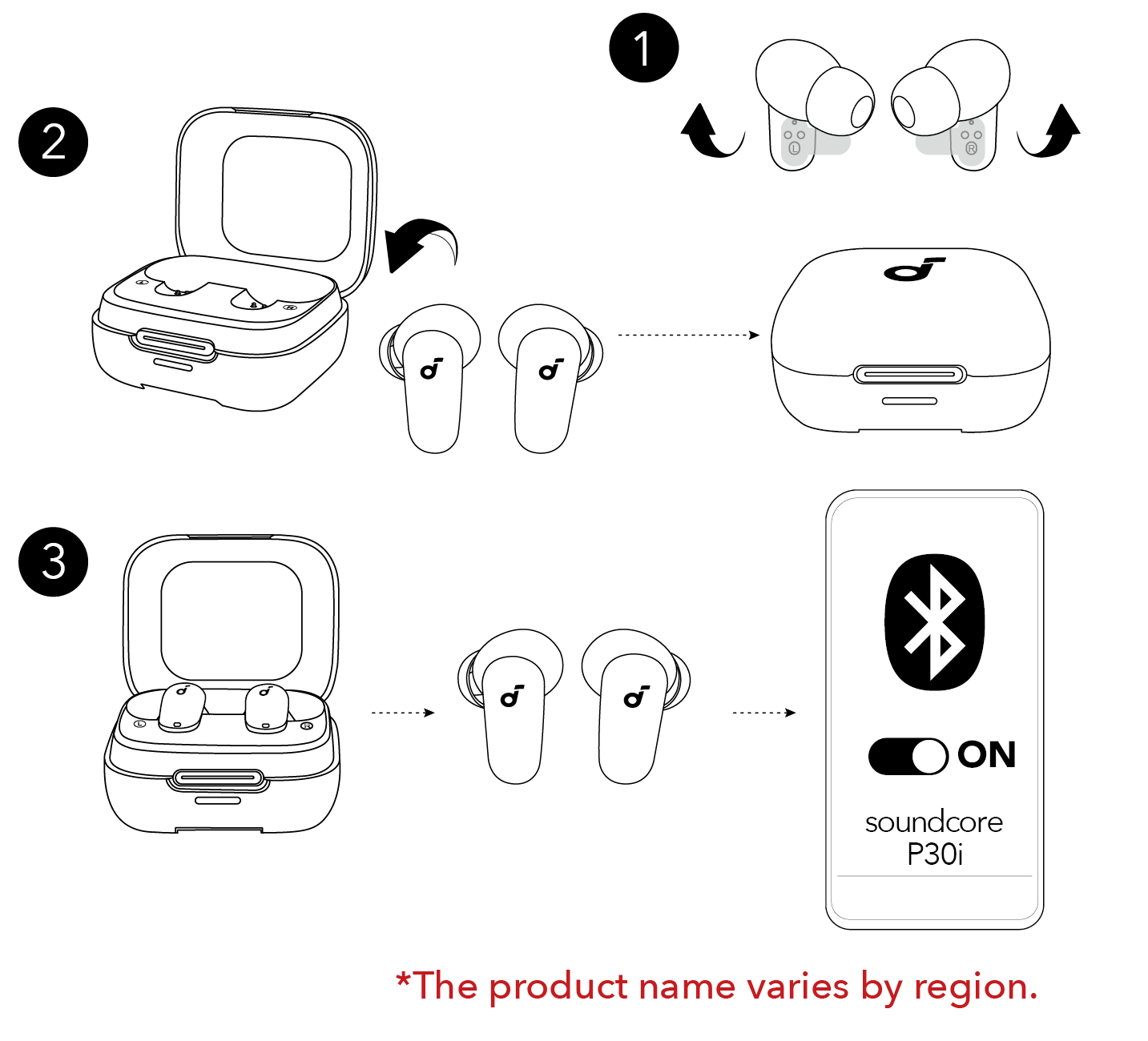
Open the charging case and remove your Soundcore earbuds to turn them on automatically.
Learning how to turn on Soundcore earbuds is simple, but the exact method can vary by model. Most Soundcore earbuds power on when you open the case or take them out, while some models also support manual touch or button controls. This guide explains each safe method, common problems, charging checks, and pairing steps so you can start listening without guesswork.
How to Turn On Soundcore Earbuds
The fastest way to turn on Soundcore earbuds is to place them in the charging case, charge them briefly, and then remove them. Most Soundcore models wake up automatically when they leave the case.
Follow these steps:
- Put both earbuds into the charging case.
- Check that each earbud sits correctly on its charging contacts.
- Close the lid for a few seconds.
- Open the lid again.
- Remove the earbuds from the case.
- Wait for the LED lights or startup sound.
- Place the earbuds in your ears.
If the earbuds turn on correctly, they may enter Bluetooth pairing mode. Your phone should then show the Soundcore earbuds in its Bluetooth list.
The case acts like a small power station. When the earbuds touch the charging pins, they usually turn off and charge. When you remove them, they usually turn on and reconnect to the last device.

How to Turn On Soundcore Earbuds Manually
Some Soundcore earbuds have physical buttons. Others use touch controls. Manual power controls are useful when automatic power-on does not work or when the earbuds are not stored in the case.
Models with physical buttons
For earbuds with buttons, press and hold the button on each earbud for about two seconds. You may hear a sound or see the LED flash.
The exact button action can differ by model. If a short press does not work, try holding the button for three seconds. Avoid pressing the button many times, because repeated presses may start pairing, pause audio, or activate another control.
Models with touch controls
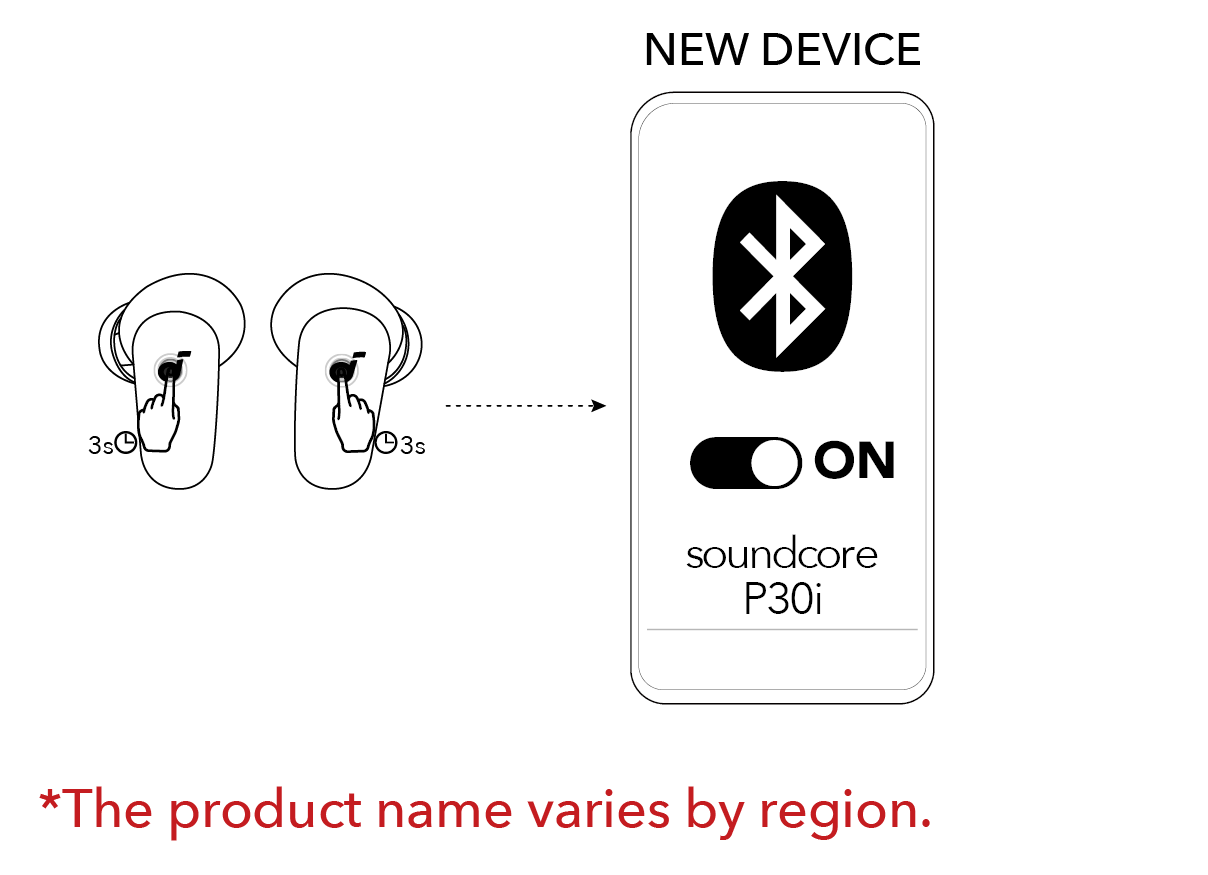
For touch-based models, remove the earbuds from the case first. Then touch and hold the control area on each earbud for about two seconds.
Some models use a longer hold, such as five seconds, to turn on or enter pairing mode. The touch panel is often on the outer face of the earbud, not near the speaker tip.
If only one earbud turns on
Place both earbuds back into the case. Confirm that both LEDs respond or that the case shows both earbuds are charging. Then remove them together.
This step helps the earbuds start in stereo mode. If one earbud remains off, clean its charging contact and repeat the process.
How to Turn On Soundcore Earbuds Without the Charging Case
Turning on Soundcore earbuds without the case depends on the model. Many earbuds can power on manually, but some models rely heavily on the case to control power.
Try this method:
- Take the earbuds out of the case.
- Press and hold the button on each earbud.
- For touch models, touch and hold the control panel.
- Continue for two to five seconds.
- Watch for a flashing LED or listen for a startup tone.
If nothing happens, the earbuds may be fully drained. Place them in the case and charge them for at least 15 minutes. A very low battery may not show a bright LED at first.
In daily use, I have found that users often assume an earbud is broken when it is simply below its startup voltage. A short charge can restore normal operation, much like adding a little fuel before starting a cold car.

How to Turn On Soundcore Earbuds for the First Time
New Soundcore earbuds usually start pairing mode after you remove them from the case. Pairing mode lets a phone, tablet, or computer find the earbuds.
Use these steps:
- Remove the protective film from the charging contacts.
- Charge the case and earbuds.
- Open the case.
- Remove both earbuds.
- Open Bluetooth settings on your device.
- Select the Soundcore model from the device list.
- Approve the pairing request if one appears.
The protective film is easy to miss. It can block the metal contacts and prevent the earbuds from charging or turning on.
A Soundcore earbud name may look like “Soundcore Liberty,” “Soundcore Life P3,” or another model name. Select the entry that matches the label on the box or inside the Soundcore app.
After the first connection, the earbuds should reconnect when you open the case and remove them. Keep Bluetooth enabled on your phone for automatic reconnection.
How to Turn On Soundcore Earbuds After They Shut Off
Soundcore earbuds may shut off because of a low battery, inactivity, or a control setting. To turn them on again, return them to the case, close the lid, and then remove them.
If the earbuds shut off while you are listening, check these points:
• Charge the earbuds and case.
• Make sure the earbuds are not still inside the case.
• Check whether the charging case has power.
• Turn Bluetooth off and on again.
• Restart your phone.
• Remove the earbuds from your phone’s Bluetooth list and pair them again.
Some models also power off after a period without a Bluetooth connection. This behavior saves battery and is usually normal.
If the earbuds turn off every few minutes, inspect the charging contacts. Sweat, dust, and skin oils can interrupt charging and cause confusing power behavior.

What to Do When Soundcore Earbuds Will Not Turn On
When Soundcore earbuds will not turn on, start with the battery and charging contacts. These cause many apparent power problems.
Charge the case and earbuds
Connect the case to a reliable USB charger. Leave it connected for at least 30 minutes. Then place both earbuds inside the case and confirm that they sit firmly on the charging pins.
Use the charging cable supplied with the earbuds when possible. A damaged cable, loose plug, or weak power adapter may prevent the case from charging.
Clean the charging contacts
Turn off the charger and remove the earbuds. Use a dry cotton swab or soft, dry cloth to clean:
• The metal contacts on each earbud
• The spring pins inside the case
• The area around the charging wells
Do not pour liquid into the case. Do not use sharp metal tools, as they can damage the pins or create a short circuit.
Check for a stuck earbud
Press each earbud gently into its charging slot. If the LED responds only when you press it down, the earbud may not be seated correctly.
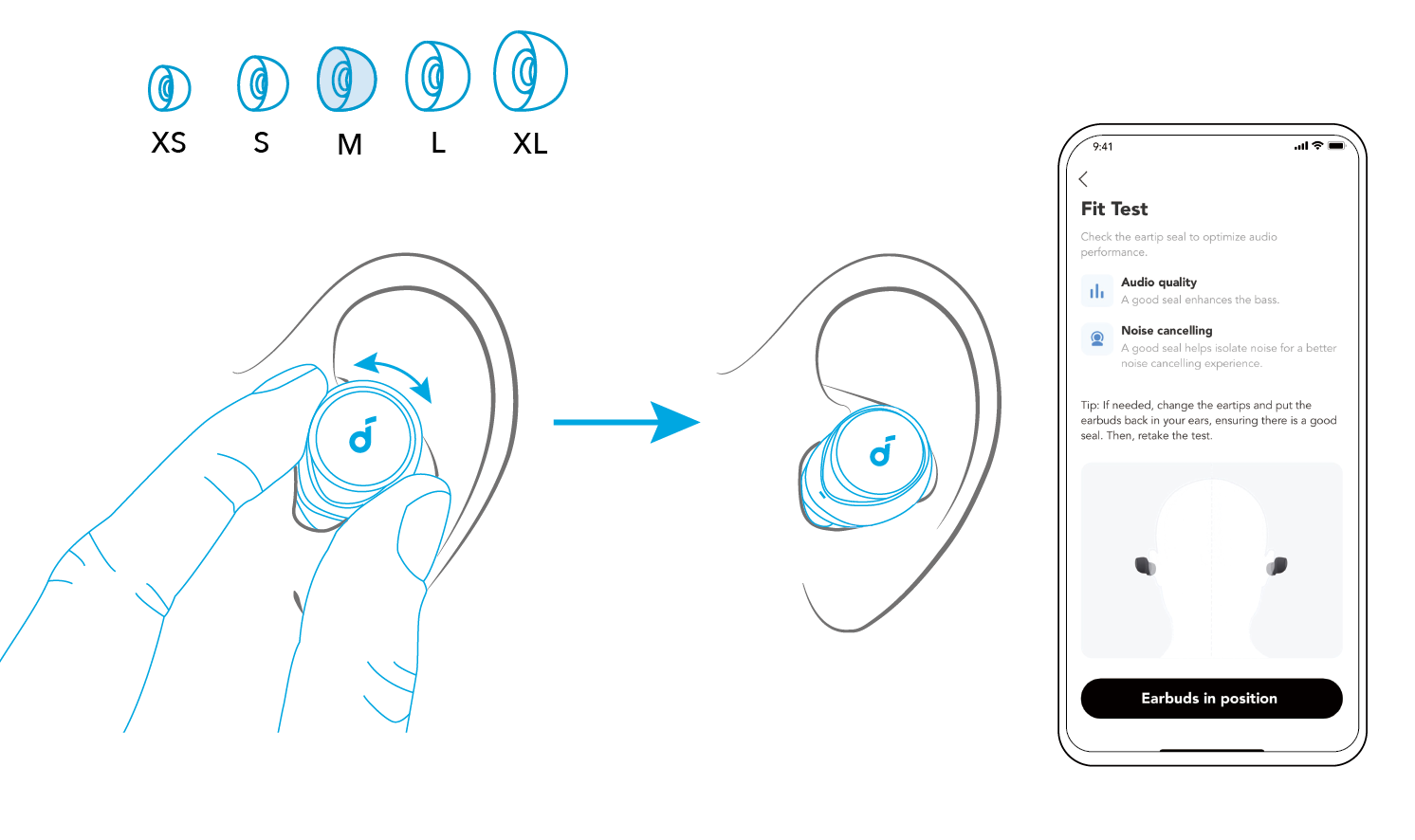
A silicone ear tip that is too large can sometimes keep an earbud from sitting fully in the case. Try a smaller tip and test the fit.
Reset the earbuds
A reset can fix failed pairing, uneven stereo operation, and some startup errors. The reset method varies by Soundcore model, so check the model-specific instructions in the Soundcore app or user guide.
Many models use a case button or touch controls during a reset. A reset usually clears old Bluetooth connections, so you will need to pair the earbuds again.
How to Turn On Soundcore Earbuds and Pair Them With a Phone
Turning on Soundcore earbuds and connecting them to a phone are two separate steps. The earbuds can be powered on but still fail to connect.
To pair them:
- Turn on the earbuds.
- Open your phone’s Settings app.
- Tap Bluetooth.
- Turn Bluetooth on.
- Find the Soundcore model.
- Tap its name.
- Wait for the status to show Connected.
If the model does not appear, place the earbuds back into the case. Open the lid and remove them again. If they still do not appear, hold the touch area or button until the LED flashes in pairing mode.
If the earbuds were connected to another device nearby, that device may capture the connection first. Turn Bluetooth off on the old phone, tablet, laptop, or television and try again.
The Soundcore app can also help with firmware updates, battery levels, control settings, and model-specific instructions. Keep the app updated, but do not interrupt an earbud firmware update.
How to Turn On Soundcore Earbuds With One Earbud
Most Soundcore earbuds can work with one earbud at a time. Remove the earbud you want to use and leave the other one in the case.
If the single earbud does not turn on:
- Put it into the case.
- Check that it is charging.
- Close the lid briefly.
- Open the lid.
- Remove the earbud.
- Try pairing again.
Some older or specialized models may require both earbuds to start together. If single-earbud use fails, consult the instructions for your exact model.
Single-earbud use is useful for calls, work, travel, and situations where you want to hear nearby sounds. It also uses less battery because only one earbud is active.
Soundcore Earbud LED Lights and What They Mean
LED behavior helps show whether the earbuds are charging, pairing, or powered on. However, light colors and patterns can differ between Soundcore models.
Common signs include:
• A flashing light often means pairing mode.
• A steady light may indicate charging or a completed connection.
• No light may mean the battery is empty, the earbud is not seated correctly, or the model uses limited LED feedback.
• A light on the case may show the case battery rather than the earbud battery.
Do not rely on color alone. Check the Soundcore app or Bluetooth menu when possible. The user guide for the exact model is the most accurate reference because Liberty, Life, Space, and other product lines may use different signals.

Mistakes to Avoid When Turning On Soundcore Earbuds
Small mistakes can make working earbuds seem dead. Avoid these common problems:
• Do not store the earbuds outside the case for long periods if they are not in use.
• Do not ignore the protective charging films on new earbuds.
• Do not clean contacts with water or household sprays.
• Do not force the earbuds into the case.
• Do not reset the earbuds before trying a basic charge and reconnection.
• Do not pair with several nearby devices at the same time during troubleshooting.
• Do not assume that a dark LED always means a hardware failure.
One lesson I often see in earbud troubleshooting is that the case matters as much as the earbuds. If the case has no power, it cannot wake, charge, or reset the earbuds in the normal way.
When to Contact Soundcore Support
Contact Soundcore support if the earbuds remain unresponsive after charging, cleaning, and resetting. Include the exact model name, purchase date, and steps you have already tried.
Support may ask for:
• A photo of the earbuds and charging case
• The case LED behavior
• The charger and cable used
• The phone or computer model
• The Soundcore app version
Do not open the earbuds yourself. Their small batteries and sealed parts can be damaged easily, and unauthorized repairs may affect warranty coverage.
Battery performance also declines over time. If the earbuds are several years old and lose power very quickly, battery wear may be the real cause rather than a power-on fault.
Frequently Asked Questions About How to Turn On Soundcore Earbuds
How do I turn on Soundcore earbuds?
Open the charging case and remove both earbuds. Most Soundcore earbuds turn on automatically, but models with buttons or touch controls may also require a two- to five-second press.
Why are my Soundcore earbuds not turning on?
They may have a dead battery, dirty charging contacts, or a poor connection inside the case. Charge the case, clean the contacts with a dry cloth, and reseat both earbuds.
Can I turn on Soundcore earbuds without the case?
Some models support manual power-on by holding a physical button or touch panel. If your model does not respond, you may need the case to charge, reset, or activate the earbuds.
How do I put Soundcore earbuds into pairing mode?
Remove the earbuds from the case and wait for the LED to flash. If they do not appear on your phone, press and hold the button or touch control according to your model’s instructions.
How long should I charge Soundcore earbuds before turning them on?
A short charge of 15 to 30 minutes is often enough to test them. For a first setup or a fully drained battery, charge the case and earbuds longer before troubleshooting.
Why does only one Soundcore earbud turn on?
The earbud may not be charging, or the two earbuds may have lost their stereo connection. Put both earbuds in the case, clean the contacts, close the lid, and remove them together.
Conclusion
Turning on Soundcore earbuds usually takes only two steps: charge the case and remove the earbuds. If automatic power-on fails, try the manual button or touch control, inspect the charging contacts, and reset the earbuds only when simpler fixes do not work.
The most reliable habit is to keep the case charged and store the earbuds in it after every use. Follow these steps with your exact Soundcore model, then explore the Soundcore app for updates and control options. Share your model and troubleshooting result in the comments to help other Soundcore users.
