

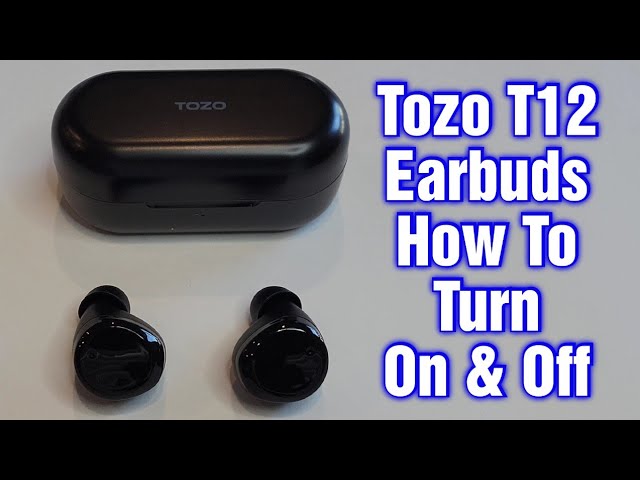
To turn on TOZO earbuds, remove them from the charged case or hold each touch panel.
Learning how to turn on TOZO earbuds is simple, but the exact method can vary by model. Most TOZO earbuds power on automatically when removed from the case, while some models also support manual activation through the touch controls. This guide explains both methods, plus quick fixes for earbuds that stay off, fail to pair, or show no lights.

How to turn on TOZO earbuds automatically
Most TOZO wireless earbuds use the charging case as their power switch. When the case has power, removing the earbuds usually turns them on and places them in pairing mode.
Follow these steps:
- Charge the case for at least 15 minutes if it appears empty.
- Open the charging case.
- Remove both earbuds at the same time.
- Look for a flashing white, blue, or red light.
- Listen for a voice prompt or startup sound.
- Open your phone’s Bluetooth settings and select your TOZO earbuds.
If the earbuds connect to your phone before, they may reconnect by themselves. Keep the earbuds close to the phone during this process.
When I test wireless earbuds, I first remove both buds together. This helps them start as a stereo pair instead of turning on one at a time. It also prevents a common mistake: trying to pair one earbud while the other remains asleep in the case.

How to turn on TOZO earbuds manually
Sometimes the charging case does not wake the earbuds. In that case, use the touch controls on each earbud.
The usual manual method is:
- Remove both earbuds from the case.
- Press and hold the touch panel on each earbud.
- Keep holding for about 3 seconds.
- Release the panels when the LED lights up or you hear a prompt.
- Wait a few seconds for the earbuds to connect to each other.
- Turn on Bluetooth and choose the TOZO device.
Some TOZO models use a longer press, such as 5 seconds. Touch controls also differ between models. If a 3-second press does not work, check the model’s user guide and try a 5-second press.
Do not press only the small microphone opening. The touch panel is usually the flat outer surface of the earbud. A light tap may control music, but powering on often requires a firm, steady touch.
How to turn on TOZO earbuds without the charging case
If you lose the case or leave it at home, you may still be able to power on the earbuds. This depends on the TOZO model and its remaining battery.
Try this method:
- Take the earbuds out of the case.
- Press and hold the touch area on both earbuds.
- Continue holding for 3 to 5 seconds.
- Watch for an LED light or listen for a sound.
- Open Bluetooth settings on your phone.
- Tap the saved TOZO name.
If the earbuds were fully powered off and have no battery, they cannot turn on without charging. The case is also needed to recharge them, reset many models, and place them into a fresh pairing state.
A useful habit is to charge the case whenever its battery drops below one light or 25 percent. A weak case can make working earbuds seem broken because it cannot wake or recharge them properly.

What the TOZO indicator lights mean
The LED colors can help you understand whether the earbuds are on, pairing, charging, or empty. Exact colors differ across TOZO models, so treat these meanings as general guidance.
Common light patterns include:
• Flashing blue or white: The earbuds may be on or ready to pair.
• Alternating red and blue: The earbuds may be searching for a Bluetooth device.
• Solid red: The earbud or case may be charging.
• No light: The battery may be empty, the charging contacts may be dirty, or the earbud may be off.
• Light turns off inside the case: The earbud may be fully charged or properly seated.
If your model uses different colors, the printed manual is the most reliable source. Product names such as TOZO T6, T10, A1, NC9, and Golden X1 can use different LED patterns and touch commands.

How to turn on TOZO earbuds when they do not respond
If how to turn on TOZO earbuds does not work with the normal steps, check the power path first. Most startup problems come from a drained case, blocked charging contacts, or earbuds that did not sit correctly in their slots.
Try these fixes in order:
- Place both earbuds inside the case.
- Press each earbud down gently so it touches the charging pins.
- Charge the case with a working USB cable.
- Leave the case charging for 30 minutes.
- Remove the earbuds and hold both touch panels for 5 seconds.
- Turn Bluetooth off and back on.
- Try connecting again.
Clean the metal contacts with a dry cotton swab. Do not pour water or cleaning fluid into the case. Even a thin layer of earwax or dust can stop an earbud from charging.
If one earbud works and the other does not, compare their LED lights. A completely dark earbud often needs charging or contact cleaning. If it still shows no response after several hours, the battery or hardware may need service.
How to reset TOZO earbuds before turning them on
A reset can solve pairing problems, one-sided audio, and earbuds that connect to the wrong device. The reset process is not identical for every TOZO product, but many models use a long press while the earbuds sit in the case.
A common reset process is:
- Forget the TOZO earbuds in your phone’s Bluetooth menu.
- Turn Bluetooth off.
- Put both earbuds in the charging case.
- Keep the case open.
- Touch and hold both earbuds for about 10 seconds.
- Watch for a change in the LED pattern.
- Close the case for a few seconds.
- Remove both earbuds and turn Bluetooth back on.
- Pair with the TOZO name shown on your phone.
Some models reset through a case button instead. Others use a 5-second touch command rather than 10 seconds. Check the manual for your exact model before repeating the reset several times.
Resetting removes the old Bluetooth relationship. It does not repair a damaged battery or a broken charging contact, so hardware problems may remain after a successful reset.
Pair TOZO earbuds with an iPhone or Android phone
After you learn how to turn on TOZO earbuds, pairing takes only a few steps. The earbuds need to be on and discoverable before your phone can find them.
On an iPhone
- Open Settings.
- Tap Bluetooth.
- Turn Bluetooth on.
- Wait for the TOZO name under Other Devices.
- Tap the name.
- Accept the pairing request if one appears.
On an Android phone
- Open Settings.
- Tap Connected devices or Bluetooth.
- Select Pair new device.
- Wait for the TOZO name to appear.
- Tap the name to connect.
Keep the earbuds within a few feet of the phone during setup. Bluetooth can work across a room, but close range is better for the first connection.
If you see two separate TOZO entries, remove both from the phone, reset the earbuds, and pair again. In many cases, the extra entry means the earbuds are not synchronized with each other.
Common mistakes that stop TOZO earbuds from turning on
Small setup errors can make functioning earbuds look dead. Avoid these common problems:
• Leaving the clear protective film on the charging contacts: New earbuds may have film over the metal points.
• Charging only the earbuds: The case also needs enough power to wake and recharge them.
• Removing one earbud too early: Take both out together when possible.
• Holding the wrong surface: Press the outer touch panel, not the speaker grille.
• Pairing with an old device: Turn Bluetooth off on nearby tablets, laptops, or phones.
• Using a damaged cable: Try another cable and power adapter if the case light stays off.
• Ignoring the case pins: The small spring-loaded pins must move freely and touch the earbud contacts.
In my troubleshooting routine, I check charging before Bluetooth. It saves time because a phone cannot discover an earbud that has no battery, no matter how many times Bluetooth is refreshed.

Tips for reliable TOZO earbud startup
Good charging habits can prevent most power problems. Store both earbuds in the case after use, and close the lid so they remain protected and charged.
Use these practical tips:
• Charge the case before long trips.
• Keep the charging contacts dry and clean.
• Avoid storing the earbuds in extreme heat or cold.
• Do not force an earbud into the wrong side of the case.
• Keep the TOZO earbuds away from active Bluetooth devices during first-time pairing.
• Install phone updates when available, since Bluetooth bugs can affect connections.
• Read the manual for your exact model because touch commands and LED colors may differ.
Lithium-ion batteries slowly lose capacity over time. If the earbuds are several years old and shut down soon after charging, normal battery wear may be the cause. A reset can fix software issues, but it cannot restore an aging battery.
Frequently Asked Questions About How to Turn on TOZO Earbuds
How do I turn on TOZO earbuds for the first time?
Open the charging case and remove both earbuds. They should power on automatically, flash an LED, and enter pairing mode.
Why will my TOZO earbuds not turn on?
The case or earbuds may have a dead battery, dirty charging contacts, or poor contact with the charging pins. Charge the case, clean the contacts with a dry cotton swab, and try holding each touch panel for 3 to 5 seconds.
Can I turn on TOZO earbuds without the case?
Many TOZO models can turn on without the case by holding the touch panels for several seconds. This will not work if the earbuds have no remaining battery.
How do I turn on TOZO earbuds after they shut off?
Put them in the charged case, close the lid briefly, and remove them again. If they remain off, hold both touch panels for about 3 to 5 seconds.
Why does only one TOZO earbud turn on?
One earbud may not be charging because of dirt, a poor fit, or a damaged contact. Clean the earbud and case contacts, charge both buds, and reset them if the problem continues.
How do I reset TOZO earbuds that will not pair?
Forget the TOZO device from your phone, place both earbuds in the case, and use the model’s reset command. Many models require holding both touch panels for about 10 seconds, but the exact process can vary.
Do TOZO earbuds turn on automatically?
Yes, most TOZO earbuds turn on when removed from a charged case. Automatic startup may fail if the case is empty or the earbuds are not touching the charging pins correctly.
Conclusion
The easiest way to turn on TOZO earbuds is to charge the case, open it, and remove both earbuds. If automatic startup fails, hold the touch panels for 3 to 5 seconds, clean the charging contacts, or reset the earbuds before pairing again.
The exact light colors and touch commands depend on the TOZO model, so use the model manual when a step differs. Try these methods now, and share your model or troubleshooting result in the comments for more tailored help.
