

Place JLab earbuds in your ears with the tips angled into the ear canal, then twist them gently until they feel secure.
Learning how to wear JLab earbuds correctly can improve comfort, sound quality, and noise control. The right fit depends on your ear tips, model design, and daily activity, so this guide covers setup, fit checks, common mistakes, and safe listening habits.
How to Wear JLab Earbuds Correctly
The basic method is simple, but small details matter. Clean your ears and earbuds first. Then choose the ear tip that fits your ear without pressure.
Follow these steps:
- Hold the earbud so the speaker points toward your ear canal.
- Place the ear tip at the opening of your ear.
- Push it in gently, without forcing it.
- Twist the earbud slightly backward or upward until it rests securely.
- Repeat the steps with the other earbud.
- Play music at a low volume and check the fit.
JLab earbuds should feel snug, not painful. They should stay in place when you walk, but they should not create sharp pressure or a blocked, uncomfortable feeling.
The left and right earbuds may look similar, but each belongs in its matching ear. Look for the small “L” and “R” marks. Wearing them on the wrong sides can make the fit less stable.

Choosing the Right JLab Ear Tip Size
Most JLab in-ear models include small, medium, and large silicone ear tips. Some models also include foam tips or extra designs. The best size creates a light seal without pressing hard against your ear canal.
Start with the medium tips. If the earbuds feel loose or the bass sounds weak, try a larger size. If your ears feel sore or the earbuds seem hard to insert, try a smaller size.
A good ear tip should give you these signs:
• The earbud stays in place when you turn your head.
• Outside noise becomes slightly quieter.
• Music sounds full, especially bass notes.
• Your ear does not feel painful after several minutes.
• You can remove the earbud without pulling hard.
When learning how to wear JLab earbuds, test each ear separately. Many people have slightly different ear canal sizes. You may need a medium tip in one ear and a small tip in the other.
Do not judge the fit only by comfort at first. Play a familiar song and compare the sound. A poor seal often makes music sound thin, quiet, or overly bright.

How to Get a Secure Fit for Exercise
Movement changes the way earbuds sit in your ears. For walking or light exercise, standard JLab earbuds may stay secure with the correct silicone tips. For running, gym workouts, or outdoor sports, a model with ear hooks or stabilizing fins may work better.
Before exercising, use this fit test:
- Insert both earbuds.
- Shake your head gently from side to side.
- Bend forward as if tying your shoes.
- Walk or jog for one minute.
- Adjust the angle if either earbud moves.
Do not press the earbuds deeper to stop them from falling out. That can cause soreness and may push wax farther into the ear. Instead, remove the earbuds and try a different tip size or a small rotation.
Sweat can also reduce grip. Wipe the earbuds and your ears with a clean, dry cloth before use. Many JLab models have water or sweat resistance, but resistance levels vary. Water resistance does not mean every model is safe for swimming or heavy rain.
When learning how to wear JLab earbuds for workouts, check the product’s protection rating. Also keep the charging case dry, since the case may have a lower resistance rating than the earbuds.

How to Wear JLab Earbuds for Better Sound
Correct placement affects more than comfort. The ear tip must point into the ear canal so the speaker sends sound in the right direction. If the earbud sits at an odd angle, the sound may seem distant or uneven.
Try this simple adjustment:
• Insert the earbud with the tip aimed slightly forward.
• Twist it until the outer body rests against your ear.
• Press the earbud lightly for a few seconds.
• Listen to a song with clear vocals.
• Move the earbud by a few degrees and compare the sound.
Bass depends on a proper seal. If your music lacks bass, the earbuds may be too loose. If sound feels muffled or your ears feel pressured, the tips may be too large or inserted too deeply.
Some JLab earbuds include an app with EQ settings. Adjust the equalizer only after you find a good physical fit. Software cannot fully correct a poor seal.
In my own fit tests, the biggest improvement usually comes from changing the ear tip size, not from changing the EQ. A small tip change can make voices clearer and bass stronger within seconds.
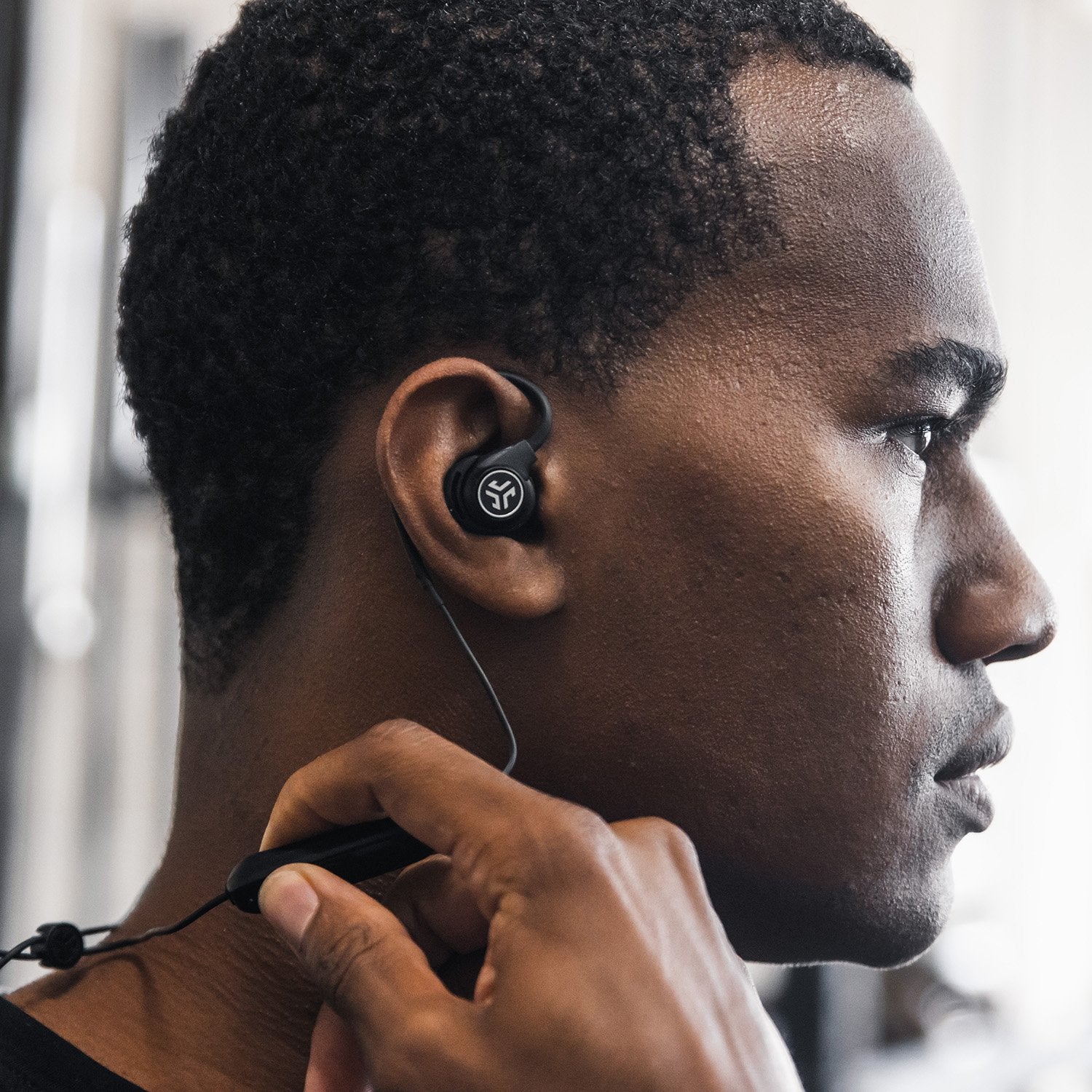
How to Use JLab Earbuds With Ear Hooks or Fins
Some JLab models include ear hooks, gel tips, or stabilizing fins. These parts help spread pressure around the outer ear. They are useful when standard earbuds move during exercise.
To wear this type of JLab earbud:
- Match the left and right earbud to your ears.
- Place the ear tip into the ear canal opening.
- Guide the hook over the top or back of your ear.
- Fit the fin into the natural fold of your outer ear.
- Adjust the earbud until the hook feels secure but relaxed.
The hook should support the earbud, not pull on your ear. If it feels tight, switch to a different size or reposition the hook.
Do not twist the ear hook sharply. Some hooks are flexible, but repeated bending can damage the material. Follow the model’s care instructions if the hook is removable.
This design can feel strange at first. Give yourself a few minutes to adjust. Once it fits well, the earbud should feel balanced rather than tightly clamped.

How to Put JLab Earbuds in Without Causing Ear Pain
Ear pain usually comes from pressure, poor sizing, a deep insertion, or wearing the earbuds too long. Pain is not a normal sign of a secure fit. Remove the earbuds if you feel sharp pain, ringing, or lasting discomfort.
Use these comfort tips:
• Try smaller ear tips if your ears feel stretched.
• Try larger tips if the earbuds press against the hard ear canal.
• Insert the tips only as far as needed to create a seal.
• Take short breaks during long listening sessions.
• Clean the ear tips often to reduce friction and buildup.
• Stop using the earbuds if pain continues.
Experts commonly advise keeping personal listening levels moderate. A practical rule is the 60/60 approach: listen at about 60 percent volume for up to 60 minutes, then take a break. This is a general habit, not a guarantee of safety, because safe volume depends on the recording, environment, and listening time.
When learning how to wear JLab earbuds, comfort should always come before maximum noise blocking. If you need to raise the volume because outside sound leaks in, fix the fit first.

How to Wear JLab Earbuds With Glasses, Hats, or Hair
Glasses, hats, and thick hair can affect the fit of some JLab earbuds. This is more common with models that have ear hooks or larger outer housings.
If you wear glasses, place the glasses arms first. Then fit the earbuds around them. With ear-hook models, make sure the hook does not press against the glasses arm.
A hat can push the earbuds inward. Choose a looser hat or adjust the earbuds after putting the hat on. For long hair, move the hair away from the ear before fitting the earbuds.
I once noticed that an earbud was slipping during a walk because a hat brim was pressing against its outer shell. The earbud itself was fine. Changing the hat position solved the problem. This is a useful reminder that fit depends on everything around the ear, not just the earbud.

Common Mistakes When Wearing JLab Earbuds
Many fit problems come from a few simple mistakes. Avoiding them can make your earbuds more comfortable right away.
• Using the same tip size in both ears without testing the fit.
• Pushing the earbuds too far into the ear canal.
• Wearing the left earbud in the right ear.
• Ignoring movement during walking or exercise.
• Cleaning the earbuds with too much water.
• Turning up the volume to cover outside noise.
• Sleeping with bulky earbuds in your ears.
• Wearing earbuds through ear pain or ringing.
Another mistake is testing the fit only while sitting still. Earbuds can feel secure at a desk but loosen when you walk. Always check the fit during the activity you plan to do.
Avoid using sharp objects to clean the speaker mesh. A soft, dry brush or clean cloth is safer. Moisture and earwax can block sound and make one earbud seem quieter than the other.
How to Clean and Maintain JLab Earbuds
Clean earbuds can sound better and feel more comfortable. Earwax, skin oil, and dust can collect on the ear tips and speaker mesh.
Use this routine:
- Remove the silicone ear tips.
- Wash the tips with mild soap and water if the model instructions allow it.
- Dry the tips completely.
- Wipe the earbuds with a soft, slightly damp cloth.
- Use a dry cotton swab around the outer edges.
- Check that no moisture enters the charging contacts.
- Reattach the tips only when everything is fully dry.
Do not soak the earbuds or place them under running water unless the manufacturer clearly allows it. Avoid alcohol, bleach, and strong cleaners because they may damage the surface or silicone.
Clean the charging case as well. Dust on the charging contacts can prevent the earbuds from charging. Store the earbuds in the case when you are not using them.
Good care supports a better answer to how to wear JLab earbuds because clean tips maintain grip and help preserve the seal.
Troubleshooting JLab Earbud Fit Problems
If one earbud keeps falling out, compare the tip sizes on both sides. Your ears may not be the same shape. You can also try a small twist after insertion.
If one side sounds quieter, check the following:
• Remove and clean the ear tip.
• Inspect the speaker mesh for wax or dust.
• Confirm that the earbud is in the correct ear.
• Try a different ear tip size.
• Check the audio balance in your phone settings.
• Charge both earbuds fully.
If the earbuds hurt after a few minutes, remove them and try a smaller tip. You may also need a model with a different shape. Ear anatomy varies, so no single JLab design fits every listener.
If sound remains uneven after cleaning and checking settings, the earbud may have a hardware problem. Contact JLab support or check the warranty rather than trying to open the earbud.
How to Use JLab Earbuds Safely
Earbuds can reduce awareness of traffic, cyclists, alarms, and people nearby. Use awareness or transparency modes when available. Keep the volume low when walking near roads or working around equipment.
Avoid using noise-isolating earbuds in situations where you must hear warnings. Never wear both earbuds while driving. Local laws may also restrict headphone use while cycling or operating a vehicle.
Give your ears regular breaks. The World Health Organization advises reducing loud sound exposure and using safe listening habits. Ringing, muffled hearing, or pain after listening may signal that the volume or listening time is too high.
How to wear JLab earbuds safely is not only about placement. It also includes choosing the right volume, taking breaks, cleaning the earbuds, and staying aware of your surroundings.
Frequently Asked Questions About How to Wear JLab Earbuds
Should JLab earbuds go deep into your ears?
No. JLab earbuds should sit securely at the entrance of the ear canal, not deep inside it. Push them only far enough to create a comfortable seal.
Why do my JLab earbuds keep falling out?
The ear tips may be too small, or the earbuds may need a slight twist after insertion. Try another tip size and test the fit while walking or moving your head.
Which way should JLab earbuds face?
The speaker tip should point into your ear canal, while the outer body should rest naturally against your ear. Match the “L” and “R” markings to the correct ears.
Can I wear JLab earbuds while working out?
Many JLab models are designed for active use, but water and sweat resistance vary by model. Check the product rating, keep the charging case dry, and clean the earbuds after exercise.
Why do my JLab earbuds hurt my ears?
Pain can result from large ear tips, deep insertion, pressure, or long listening sessions. Try smaller tips, adjust the angle, and take breaks; stop using them if discomfort continues.
How tight should JLab earbuds feel?
They should feel stable but not painful. A proper fit blocks some outside noise and stays in place without creating strong pressure.
Conclusion
The best way to wear JLab earbuds is to choose the right tip, aim the speaker into the ear canal, and twist the earbud gently into place. Test the fit while moving, keep the earbuds clean, and use a safe volume.
Your ears may need different tip sizes, so take a few minutes to test each side. Start with these steps today, then explore your JLab model’s fit options and share your experience in the comments.
