

Charge Bose headphones with the correct USB cable, connect to power, and wait until the status light shows a full battery.
Learning how to charge Bose headphones is simple, but the exact steps can differ between QuietComfort, Noise Cancelling Headphones, Sport Earbuds, and other models. This guide explains the right cable, charging time, indicator lights, common problems, battery care tips, and safe charging habits so you can get back to listening without guesswork.
How to charge Bose headphones
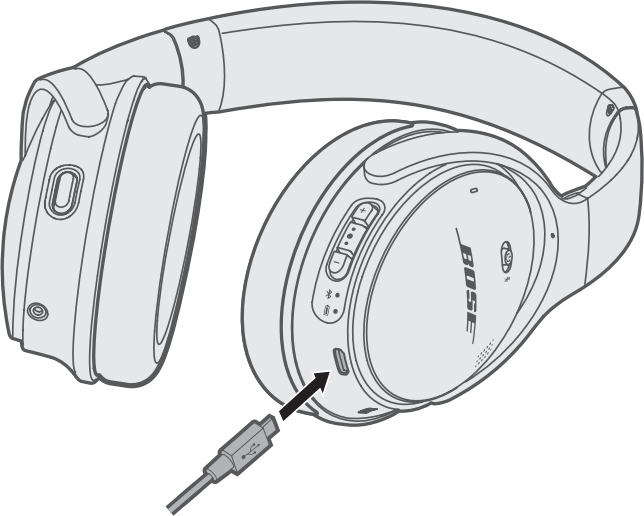
Most Bose wireless headphones charge through a USB cable. Newer models often use USB-C, while older headphones may use Micro-USB. The charging port is usually on the side or bottom of the headphones.
Follow these steps:
- Turn off your Bose headphones, if possible.
- Find the charging port on the headphones.
- Insert the correct USB cable.
- Connect the other end to a wall adapter, computer, power bank, or USB charging hub.
- Check the status light.
- Leave the headphones connected until the battery is full.
When learning how to charge Bose headphones, use the cable supplied with the product when available. A good-quality replacement cable also works, but the plug must match the port and fit firmly.
Most Bose headphones can charge while powered off. Some models may also play audio while charging, but this feature is not available on every model. For the safest and fastest charge, turn the headphones off during the process.
Identifying the correct Bose charging cable
The correct cable depends on your Bose model. USB-C is common on newer products because it is reversible and supports faster power delivery. Older models may use Micro-USB, which has a smaller tapered plug that only inserts one way.
Common cable types include:
• USB-C to USB-A for older wall chargers, laptops, and desktop computers
• USB-C to USB-C for newer wall adapters and modern laptops
• Micro-USB to USB-A for some older Bose headphones and speakers
• A dedicated charging cable or charging base for certain Bose products
Do not force a connector into the port. If the plug feels loose, will not slide in, or needs pressure, stop and check the cable. A damaged port can prevent charging and may require professional service.
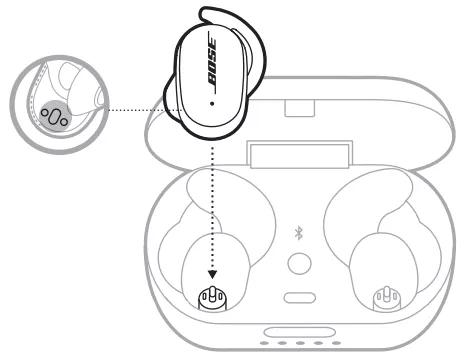
Bose earbuds work differently from Bose over-ear headphones. With earbuds, you place each earbud inside its charging case, then charge the case itself through its USB port. Some cases also support wireless charging, but only when the case and charging pad are designed for that feature.

How to check the Bose battery and charging status
Bose headphones usually show charging progress through a small LED. The exact light pattern depends on the product, so your model’s user guide is the best reference.
Common light meanings include:
• A blinking white light often means the headphones are charging or connecting
• A solid white light may indicate a full charge or normal power status
• An amber or orange light can indicate a low battery or charging state
• A red light may signal a very low battery, an error, or a temperature issue
You can also check the battery level through the Bose app. Open the Bose app, connect your headphones, and look for the battery percentage on the main device screen. Some phones also show the battery level in the Bluetooth settings.
The battery announcement feature is useful when you are away from your phone. Turn on the voice prompts in the Bose app, then press the appropriate control to hear an estimated battery level. The wording and control vary by model.
If the light does not turn on, do not assume the headphones are broken. The battery may be fully drained, the cable may be faulty, or the charging port may contain dust. Test a different cable and power source before trying more advanced steps.
How long does it take to charge Bose headphones?
A full charge often takes about two to three hours, but the time varies by model, battery level, charger, temperature, and cable. A quick charge feature on some Bose headphones can provide extra listening time after a short charging period.
For accurate results, check the product guide or the Bose app. Charging from a wall adapter is often more consistent than charging from a weak laptop port. However, a standard USB power source is usually enough for headphones because they require much less power than a tablet or laptop.
Charging speed may slow near the end of the cycle. This is normal. Lithium-ion batteries often use a faster current when they are low, then reduce the current as they approach full capacity.
In my experience helping people troubleshoot wireless audio devices, the most common mistake is removing the headphones after only a few minutes and expecting a full battery. Give the headphones enough time to charge, especially after they have been unused for several weeks.

How to charge Bose headphones with a wall charger
A wall charger is usually the easiest option at home. Plug the USB cable into the headphones, connect it to a compatible adapter, and place the headphones on a stable surface.
A modern USB wall adapter is generally suitable when it provides a standard USB output. You do not need a special Bose-branded wall charger for most models. Avoid very cheap adapters with damaged plugs, exposed wires, or unclear safety markings.
Use these tips for safer charging:
• Keep the headphones and adapter dry
• Charge them in a cool, ventilated area
• Do not cover the headphones with clothing or bedding
• Avoid charging next to a heater or in direct hot sunlight
• Unplug the cable if the headphones become unusually hot or smell unusual
• Use a different cable if the connector is bent or frayed
A warm device can be normal during charging, but excessive heat is not. If the headphones become hot to the touch, disconnect them and allow them to cool before trying again.
How to charge Bose headphones from a laptop or power bank
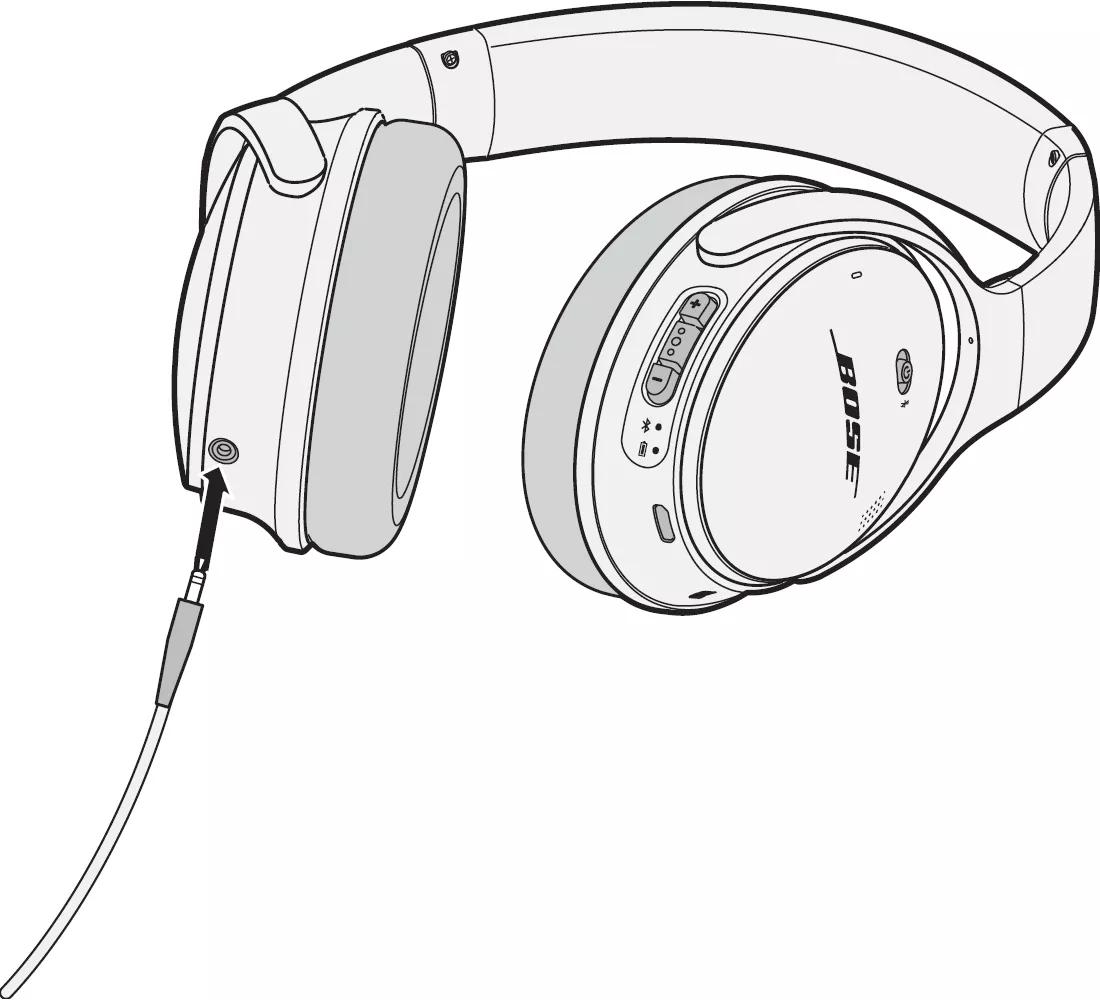
You can usually charge Bose headphones from a laptop, desktop computer, or power bank. Connect the USB cable to an active USB port, then connect the other end to the headphones.
Laptop charging may be slower than wall charging. Some computers reduce power to USB ports when they enter sleep mode, so the headphones may stop charging when the computer sleeps. Keep the computer awake if you need a continuous charge.
A power bank is useful while traveling. Check its battery level before connecting your headphones. If the power bank turns off because the headphones draw very little power, use a different output or charge the headphones from a wall adapter instead.
When learning how to charge Bose headphones on a flight, train, or bus, keep the cable and headphones secure. A bent cable can damage the charging port, and loose cables can be pulled from the seat or armrest.

How to charge Bose earbuds and their case
Bose wireless earbuds charge inside their charging case. Put the left earbud in the left slot and the right earbud in the right slot. Make sure each earbud makes contact with the metal charging pins.
Then connect the correct USB cable to the charging port on the case. If your model supports wireless charging, place the case on a compatible charging pad with the indicator facing up.
If the earbuds do not charge, check these points:
• Remove dust or debris from the charging contacts
• Make sure the earbud tips are not blocking the contacts
• Confirm that the case has battery power
• Check that each earbud is seated correctly
• Clean the contacts gently with a dry, soft cloth
Do not use water, metal tools, or sharp objects inside the case. Moisture and scratches can damage the charging contacts.

What to do if Bose headphones are not charging
If your Bose headphones will not charge, start with simple checks. Connect them to a different power source and use another compatible cable. Leave them connected for at least 15 minutes if the battery was completely empty.
Try this troubleshooting sequence:
- Inspect the charging port for lint or dirt.
- Test a different USB cable.
- Test a different wall adapter or USB port.
- Confirm that the cable is fully inserted.
- Restart the headphones.
- Check for a firmware update in the Bose app.
- Reset the headphones according to the model guide.
A very low battery can cause a delay before the charging light appears. This does not always mean the battery has failed.
If the headphones charge only when the cable is held at an angle, the port or cable may be damaged. Stop bending the cable because this can make the problem worse. Contact Bose support or an authorized repair provider for advice.
Water can also cause charging problems. If the headphones were exposed to rain, sweat, or a spill, let them dry fully before connecting a charger. Never charge a wet device.
How to protect Bose headphone battery life
Bose headphones use rechargeable lithium-ion batteries. These batteries work best when you avoid extreme heat, deep discharge, and long periods without use.
Good battery habits include:
• Charge the headphones before the battery reaches zero when practical
• Store them in a cool, dry place
• Avoid leaving them in a hot car
• Use the correct cable and a reliable power source
• Charge the earbuds case regularly
• Install official firmware updates when available
You do not need to drain the battery completely before charging. Modern rechargeable batteries do not require this older “memory effect” routine.
Long-term battery capacity naturally decreases with age and use. If your headphones run for much less time than they did when new, the battery may be worn. Software settings, high volume, noise cancellation, and Bluetooth use can also affect listening time.
One practical lesson is to charge before travel rather than at the last minute. I have seen many people discover a flat headset at an airport gate because they assumed it still had power from the previous week. A short charging routine after use can prevent that problem.

Charging mistakes to avoid
Incorrect charging habits can lead to slow charging, connection problems, or unnecessary battery wear. Most mistakes are easy to prevent.
Avoid these common errors:
• Using a cable that does not match the charging port
• Forcing a USB plug into the port
• Charging near water or high heat
• Covering the headphones while they charge
• Using a visibly damaged cable
• Cleaning the port with a metal object
• Assuming every Bose case supports wireless charging
• Ignoring unusual heat, odor, or swelling
Do not attempt to open the headphones or replace the internal battery unless you have proper technical training. The battery is built into a small enclosure, and incorrect repairs can create a safety risk.
If the battery appears swollen, stop using the headphones and keep them away from heat. Contact the manufacturer or an approved service center for safe handling.
Using the Bose app while charging
The Bose app can help you check battery status, manage settings, and install firmware updates. It may also show model-specific information about charging and battery performance.
To use it:
- Install the Bose app on your phone.
- Turn on Bluetooth.
- Open the app and select your headphones.
- Check the battery indicator.
- Review any update or support messages.
An app update cannot repair a physically damaged charging port, but it may resolve connection or battery reporting issues. If the battery percentage seems stuck, restart both the headphones and your phone before checking again.
Keep in mind that reported battery levels are estimates. The percentage may change in larger steps rather than dropping one percent at a time.
Frequently Asked Questions About How to Charge Bose Headphones
Can I charge Bose headphones with a phone charger?
Yes, most Bose headphones can charge with a compatible USB phone charger. Use the correct cable and a safe, undamaged adapter that matches the headphone port.
Can I use Bose headphones while they are charging?
Some Bose models may work while connected to a charger, but others disable Bluetooth audio during charging. For the most reliable charge, turn the headphones off while they are connected.
How do I know when my Bose headphones are fully charged?
The status light may become solid or change color when charging is complete, depending on the model. You can also check the battery level in the Bose app or through your phone’s Bluetooth settings.
Why are my Bose headphones not charging?
Try a different cable, USB port, and wall adapter, then inspect the charging port for dust. If the headphones still do not respond after charging for 15 to 30 minutes, follow the model reset steps or contact Bose support.
Can I leave Bose headphones charging overnight?
A modern Bose device is designed to manage normal charging, but it is still better to charge it on a clear, cool surface. Unplug it if you notice heat, a strange smell, or visible damage.
Do Bose headphones need to be fully drained before charging?
No, you do not need to drain the battery completely. Charging the headphones before the battery reaches zero is often more convenient and helps prevent unexpected shutdowns.
Conclusion
Knowing how to charge Bose headphones comes down to using the right cable, connecting to a reliable power source, checking the status light, and giving the battery enough time to charge. Keep the port clean and dry, avoid extreme heat, and use the Bose app to check battery information when needed.
Make charging part of your normal routine, especially before work, travel, or a long listening session. If your headphones still will not charge after testing another cable and power source, use the model guide or contact Bose support. Share your experience or explore more headphone care guides to keep your audio gear working at its best.
