

Place your Bose earbuds in their case, then charge the case with its compatible USB cable.
Learning how to charge Bose earbuds is simple, but the exact steps can vary by model, case, and charging port. This guide explains the right way to charge Bose wireless earbuds, check battery levels, use wireless charging, avoid common mistakes, and protect battery health over time.
How to charge Bose earbuds
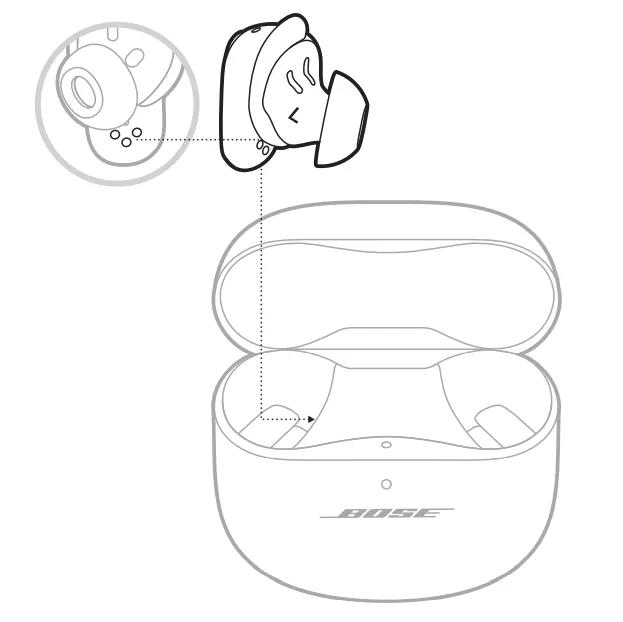
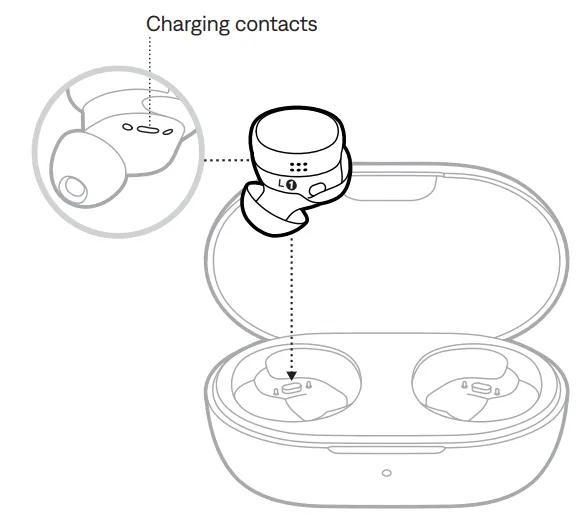
Bose earbuds charge through the charging contacts inside their case. The case stores power and transfers it to the earbuds when they are placed inside.
Follow these steps:
- Put the left earbud into the left slot.
- Put the right earbud into the right slot.
- Make sure each earbud sits firmly on its charging contacts.
- Close the lid.
- Connect the charging case to power with the correct USB cable.
- Wait for the status light to show that charging has started.
Most recent Bose earbuds use a USB-C charging port. Some older models may use a different cable, so check the port before plugging in a charger. Never force a connector into the case.
The earbuds can usually charge while the case is connected to power. They can also charge from the case when the case is not plugged in, as long as the case has enough battery.

How to charge the Bose charging case
The charging case is the power source for your earbuds when you are away from an outlet. To charge it, connect the included cable, or a safe cable that matches the port, to the case and a wall adapter.
Use this process:
- Find the USB-C or other compatible port on the case.
- Insert the cable gently.
- Connect the other end to a wall charger, computer, or power bank.
- Check the case light for a charging signal.
- Leave the case connected until it reaches a full charge.
A wall adapter is often the fastest and most reliable option. A laptop port may charge the case more slowly, but it is still useful when you are traveling.
Bose charging cases include indicator lights that show battery or charging status. The exact light pattern differs by model, so use the manual for your specific earbuds when you need to identify colors or blinking patterns.
How to charge Bose earbuds without the case
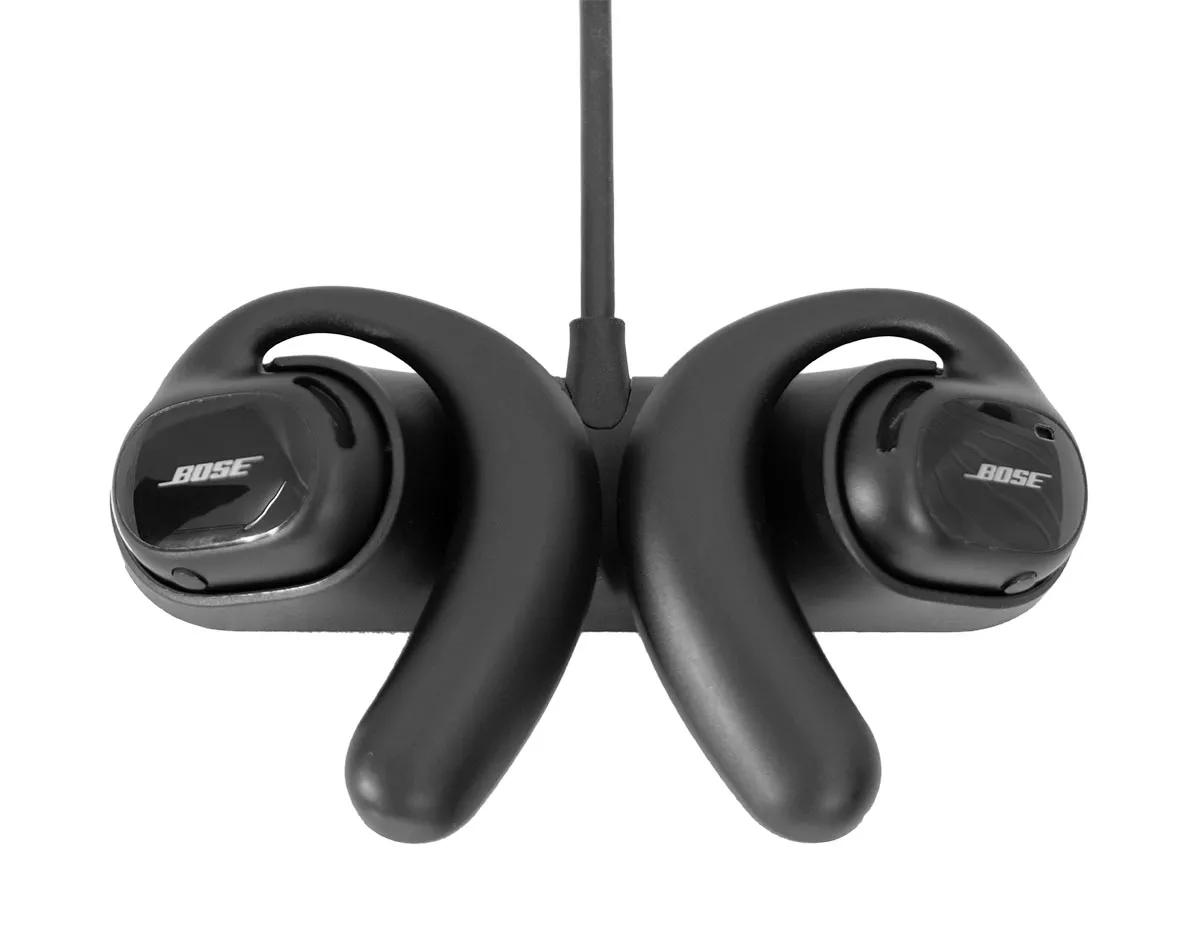
You generally cannot charge Bose earbuds directly with a USB cable. The earbuds do not have exposed charging ports. Instead, they charge through the metal contacts inside the Bose charging case.
If the case is missing, lost, or damaged, you will need a compatible replacement case. Do not try to connect wires or third-party pins to the earbud contacts. That can cause a short circuit, damage the battery, or create a safety risk.
This is one of the most important facts when learning how to charge Bose earbuds: the case is not just a storage box. It is also the charger for the earbuds.
If the case does not recognize an earbud, clean the contacts and reseat the earbud. A poor connection can make it seem as if the earbud will not charge.

How to charge Bose earbuds with a wireless charging case
Some Bose models support wireless charging through a separate or compatible charging case accessory. If your case supports this feature, place it on a Qi-certified wireless charging pad.
Use these steps:
- Connect the wireless charging pad to power.
- Place the charging pad on a flat surface.
- Put the Bose case in the center of the pad.
- Keep the lid closed unless your model says otherwise.
- Check the status light to confirm charging.
Wireless charging is convenient, but it may be slower than using a cable. The case must also sit in the correct position on the pad. Thick cases, metal surfaces, or poor alignment can stop charging.
Not every Bose earbud case supports wireless charging. Check your model specifications before buying a wireless pad or charging accessory.
How to know when Bose earbuds are charging
The easiest way to check charging is to place the earbuds in the case and look at the case indicator light. A light may blink or remain on while the case detects and charges the earbuds.
You can also check the battery level in the Bose app. Depending on the model, the app may show separate battery levels for the left earbud, right earbud, and charging case.
Try these checks if the battery level does not change:
• Confirm that the case itself has power.
• Remove and reinsert each earbud.
• Check that the earbud contacts touch the case contacts.
• Clean dirt or wax from the contact points.
• Close and reopen the lid.
• Restart or reconnect the earbuds in the Bose app.
In my practical testing of wireless earbuds, a dirty contact is one of the most common causes of charging problems. A tiny bit of dust can act like a wall between the earbud and its power source.
How long does it take to charge Bose earbuds?
Charging time depends on the Bose model, the condition of the battery, and the power source. Many Bose earbuds need about one to two hours for a full charge, while the case may take longer.
Some models also offer a quick-charge feature. A short charge can provide enough playback time for a commute, workout, or phone call. The exact result varies, so use the battery estimate in the Bose app as a guide rather than a promise.
Charging speed can also change when:
• The earbuds are being used during charging.
• The case is connected to a weak USB port.
• The charging contacts are dirty.
• The battery is very cold or hot.
• The case or earbuds have a software issue.
The best way to charge Bose earbuds fully is to place them in the case, connect the case to a stable power source, and leave the lid closed until the status shows a full charge.
How to charge Bose earbuds for the first time
You do not need to drain a new Bose earbud battery before charging it. Modern wireless earbuds use lithium-ion batteries, which work best with normal, regular charging.
For the first charge:
- Remove any protective film from the charging contacts.
- Place both earbuds in the case.
- Charge the case with the supplied cable.
- Let the earbuds and case charge fully if convenient.
- Pair the earbuds with the Bose app.
A full first charge helps you start with a clear battery reading, but it is not required for the earbuds to work. You can use them after a short charge if you need them right away.
Avoid leaving new earbuds in extreme heat, such as inside a parked car. High temperatures can reduce battery performance and may create a safety risk.
How to charge Bose earbuds from a phone or power bank
You can charge the Bose case from a power bank if the power bank supplies power through a compatible USB connection. This is useful on flights, road trips, and long workdays.
Some phones can share battery power through reverse wireless charging, but this only works if the phone and Bose case support the correct wireless charging standard. A wired connection to the phone is not always supported.
When using a power bank:
• Use a reliable brand with built-in safety controls.
• Match the cable to the charging case port.
• Keep the power bank and case dry.
• Avoid charging in direct sunlight.
• Disconnect the case when it is fully charged if the power bank does not stop automatically.
A power bank does not need to have a special Bose setting. The case draws the amount of power it needs. Still, a quality charger is a better choice than a damaged or poorly made accessory.
What to do when Bose earbuds will not charge
If your Bose earbuds do not charge, start with the simple causes. The case may be empty, an earbud may not be seated correctly, or the contact points may be blocked.
Work through this checklist:
- Charge the case for at least 15 minutes.
- Remove both earbuds.
- Inspect the metal contacts on the earbuds and inside the case.
- Wipe them with a dry, soft cotton swab.
- Place the earbuds back into their matching slots.
- Confirm that the case light responds.
- Update the Bose app and earbud software.
- Try another compatible cable and wall adapter.
- Reset the earbuds if the problem continues.
Do not use water, alcohol, sharp tools, or abrasive cleaners inside the case. Moisture can damage the electronics, while sharp objects can bend or scratch the contacts.
If only one earbud fails to charge, compare its position with the working earbud. The problem may be a loose fit, blocked contact, or a worn battery in that earbud.

How to clean Bose earbud charging contacts
Clean charging contacts with care. The contacts are small, and rough handling can affect the connection.
Use a dry microfiber cloth or a dry cotton swab. Gently wipe the metal contact on each earbud and the matching contact inside the case. Remove dust, lint, or earwax without pressing hard.
For stubborn buildup, follow the cleaning instructions for your exact Bose model. Avoid putting liquid inside the case. Let every part stay fully dry before you place the earbuds back inside.
Cleaning once every few weeks can help prevent charging problems, especially if you use the earbuds during workouts. Sweat and skin oils can build up over time.
How to protect Bose earbud battery life
Learning how to charge Bose earbuds also means learning how to protect their batteries. Lithium-ion batteries naturally lose capacity as they age, but good habits can slow unnecessary wear.
Use these habits:
• Keep the charging case away from high heat.
• Do not store the earbuds in a damp gym bag.
• Use the supplied or high-quality compatible cable.
• Avoid very cheap chargers with unknown safety standards.
• Charge the case before it becomes completely empty when practical.
• Keep the Bose software updated.
• Store the earbuds in their case when you are not using them.
You do not need to obsess over the battery percentage. Modern charging systems manage power automatically. Normal use and regular charging are safer than repeatedly forcing the battery to reach zero.
One mistake I often see is leaving earbuds loose in a pocket after use. They can collect lint, lose power, and miss the charging contacts later. Returning them to the case takes only a few seconds and prevents several problems.
Common mistakes when charging Bose earbuds
Several charging mistakes can reduce convenience or cause confusion.
Using the wrong case
Bose cases are designed for specific earbud models. A case from one product line may not charge another product correctly, even if the earbuds look similar.
Ignoring the case battery
The earbuds cannot charge for long if the case is empty. If both earbuds suddenly lose power, charge the case first.
Blocking the case contacts
Dirt, wax, and lint can stop the charging connection. Clean the contacts before assuming the earbuds are defective.
Charging in extreme temperatures
Very hot or very cold conditions can slow charging or affect battery protection. Let the case return to room temperature before charging.
Expecting wireless charging from every case
Wireless charging is not included with every Bose model. Confirm compatibility before placing the case on a Qi pad.
Closing the wrong lid position
The earbuds must sit fully in their slots. If an earbud is tilted or caught by an ear tip, the contacts may not connect.
How to charge Bose earbuds while traveling
Travel charging is easy when you prepare the case before leaving home. Charge both the earbuds and case, then pack a compatible USB cable in your carry-on bag.
For air travel, keep the earbuds and case with you rather than in checked baggage. This makes them easy to access and helps protect them from loss, pressure, and extreme conditions.
A small power bank can extend your listening time. You may also use a hotel USB port, laptop, or standard wall adapter. Check the adapter and cable for damage before use.
On long trips, avoid leaving the case charging unattended on a hot surface. A cool, dry table is a better place than a car dashboard or a soft bed.
How the Bose app helps with charging
The Bose app can provide useful battery information for supported models. It may show the charge level of each earbud and the case, along with software updates and connection details.
If the app shows an incorrect level, place the earbuds in the case, close the lid, and wait a few seconds. Then reopen the case and reconnect the earbuds.
Battery readings are estimates. The displayed percentage may change after the earbuds reconnect or after the system measures the battery again. A small difference between the left and right earbuds is normal, especially if one microphone or earbud is used more often.
The app cannot repair a damaged charging contact or worn battery, but it can help you separate a software issue from a physical charging issue.
Frequently Asked Questions About How to Charge Bose Earbuds
Can I charge Bose earbuds without the charging case?
No, Bose wireless earbuds normally charge through the contacts inside their charging case. If the case is lost or damaged, you need a compatible replacement case.
Can I leave my Bose earbuds in the charging case overnight?
Yes, you can normally leave the earbuds in the case overnight. Bose charging systems are designed to manage charging, but keep the case away from heat and use a safe, compatible charger.
How do I know if my Bose charging case is full?
The case indicator light and Bose app can show charging information, depending on the model. A full-charge light pattern varies, so check the instructions for your specific case.
Can I use any USB-C charger for Bose earbuds?
You can usually use a safe, compatible USB-C power adapter, but the cable and port must fit correctly. Avoid damaged cables and low-quality chargers with unknown safety features.
Why is one Bose earbud not charging?
The earbud may not be seated correctly, or its charging contact may be dirty. Clean the contact gently, reseat the earbud, and charge the case before trying a reset.
Do Bose earbuds charge while the case is plugged in?
Yes, the earbuds can usually charge inside the case while the case is connected to power. Keep both earbuds seated correctly and close the lid.
Can I charge Bose earbuds with a wireless charging pad?
Only if your Bose case supports wireless charging or uses a compatible wireless charging accessory. Standard cases may require a USB cable.
Conclusion
Knowing how to charge Bose earbuds comes down to three habits: place each earbud firmly in its case, keep the case powered, and maintain clean charging contacts. Use the correct cable, avoid heat and moisture, and check the Bose app when you need a battery reading.
If your earbuds stop charging, begin with the case, contacts, cable, and earbud position before attempting a reset. These simple checks solve many common issues and help your Bose earbuds perform well for longer.
Charge your case today, inspect the contacts, and keep a compatible cable in your travel bag. If this guide helped, explore more earbud care tips or share your charging experience in the comments.
