

Place the earbuds in their case, connect the case to power, and wait for the charging light.
Learning how to charge wireless earbuds is simple once you understand the role of the charging case, contact pins, battery indicators, and power source. I have tested many earbud styles, and most charging problems come from dirty contacts, a loose cable, or a case that was never charged. This guide explains how to charge wireless earbuds safely, quickly, and in a way that helps protect battery life.

How wireless earbuds charge
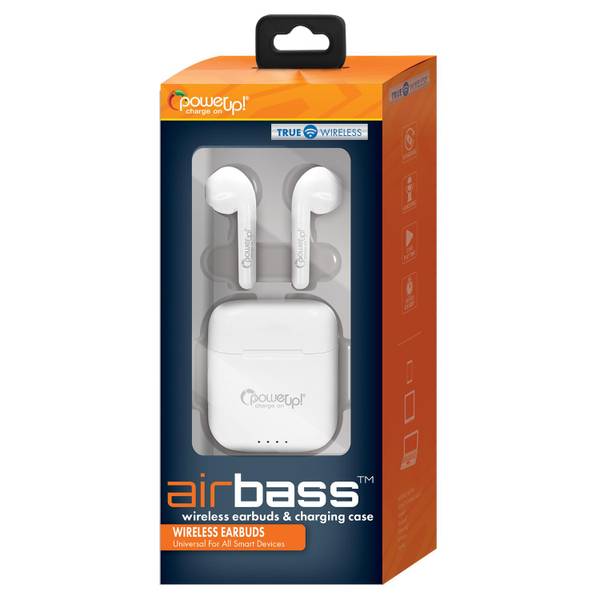
Most wireless earbuds charge through a small charging case. The case stores power in its own battery, then transfers that power to the earbuds through metal contact points when you place them inside.
The case usually charges through a USB-C or Lightning cable. Some models also support wireless charging through a Qi pad or a magnetic charging puck. Always check the product manual because charging ports and wireless charging support vary by model.
Think of the case as a portable battery station. It charges the earbuds several times before the case itself needs more power.

How to charge wireless earbuds step by step
Follow these steps for a reliable charge:
- Put both earbuds into the correct slots in the charging case.
- Press each earbud down gently so the charging contacts touch.
- Close the lid, unless the manufacturer says to leave it open.
- Connect the case to a power adapter with the correct cable.
- Plug the adapter into a wall outlet, computer, or approved charging hub.
- Check the status light or phone app to confirm charging.
- Leave the earbuds in the case until the battery reaches the desired level.
Many earbuds begin charging as soon as they touch the case contacts. Some models need the case lid open before the indicator light appears.
If one earbud does not charge, remove both earbuds and inspect the slots. A small amount of dust, skin oil, or pocket lint can block the metal contacts. Clean them with a dry cotton swab, then try again.

How to charge the earbud case
Charging the case is just as important as charging the earbuds. Without power in the case, the earbuds cannot recharge when you are away from an outlet.
Charging with a cable
Most modern cases use USB-C. Older products may use a Lightning cable or a special micro-USB cable.
Connect the cable firmly to the case. Then connect the other end to a safe power source. A standard phone charger is often suitable, but use the cable and adapter approved by the manufacturer when possible.
A laptop USB port can charge the case, but it may charge more slowly. Avoid loose, damaged, or unusually hot chargers.
Charging with a wireless pad
If your case supports Qi wireless charging, place it in the center of the charging pad. The status light may face upward, downward, or toward the front, depending on the design.
Remove thick metal accessories or magnetic objects from between the case and pad. If the light does not appear, move the case slightly until the charging coil lines up with the pad.
Some premium cases work with magnetic charging systems. Even then, use only accessories that the manufacturer confirms are compatible.

How to charge wireless earbuds without damaging the battery
Wireless earbuds use small lithium-ion or lithium-polymer batteries. These batteries do not need to be fully empty before charging. In fact, frequent deep discharges can place more stress on a small battery over time.
For better battery care:
• Charge the earbuds when they reach about 20% to 30% if convenient.
• Avoid leaving the case in direct sunlight or inside a hot car.
• Keep the charging port dry and free from debris.
• Use a quality cable with no exposed wires.
• Do not force a connector into the charging port.
• Remove the case from a hot surface if it becomes unusually warm.
Modern charging systems stop or reduce power when the battery is full. Still, heat remains a concern. Battery research and manufacturer guidance consistently identify high temperature as a major factor in faster battery aging.
You do not need to worry about charging overnight on every modern model, but avoid making it a habit in a hot place. A cool, hard surface is safer than a bed, sofa, or car dashboard.

How long does it take to charge wireless earbuds?
The charging time depends on the earbud model, battery level, case design, and charger.
Many earbuds need about 30 minutes to 2 hours for a full charge. The case may take 1 to 3 hours, especially when using a slow USB port or wireless pad.
Some models support fast charging. For example, a short charge may provide enough power for an hour of listening. The exact result depends on volume, noise cancellation, phone calls, and other features.
Do not judge charging speed only by the light. Use the companion app when available. It usually shows separate battery levels for the left earbud, right earbud, and case.

Understanding earbud charging lights
Charging lights differ between brands, but common signals include:
• Red, amber, or orange: The earbuds or case are charging.
• Green or white: The battery is full or nearly full.
• Flashing light: The case may be pairing, resetting, or reporting an error.
• No light: The case may be empty, closed, disconnected, or not making contact.
The manual provides the final answer because colors are not universal. For example, one brand may use white for charging while another uses white for a full battery.
If your case has no visible light, open the lid near your phone. Many newer models show the charge status on the phone screen instead of using a bright external light.
How to charge wireless earbuds with a phone
Some phones can share power wirelessly through reverse wireless charging. This feature may be called Wireless PowerShare, Battery Share, or reverse charging.
To use it:
- Turn on reverse wireless charging on the phone.
- Place the earbud case on the phone’s charging area.
- Align the case with the phone’s wireless charging coil.
- Watch for a charging light or battery notification.
This method is useful during travel, but it is usually slower than a wall charger. It also drains the phone battery, so it works best as an emergency option.
The earbud case must support compatible wireless charging. A standard plastic case is not enough if the charging hardware is missing.
What to do when one wireless earbud is not charging
One earbud may stop charging even when the other works normally. This issue is often caused by poor contact rather than a dead battery.
Try these steps:
- Remove both earbuds from the case.
- Check the metal contacts on the earbuds and inside the case.
- Wipe the contacts with a dry, soft cloth or cotton swab.
- Check that the ear tip is not blocking the earbud’s position.
- Place the earbud back into the slot.
- Confirm that its charging light or app indicator responds.
- Reset the earbuds if the problem continues.
Do not scrape the contacts with a pin or use water inside the case. Sharp tools can damage the charging terminals, while moisture can cause corrosion.
A lesson I have seen repeatedly is that a tiny piece of lint can create a large problem. Cleaning the contacts solved more “dead earbud” issues than replacing the battery in many cases.
What to do when the charging case will not charge
If the case shows no charging signal, work through the simplest causes first:
• Try another compatible cable.
• Test a different wall adapter.
• Check the outlet with another device.
• Inspect the charging port for lint.
• Restart or reset the case if the manual allows it.
• Leave the case connected for at least 15 minutes if the battery is completely empty.
Do not use metal objects to clean a USB-C or Lightning port. A wooden toothpick can sometimes remove loose lint, but compressed air should be used carefully because strong air can push debris deeper into the case.
If the case becomes very hot, smells unusual, swells, or shows physical damage, unplug it. Stop using it and contact the manufacturer or a qualified service provider.
How to clean wireless earbud charging contacts
Clean contacts help the earbuds charge evenly. They also reduce the chance of intermittent charging.
Use a dry microfiber cloth or cotton swab. For stubborn oil, lightly dampen the cloth with a small amount of isopropyl alcohol, but never pour liquid into the case. Let every surface dry fully before charging.
Clean the contacts every few weeks if you use the earbuds daily. People who exercise with earbuds may need to clean them more often because sweat and skin oil can build up around the charging points.
Keep the case itself clean as well. Earwax and pocket dust can collect in the wells and prevent an earbud from sitting low enough to charge.
Common mistakes when charging wireless earbuds
Even good earbuds can develop charging problems when used in poor conditions. Avoid these common mistakes:
• Using a damaged or very cheap cable.
• Charging the case on a soft, hot surface.
• Storing wet earbuds inside the case.
• Ignoring a loose charging connection.
• Carrying the case in a pocket with coins or metal debris.
• Assuming both earbuds are charging without checking the indicators.
• Using an incompatible wireless charging pad.
• Leaving the earbuds exposed to extreme heat or freezing temperatures.
Sweat-resistant does not mean waterproof. If your earbuds get wet, dry them before placing them in the case. The case often has less water resistance than the earbuds themselves.
How to make wireless earbud batteries last longer
Battery capacity slowly decreases with age. No charging method can stop that process, but good habits can reduce unnecessary stress.
Use these practical habits:
• Keep the volume at a comfortable level.
• Turn off noise cancellation when you do not need it.
• Update the earbuds through the official app.
• Avoid storing the case at 0% for long periods.
• Keep the case between roughly 20% and 80% when convenient.
• Store the earbuds in a cool, dry place.
• Use the original charging accessories when possible.
Charging from 20% to 80% is not a strict rule. If you need a full charge before a flight or workday, charge to 100%. Convenience matters, and modern earbuds are designed for normal daily charging.
The most useful approach is simple: avoid heat, moisture, physical damage, and repeated deep discharge.
How to charge wireless earbuds while traveling
Travel charging is easy with a small routine. Charge the case before leaving home, pack the correct cable, and check whether your destination supports the same wall plug.
A USB-C case is convenient because many phones, tablets, and laptops use the same cable. If you fly, keep the earbuds and charging case in your carry-on bag rather than checked luggage.
For long trips, consider a compact power bank with a reliable USB output. Do not leave the case charging unattended inside a hot vehicle or packed tightly under clothing.
Before travel, test the cable and verify that both earbuds charge. Discovering a dead case at the airport is a frustrating lesson that is easy to avoid.
Frequently Asked Questions About How to Charge Wireless Earbuds
Can I charge wireless earbuds without the case?
Most true wireless earbuds cannot charge by themselves because the case contains the charging contacts and power system. You need the original case or a compatible replacement case made for that exact model.
Can I charge wireless earbuds with a phone charger?
Yes, you can usually charge the case with a compatible phone charger and cable. Use the correct connector, avoid damaged accessories, and follow the earbud manufacturer’s charging guidance.
Is it safe to charge wireless earbuds overnight?
Most modern earbuds and cases stop drawing full power when the battery is charged. Overnight charging is generally safe, but keep the case on a cool, hard surface and avoid damaged cables or hot environments.
Why are my wireless earbuds not charging in the case?
Dirty contacts, poor alignment, a drained case, or a damaged cable are common causes. Clean the contacts, recharge the case, and confirm that each earbud sits firmly in its slot.
Can I use a wireless charging pad for any earbud case?
No. The case must support Qi or another compatible wireless charging system. If it does not, use its USB-C, Lightning, or approved charging port instead.
Should I let wireless earbuds die before charging them?
No. Lithium batteries do not need to reach 0% before charging. Charging when the battery is partly empty is usually better for daily use than repeated deep discharges.
How do I know when wireless earbuds are fully charged?
The charging light may turn green, white, or another color listed in the manual. You can also check the battery percentage in your phone’s Bluetooth settings or the manufacturer’s app.
Conclusion
Knowing how to charge wireless earbuds comes down to a few simple habits: place each earbud correctly in the case, keep the contact points clean, charge the case with a safe cable, and protect the battery from heat and moisture. Wireless charging pads can add convenience, while a cable is often faster and more reliable.
Check the battery levels before travel, clean the contacts when needed, and do not ignore unusual heat or physical damage. Use these steps the next time you charge wireless earbuds, then explore your manufacturer’s guide for model-specific features and settings.
