

Turn off the device, expose the broken plug, and remove it gently with tweezers, a magnet, or a tiny amount of glue.
A broken headphone plug can feel like a tiny problem with a very big risk. If you push too hard, you may damage the audio port, bend internal contacts, or make the broken piece harder to reach. This guide explains how to get a broken headphone jack out safely, using simple tools and clear steps for phones, laptops, tablets, game controllers, and other devices.
Before You Try to Remove the Broken Headphone Plug
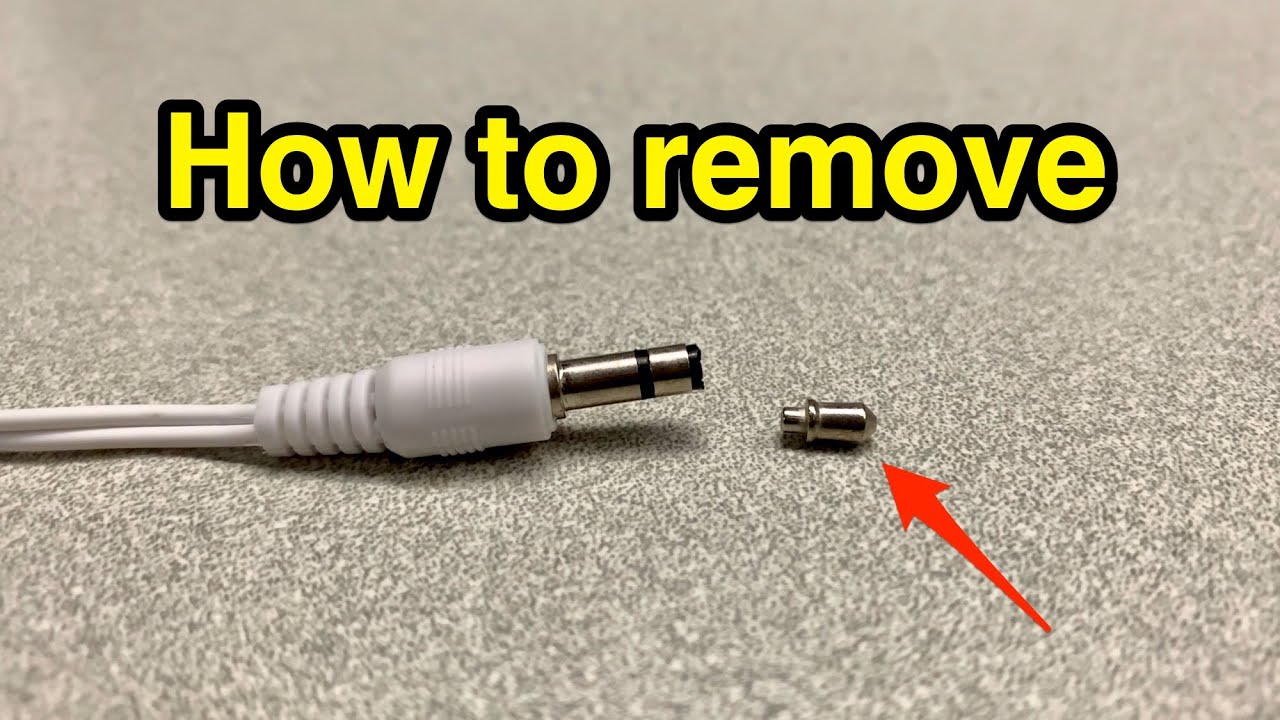
First, confirm what is stuck. The broken part is usually the metal tip or sleeve of a 3.5 mm headphone plug. The port itself is not normally called the “headphone jack”; the port is the socket, while the broken piece is the plug.
Knowing this difference helps you choose the right method. A plug that is sticking out needs a different approach from one that is completely hidden inside the port.
Before learning how to get a broken headphone jack out, follow these safety steps:
- Turn the device off completely.
- Disconnect the charger and any cables.
- Remove the battery if the device allows it.
- Work under a bright lamp.
- Use a clean, flat surface.
- Do not force a tool deep into the port.
- Avoid liquid cleaners, oil, and metal objects that can short nearby contacts.
A flashlight can help you see the broken plug. If the piece is not visible at all, avoid guessing. Some audio ports have delicate spring contacts inside, and a sharp tool can bend them like the thin arm of a watch.
Check the Damage Before Choosing a Method
Inspect the port from several angles. Use a phone flashlight or a small inspection light, but do not insert another plug to test it. The second plug may push the broken piece farther inside.
Look for these signs:
- The metal plug is partly visible.
- The plug is level with the port opening.
- The plug is deep inside the port.
- The plastic body broke, but the metal tip remains.
- The port looks bent, loose, or cracked.
- The device still plays sound through its speakers or Bluetooth.
If the port moves inside the device, stop. A loose port may have broken away from its circuit board. In that case, learning how to get a broken headphone jack out at home may not be enough. A repair shop may need to open the device and replace or resolder the port.
The safest method depends on grip. If you can grip the broken piece, use tweezers. If you cannot grip it but it contains steel, try a small magnet. If it is flush with the opening, a tiny glue method may work, but it carries more risk.

Method 1: Pull It Out With Fine-Tip Tweezers
Fine-tip tweezers are usually the best first tool. They work well when part of the broken headphone plug remains visible.
Use tweezers made for electronics or craft work. Their tips should meet evenly. Wide cosmetic tweezers may slip or press against the inside of the port.
Follow these steps:
- Turn the device off and place it on a stable surface.
- Shine a light into the headphone port.
- Open the tweezers only as far as needed.
- Grip the exposed metal edge or plastic shaft.
- Pull straight out with slow, steady pressure.
- Stop if the tweezers slip more than once.
Do not twist the tweezers while pulling. Twisting can scrape the port contacts or wedge the broken plug against the wall. Think of the port as a narrow straw: the cleanest exit is usually a straight path.
If the plug is deep inside, do not use long tweezers that flex. Flexible tools can buckle and push the broken piece farther in. This simple approach is often the safest answer to how to get a broken headphone jack out when the plug is partly visible.

Method 2: Use a Small Magnet
A small neodymium magnet may remove a broken plug if the plug contains magnetic steel. Some headphone connectors use materials that respond weakly or not at all to magnets, so this method is not guaranteed.
Choose a magnet smaller than the port opening. Hold it near the broken plug and move it slowly toward the opening. If the piece follows the magnet, keep the movement straight and gentle.
Important precautions include:
- Keep the magnet away from magnetic stripe cards.
- Do not place it near a mechanical hard drive.
- Keep it away from a pacemaker or implanted medical device.
- Do not scrape the port with the magnet.
- Stop if the broken part does not move after a few tries.
A magnet may help when tweezers cannot reach the plug. It is less useful when the broken piece is made from nonmagnetic metal or is held tightly by the port contacts.
This method can help with how to get a broken headphone jack out, but patience matters more than strength. A magnet should pull the piece, not drag it across the inside of the socket.

Method 3: Try the Glue-on-a-Toothpick Technique Carefully
The glue method is popular because it can grip a broken plug that sits flush with the port. It is also the easiest method to misuse.
You need a wooden toothpick, a very small amount of cyanoacrylate glue, and a steady hand. The goal is to glue the toothpick to the broken metal piece, not to the port.
Use this process:
- Turn the device off.
- Place the device so the port faces upward.
- Put one tiny drop of glue on the toothpick tip.
- Touch the glue only to the center of the broken plug.
- Hold the toothpick still for about 30 to 60 seconds.
- Pull the toothpick straight out very slowly.
Do not flood the toothpick with glue. Excess glue can run into the socket and bond the broken plug to the port. It can also damage nearby plastic or make professional repair more difficult.
I have seen this technique succeed when the broken plug was level with the port opening. I have also seen people make the problem worse by using too much glue. If you cannot clearly see the broken piece, skip this method and seek professional help.
When people ask how to get a broken headphone jack out, glue is often mentioned first. In practice, it should be a later option, not the first one.

Method 4: Use a Small Self-Tapping Screw
A tiny self-tapping screw can sometimes grip the inside of a hollow broken plug. This method requires excellent control and is best for people who regularly work with small electronics.
Choose a screw that is narrower than the port. Gently turn it into the center of the broken plug by hand. Do not use a power drill. Once the screw catches, pull it straight out with fine pliers.
This method has real limits:
- The screw may damage the port contacts.
- The plug may not be hollow.
- Metal shavings can remain inside the device.
- Too much pressure can push the plug deeper.
- A damaged port may need replacement afterward.
Because of these risks, a repair technician should handle this method when the device is expensive or difficult to replace. A $10 pair of headphones is not worth risking a $1,000 laptop.

Methods You Should Avoid
Some online tips can cause more harm than good. Avoid methods that add force, heat, or liquid to a small electronic port.
Do not use the following:
- A large needle or safety pin pushed deep into the port.
- A drill or electric screwdriver.
- Super glue poured into the socket.
- Water, alcohol, oil, or contact cleaner without proper guidance.
- A second headphone plug used to push the broken piece out.
- Heat from a lighter, hair dryer, or soldering iron.
- Sharp blades that can cut the port housing.
- Repeated pushing after the piece fails to move.
A metal tool can bridge electrical contacts. Even when the device is turned off, a battery may still power parts of the circuit. Removing power reduces risk, but it does not make careless probing safe.
The biggest mistake I see is treating the broken plug like a splinter. A headphone port is not open space. It contains spring contacts that must stay aligned, so force can turn a quick repair into a port replacement.
What to Do After Removing the Broken Plug
Once the broken piece comes out, inspect the port again. Look for bent contacts, loose plastic, glue residue, or metal fragments.
Use a bright light to check the opening. If you see dust, use short bursts of clean, dry compressed air while holding the device so debris can fall out. Keep the nozzle a short distance away, and do not use an air compressor with high pressure.
Then test the device carefully:
- Turn the device on.
- Play audio through the speakers.
- Insert a known-good pair of headphones.
- Play audio at a low volume.
- Gently move the plug without forcing it.
- Check whether sound cuts in and out.
If the device does not detect headphones, the port may be damaged. The broken plug may also have bent an internal contact. At that point, do not keep inserting plugs. A technician can inspect the port and replace it if needed.
If glue touched the port, tell the technician. Hiding that detail can waste time and lead to a poor repair plan.

When to Stop and Contact a Repair Professional
Home removal makes sense when the broken plug is visible and easy to grip. Professional repair is the better choice when the plug is deep, the device is valuable, or the port has visible damage.
Ask for help if:
- The broken plug will not move with light pressure.
- The port is loose or pushed into the device.
- The device contains important data.
- You smell burning or see heat.
- The device has a swollen battery.
- Glue has entered the port.
- The audio port is part of a sealed phone or tablet.
- You lack proper lighting and small tools.
A repair shop may remove the plug with a microscope and precision tools. In some devices, the technician may need to replace the complete audio board. The cost depends on the device design, labor, and part availability.
The best answer to how to get a broken headphone jack out is not always a home repair. Knowing when to stop is part of a good repair.
How to Prevent Another Broken Headphone Plug
A broken plug often results from side pressure. This happens when someone uses headphones while the cable is bent sharply against a desk, pocket, car seat, or bed.
You can reduce the risk with a few simple habits:
- Hold the plug body when removing headphones.
- Do not pull the cable.
- Avoid using damaged or bent plugs.
- Keep the cable loose while listening.
- Use a right-angle connector in tight spaces.
- Store headphones in a case.
- Do not leave the plug inserted while carrying the device.
- Replace headphones when the metal connector feels loose.
A cheap cable can become expensive if it damages a laptop or phone port. A strong strain relief, careful storage, and gentle removal often prevent the problem entirely.
PAA-Style Questions About Removing a Broken Plug
Can I use super glue to remove a broken headphone plug?
You can use a tiny amount of cyanoacrylate glue on a toothpick, but it is risky. Keep the glue away from the port walls, and stop if the broken piece is not clearly visible.
Will a magnet remove a broken headphone jack?
A small magnet may remove the plug if its metal parts are magnetic. It will not work reliably with nonmagnetic materials, and you should never force the magnet into the port.
Can I use a needle to get the broken piece out?
A needle may scratch or bend the contacts inside the port. Use fine tweezers first, and avoid inserting sharp metal tools deeply.
Why is my device stuck in headphone mode?
The broken plug may still touch the detection contact inside the port. Dust, glue, or a bent contact can cause the same problem even after the plug is removed.
Should I repair the port after removing the broken plug?
Test the port with known-good headphones at low volume. If sound cuts out, the port feels loose, or the device remains in headphone mode, have it inspected by a qualified technician.
Conclusion
Learning how to get a broken headphone jack out starts with patience, good light, and the least invasive tool. Try fine-tip tweezers first, consider a small magnet when suitable, and treat the glue method as a risky last resort. Avoid drills, excess glue, liquid, heat, and force.
If the plug is deep or the port looks damaged, stop before a small problem becomes a costly repair. Use the safest method for your device, test the port gently afterward, and share your repair experience or questions in the comments.
