

To turn off Shokz headphones, press and hold the power button for about three seconds until you hear “Power off.”
Learning how to turn off Shokz headphones is simple once you know which control your model uses. Most Shokz bone-conduction headphones use the power or multifunction button, while OpenMove, OpenFit, and some newer models follow different steps. This guide explains each method, common mistakes, charging tips, and easy fixes if your headphones will not shut down.
How to Turn Off Shokz Headphones
For most Shokz models, you can turn off the headphones by holding the correct button for about three seconds. A voice prompt usually confirms the action by saying “Power off.”
Follow these steps:
- Stop your music or call.
- Find the power, multifunction, or volume button.
- Press and hold the button for about three seconds.
- Release it when you hear “Power off.”
- Wait a few seconds before storing the headphones.
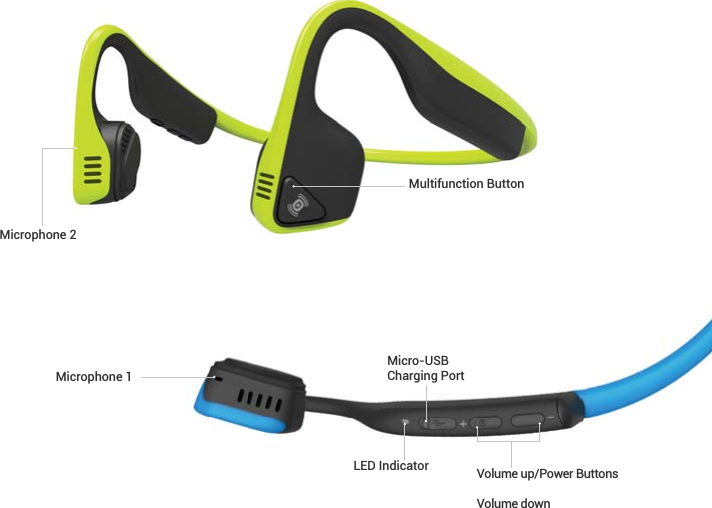
The button location depends on the model. On many OpenRun and OpenRun Pro headphones, the power button sits on the right side of the headset. On OpenMove, the volume-plus button controls power.
If the headphones do not respond, hold the button for a full five seconds. Do not press it repeatedly, as short presses may pause music, change tracks, or activate another feature.

How to Turn Off Shokz OpenRun and OpenRun Pro
To turn off Shokz OpenRun headphones, press and hold the power button for about three seconds. The power button is located on the right side of the headset, near the control buttons.
Use this method:
- Remove the headphones from your ears.
- Press and hold the power button.
- Keep holding it until the voice prompt says “Power off.”
- Release the button.
The same basic process works for the OpenRun Pro and OpenRun Pro 2. The headphones may also turn off after a long period of inactivity, but manual shutdown is better when you want to save battery right away.
The power button also performs other tasks:
• A short press can play or pause audio.
• Two presses may skip to the next song.
• A press can answer or end a call.
• A long press turns the headphones on or off.
This is why timing matters. A quick tap will not turn off the headphones.
How to Turn Off Shokz OpenMove
OpenMove uses a slightly different power control. To turn off Shokz OpenMove headphones, press and hold the volume-plus button for about three seconds.
Follow these steps:
- Locate the volume-plus button on the side of the headset.
- Press and hold it for three seconds.
- Listen for the “Power off” voice prompt.
- Release the button.
The volume-plus button may look like a normal volume control, but it also works as the power button. This design often causes confusion for first-time users.
Avoid pressing the volume-minus button. It lowers the sound level but does not shut down the headphones.
If your OpenMove does not turn off, charge it for at least 10 minutes and try again. A very low battery can make the controls slow or unresponsive.

How to Turn Off Shokz OpenComm
To turn off Shokz OpenComm headphones, press and hold the power or multifunction button for about three seconds. The headset should play a voice prompt when it shuts down.
The exact button may vary between OpenComm versions. Look for the button near the charging port and microphone controls. If you are unsure, check the small symbols printed beside the buttons or consult the manual for your exact model.
Use this simple process:
• End any active call.
• Press and hold the power button.
• Wait for the shutdown voice prompt.
• Release the button after the prompt plays.
OpenComm is designed for work calls, so it may remain connected to a computer or phone until you power it off. Turning off Bluetooth on your phone does not always turn off the headset itself.
How to Turn Off Shokz OpenFit and OpenFit 2
OpenFit earbuds work differently from bone-conduction models. To turn off Shokz OpenFit earbuds, place both earbuds inside the charging case and close the lid.
The case normally disconnects and powers down the earbuds. Make sure each earbud is seated correctly on its charging contacts. If one earbud stays connected, remove it and place it back into the case.
You can also use the Shokz app to review settings, firmware, and battery status. However, the case is the main way to stop the earbuds from running.
Try these steps if OpenFit earbuds remain active:
- Place both earbuds in the case.
- Check that the charging indicators appear.
- Close the lid fully.
- Wait about 10 seconds.
- Check your phone’s Bluetooth menu.
OpenFit earbuds may not shut down if the case battery is empty. Charge the case and repeat the process.

How to Turn Off Shokz OpenSwim
OpenSwim headphones are made for swimming and do not use Bluetooth audio. To turn off Shokz OpenSwim headphones, press and hold the volume-plus button for about three seconds.
Wait for the voice prompt before releasing the button. The controls can feel different after swimming because water, moisture, or wet fingers may reduce button response.
Dry the headset before storing it. Shokz swimming headphones are water resistant within their stated rating, but they still need proper care after use. Rinse them with clean water if they were used in a pool, then let them dry fully.
Do not charge the headphones while the charging port is wet. Moisture near electrical contacts can cause charging problems or damage.

What to Do If Shokz Headphones Will Not Turn Off
Sometimes the correct shutdown button does not respond. This can happen because of low battery power, a frozen control system, a Bluetooth issue, or a button press that was too short.
Try these fixes in order:
- Press and hold the correct button for five seconds.
- Disconnect the headphones from your phone.
- Turn Bluetooth off on the phone.
- Charge the headphones for at least 10 minutes.
- Try the shutdown command again.
- Restart your phone and test the headphones.
- Install available firmware updates through the Shokz app.
If the headset remains frozen, perform a reset. The reset steps differ by model, so use the instructions for your exact device. A reset may clear pairing data, so you might need to reconnect the headphones afterward.
Do not force the buttons or use sharp tools around them. If the button feels stuck, the headset becomes unusually hot, or the battery swells, stop using it and contact Shokz support.

How to Reset Different Shokz Headphones
A reset can help when learning how to turn off Shokz headphones does not solve a control problem. It is useful when the headset stays connected, will not pair, or ignores button presses.
Many Shokz models use a similar reset process:
- Turn the headphones off.
- Press and hold the power or multifunction button.
- While holding it, press the volume-plus and volume-minus buttons together.
- Continue holding the buttons for several seconds.
- Release them when you hear a confirmation tone or voice prompt.
This method is common on several Bluetooth Shokz models, but it is not universal. OpenFit earbuds and newer products may use different reset controls through the case or app.
A reset is not the same as turning off the headphones. Shutdown saves power without changing settings. Resetting may remove Bluetooth pairings and return some settings to their default state.
How to Check Whether Shokz Headphones Are Off
The easiest way to confirm that Shokz headphones are off is to listen for the “Power off” prompt. You can also check whether the headphones still appear as connected in your phone’s Bluetooth settings.
Use these signs:
• No music plays through the headset.
• The voice assistant does not respond.
• The headphones disappear from the active Bluetooth connection list.
• The status light stops flashing.
• The battery level no longer appears as an active device status.
Bluetooth menus can be slow to update. A phone may still show the headset for a short time after shutdown. Wait several seconds, then refresh the Bluetooth screen before assuming the headphones are still on.
In daily use, I find the voice prompt more reliable than the phone menu. Bluetooth screens often keep recently used devices listed even after they are powered off.
Why Turning Off Shokz Headphones Matters
Turning off Shokz headphones after use helps preserve battery life. It also prevents unwanted connections, accidental audio playback, and battery drain while the headset sits in a bag.
Manual shutdown is especially useful when:
• You will not use the headphones for several hours.
• You are traveling or commuting.
• Your phone connects to several Bluetooth devices.
• You want the headset ready for an important call later.
• You plan to store the headphones overnight.
Modern headphones often include sleep or idle modes, but these features are not a replacement for manual shutdown. Automatic sleep may take time, and some activity can keep the device awake.
Think of the power button like closing a laptop lid. The device may protect itself when left alone, but closing it yourself is faster and more certain.
Battery and Charging Tips for Shokz Headphones
Correct charging habits can improve reliability when you turn off Shokz headphones and prepare them for the next use. Use a suitable USB power source and keep the charging contacts clean and dry.
Follow these habits:
• Charge the headphones before the battery reaches zero.
• Use the supplied charging cable when possible.
• Keep magnetic charging contacts free of sweat and dirt.
• Dry the headset before connecting a charging cable.
• Avoid leaving the headphones in extreme heat.
• Store them in a dry, safe place.
Battery life varies by model, listening volume, Bluetooth use, calls, and temperature. A headset that lasts fewer hours than expected may be affected by high volume, frequent calls, or an aging battery.
Do not use damaged cables or chargers. If the headset will not charge after cleaning the contacts and trying another safe power source, contact the manufacturer for support.
Common Mistakes to Avoid
Many people press the wrong button or release it too soon. The most common mistake is treating the power control like a standard one-tap button.
Avoid these errors:
• Do not tap the power button once and expect the headset to shut down.
• Do not confuse volume-plus with volume-minus on OpenMove.
• Do not rely only on your phone’s Bluetooth screen.
• Do not store wet headphones in a closed case.
• Do not reset the headset before trying a normal shutdown.
• Do not keep pressing buttons if the headset feels hot or damaged.
Another common mistake is placing OpenFit earbuds in a case with poor contact. If an earbud is not seated correctly, it may stay connected and continue using power.
The best routine is simple: stop playback, use the correct shutdown control, wait for the voice prompt, and store the headphones safely.
A Simple Daily Routine
Once you know how to turn off Shokz headphones, shutdown can become part of your normal routine. It takes only a few seconds and helps prevent many small problems.
Use this routine after each listening session:
- Pause your audio.
- End any call.
- Turn off the headset using the correct button.
- Listen for the shutdown prompt.
- Wipe away sweat or moisture.
- Store the headphones in a safe place.
- Charge them when the battery is low.
For OpenFit earbuds, place both earbuds in the charging case instead of holding a power button. For OpenRun, OpenRun Pro, OpenComm, and OpenSwim, use the model’s power control. For OpenMove, hold the volume-plus button.
This small habit reduces battery waste and makes your headphones more dependable when you need them.
Frequently Asked Questions About How to Turn Off Shokz Headphones
How do I turn off Shokz OpenRun headphones?
Press and hold the power button on the right side of the headset for about three seconds. Release it after you hear “Power off.”
How do I turn off Shokz OpenMove headphones?
Press and hold the volume-plus button for about three seconds. OpenMove uses this button for both volume control and power.
How do I turn off Shokz OpenFit earbuds?
Place both earbuds into the charging case and close the lid. Make sure the earbuds touch the charging contacts so they disconnect and begin charging.
Why will my Shokz headphones not turn off?
The battery may be too low, the button press may be too short, or the headset may have frozen. Charge the headphones briefly, then hold the correct power button for up to five seconds.
Does turning off Bluetooth turn off Shokz headphones?
No. Turning off Bluetooth on your phone only disconnects the connection. You must shut down the headphones with the correct power control or place OpenFit earbuds in their case.
Can I turn off Shokz headphones from the app?
The Shokz app mainly manages settings, firmware, and device information. Most models still require the physical power control for a full shutdown.
Should I turn off Shokz headphones before charging them?
It is a good habit, but many models can charge while powered off or inactive. Always keep the charging port and contacts dry before connecting the charger.
Conclusion
Knowing how to turn off Shokz headphones depends on the model. Hold the power button on most OpenRun, OpenRun Pro, OpenComm, and OpenSwim headphones. Hold the volume-plus button on OpenMove, and place OpenFit earbuds in their charging case.
Listen for the “Power off” prompt, keep the headset dry, and charge it safely when needed. Use these steps after each listening session to protect battery life and avoid unwanted Bluetooth connections. Check your model’s manual or the Shokz app for model-specific support, and share your experience if you discover another useful tip.
