

Most earbuds cannot charge without their case unless they have a built-in USB-C or wireless charging port.
Learning how to charge earbuds without case can save you during a commute, workday, or trip. The right method depends on your earbud design, charging contacts, and manufacturer instructions. This guide explains safe options, risky shortcuts to avoid, and the best backup solutions when your charging case is missing or dead.
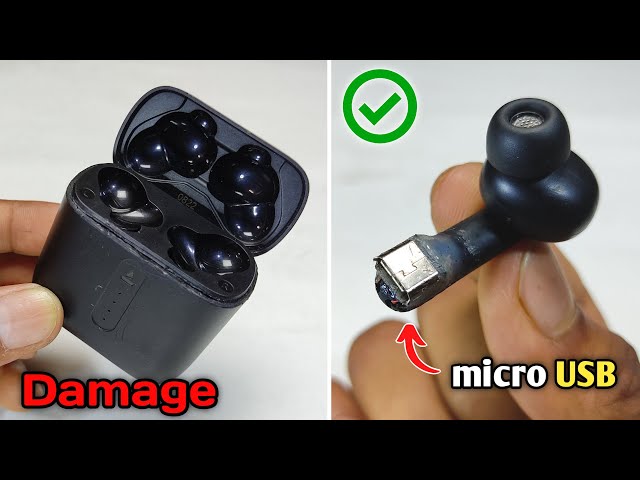
Can You Charge Earbuds Without the Case?
In most cases, you cannot charge standard true wireless earbuds without their charging case. The case usually contains the battery, charging circuit, and small contact pins that transfer power to each earbud.
Some earbuds are different. Certain sports earbuds, over-ear wireless headphones, and older Bluetooth models have a USB-C, micro-USB, or proprietary charging port built into the earbud or headphone body.
Before trying anything, inspect both earbuds carefully. Look for a covered port, charging symbol, or manufacturer-approved charging accessory.
You may be able to charge earbuds without case if they support one of these options:
• A USB-C or micro-USB port on each earbud
• A special charging cable made for the earbud model
• A charging dock designed for that product
• A replacement case from the original manufacturer
• A compatible case with the exact same charging contacts and firmware support
Do not assume that exposed metal contacts can safely connect to a random cable. Earbuds use small lithium-ion batteries. Too much voltage, reversed polarity, or poor contact can cause overheating or permanent damage.

How to Charge Earbuds Without Case Safely
The safest approach is to identify the earbud model first. Check the label, Bluetooth name, original packaging, or companion app. Then read the official charging instructions for that exact model.
If your earbuds have a built-in port, use this process:
- Clean the charging port with a dry, soft brush.
- Connect the correct USB cable.
- Plug the cable into a low-power USB charger or computer.
- Check for a charging light or battery icon.
- Leave the earbuds on a hard, nonflammable surface.
- Disconnect them when they are fully charged.
Use only the cable and voltage recommended by the manufacturer. A USB-C connector describes the shape of the plug, not the charging requirements of the device. Two USB-C devices may need different power controls.
If your earbuds have no charging port, do not try to push wires against the contact points. This is not a reliable way to learn how to charge earbuds without case. It can short the battery, damage the charging circuit, or create enough heat to soften plastic.
A useful rule is simple: if the product was not designed for direct charging, do not force direct charging.

Check Whether Your Earbuds Support Direct Charging
Not all wireless earbuds use the same design. Understanding the type of product can quickly show whether direct charging is possible.
True wireless earbuds
Most true wireless earbuds have no charging port on the earbuds themselves. They rely on a case that stores power and charges each bud through metal pins or wireless charging coils.
For these models, how to charge earbuds without case usually means finding a replacement case rather than connecting a cable directly.
Wireless headphones
Over-ear and on-ear wireless headphones often include a USB-C or micro-USB port. You can usually charge them directly with the supplied cable.
Some headphones may work while plugged in, while others turn off during charging. Both behaviors are normal and depend on the internal design.
Neckband earbuds
Neckband models often have a battery section along the connecting cable. That section may include a USB charging port, so the earbuds can charge without a separate case.
Earbuds with a removable battery
A few specialty devices use replaceable batteries or a dedicated dock. Use only the approved battery type and dock. Generic batteries may have the wrong voltage or protection system.
Look at the product manual before buying an accessory. A case that looks similar may have different contact placement, battery capacity, or charging software.

Use a Replacement Charging Case
For standard true wireless earbuds, a replacement case is usually the safest answer. The case must match the exact model, and sometimes the exact generation.
Search for the model number on the earbuds or inside the companion app. Then choose one of these options:
• An original replacement case from the manufacturer
• An authorized retailer’s replacement case
• A verified third-party case that clearly lists your exact model
• A used original case in good condition
Avoid buying a case based only on appearance. Earbuds from the same brand may use different charging pins and internal charging controls.
Some replacement cases pair automatically. Others require you to reset the earbuds and place them in pairing mode. Read the setup steps before assuming the case is defective.
A replacement case also solves more than the charging problem. It protects the earbuds, helps them reconnect, and gives you a safe place to store them. In many situations, it costs less than replacing a damaged pair.

Can a Different Earbud Case Charge Your Earbuds?
Usually, no. A different case may have the wrong contact spacing, charging voltage, battery control system, or software design.
Even if the earbuds fit inside, they may not charge correctly. A poor fit can also press against the wrong contacts or leave one earbud partly connected.
There are rare exceptions. Some product families use the same case across several models. The manufacturer must clearly confirm compatibility before you use one.
Check these details before purchasing:
• Exact model number
• Product generation
• Left and right earbud compatibility
• Case firmware support
• Charging connector type
• Return policy
If the listing says “universal,” treat that claim carefully. A universal storage case is not always a universal charging case.
Can You Charge Earbuds With a Phone or Laptop?
A phone or laptop can charge earbuds only when the earbuds have a suitable charging port or approved charging accessory. In that situation, connect the earbud cable or charging case to the phone or laptop with the correct adapter.
Reverse charging may work with some phones. This feature lets a phone share power through USB-C or wireless charging. However, it normally charges a case, not bare true wireless earbuds.
A laptop USB port can provide power, but it does not solve the contact problem. If your earbuds have no direct charging port, plugging a cable into a laptop will not charge them by itself.
Wireless reverse charging is also limited. An earbud must contain a compatible wireless charging coil. Most separate earbuds do not have enough surface area or the right coil placement for direct phone charging.
Why Improvised Charging Methods Are Dangerous
Online videos may show people using loose wires, foil, magnets, or modified cables to charge earbuds. These methods are risky because they bypass the charging controls built into the case.
The main dangers include:
• Short-circuiting the battery
• Reversing positive and negative contacts
• Overheating the earbud
• Damaging the battery protection circuit
• Causing swelling or leakage
• Starting a fire
Lithium-ion batteries need controlled charging. The charger must manage current, voltage, and temperature. A simple wire cannot perform those tasks safely.
Never charge an earbud that is swollen, cracked, unusually hot, leaking, or giving off a chemical smell. Move away from the device and contact the manufacturer or a qualified electronics recycling service.
Do not place a damaged earbud in water or a freezer. These actions do not repair battery damage and can create more hazards.

What to Do When the Case Battery Is Dead
Sometimes the case is present but empty. This is different from needing to charge earbuds without case.
Charge the case first with its normal cable. If it supports wireless charging, place it on a compatible charging pad and check the alignment. Keep the lid closed unless the manual says otherwise.
If the case shows no light, try these steps:
- Test another compatible charging cable.
- Try a different wall adapter.
- Clean the case charging port with a dry brush.
- Leave it charging for at least 30 minutes.
- Check whether the indicator light changes.
- Reset the case only if the manual recommends it.
Avoid high-power adapters from unknown brands. Most modern USB chargers regulate power, but damaged cables and poor-quality accessories can still cause problems.
If the case remains dead after several tests, the internal battery or charging port may have failed. A replacement case is often safer and more economical than opening the case yourself.
How to Get More Battery Life Until You Find a Case
If your earbuds still have some power, small changes can extend listening time.
• Lower the volume slightly.
• Turn off noise cancellation when you do not need it.
• Disable transparency mode in quiet places.
• Use one earbud at a time.
• Turn off extra features in the companion app.
• Keep the earbuds away from heat and direct sunlight.
• Avoid repeated pairing and unpairing.
Using one earbud at a time is especially useful. It lets you keep one earbud powered while using the other. This does not replace learning how to charge earbuds without case, but it can help you get through a meeting or trip.
Battery estimates are not exact. Music volume, Bluetooth strength, calls, and noise control can change the remaining time. Treat the displayed percentage as a guide rather than a guarantee.
Practical Mistakes to Avoid
A few common mistakes can turn a small inconvenience into an expensive repair.
First, do not buy a case based on brand name alone. Confirm the full model number. Second, do not clean contacts with water, alcohol poured directly into the case, or sharp metal tools.
Third, do not leave a charging case under a pillow or inside a hot car. Batteries charge best in a cool, dry place with airflow. Extreme heat can shorten battery life and increase safety risks.
In troubleshooting work, one pattern appears often: people blame the earbuds when the real problem is dirt on the case contacts. Use a dry cotton swab or soft brush to remove dust. Never scrape the contacts hard, because the thin plating can wear away.
Another lesson is to test one change at a time. Use a known-good cable, then a different adapter, then a clean port. This makes it easier to find the real fault.
How to Protect Your Earbuds and Charging Case
A charging case is not just a container. It is part of the earbud power system, so protect it like a small electronic device.
Keep the case in a separate pocket rather than beside coins, keys, or loose metal objects. Metal items can scratch the contacts or create a short if they enter the port.
Clean the earbud contacts and case pins every few weeks. Use a dry tool and gentle pressure. If sweat or moisture gets inside, let the device dry fully before charging.
It also helps to follow good battery habits:
• Avoid leaving the case at 0% for long periods.
• Do not store it in extreme heat or cold.
• Use approved cables and adapters.
• Update firmware through the official app.
• Replace damaged cables promptly.
• Store the earbuds in the case when not in use.
These habits reduce the chance that you will need to charge earbuds without case in the first place.
Frequently Asked Questions About How to Charge Earbuds Without Case
Can I charge wireless earbuds directly with a USB cable?
Only if the earbuds have a built-in charging port designed for that cable. Most true wireless earbuds do not, so connecting loose wires to their contacts is unsafe.
Can I use another brand’s charging case?
Usually, you cannot. The case must match the earbuds’ model, contact layout, charging controls, and sometimes firmware.
Can my phone wirelessly charge earbuds?
A phone may wirelessly charge a compatible charging case through reverse wireless charging. Most individual earbuds cannot receive power directly because they lack a properly positioned wireless charging coil.
Can I charge earbuds with a laptop?
You can charge earbuds or headphones with a laptop when they have a suitable charging port and cable. A laptop cannot charge standard earbuds that depend on a missing case.
What should I do if I lost my earbud case?
Find the exact model number and order an original or confirmed compatible replacement case. Do not use a random case just because the earbuds fit inside it.
Is it safe to use foil to charge earbuds?
No. Foil can connect the wrong contacts and cause a short circuit, heat, battery damage, or fire. Use a compatible charging case or manufacturer-approved charger instead.
How do I know whether my earbuds are charging?
Look for a charging LED, battery symbol in the companion app, or a rising battery percentage. If there is no sign of charging, clean the contacts and confirm that the case and cable are compatible.
Conclusion
Learning how to charge earbuds without case starts with knowing your device. Earbuds with a built-in USB port may charge directly, while most true wireless models need their original or compatible replacement case.
Avoid loose wires, foil, magnets, and other improvised methods. They bypass essential battery safety controls and can damage the earbuds or create a fire risk. Check the model number, use approved accessories, and keep the case clean and cool.
If your case is missing, buy a verified replacement rather than taking a dangerous shortcut. Share your earbud model and charging experience in the comments, and explore the manufacturer’s support resources for the safest solution.
