

Use the Bose app’s Find My Buds feature, then follow the last known location and play a sound if the earbuds are nearby.
Losing a small earbud can feel like losing a coin in tall grass. Fortunately, learning how to find Bose earbuds is usually simple when you use the Bose app, Bluetooth settings, and a few practical search steps. This guide explains what works, what does not, and how to avoid common mistakes with Bose QuietComfort, Sport, and other wireless earbuds.

Use the Bose App to Find Your Earbuds
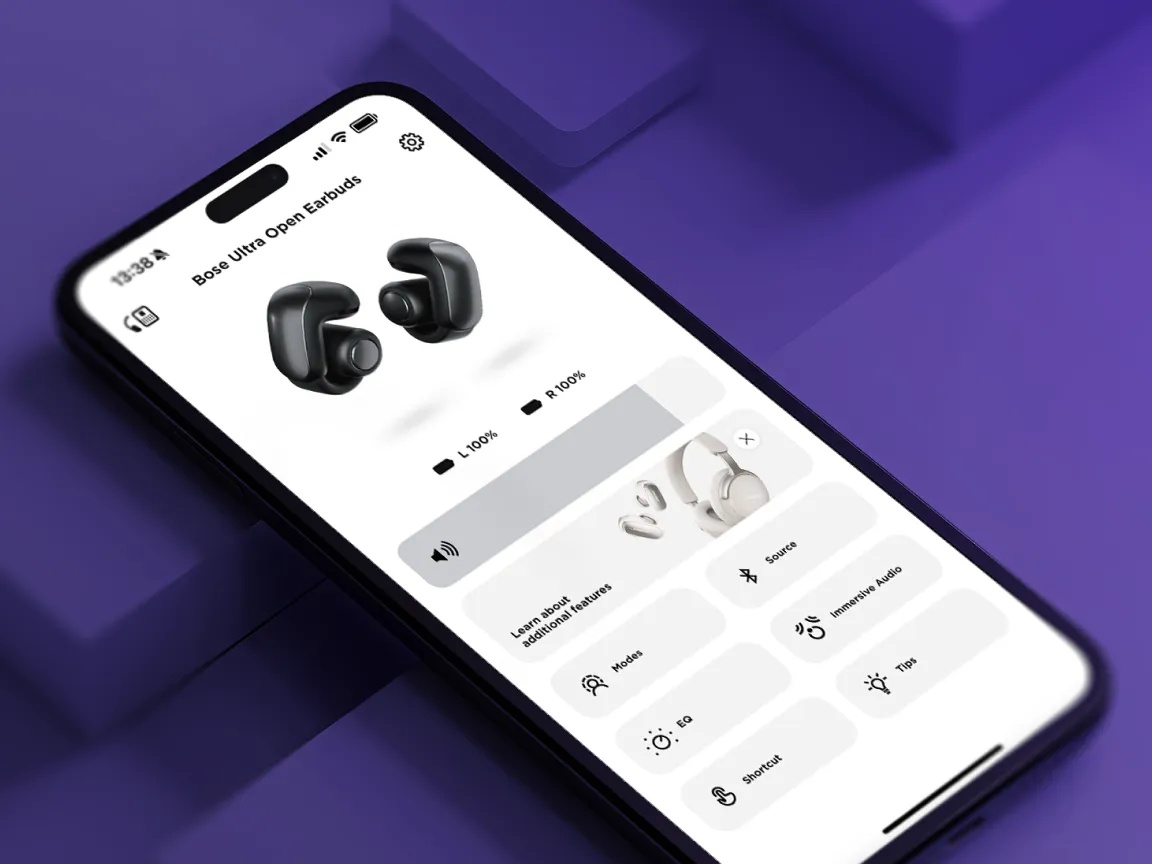
The Bose app is the best place to start when you need to find Bose earbuds. Depending on your model and app version, the feature may appear as Find My Buds or a similar location tool.
The app may show the last place where your earbuds connected to your phone. Some models can also play a sound through the earbuds. This sound helps you locate them under a couch, inside a bag, or between car seats.
Steps to find Bose earbuds with the Bose app
- Open the Bose app on your iPhone or Android phone.
- Select your earbuds from the product list.
- Look for Find My Buds, Find My Earbuds, or a similar option.
- Check the last known location shown on the map.
- Go to that location and search nearby.
- Use the sound feature if your earbuds are still powered on and connected.
- Check the left and right earbud separately if the app allows it.
The exact menu can vary by model, region, app version, and phone type. If you do not see the feature, update the Bose app and your earbuds’ firmware first.

Check the Last Known Location
The last known location is often the most useful part of the search. It tells you where your phone last connected to the earbuds. It does not always show the earbuds’ current location.
For example, your phone may have connected to your Bose earbuds at home before you placed them in a gym bag. The app may still show your home as the last location, even if the earbuds are now somewhere else.
Use the location as a starting point, not as proof.
Search the area in a smart order
Search slowly and follow the route you took after using the earbuds. Start with the places where you stopped or changed clothes.
Check these spots:
• Couch cushions and the space beneath the couch
• Bed sheets, blankets, and pillow covers
• Jacket, jeans, and workout clothes
• Backpack pockets and laptop sleeves
• Car seats, floor mats, and door pockets
• Bathroom counters and kitchen surfaces
• Desk drawers and charging areas
• The earbud case, if you have it
• Places near your phone charger
A flashlight can help. Shine it across the floor at a low angle. The plastic surface of an earbud may reflect light and stand out from dust or fabric.
Play a Sound Through Your Bose Earbuds
If the earbuds are close and still connected, playing a sound can make them much easier to find. This method works best in a quiet room.
First, turn off music and other phone sounds. Then activate the sound feature in the Bose app. Listen for a faint tone or alert. A single earbud may be hard to hear, so search one side of the room at a time.
Keep in mind that sound playback has limits. The earbuds may not play a sound when they are inside the charging case, switched off, out of battery, or too far from your phone.
Improve your chances of hearing them
• Turn off fans, televisions, and air conditioners.
• Ask other people to stay quiet for a minute.
• Walk slowly and pause often.
• Check soft areas where sound may be muffled.
• Look under furniture with a flashlight.
• Use the phone’s volume controls if the app provides them.
Do not turn the volume up to an uncomfortable level if you are wearing the earbuds. The goal is to locate them, not expose your ears to a sudden loud sound.

Find Bose Earbuds With Bluetooth
Bluetooth can help you find Bose earbuds when they are nearby. Your phone may reconnect when you move close to them.
Open your phone’s Bluetooth settings and watch the connection status. Walk around the room or nearby area. If the earbuds connect, you are likely within Bluetooth range.
Bluetooth range depends on walls, furniture, metal, other wireless devices, and the earbud’s battery. In an open space, the range may reach farther. Inside a home, walls can reduce it sharply.
Use a Bluetooth scanner carefully
Some phone apps can show nearby Bluetooth signals. These apps may display a signal strength value. A stronger signal usually means you are getting closer.
However, Bluetooth signal strength is not a precise distance meter. Your body, a wall, or a metal object can change the reading. Move in several directions and look for a pattern instead of trusting one number.
A simple method is:
- Stand in one place and check the signal.
- Walk a few steps in one direction.
- Check the signal again.
- Return to the strongest reading.
- Repeat the process until you find the earbuds.
This method is especially useful when you know the earbuds are inside your home but cannot see them.

Use Apple Find My or Google Find My Device When Supported
Most Bose earbuds do not work exactly like AirPods in Apple Find My. Many Bose models rely on the Bose app and Bluetooth instead. Some newer models or phone setups may offer added finding features, so check the product instructions for your exact model.
On Android, certain earbuds may support Google Find My Device or related device-finding features. Support can depend on the model, firmware, account settings, and region.
Check these settings:
• Your phone’s Bluetooth is on.
• Location services are enabled.
• The Bose app has location permission.
• You are signed in to the correct account.
• The earbuds have recent firmware.
• The earbuds were paired with your phone before they went missing.
If your model does not support a wider device-finding network, the app may only show the last connection point. That limitation is normal and does not mean the app is broken.

Find Bose Earbuds That Are Offline
Finding Bose earbuds is harder when they are offline. Offline earbuds may have no battery, may be inside their charging case, or may be outside Bluetooth range.
Start with the last known location in the Bose app. Then retrace your steps from that point. Think about the last time you removed the earbuds and what you did next.
If the battery is dead, no app can make the earbuds play a sound. You must rely on a physical search and your memory. Look in places where small objects often slide, such as car seat gaps, sofa edges, coat pockets, and laundry baskets.
What offline status means
Offline status can mean:
• The earbuds are too far from your phone.
• The earbuds are inside the charging case.
• The battery has run out.
• Bluetooth is disabled.
• The earbuds were reset or unpaired.
• Your phone cannot access the app’s location permission.
Wait a few minutes after opening the case near your phone. If the earbuds have power, they may reconnect automatically.

Find Bose Earbuds Without the Charging Case
The charging case is not required to search for the earbuds, but it can make the process easier. The case protects the earbuds and keeps them charged. Without it, the earbuds may lose power faster.
If you lost only the earbuds, open the Bose app and check whether the left or right earbud appears. Some models show both earbuds together, while others provide separate details.
Search areas where you may have removed one earbud. A single missing earbud often falls out while you are taking off a hat, adjusting a mask, changing clothes, or getting into a car.
Use these extra clues:
• Check the side of the bed where you sleep.
• Search the pocket on the side of your dominant hand.
• Look near exercise equipment.
• Check under towels and gym clothing.
• Inspect the floor around your usual charging spot.
If you find one earbud but not the other, keep the found earbud in a safe place. Do not accidentally mix it with another pair.

Find Bose Earbuds in a Car
Cars are common hiding places for wireless earbuds. Their small shape allows them to slide into gaps that are difficult to see.
Move the front seats forward and backward. Check the gap beside the center console, under the floor mats, and inside door pockets. Look in cup holders, glove compartments, and the area between the seat and the door.
Use your phone’s Bluetooth connection while searching. If the Bose earbuds reconnect, stay in that area and search carefully. Avoid driving until you finish the search, since a loose earbud can move farther under the seat.
A thin flashlight works better than a phone screen light. Do not use sharp tools near the battery or charging contacts.
Troubleshoot the Bose Find My Buds Feature
Sometimes users cannot find Bose earbuds because the app is not set up correctly. A few quick checks can restore the connection.
Try these steps:
- Turn Bluetooth off and on.
- Restart your phone.
- Open the Bose app again.
- Confirm that the earbuds are listed in the app.
- Check location permission for the Bose app.
- Update the app through the App Store or Google Play.
- Install available earbud firmware updates.
- Remove nearby Bluetooth devices that may cause confusion.
- Place the earbuds in the case, close it, and reopen it.
- Pair the earbuds again if necessary.
Avoid resetting the earbuds too early. A reset may erase the connection that helps you locate them. First, try the app, Bluetooth search, and last known location.
One mistake I often see is searching only through the phone’s general Bluetooth menu. That menu can confirm a connection, but it may not show the location or sound tools available in the Bose app.
What to Do If You Cannot Find Bose Earbuds
If the earbuds remain missing, make the search more systematic. Randomly checking the same places wastes time and increases stress.
Write down the last three places where you used them. Search each location from left to right, then from high to low. Mark each area as checked. This simple method prevents gaps in your search.
You can also ask whether someone moved them. A family member may have placed them on a counter or in a drawer while cleaning. At work, check the lost-and-found area and ask the front desk.
If you believe the earbuds were stolen, do not confront anyone based only on a map location. A last known Bluetooth location is not precise enough to identify a person or prove theft.
Prevent Losing Bose Earbuds Again
The easiest way to find Bose earbuds is to make them harder to lose. Give the charging case a regular home, such as a desk drawer, entryway shelf, or backpack pocket.
Create a simple routine:
• Put both earbuds in the case after every use.
• Charge the case in the same place.
• Keep the case in a bright or distinctive color.
• Add a small case cover with a visible label.
• Check your pockets before leaving a car or gym.
• Keep location permission enabled for the Bose app.
• Turn on phone and app updates.
• Avoid placing loose earbuds on beds or soft furniture.
A case cover with a clip can help during travel. Do not attach a heavy item that strains the case hinge or causes discomfort.
It is also smart to save the model name and serial number. The serial number may help with support, warranty questions, or a replacement request.
Limitations of Earbud Tracking
Bose earbud tracking is useful, but it is not the same as a dedicated GPS tracker. Earbuds usually depend on Bluetooth, battery power, and a recent phone connection.
The app may not provide a live location. It may show only where the earbuds last connected. Location accuracy can also vary inside buildings, apartment complexes, offices, and parking garages.
Tracking may fail when:
• The earbuds are out of battery.
• The earbuds are sealed inside the charging case.
• The earbuds are outside Bluetooth range.
• The app lacks location permission.
• The earbuds were never paired with the current phone.
• The earbuds were reset or connected to another device.
Understanding these limits prevents false confidence. Treat the app like a trail of breadcrumbs, not a perfect map.
Frequently Asked Questions About How to Find Bose Earbuds
Can I find Bose earbuds if they are in the charging case?
Usually, the Bose app cannot play a sound through earbuds that are sealed in the charging case. Check the last known location and search nearby by hand.
How do I find Bose earbuds that are turned off?
You cannot remotely activate earbuds that are turned off or out of battery. Use the last connected location, retrace your steps, and search places such as bags, pockets, cars, and furniture.
Does Bose have a Find My Buds feature?
Many Bose earbuds support a finding feature in the Bose app, but available tools vary by model and software version. Update the app and check your product’s settings to confirm support.
Can I find Bose earbuds with Bluetooth?
Yes, Bluetooth can help locate nearby Bose earbuds. Watch for reconnection as you move around, but remember that walls and other objects can affect the signal.
Can I track Bose earbuds from another phone?
You may be able to sign in to the same Bose account on another compatible phone, but results depend on the model and app setup. The earbuds must usually have connected to the account or phone before they went missing.
Why does the Bose app show the wrong location?
The app may be showing the last place where your phone connected to the earbuds, not their current position. The location can also be less accurate indoors or after the earbuds move.
Can I replace one lost Bose earbud?
Replacement options depend on the model and availability. Contact Bose support with the product name and serial number before buying a single earbud, because compatibility can vary.
Conclusion
Learning how to find Bose earbuds starts with the Bose app, the last known location, and a careful Bluetooth search. Play a sound when the earbuds are nearby, check likely hiding places, and remember that a dead battery or closed charging case limits tracking.
The best long-term habit is simple: return both earbuds to their case after every use and keep the case in one regular spot. Try these steps the next time your earbuds disappear, and explore the Bose app settings today so you know where the finding tools are before you need them.
