

You can find a JBL earbuds case by retracing your steps, checking Bluetooth clues, and searching common drop spots.
Losing a small charging case is frustrating, especially when the earbuds are still in your ears or sitting somewhere nearby. I have tested many wireless earbud recovery methods, and the key lesson is simple: most JBL charging cases do not have built-in GPS. Still, learning how to find JBL earbuds case locations through careful searching, Bluetooth checks, and smart habits can save time and money.
Check Whether the JBL Earbuds Case Is Nearby
Start with the places where you last used or handled the earbuds. Small cases often blend into dark bags, couch cushions, car seats, and cluttered desks.
Before searching the whole house, stand still and think through your last known moment with the case. Ask yourself whether you opened it at work, in the car, at the gym, or beside your bed.
Use this quick search order:
- Check your pockets and jacket.
- Look inside your backpack, purse, or laptop bag.
- Search under furniture and between cushions.
- Check your desk, nightstand, kitchen counter, and bathroom shelf.
- Look near charging cables and power outlets.
- Inspect your car seat, center console, door pocket, and floor.
- Check laundry baskets, coat racks, and gym lockers.
A flashlight can help. Shine it across the floor at a low angle. The light may reflect off the case and reveal it under a bed or sofa.
If you are learning how to find JBL earbuds case, do not rely only on memory. Search by touch as well as sight. A case may be hidden under clothing or inside a bag pocket that you rarely use.

Use Bluetooth to Narrow Down the Location
Bluetooth can help you decide whether the JBL earbuds case or earbuds are close. However, Bluetooth does not usually provide a map location for the charging case.
Most JBL cases do not broadcast a separate tracking signal. The earbuds connect to your phone, while the case mainly stores and charges them. If the earbuds are inside the missing case and disconnected, your phone may not detect them.
Try these steps:
- Open your phone’s Bluetooth settings.
- Turn Bluetooth on.
- Walk slowly through rooms where you may have left the case.
- Watch for the JBL earbuds to reconnect.
- Stop when the connection becomes stable.
- Search within that area.
A connection is only a clue. It does not prove that the case is nearby. Walls, furniture, other electronics, and low battery power can affect Bluetooth range.
If your earbuds are outside the case, place them in pairing mode only if your model allows it. Avoid repeatedly resetting them, since that can remove useful connection information.
Understanding this limit is important when learning how to find JBL earbuds case. Bluetooth can narrow the search, but it cannot work like a true GPS tracker.

Check the JBL Headphones App
The JBL Headphones app can show useful details for supported earbuds. Depending on your model, it may display battery levels, connection status, controls, and firmware information.
Open the app while the earbuds are connected. Check whether the app shows a current connection or the last time the earbuds were active. This may help you identify where you last used them.
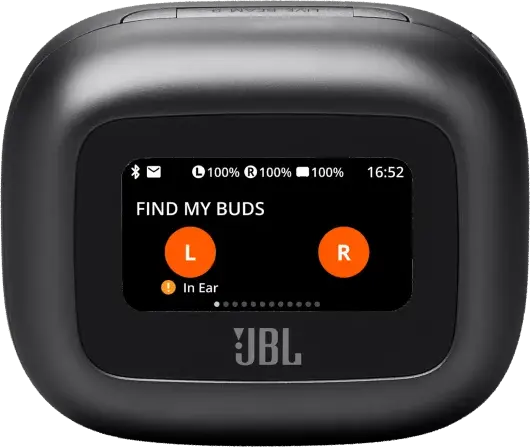
The app usually cannot locate a lost charging case on a map. It also cannot make most JBL cases ring. These features depend on the hardware inside the product, not just the mobile app.
Supported JBL products and app features can change over time. Check the product guide for your exact model, such as JBL Live Pro 2, JBL Tune Buds, JBL Tour Pro 2, or another series.
When researching how to find JBL earbuds case, confirm the model before following advice made for another brand. Apple AirPods, Samsung Galaxy Buds, and some Tile-enabled earbuds may offer tracking features that many JBL models do not have.

Search the Places Where Cases Commonly Disappear
A JBL charging case is small, smooth, and easy to knock off a surface. It often disappears in places that seem obvious only after you find it.
Focus on high-risk areas first:
• Sofa cushions and gaps beside armrests
• Bed sheets, blankets, and pillow areas
• Trouser pockets and hoodie pockets
• Small handbag or backpack compartments
• Car seats and floor mats
• Desk drawers and bedside tables
• Gym bags and locker shelves
• Grocery bags and coat pockets
• Areas beside charging outlets
• Under tables, chairs, and beds
Use a slow grid search. Divide the room into sections and check one section at a time. This method works better than walking around randomly and looking at the same places again.
If you have children or pets, search lower areas first. A case can be moved from a table to the floor without anyone noticing. Also check places where pets sleep or play, but do not let a pet chew the case or earbuds.
One mistake I often see is searching only at eye level. When people ask how to find JBL earbuds case, the answer is often under furniture, inside clothing, or beside a wall.

Retrace Your Route Outside the Home
If the case is not at home, reconstruct your movements in order. Think about the last time you removed the earbuds, not just the last time you remember seeing the case.
Write down each stop:
- Your home or apartment.
- Your car or public transit seat.
- Your workplace or classroom.
- A coffee shop, store, or restaurant.
- A gym, park, or walking route.
- A friend’s home or another recent location.
Call places you visited as soon as possible. Give staff a clear description, including the brand, color, model, and any scratches or stickers.
Ask whether they have a lost-and-found area. Do not describe the case only as “black earbuds.” Many cases look alike, so mention the JBL logo and the approximate size.
If you used a rideshare service, check the trip’s lost-item process. For public transit, contact the agency’s lost-property office. Acting quickly improves the chance that someone has turned it in.
This route-based approach is one of the most reliable parts of learning how to find JBL earbuds case. Memory can be vague, but a written timeline makes the search more focused.

Check Your Phone’s Location History
Your phone may help you remember where you were when the case went missing. Location history does not track the JBL case itself, but it can show your recent stops.
Review your phone’s map timeline if you have that feature enabled. You may also check:
• Recent rideshare trips
• Calendar appointments
• Photos taken that day
• Payment records
• Fitness or walking apps
• Text messages and emails
• Wi-Fi networks your phone joined
A photo can be especially useful. You may notice the case on a desk, car seat, or table in the background. Payment records can remind you that you stopped at a store you had forgotten.
Remember that location history can have gaps or privacy limits. It may show a general place, not the exact spot where you set down the case.
Still, these digital clues can make how to find JBL earbuds case much easier when your memory is unclear.

Use a Bluetooth Scanner Carefully
A Bluetooth scanner app may show nearby devices and signal strength. This can help in some situations, but it has strict limits.
The scanner may detect the earbuds if they are outside the case and still powered on. It normally will not detect a closed case that has no active Bluetooth signal.
If you use a scanner, walk slowly and watch whether the signal becomes stronger. Move toward the strongest reading, then search nearby objects by hand.
Do not treat signal strength as exact distance. Bluetooth signals can bounce off walls and weaken near metal, concrete, appliances, and other wireless devices.
Also be careful with unknown apps. Choose well-reviewed software, read its privacy policy, and avoid apps that ask for unnecessary access to contacts, messages, or files.
For most people, a Bluetooth scanner is an extra tool, not the main answer to how to find JBL earbuds case. A careful physical search usually works better.

What to Do If the Case Is Truly Lost
If you cannot find the case after a full search, check whether JBL sells a replacement charging case for your model. Replacement availability varies by product, region, and color.
Contact JBL customer support or an authorized retailer. Have this information ready:
• Exact earbud model
• Case color
• Purchase date, if known
• Serial number, if available
• Proof of purchase
• Country or region
Do not buy a random case that looks similar. JBL charging cases are often model-specific. The charging contacts, firmware, magnets, and internal electronics may not match.
Some replacement cases may need pairing or service support. In other cases, the earbuds may not work correctly with a case from another model.
If you lost only the case but still have both earbuds, keep them in a safe container. Avoid placing them loose in a pocket or bag, where they can be damaged or separated.
When considering how to find JBL earbuds case, replacement should be the final step. Search, retrace your route, contact lost-and-found locations, and confirm compatibility before spending money.
Mistakes to Avoid When Searching
A rushed search can make the problem worse. Avoid these common mistakes:
• Do not reset the earbuds before checking connection history.
• Do not assume the case has GPS tracking.
• Do not search one room repeatedly while ignoring your car or bag.
• Do not buy a replacement case without checking the exact model.
• Do not rely on an app that promises features your JBL model does not support.
• Do not leave the earbuds loose where they can collect dust or moisture.
• Do not give personal information to someone claiming to have found them without verification.
It is also wise to label your case. A small sticker, colored skin, or protective cover makes it easier to identify and recover.
Bright colors are easier to see than plain black. A case cover with a loop can also attach to a key ring or bag clip. These simple changes reduce the chance of losing it again.
The best long-term lesson from learning how to find JBL earbuds case is prevention. A fixed storage spot works like a home for the case. Put it there every time you remove the earbuds.
How to Prevent Losing a JBL Earbuds Case Again
Once you find the case, create a simple routine. Place it in the same location whenever you are not using it.
Good storage options include:
• A small tray beside your bed
• A zippered pocket in your daily bag
• A desk organizer
• A car console compartment
• A protective case with a clip
• A dedicated charging station
Avoid placing the case on unstable surfaces, such as the arm of a sofa, the top of a car, or the edge of a counter. These spots invite accidental drops.
Charge the case in one regular location too. This gives you a visual check each day and makes it easier to notice if the case is missing.
If your model supports a phone connection history, check it from time to time. Knowing how your earbuds behave when they disconnect can help you respond faster during a future loss.
Learning how to find JBL earbuds case is useful, but building a repeatable storage habit is even better.
Frequently Asked Questions
Can I track my JBL earbuds case with GPS?
Most JBL earbuds charging cases do not include GPS or a built-in location tracker. You may be able to use Bluetooth clues from the earbuds, but this will not provide a precise map location for the case.
Can the JBL Headphones app find a lost case?
The JBL Headphones app can show connection and battery information for supported products. In most cases, it cannot display the charging case on a map or make the case play a sound.
How do I find my JBL earbuds case if the earbuds are inside it?
Retrace your last steps and search common areas such as bags, pockets, furniture gaps, cars, and charging spots. If the earbuds are closed inside the case, your phone may not detect them through Bluetooth.
Can I buy a replacement JBL charging case?
A replacement may be available for some JBL models, but compatibility is not universal. Contact JBL or an authorized seller with the exact model name before buying a case.
Will a different JBL case charge my earbuds?
Usually, you should use the case made for your specific earbud model. Different cases may have different charging contacts, magnets, electronics, and firmware, so a similar-looking case may not work.
Can Bluetooth show the exact location of a JBL case?
Bluetooth can sometimes help you decide whether connected earbuds are nearby. It cannot normally show the exact location of a JBL case, especially when the earbuds are inside a closed case.
What is the fastest way to find a lost JBL earbuds case?
Check your pockets, bag, car, couch, bed, desk, and charging area first. Then retrace your route and contact the lost-and-found departments of places you visited.
Conclusion
Finding a JBL earbuds case starts with a calm, organized search. Check common hiding spots, use Bluetooth only as a clue, review your recent route, and contact lost-and-found locations quickly. Remember that most JBL cases do not have GPS, so physical searching is usually more effective than relying on an app.
Once you recover the case, choose one storage spot and use it every day. A bright cover, bag clip, or dedicated charging tray can prevent another frustrating search. Save this guide for later, and share your own tip for how to find JBL earbuds case in the comments.
