

Press the power button or slide the Power/Bluetooth switch, then wait for the shutdown tone.
Learning how to turn off Bose QC headphones is simple, but the exact step depends on your model. This guide explains the controls on popular Bose QuietComfort, QC35, QC45, and QuietComfort Ultra headphones, along with power-saving tips, app settings, and fixes for headphones that stay on.

How to turn off Bose QC headphones
Bose uses a few different power controls across its QuietComfort range. Older models often use a dedicated power button, while newer models may use a Power/Bluetooth switch or a combined Bluetooth and power button.
Use the method that matches your headphones:
- Remove the headphones from your ears.
- Find the power control on the right earcup.
- Press the power button once, or slide the Power/Bluetooth switch to the power position.
- Wait for the voice prompt or power-off tone.
- Check that the status light turns off.
Knowing how to turn off Bose QC headphones correctly helps save battery and prevents the headphones from reconnecting when you do not need them.
How to turn off Bose QuietComfort headphones
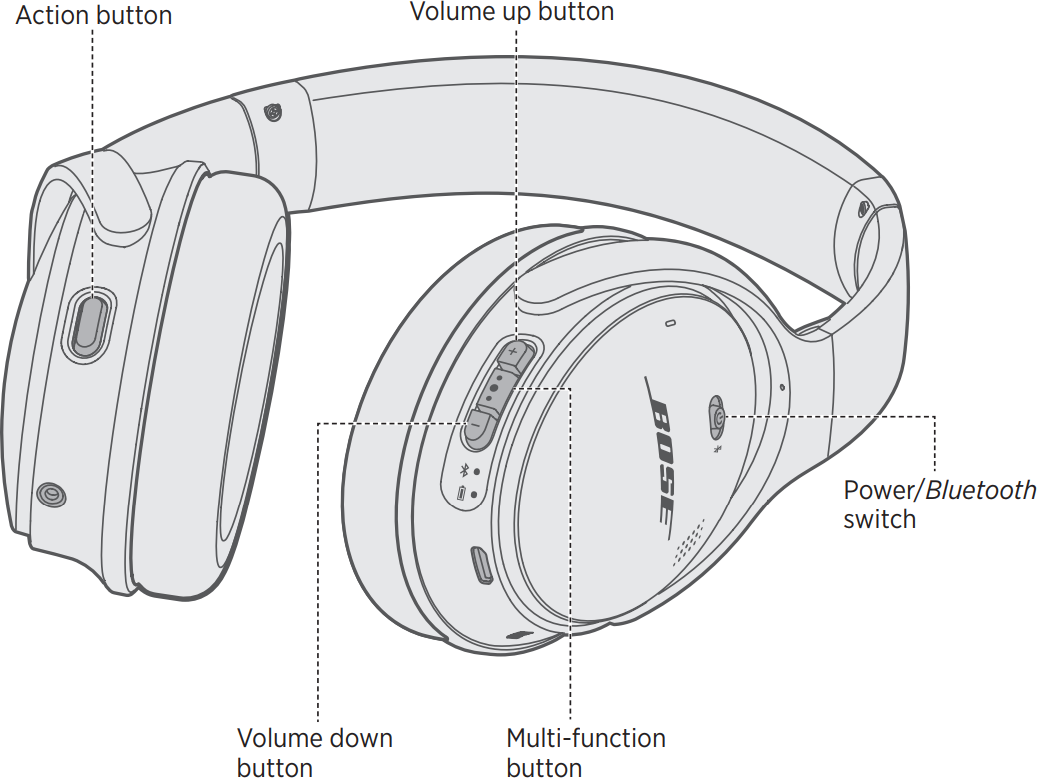
The current Bose QuietComfort Headphones usually have a Power/Bluetooth switch on the right earcup. This switch often springs back after you move it.
To turn off Bose QuietComfort headphones:
- Locate the Power/Bluetooth switch.
- Slide it toward the Bluetooth symbol or power mark, depending on the label.
- Hold it briefly for about one second.
- Release the switch.
- Listen for the shutdown sound.
The exact symbol can vary by production year and region. If the headphones do not respond, hold the switch slightly longer, then try again.
Do not keep moving the switch back and forth. A short, firm movement works better and reduces wear on the control.
How to turn off Bose QC35 and QC35 II headphones
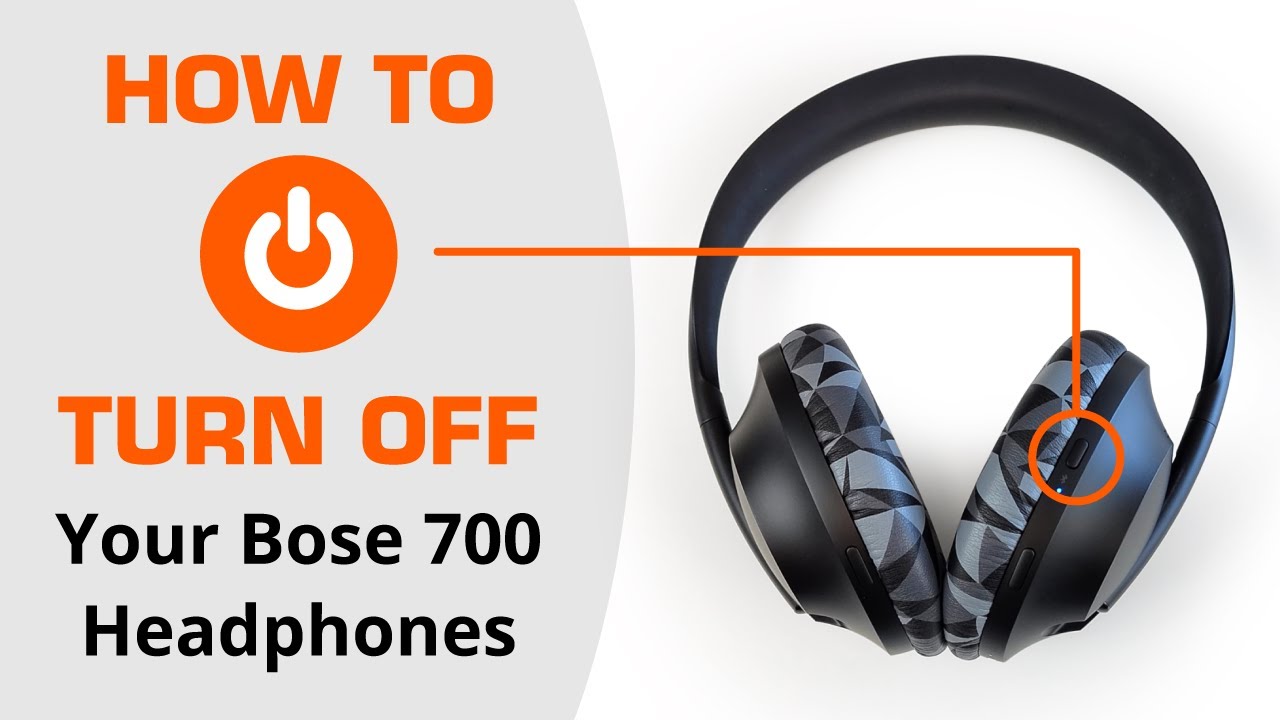
The Bose QC35 and QC35 II use a physical power switch on the right earcup. This control is easy to miss because it is small and sits near the Bluetooth button.
Follow these steps:
- Find the power switch on the right earcup.
- Slide it toward the front of the headphones.
- Hold it for about one second.
- Release the switch when you hear the power-down tone.
- Confirm that the indicator light goes dark.
The QC35 II does not turn off by pressing the volume buttons or the Bluetooth button. If you only disconnect Bluetooth, the headphones may remain powered on and continue using battery.
When learning how to turn off Bose QC headphones, remember that disconnecting from a phone is not the same as powering down the headset.
How to turn off Bose QC45 headphones
The Bose QC45 has a Power/Bluetooth switch on the right earcup. It works much like the switch on newer QuietComfort models.
To power off your QC45:
- Slide the Power/Bluetooth switch toward the Bluetooth icon.
- Hold it for around one second.
- Let go after the headphones play the power-off sound.
- Place the headphones in their case or fold them for storage.
The QC45 may stay connected for a short time if you only pause your music. Pausing audio does not shut down the headphones. You must use the power switch to complete the process.
If the headphones seem frozen, connect them to a charger for a few minutes and try the switch again. This simple step can help when a very low battery causes delayed responses.

How to turn off Bose QuietComfort Ultra headphones
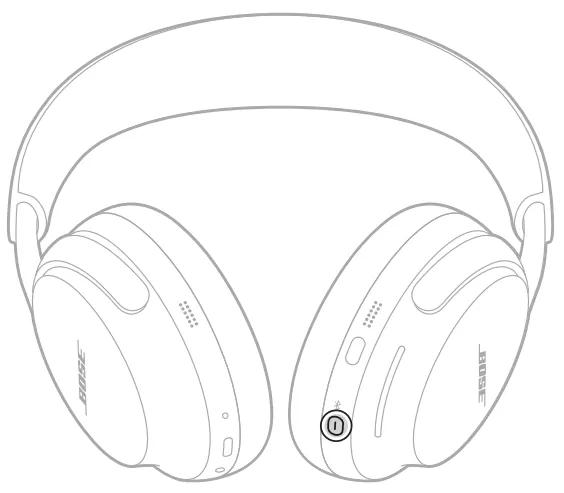
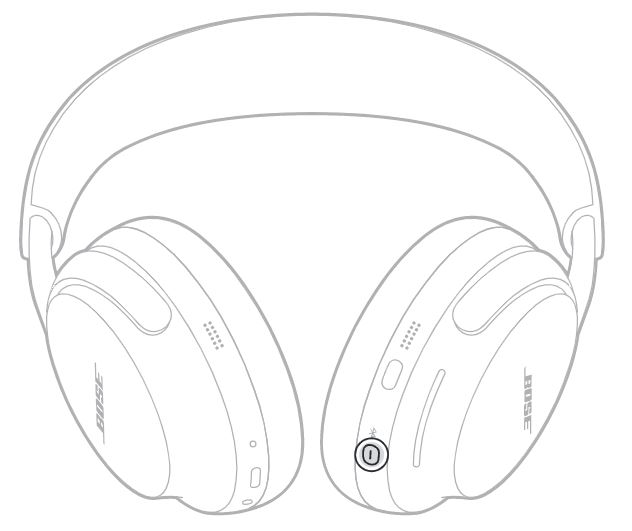
The Bose QuietComfort Ultra Headphones use a combined Bluetooth and power button. The button is on the right earcup.
Here is how to turn off Bose QC headphones in the Ultra range:
- Press and hold the Bluetooth/Power button.
- Keep holding it until you hear the power-off tone.
- Release the button.
- Check that the status light is no longer active.
A quick press may perform another function, such as starting Bluetooth pairing or checking the connection. For this reason, use a longer press when you want to shut down the QuietComfort Ultra.
The Ultra model may also enter a low-power state when you stop using it. However, manual shutdown is still the best choice before storing it in a bag or leaving it unused overnight.
How to turn off Bose Noise Cancelling Headphones 700
The Bose Noise Cancelling Headphones 700 use a physical power button on the right earcup.
To turn them off:
- Press and hold the power button.
- Continue holding it until the voice prompt confirms that the headphones are powering down.
- Release the button.
- Wait for the lights to turn off.
The Bose Music app can also help you check the connection and battery level. However, the physical power button remains the fastest way to shut down the headphones.
Do not confuse the power button with the Action button. The Action button controls noise cancellation and other assigned features. It does not normally power off the headphones.

What if Bose QC headphones do not turn off?
Sometimes Bose QC headphones appear to stay on after you press the power control. This issue may come from a low battery, a software glitch, or a button that did not register the command.
Try these solutions in order:
- Press and hold the power control for one full second.
- Move away from your phone and other Bluetooth devices.
- Plug the headphones into a charger.
- Wait five minutes, then try the power control again.
- Restart your phone and open the Bose app.
- Check for a firmware update.
- Reset the headphones if normal shutdown still fails.
A reset should be a later step, not the first one. Resetting can clear stored connections and require you to pair the headphones again.
If the control feels loose, sticks, or does not click normally, the problem may be physical. In that case, contact Bose support or an authorized repair center instead of forcing the switch.
How to turn off Bose QC headphones without the buttons
The Bose app does not always provide a direct virtual power button. In most cases, you must use the physical control on the headphones.
You can still reduce battery use by doing the following:
• Turn off Bluetooth on your phone.
• Disconnect the headphones from the Bose app.
• Put the headphones into their case or a safe storage place.
• Allow the headphones to enter their automatic standby mode.
These steps may stop the connection, but they do not always fully power off the headphones. If you need to know how to turn off Bose QC headphones completely, use the physical power button or switch whenever possible.

How to use auto-off and standby settings
Many Bose headphones include an automatic power or standby feature. This setting is designed to save battery when the headphones are not in use.
Depending on your model, you may find the setting in the Bose app under device settings. Look for options such as:
• Auto-off timer
• Standby timer
• Power settings
• Sleep timer
The available choices can differ by model and firmware version. Some headphones may not show the same options in the Bose Music app or Bose Connect app.
Automatic shutdown is useful when you often forget how to turn off Bose QC headphones after work, travel, or study. Still, it should not replace manual shutdown before long-term storage.
Bose Connect app versus Bose Music app
Older Bose QC models, such as some QC35 versions, commonly use the Bose Connect app. Newer products, including many QuietComfort and QuietComfort Ultra models, use the Bose Music app.
The app can help you:
• View battery information
• Manage Bluetooth connections
• Change noise cancellation settings
• Install firmware updates
• Adjust auto-off or standby preferences when supported
The app does not change the basic power-button steps. If you are unsure which app to use, check the product name shown in your phone’s Bluetooth menu or the model label inside the headband.
Keeping the app and headphone firmware current may also improve button response and connection stability. Bose product manuals remain the best reference when your model uses an unusual control layout.
Why turning off Bose QC headphones matters
Powering down your headphones after each use has several benefits. The most obvious one is longer battery life, especially during travel.
Manual shutdown can also help prevent:
• Unwanted Bluetooth connections
• Audio playing from a nearby device
• Battery drain inside a backpack
• Heat buildup while charging or storing
• Confusion when switching between phones, tablets, and laptops
A pair of headphones that stays on can act like a small lamp left running all night. It may not use much power at one moment, but the loss adds up over time.
From practical testing, the most common mistake is putting the headphones away after pausing music. Pause stops sound, but it does not always stop power use. Make the power control part of your routine, just like locking your front door.
Common mistakes to avoid
Correctly learning how to turn off Bose QC headphones also means knowing what not to do. Small mistakes can cause unnecessary battery drain or pairing problems.
Avoid these habits:
• Do not assume that pausing music powers off the headphones.
• Do not rely only on turning off your phone’s Bluetooth.
• Do not press the Action button when you mean to use the power control.
• Do not force a stiff switch.
• Do not store wet headphones in a closed case.
• Do not leave the headphones charging in extreme heat.
A clean, dry power control is more reliable. If you use your headphones during exercise or hot weather, wipe away moisture before placing them in storage.
How to reset Bose QC headphones
A reset can help when the headphones will not shut down, will not connect, or respond slowly. The reset method differs by model, so use the instructions for your exact product.
A safe general approach is:
- Turn off the headphones if possible.
- Disconnect the charging cable.
- Remove the headphones from your phone’s Bluetooth settings.
- Restart the headphones.
- Pair them again through the Bose app.
Some Bose models use a specific button combination for a full reset. Because the steps can change between QC35, QC45, QuietComfort, and Ultra models, check the official manual for your product before using a button combination.
Resetting should not be necessary every time you want to know how to turn off Bose QC headphones. Use it only for persistent problems.
Battery and storage tips
Good storage habits can extend the useful life of your Bose headphones. Lithium-ion batteries perform best when they are not exposed to extreme heat, deep discharge, or constant stress.
Use these simple habits:
• Power off the headphones before placing them in a bag.
• Keep the battery above zero when possible.
• Store them in a cool, dry location.
• Use the protective case during travel.
• Avoid leaving them on a hot car seat.
• Charge with a suitable, undamaged cable.
You do not need to drain the battery fully before charging. Modern lithium-ion batteries do not require the old “full discharge” routine used by some older battery types.
If your headphones lose power much faster than before, check firmware, Bluetooth connections, and battery age. Batteries naturally lose capacity over time, and a software setting cannot reverse normal battery wear.
How to check whether Bose QC headphones are off
The easiest sign is the power-down tone or voice prompt. You can also check the status light and your phone’s Bluetooth menu.
Use this quick check:
- Turn off the headphones.
- Wait about 10 seconds.
- Open your phone’s Bluetooth settings.
- Look for the Bose device.
- Confirm that it shows as disconnected.
A phone may keep the Bose name in its saved-device list even when the headphones are off. That does not mean the headphones are still powered on.
The status light may vary by model, so treat the sound and the Bluetooth connection as stronger clues than the light alone.
Frequently Asked Questions
How do I turn off Bose QC headphones?
Press and hold the power button, or slide the Power/Bluetooth switch for about one second. Release it after you hear the shutdown tone or voice prompt.
Why will my Bose QC headphones not turn off?
The battery may be too low, the control may not have registered, or the headphones may have a temporary software issue. Charge them briefly, then try the power control again.
Does pausing music turn off Bose QC headphones?
No. Pausing music usually stops playback but does not fully power off the headphones. Use the physical power button or switch to shut them down.
Can I turn off Bose QC headphones from the Bose app?
The app may offer standby or auto-off settings, but it does not always provide a direct power-off command. Manual shutdown through the headphone control is the most reliable method.
How do I turn off Bose QC45 headphones?
Slide the Power/Bluetooth switch toward the Bluetooth symbol and hold it briefly. Release the switch when you hear the power-off sound.
How do I turn off Bose QuietComfort Ultra headphones?
Press and hold the Bluetooth/Power button on the right earcup until the headphones announce that they are powering off. Then release the button.
Will turning off Bluetooth power down my Bose headphones?
No. Turning off Bluetooth on your phone only stops or changes the wireless connection. The headphones may remain powered on until you shut them down directly.
Should I turn off Bose QC headphones before charging them?
You can charge many Bose headphones while they are on, but powering them off first is a good habit. It reduces active power use and makes the charging process more predictable.
Conclusion
The simplest way to turn off Bose QC headphones is to use the power control on the right earcup. QC35 and QC45 models use a power switch, while newer QuietComfort and QuietComfort Ultra headphones may use a Power/Bluetooth switch or combined button.
Remember that pausing music and disconnecting Bluetooth are not the same as powering off. Use the shutdown tone, status light, and Bluetooth menu to confirm the headphones are no longer active. Save this guide for your exact Bose model, and explore the Bose app settings to make auto-off work better for your daily routine.
