

Use your phone’s tracking app, retrace your steps, and search quiet, hidden places first.
Learning how to find lost earbuds is easier when you use a calm, step-by-step plan. Most lost earbuds are not far away. They are often under furniture, inside clothing, in a bag, or near the last place you removed them.
This guide explains how tracking apps, Bluetooth, sound alerts, visual searches, and smart habits can help. It also covers what to do when one earbud is missing, the case is lost, or the battery has died.
Start with the last place you used your earbuds
The fastest way to find lost earbuds is to pause and rebuild your movements. Do not search the whole house at once. Start with the last place where you clearly remember wearing, charging, or touching them.
Think of your day as a trail of small stops. Ask yourself:
• Where did you take the earbuds out?
• Did you place them on a desk, table, bed, or kitchen counter?
• Did you put them in a pocket or bag?
• Did you remove them while driving, working out, or changing clothes?
• Did you carry the charging case to another room?
Walk through these places in the same order you visited them. Look at eye level first, then search the floor. A small earbud can blend into carpet, bedding, wood floors, and dark clothing.
In my own searches, I have often found that rushing makes the problem worse. I once looked for a small wireless earbud for nearly 20 minutes, only to find it beside a laptop charger. It was in plain sight, but the black plastic matched the desk.
Use the official tracking app
Most modern earbuds work with a tracking service. The right app depends on your phone and earbud brand. These services may show a last known location, play a sound, or display whether the earbuds are nearby.
Apple AirPods
If you use AirPods with an iPhone, open the Find My app and select the earbuds under Devices. Depending on the model and battery level, you may be able to:
• View the current or last known location
• Play a sound
• Find one earbud at a time
• Use a nearby finding feature with distance and direction guidance
Some newer AirPods support more precise nearby tracking. Older models may show only the last place where they connected to your Apple device.
Google Pixel Buds and Android earbuds
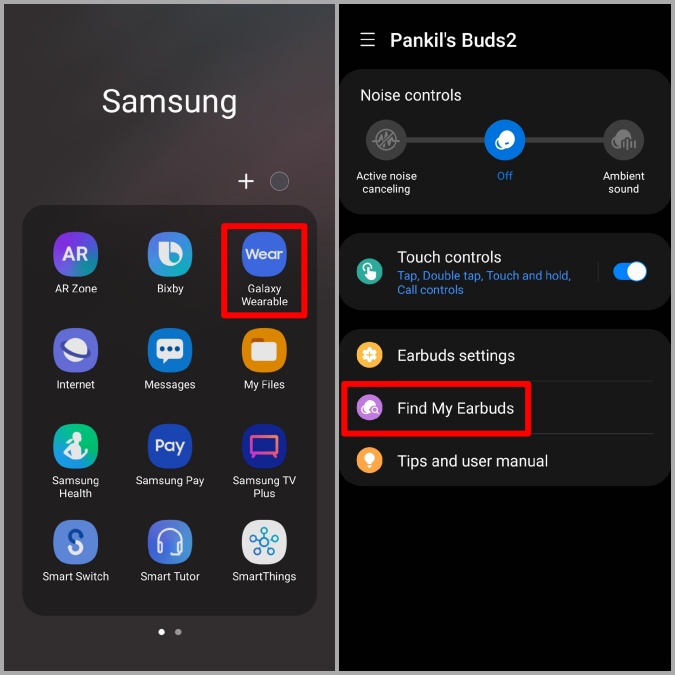
Android users may find compatible earbuds through Find My Device or the brand’s own app. Pixel Buds can connect with Google’s device-finding tools, while other brands may use apps such as Galaxy Wearable, SmartThings Find, or a manufacturer-specific service.
Open the matching app and check:
• The last recorded location
• The last connection time
• Battery status
• Whether the left and right earbuds are listed separately
• Whether the case has its own location
The app cannot always locate every earbud. Compatibility varies by model, phone, software version, and battery life.
Other wireless earbuds
Brands such as Bose, Jabra, Sony, and JBL may offer a “find” feature inside their companion apps. Search the app menu for terms such as Find My Earbuds, Find Device, Locate, or Play Sound.
If your earbuds do not have a tracking feature, Bluetooth scanning can still help. It will not provide a map, but it may show whether the earbuds are close enough to connect.
Check the last known location carefully
A tracking map is a useful clue, not always an exact answer. It may show where the earbuds last connected to your phone. That could be your home, office, gym, car, or a nearby street.
Go to the location shown on the map and search slowly. If the location is a public place, contact the business or lost-and-found desk. Do not enter private property or unsafe areas just to recover a small device.
When you reach the location:
Open the tracking app again.
Refresh the location.
Turn on Bluetooth.
Walk slowly around the area.
Check whether the earbuds reconnect.
Try the sound alert if it is available.
A last known location does not prove that the earbuds are still there. Someone may have moved them, the location may be delayed, or the earbuds may have lost power.
Play a sound and follow the signal
Playing a sound is one of the best methods for how to find lost earbuds indoors. It works well when the earbud is under a couch, behind a bed, or inside a jacket pocket.
Before starting, make the room quiet. Turn off the television, pause music, and ask other people to stop talking. Then play the sound through the tracking app.
Search in a pattern:
• Stand still and listen for a few seconds.
• Move around the room in small steps.
• Check under furniture and cushions.
• Look inside bags, pockets, and blankets.
• Repeat the sound from different areas.
Some earbuds produce a high, soft tone. You may not hear it through walls, traffic, running water, or loud fans. A nearly empty battery may also prevent the sound from playing.
The charging case may not make a sound even when the earbuds do. If you lost the entire set, check whether your model supports case tracking or case alerts.

Find earbuds with Bluetooth
Bluetooth can help you tell whether your earbuds are nearby. It is most useful when the earbuds still have battery power and are not sealed inside the charging case.
Open your phone’s Bluetooth settings or use a trusted Bluetooth scanner. Look for the earbud name. Then move around the room and watch for changes in connection or signal strength.
A stronger signal usually means you are closer, but Bluetooth is not a precise measuring tool. Walls, furniture, metal objects, and other wireless devices can affect the signal.
Try this method:
Stay in one room.
Walk toward likely hiding places.
Wait several seconds after each move.
Watch for the earbuds to connect.
Play audio at a low volume once connected.
Stop and listen before moving again.
Never download an unknown tracking app that asks for unnecessary access to your contacts, messages, or account passwords. Use your phone’s built-in tools or a well-known app from the earbud maker.

Search the places people often miss
Small earbuds tend to fall into narrow gaps. A normal visual search may miss them because they can roll, bounce, or hide under soft items.
Search these areas closely:
• Under sofas, chairs, beds, and desks
• Between couch cushions
• Inside blankets, pillowcases, and sheets
• In coat, jeans, and workout clothing pockets
• Inside backpacks, purses, gym bags, and laptop cases
• Around charging cables and power outlets
• Under car seats and floor mats
• Near sinks, nightstands, and bathroom counters
• Beside pet beds or children’s play areas
• Inside laundry baskets and folded clothes
Use a flashlight held close to the floor. Shine it from several angles because the plastic may reflect light. Move soft items one at a time instead of shaking them, which can make the earbud fall farther away.
If you use a vacuum, cover the nozzle with a thin sock or piece of fabric. Secure it with a rubber band. This lets you collect the earbud safely without pulling it into the vacuum.
Check your car, workplace, and outdoor route
If you still cannot find lost earbuds at home, expand the search to places you visited that day. Start with your car, desk, gym locker, café table, or public transit seat.
For a car search, inspect:
• The space between the seat and center console
• Under the driver and passenger seats
• Door pockets
• Cup holders
• Floor mats
• The area under child safety seats
At work, ask the front desk or cleaning staff. At a gym, check the locker, treadmill, bench, and equipment storage area. At a café or restaurant, contact the business as soon as possible because tables may be cleared quickly.
If you dropped an earbud outdoors, return during daylight. Search slowly along sidewalks, grass, parking spaces, and entry paths. Wear visible clothing and stay aware of traffic.
What to do when one earbud is missing
Finding one lost earbud can be harder than finding the whole set because the charging case may still be in your possession. Start by placing the earbud you have inside the case. This prevents confusion and helps you focus on the missing side.
Then open the tracking app and select the missing left or right earbud. Many services can show or play a sound for each earbud separately.
If both earbuds appear as one location, separate them in the app if that option exists. If the missing earbud is inside the case, it may stop transmitting Bluetooth signals. Search the last place where you opened or removed the case.
Do not assume the missing earbud is with its partner. One may fall out while you walk, while the other stays in your ear or case.
What to do if the earbuds are offline or dead
Tracking becomes limited when the battery is empty. In that situation, an app may show only the last location and time the earbuds connected.
Use the last known location as your starting point. Then retrace your route and search physical spaces carefully. Check pockets and bags before washing clothes or sending them through a dryer.
If the earbuds are offline because they are inside the closed case, open the case near your phone. Some models reconnect within seconds. Others need the earbuds removed from the case before they appear in Bluetooth settings.
A dead battery cannot be repaired through an app. Your best tools are memory, a careful search pattern, and help from people who were with you.
Avoid common mistakes
Many people make the search harder without realizing it. Avoid these mistakes:
• Searching randomly from room to room
• Looking only at eye level
• Assuming the map pin is exact
• Forgetting the charging case
• Playing loud music while trying to hear a tracking sound
• Washing clothes before checking the pockets
• Using a vacuum without protecting the earbud
• Waiting several days before contacting a lost-and-found desk
• Sharing account passwords with a stranger who claims to have found the earbuds
A calm search is more effective than a fast one. Treat the process like finding a tiny lost coin. Divide the area into sections and finish one section before moving to the next.
Improve your chances of finding earbuds next time
The best solution for how to find lost earbuds is prevention. Small habits can make future searches much shorter.
Try these simple steps:
• Keep the charging case in one fixed place.
• Turn on the official device-finding feature now.
• Add a small bright sticker to the case.
• Use a case with a clip when traveling.
• Avoid placing earbuds on beds, sofas, or clothing.
• Put them in the case as soon as you remove them.
• Check battery levels before leaving home.
• Add a contact method to the case, without sharing sensitive personal data.
• Use a bright silicone case that stands out from the floor.
I recommend choosing one “earbud home,” such as a desk tray or entryway shelf. This works like a parking spot for your car. The habit feels small, but it prevents many lost-earbud searches.
Are tracking tags worth using?
A small Bluetooth tracker can help you locate the charging case if the case has room for one. Some protective cases include a tracker pocket or built-in holder.
A tracker is useful for finding the case, but it may not locate each earbud inside it. It also adds weight, cost, and another battery to maintain. Check the tracker’s network, privacy settings, range, and compatibility before buying one.
For many people, an official tracking app is enough. A separate tracker makes more sense for frequent travelers, commuters, or anyone who often loses small items.
Safety and privacy tips
Use care when searching in public places. Do not confront someone because a map shows your earbuds near their home or car. Location data can be delayed or inaccurate.
Protect your accounts as well. Use strong passwords and two-factor authentication for Apple, Google, Samsung, or other device accounts. Do not give another person your login code to help recover a missing device.
If you believe the earbuds were stolen, save the tracking information and contact the location manager or local authorities. Avoid meeting a stranger alone to collect them.
Frequently Asked Questions About How to Find Lost Earbuds
Can I find lost earbuds if they are turned off?
You may see their last known location, but you usually cannot track them live while they are off or out of battery. Retrace your route and search the physical area shown in the tracking app.
How do I find lost earbuds without a charging case?
Open the official tracking app and select the individual left or right earbud. If it has battery power and is outside the case, you may be able to view its location or play a sound.
Can Bluetooth locate earbuds accurately?
Bluetooth can show that earbuds are nearby, but it does not provide a precise map. Walls, furniture, battery level, and interference can affect the connection.
Why will my lost earbuds not play a sound?
The earbuds may be offline, inside the case, out of battery, or outside the supported connection range. Some models also limit sound alerts when only the case is missing.
Can I find earbuds that were reset or paired with another phone?
A reset may remove the earbuds from your account or tracking service. You can still search the last physical location, but live tracking may no longer work.
How far away can I find my lost earbuds?
The distance depends on the model, phone, battery level, and tracking network. Bluetooth usually works over a limited nearby range, while some tracking networks can report a location through other compatible devices.
Are lost earbuds covered by warranty?
Most warranties cover manufacturing defects, not accidental loss. Check the specific warranty terms and ask the manufacturer whether a single replacement earbud is available.
Conclusion
The most reliable way to find lost earbuds is to combine technology with a careful physical search. Check the official tracking app, use a sound alert, test Bluetooth, revisit the last known location, and inspect pockets, bags, furniture, and cars.
Do not panic if the earbuds are offline. A dead battery limits tracking, but a slow search often succeeds. Turn on device-finding tools today, choose a regular storage spot, and use a bright case to make future searches easier. If these tips helped, share your own recovery method or explore more practical guides for protecting your everyday devices.
