How To Find Lost Headphones: Quick Search Guide
If you lost your headphones in the United States, start with the last place you used them, then check your phone’s tracking app. Apple AirPods may appear in Find My, Android-compatible headphones may appear in Google Find My Device, and some brands use their own apps. If tracking is not available, use Bluetooth, retrace your steps, and search common hiding spots such as couch gaps, car seats, bedding, bags, and jacket pockets.
Introduction
Losing headphones is frustrating, especially when they are small, wireless, and easy to hide under a seat or blanket. The best search method depends on the brand, battery level, phone used for pairing, and whether the earbuds are in their charging case.
This guide covers common headphones used in the United States, including Apple AirPods, Beats, Samsung Galaxy Buds, Google Pixel Buds, Bose, Sony, Jabra, JBL, and Bluetooth headphones with no tracking feature. It also explains what to do when only one earbud is missing, the case is lost, or the headphones are offline.
Start With the Fastest Search Method
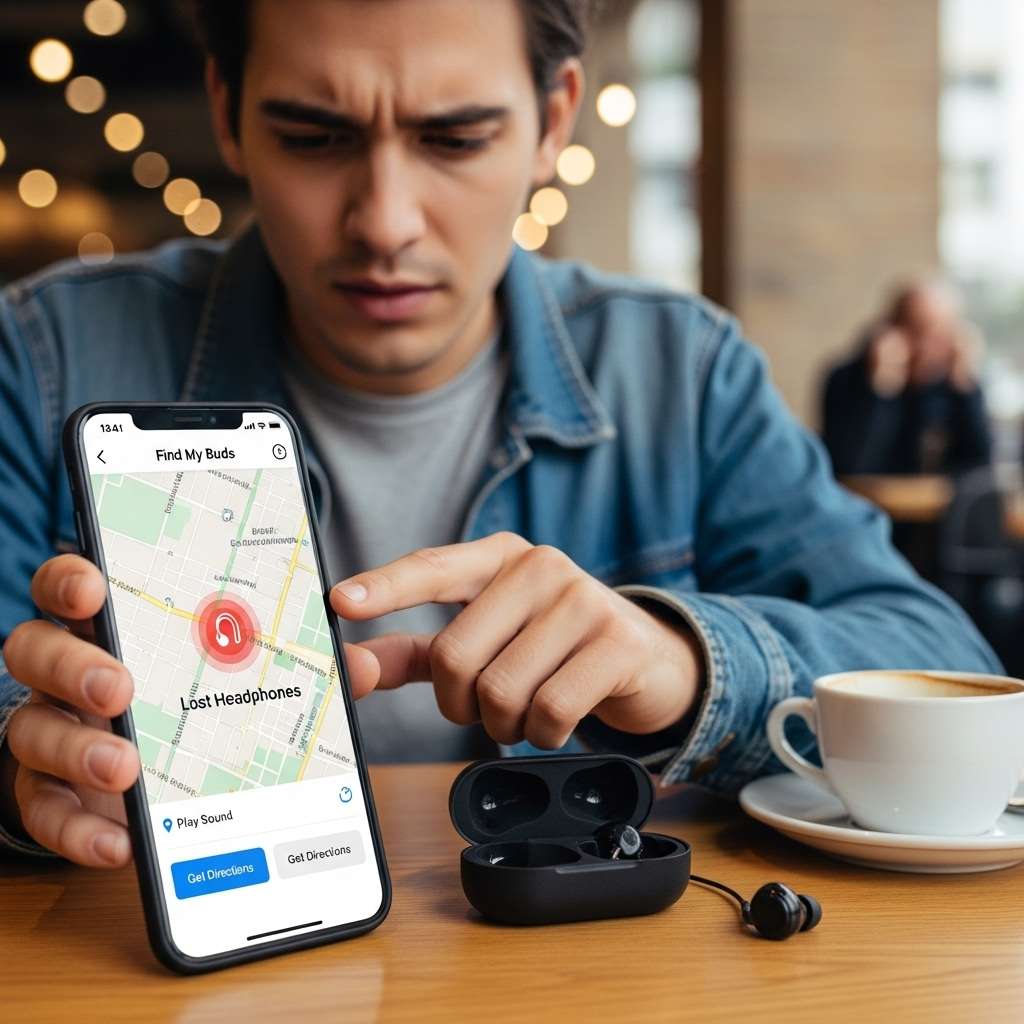
Use the method that matches your headphones. Do not spend time looking for a map location if the headphones do not support location tracking.


| Headphone type | Best first step | Main limit |
|---|---|---|
| Apple AirPods | Open the Find My app | Some features depend on the AirPods model, battery, and Find My setup |
| Beats with Find My support | Check Find My on iPhone or iPad | Support varies by model |
| Samsung Galaxy Buds | Open Galaxy Wearable or SmartThings Find | Samsung account and supported model may be required |
| Google Pixel Buds | Check the Pixel Buds settings or Google device tools | Features vary by model and setup |
| Tile-enabled headphones | Open the Tile app | The headphones must support Tile or have a Tile tracker attached |
| Sony, Bose, Jabra, JBL, or similar Bluetooth headphones | Check the brand app and Bluetooth connection | Many models show connection status but not a map location |
| Wired headphones | Retrace your steps and search manually | They usually cannot be tracked electronically |
The key difference is between location tracking and Bluetooth detection. Location tracking may show a recent or current position. Bluetooth detection only shows that your phone can connect to the headphones nearby.
How to Find AirPods With Apple Find My
Apple AirPods are easiest to find through the Find My app when they were added to your Apple Account before they went missing.
1. Open Find My
On an iPhone or iPad:
- Open Find My.
- Tap Devices.
- Select your AirPods.
- Check the map for the current or last known location.
You can also use Find My on a Mac or sign in to Apple’s Find Devices service through iCloud.
The map may show the AirPods at their last known location rather than their current location. This can happen when the battery is dead, the earbuds are inside a closed case, or the headphones are out of range.
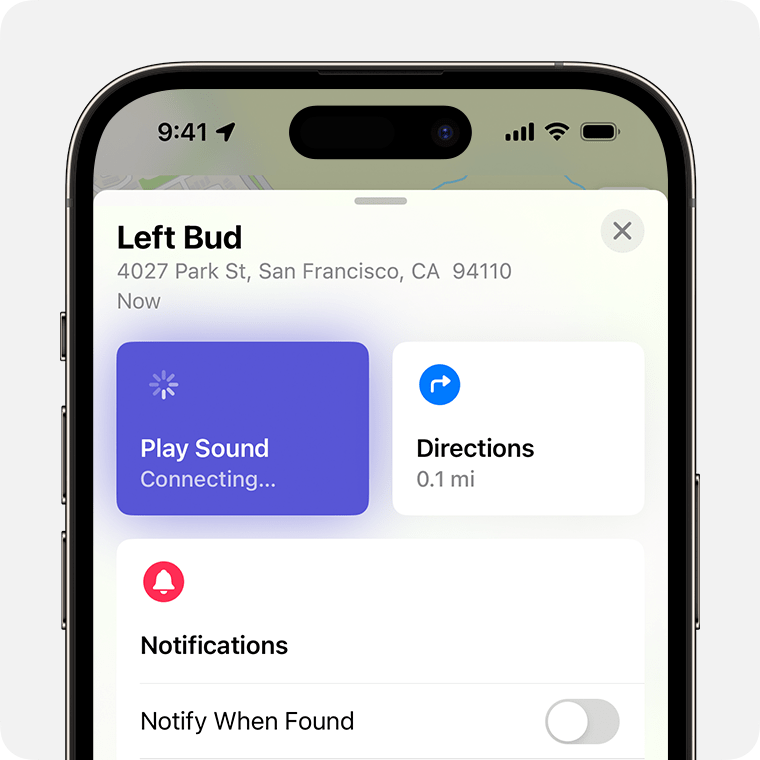
2. Play a sound
If the AirPods are online and able to connect, tap Play Sound. Follow the sound instead of relying only on the map.
A sound may not play when:
- The AirPods are out of battery.
- The earbuds are inside a closed charging case.
- The AirPods are too far away.
- The phone cannot connect to them.
- Only one earbud is online.
- The model does not support the same Find My features as newer models.
Keep the room quiet. Pause between sounds and listen near floors, furniture, bags, and car seats.
3. Look for each earbud separately
Many AirPods models let you see or play a sound for the left and right earbuds separately. If you lost one AirPod, place the one you still have in its case. Then refresh Find My and search for the missing side.
This step matters because the two earbuds may be in different places. A map marker can also reflect the location of only one earbud.


4. Mark AirPods as lost when appropriate
If the AirPods support the feature, use Mark as Lost in Find My. Add contact information if Apple provides the option.
This does not guarantee recovery. It may help someone contact you if they find the AirPods, but a person who finds them may not return them.
How to Find Lost Headphones on Android
Android users have several possible tools, but support differs by brand and model.
Check Google Find My Device
Some headphones and earbuds can appear in Google’s device-finding system. Open the Find My Device app or visit Google’s device-finding website while signed in to the Google Account used with the headphones.
If your headphones appear:
- Select them from the device list.
- Review the location or last known location.
- Use the play-sound option if available.
- Go to the location only if it is safe and permitted.
- Refresh the result when you are nearby.
Do not assume every Bluetooth headset will appear. Many regular Bluetooth headphones can pair with an Android phone but do not support Google’s location network.
Check the brand’s app
The official app may offer better help than Android’s general settings. Examples include:
- Samsung Galaxy Wearable and SmartThings Find for supported Galaxy Buds.
- Google Pixel Buds settings for supported Pixel Buds.
- Tile for Tile-enabled earbuds or headphones.
- The manufacturer’s app for connection status, battery status, or last use.
Open the app and look for terms such as:
- Find my earbuds
- Find device
- Locate
- Ring
- Last connected
- Offline location
The exact menu name changes by app and software version.
Use Bluetooth as a short-range detector
If the headphones do not show on a map, turn on Bluetooth and walk slowly through the places where you may have lost them.
A successful connection is a strong clue that the headphones are close. Bluetooth range is often around 30 feet indoors under good conditions, but walls, furniture, metal, and other wireless signals can reduce it. A connection does not give you an exact distance or direction.
Walk in a grid. Stop at each room. Check whether the headphones reconnect. If they do, search that room before moving on.

Use the Last Connected Location Carefully
The last connected location is a clue, not proof. Your phone may record where it last communicated with the headphones, but that does not always show where you left them.


For example, you may have:
- Taken the headphones out of the case at home.
- Put them in a bag.
- Driven to work.
- Removed them in a parking lot.
- Returned home without them.
The app may show home, work, the car, or another place where the phone last connected. Use the location to build a timeline.
Write down the last three places where you remember using the headphones. Then ask:
- When did you last hear audio?
- Did you remove the headphones before entering a car, store, gym, or office?
- Did you use a different jacket or bag?
- Could someone have moved them?
- Did you charge them after last using them?
This simple timeline often works better than searching randomly.

Search the Most Likely Hiding Places
Small earbuds tend to fall into gaps and soft surfaces. Search in a fixed order so you do not check the same place again and again.
At home
Check:
- Couch and recliner gaps
- Under beds and dressers
- Blankets, sheets, and pillows
- Laundry baskets and clothing pockets
- Bathroom counters and cabinets
- Kitchen counters and tables
- Backpacks, purses, and gym bags
- Near charging cables and power outlets
- Between the wall and furniture
- Under rugs or near floor vents
Use a flashlight held close to the floor. A low beam can make a small earbud cast a useful shadow.
In a car
Check:
- Between the seat and center console
- Under the driver’s and passenger’s seats
- Door pockets
- Cup holders
- Floor mats
- Seat-back pockets
- Under child safety seats
- The trunk or cargo area
Move the seats forward and backward. Earbuds can slide along the seat rail and remain hidden from normal view.
At work, school, or a gym
Ask staff about lost-and-found items. Check:
- Lockers
- Desks
- Meeting rooms
- Break rooms
- Treadmills and exercise machines
- Benches
- Coat rooms
- Shared charging stations
If the tracker shows a location inside a private building, do not enter restricted areas or confront someone. Ask the building manager or security staff for help.

What to Do When You Lost One Earbud or the Charging Case
A single missing earbud needs a different search plan from a missing pair.
If one earbud is missing
Place the earbud you still have in the charging case. Then reopen the tracking app. This may isolate the missing earbud or make its status easier to read.


Search the places where you removed or adjusted the earbuds. One earbud often falls when you:
- Remove a hat or hood
- Take off a mask
- Change clothes
- Lie down
- Put on a jacket
- Remove a helmet
- Exercise or run
Check clothing seams and laundry before washing anything.
If the charging case is missing
The case may be harder to track than the earbuds. Some newer products can report the case location, but many cannot.
Look near:
- Your normal charging area
- A nightstand
- A desk
- A car cup holder
- A coat pocket
- A bag’s small inner pocket
- The place where you usually remove the earbuds
If the earbuds are still with you but the case is missing, the earbuds may not help you locate the case unless the product supports separate case tracking.
If the earbuds are inside the case
A closed case can block sound and wireless communication on some models. The app may show only an earlier location. Search the case’s likely storage places first, then retrace your route.

What to Do When Tracking Does Not Work
Tracking can fail for normal reasons. Use the symptom to choose the next step.
| What you see | Likely reason | Next action |
|---|---|---|
| No location appears | The headphones were never added to a tracking service | Use the last-use timeline and manual search |
| Last location is old | Battery is dead or the headphones are offline | Search that location and nearby route |
| Play sound fails | The headphones cannot connect or are inside the case | Move closer and check each earbud |
| Only one earbud appears | The earbuds are separated | Search for the missing side |
| The app shows “offline” | No current network or Bluetooth link | Use the last known location |
| Bluetooth will not connect | The headphones are too far away, off, or out of battery | Search close range and check the case |
| The map points to a public place | The headphones may have been left or moved | Contact the business or lost-and-found |
Restarting your phone may fix an app problem, but it will not create a location record that was never saved. Avoid repeatedly pairing and unpairing the headphones while searching. That can make the process less clear and may remove useful connection information.

Use a Bluetooth Scanner With Care
Bluetooth scanner apps can sometimes show nearby Bluetooth signals. They may help confirm that a device is close, but they do not work like a precise radar system.
A scanner may show:
- Device name
- Signal strength
- Bluetooth address
- Approximate change in signal as you move
Signal strength can change because of walls, bodies, furniture, and radio interference. Do not treat it as an exact distance. Move slowly and compare readings in the same room.
Download apps only from reputable app stores. Review permissions before installing. A scanner does not give you the right to track another person’s device or enter a private location.
Prevent Losing Your Headphones Again
The most useful prevention step is to turn on tracking before the headphones disappear.
Set up tracking now
- Add supported headphones to Apple Find My, Google Find My Device, SmartThings Find, or the brand’s app.
- Keep the companion app updated.
- Turn on Bluetooth and location permissions required by the app.
- Confirm that the headphones appear in the device list.
- Learn how to play a sound before you need it.
- Keep the charging case in one regular place.


Some location features need an account, a compatible model, a software update, or an active network connection. Check the manufacturer’s support page for your exact model.
Add a physical tracker when suitable
A small Bluetooth tracker attached to a headphone case can help if the case has room for it. Choose a tracker that works with your phone and understand its limits.
A tracker may report a recent location, not a live position. It also needs battery power and may depend on nearby phones or your own Bluetooth connection. Do not attach a tracker where it blocks the case lid, charging port, vents, or wireless charging area.
Build a simple storage habit
Use one place at home for your headphones. When you remove them outside the home, put them in the case at once. Avoid leaving loose earbuds on beds, sofas, car seats, or counters.
A fixed habit is often more reliable than an app.

Common Mistakes to Avoid
Do not search only where the map marker appears. The marker may show the last place the headphones connected, not the place where they fell.
Do not assume a dead battery means the headphones are gone. The last known location can still narrow the search.
Do not play loud sound directly against your ear. If you find an earbud, lower the volume before testing it.
Do not use magnets, heat, water, or tools to retrieve an earbud from a narrow space. You could damage the battery, furniture, or device. If an earbud falls into a dangerous or inaccessible area, ask the property owner or a qualified professional for help.
Do not visit a private address because a tracking app shows a location. Contact local authorities or the relevant business if you believe the headphones were stolen. Avoid confrontation.
Key Takeaways
- Check Apple Find My, Google Find My Device, SmartThings Find, or the headphone brand’s app first.
- A map location may be the last known location, not the current location.
- Play a sound only when the headphones are online, charged, and able to connect.
- Search one earbud and the charging case separately.
- Use Bluetooth as a nearby signal, not as an exact locator.
- Search cars, couch gaps, clothing, bags, bedding, and charging areas.
- Set up tracking and use one storage place before the next loss.
FAQs About Finding Lost Headphones
Can I find headphones if they are turned off?
Usually, you cannot get a new live location when headphones are turned off or out of battery. You may still see a last known location if the phone or tracking service saved one earlier.
Can I find lost headphones without an app?
Sometimes. Turn on Bluetooth and walk through likely areas to see whether the headphones reconnect. You can also retrace your route and contact lost-and-found desks. Without an app or tracker, there may be no electronic way to locate them.
Can someone else use my lost Bluetooth headphones?
Many Bluetooth headphones can be reset and paired with another phone. Do not assume that a pairing lock exists. If the headphones contain an account-linked tracking feature, the original owner may still see information about them, depending on the model and its settings.


Why does Find My show an old location?
An old location usually means the headphones are offline, out of range, inside a case, or out of battery. It may also mean the tracking service saved only the last successful connection.
Can I replace just one lost earbud?
Some manufacturers sell replacement earbuds or cases for supported models. Compatibility, pairing steps, and cost vary. Check the manufacturer’s support page for the exact model before buying a replacement.
What should I do if I think my headphones were stolen?
Save the last known location and any purchase or serial-number details. Contact the business, transit agency, school, workplace, or building security where the headphones disappeared. If the location points to a private residence or an active theft, do not confront anyone; contact local law enforcement if appropriate.
Conclusion
To find lost headphones, begin with the tracking service that matches the brand, then use the last connected location to rebuild your route. If the headphones are nearby, Bluetooth or a sound alert can help. If they are offline, focus on a careful search of cars, furniture, clothing, bags, bedding, and charging areas.
After you find them, set up tracking, keep the case in one place, and store each earbud as soon as you remove it. These small steps can turn the next search from a long hunt into a quick check.