

SSD prices can go up when NAND flash supply falls faster than demand. NAND flash is the memory used to store data in an SSD. When manufacturers cut output, data centers buy more drives, or retailers run out of low-cost stock, prices can rise.
For buyers in the United States, the increase may also reflect shipping costs, the value of the U.S. dollar, import duties, and retailer pricing. Prices will not rise equally for every SSD. A 2TB PCIe 4.0 drive may move differently from a 1TB SATA SSD or an enterprise NVMe drive.
The short answer is this: SSD prices are cyclical. Current increases usually result from tighter NAND supply, stronger data-center demand, and the end of aggressive retail discounts.
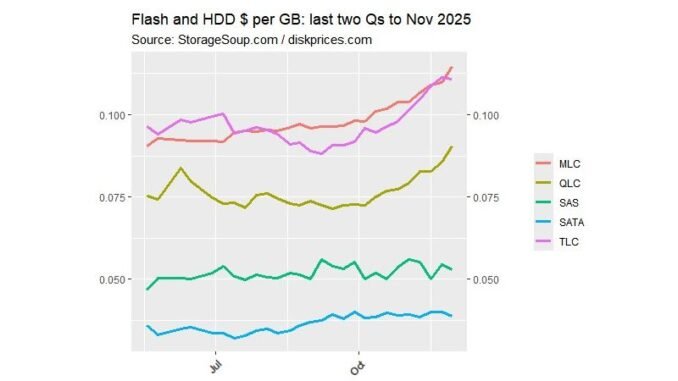
Why SSD prices are going up
The main cause is a change in the balance between NAND supply and demand. SSD makers often reduce production after a period of weak sales. If demand then improves, retailers and computer makers may need to rebuild their stock at higher prices.
Several forces can act at the same time:
- NAND flash manufacturers reduce output.
- Cloud companies buy more enterprise SSDs.
- PC and phone sales recover.
- Retail discounts become smaller.
- New NAND technology takes time to reach full production.
- U.S. import and logistics costs raise the final price.
- Some low-cost models leave the market.
This pattern is normal for the storage industry. NAND flash is a commodity-like part. Many companies make similar memory chips, so prices respond strongly to supply changes.
The basic price cycle
The NAND market often follows a cycle:
- Manufacturers produce more chips than buyers need.
- Excess stock builds up.
- Prices fall.
- Manufacturers cut production.
- Buyers return to the market.
- Supply becomes tighter.
- Prices rise.
- New production or weaker demand starts the cycle again.
This cycle can make SSD prices appear unpredictable. A drive may cost less one month and much more a few months later, even when its performance has not changed.
The U.S. International Trade Commission explains that semiconductor supply chains involve many stages and countries. That structure means a change in manufacturing, shipping, or trade policy can affect products sold in U.S. stores.

NAND flash supply cuts have a direct effect
NAND flash is the largest physical storage component inside most SSDs. When NAND prices rise, SSD makers face higher costs before the drive reaches a retailer.
Manufacturers may cut production when prices become too low. This can help reduce excess inventory. It also means that fewer chips are available when demand returns.
Companies have discussed these market conditions in their public financial reports. For example, Micron’s investor materials and Western Digital’s annual reports describe the effects of memory cycles, inventory levels, and demand changes on their businesses.
A production cut does not always create an immediate price jump. Retailers may still have older stock. Prices often rise in stages:
- Existing cheap stock sells first.
- New stock arrives at a higher wholesale cost.
- Retailers adjust prices.
- Promotional prices become less frequent.
- Customers notice the change during sales events.
This explains why two stores may list the same SSD at very different prices. One store may be selling older inventory. Another may already be paying the new market price.
AI and data centers are increasing demand for enterprise SSDs
Artificial intelligence has increased demand for servers, data centers, and fast storage. AI systems need large data sets and frequent data access. That creates demand for enterprise SSDs, especially high-capacity NVMe drives.
Cloud providers and server companies do not buy storage in the same way as home users. They may purchase thousands of drives at a time. Their orders can affect the supply available to smaller computer makers and retail buyers.
This does not mean every AI system directly raises the price of a consumer SSD. Enterprise and consumer products are not identical. However, they can use related NAND supply and manufacturing capacity.
Demand from data centers can also make manufacturers favor more profitable products. If enterprise SSDs offer better margins, a supplier may allocate more resources to them than to low-cost consumer drives.
The U.S. Department of Energy describes data centers as major electricity and computing users. Storage is one part of that larger infrastructure. The practical effect for shoppers is simple: strong data-center investment can support NAND demand even when consumer PC sales are weak.

PC and laptop demand can change SSD prices
Most new laptops and desktops use SSDs instead of hard disk drives. When PC sales improve, computer makers order more SSDs. When PC sales fall, SSD demand weakens.
The PC market also affects the type of SSD that manufacturers produce. Newer computers are more likely to use:
- M.2 NVMe SSDs
- PCIe 4.0 drives
- PCIe 5.0 drives in some high-end systems
- Higher-capacity storage
Older SATA SSDs may remain affordable because they are mature products. Newer drives can cost more because they may use faster controllers, newer NAND, or better cooling.
The U.S. Bureau of Economic Analysis and U.S. Census Bureau publish data on consumer spending and durable goods. These sources do not set SSD prices, but they help show why hardware demand can change over time.
A recovery in PC sales does not guarantee that every SSD will become more expensive. It can instead create different effects by product type. A popular 1TB laptop SSD may rise first, while a slow 4TB SATA model stays flat.

New NAND technology can raise costs before it lowers them
NAND manufacturers continue to increase storage density. Newer designs can store more data in each chip. Over time, this can lower the cost per gigabyte.
The transition itself can be expensive, though. New production methods may require:
- New manufacturing equipment
- Factory upgrades
- Testing and quality checks
- Lower early production yields
- Changes to controllers and firmware
A new NAND generation may therefore cost more at first. Prices can fall later when production improves and more manufacturers use the same process.
Most current consumer SSDs use some form of 3D NAND. This design stacks memory cells in layers. More layers can increase capacity, but the result still depends on the type of NAND, controller, firmware, and quality controls.
Common NAND types include:
| NAND type | Usual role | Typical trade-off |
|---|---|---|
| TLC | Mainstream consumer SSDs | Good balance of cost, speed, and endurance |
| QLC | Affordable high-capacity SSDs | Lower cost, but often lower sustained write performance |
| Enterprise-grade NAND | Servers and data centers | Higher consistency and endurance, with higher cost |
A price increase in high-end enterprise NAND may not affect all consumer drives at once. It can still influence total factory capacity and market pricing.
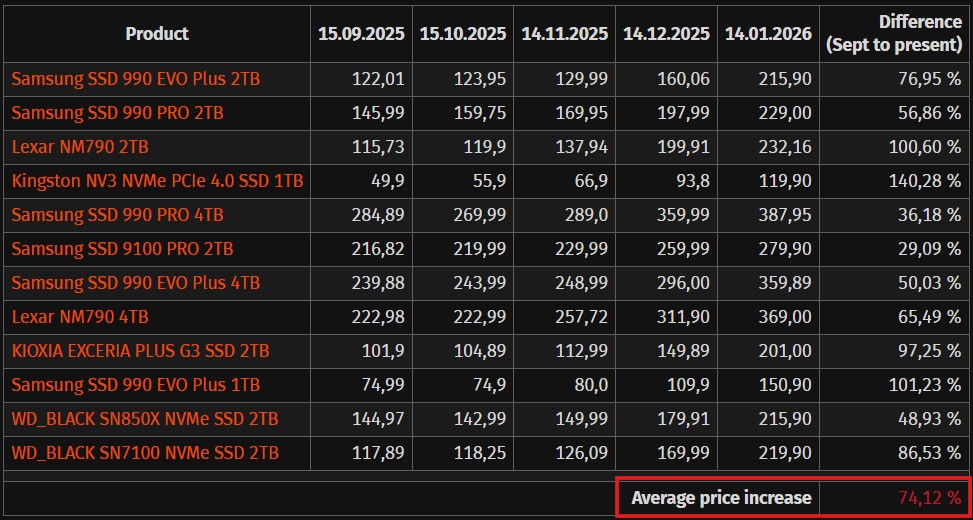
U.S. tariffs, shipping, and the dollar can add to the retail price
NAND supply is global. A drive sold in the United States may involve materials, chips, assembly, packaging, and shipping from several countries.
The final U.S. price can change because of:
- Import duties
- Port and freight costs
- Fuel prices
- Warehouse expenses
- Currency exchange rates
- New trade restrictions
- Supply-chain delays
These costs are not always the main cause of an SSD price increase. NAND market conditions usually have a larger effect. Still, trade and logistics costs can make the U.S. price higher than the factory price.
Tariff treatment can also vary by product classification and country of origin. Buyers should avoid assuming that every SSD faces the same duty. The U.S. Customs and Border Protection trade resources are the appropriate place to check official import rules.
Retailers may also adjust prices when they expect replacement stock to cost more. This is called replacement-cost pricing. A store may raise the price of its current inventory before it has sold every older unit.

Why SSD prices can rise even when demand seems weak
A common question is: “If fewer people are buying computers, why are SSD prices rising?”
The answer is that consumer demand is only one part of the market. Enterprise storage, cloud computing, gaming consoles, phones, and industrial systems also use NAND flash.
Prices can rise when:
- Consumer demand is weak but enterprise demand is strong.
- Manufacturers reduce output more than demand falls.
- Retail inventory becomes unusually low.
- Buyers expect future shortages and order early.
- A low-cost product is discontinued.
- High-capacity drives become more popular.
This is why a headline about weak PC sales does not always predict lower SSD prices. The NAND market is broad, and different buyers compete for related supply.
Prices may also rise because the cheapest models disappear. Suppose a store sells 1TB SSDs at $55, $70, and $85. If the $55 model sells out, the average price shown to shoppers rises even though the other two models did not change.

Which SSDs are most affected by price increases?
Not every SSD category reacts in the same way. Use this table as a general guide, not as a live price forecast.
| SSD category | What can push prices up | What may limit the increase |
|---|---|---|
| 2.5-inch SATA SSD | NAND costs and low stock | Mature design and slower demand |
| M.2 PCIe 3.0 | Reduced production and bargain stock ending | Older interface and strong competition |
| M.2 PCIe 4.0 | High consumer demand and broad use in new PCs | Many competing models |
| PCIe 5.0 | New controllers, cooling, and early production costs | Smaller buyer base |
| Portable SSD | NAND, enclosure, controller, and shipping costs | Many brands and frequent sales |
| Enterprise NVMe | Cloud and AI infrastructure demand | Contract pricing and large-volume supply |
High-capacity models can show larger dollar increases. A $20 change matters more to a 500GB drive than to a 4TB drive when measured as a percentage, but the 4TB model may rise by more dollars.
QLC SSDs may remain among the cheapest options per terabyte. They are often suitable for game libraries, media storage, and ordinary home use. TLC drives are usually the safer choice for heavy writes, sustained transfers, or work that needs more consistent performance.
Should you buy an SSD now or wait?
Buy based on your need, not on a guess about the next price move. NAND prices are difficult to time, and no source can guarantee that prices will rise or fall on a specific date.
Buying now may make sense if:
- Your current drive is nearly full.
- You need storage for a new PC build.
- Your computer has no backup.
- A reputable drive is discounted near its normal sale price.
- You need a specific form factor or capacity.
Waiting may make sense if:
- Your current storage has plenty of free space.
- You are comparing a luxury upgrade rather than solving a problem.
- The model you want has poor reviews or unclear warranty support.
- You are buying during a short supply spike.
- You can monitor prices without risking data loss.
A practical rule is to buy enough storage for the next few years, but do not pay a large premium for speed your system cannot use.
Before buying, check:
- Interface: SATA, PCIe 3.0, PCIe 4.0, or PCIe 5.0.
- Physical size: For an M.2 drive, confirm the length, such as 2280.
- Motherboard support: Check the manual for slot type and lane support.
- Capacity: Leave free space for updates and normal operation.
- NAND type: TLC is often a balanced choice; QLC can reduce cost.
- Warranty: Read the term and any written endurance limit.
- Seller: Use a trusted seller to reduce the risk of counterfeit or used stock.
- Return policy: Storage devices can fail, and counterfeit products do exist.
Do not choose an SSD only because its box lists a high sequential speed. Real performance also depends on the controller, cache behavior, workload, temperature, and available PCIe lanes.
How to tell whether an SSD price increase is real
Compare the same model number across several U.S. retailers. Do not compare only brand names or storage capacity.
Use this process:
- Record the exact model number.
- Compare the same capacity.
- Check whether the price includes a coupon or membership discount.
- Look at recent price history when available.
- Compare the warranty and seller.
- Check whether the product is new, refurbished, or used.
- Calculate the price per terabyte.
Hypothetical price example
Suppose a 2TB SSD rises from $90 to $130.
- Old price per terabyte: $90 ÷ 2 = $45
- New price per terabyte: $130 ÷ 2 = $65
- Dollar increase: $40
- Percentage increase: about 44%
This does not prove that the whole SSD market rose by 44%. It only describes that model under those two prices.
Also watch for changes in the product itself. A newer revision may use different NAND or a different controller while keeping a similar model name. Reviews and manufacturer specifications can help, but the exact revision still matters.
Common mistakes when SSD prices rise
Buying the wrong interface
A PCIe 4.0 SSD may fit physically in an M.2 slot, but the computer may support only PCIe 3.0. The drive can still work in many cases, but it may run at the slower interface speed.
Paying for performance your system cannot use
A PCIe 5.0 SSD will not deliver its full benefit in a PCIe 3.0 system. Check the motherboard, CPU, and laptop specifications first.
Choosing capacity by price alone
The cheapest 4TB drive may use QLC NAND, have a small write cache, or offer a shorter warranty. That does not make it bad. It means the drive fits light or mixed use better than heavy write workloads.
Ignoring free space
An SSD that is almost full may suffer from slower write performance. It also leaves less room for temporary files, updates, and wear management.
Treating a sale as proof of a market trend
A retailer may discount one model to clear stock. That does not show that every SSD is becoming cheaper. Compare several models and check the normal price.
Buying without a backup
An SSD is not a backup. It can fail without warning. Keep important files in at least one separate backup location.
What could make SSD prices fall again?
SSD prices may fall when supply grows faster than demand. This can happen after:
- Manufacturers increase NAND output.
- New factories reach better production yields.
- PC or data-center demand weakens.
- Retail inventory becomes excessive.
- Newer NAND reduces the cost per gigabyte.
- Competition increases among brands.
Prices can also fall for one category while rising for another. For example, older SATA drives may receive discounts while enterprise NVMe drives remain expensive.
The timing is uncertain. Public company reports and market research can describe conditions, but they cannot provide a guaranteed retail price date. Buyers should treat forecasts as estimates, not promises.
For current U.S. pricing, compare several retailers on the day you plan to buy. Check the exact model, seller, capacity, warranty, and return terms.
Evidence and sources used
This explanation relies on documented information about NAND production, semiconductor supply chains, data-center demand, and company financial reporting. The sources below provide useful primary or industry evidence:
- Micron Investor Relations — company reports and discussions of memory demand, inventory, and market conditions.
- Western Digital SEC filings — information about storage markets, NAND operations, and business risks.
- Kioxia Investor Relations — NAND flash and memory-market disclosures.
- U.S. International Trade Commission semiconductor supply-chain report — analysis of the semiconductor supply chain.
- U.S. Customs and Border Protection trade resources — official U.S. import and trade information.
- U.S. Department of Energy data-center information — context on the scale and role of data-center infrastructure.
These sources establish market conditions and supply-chain factors. They do not guarantee the price of a particular SSD at a particular U.S. retailer.
Frequently asked questions
Are SSD prices going up because of AI?
AI is one factor. AI services need large data centers, and those data centers use enterprise SSDs. AI demand does not directly set the price of every consumer SSD, but it can increase competition for related NAND supply and manufacturing capacity.
Will SSD prices keep rising?
No one can state that with certainty. Prices depend on NAND output, inventory, PC demand, enterprise orders, production costs, and trade conditions. Prices may rise for a time and then fall when supply improves.
Are SATA SSDs affected too?
Yes, but not always by the same amount. SATA SSDs still use NAND flash, so they can feel higher memory costs. Their mature design and slower demand may also limit price increases compared with newer NVMe products.
Is QLC SSD storage safe to buy?
QLC SSDs can be suitable for game storage, media files, office work, and general home use. TLC may be a better fit for frequent large writes, professional workloads, or buyers who want more consistent sustained performance. Check independent testing and the warranty for the exact model.
Should I buy a 2TB SSD instead of a 1TB SSD?
A 2TB SSD can offer a lower price per terabyte and more usable space. A 1TB model may be enough for an office PC or a small game library. Compare the total price, warranty, and your expected storage needs rather than choosing by capacity alone.
Can a hard drive replace an SSD to save money?
A hard drive can provide cheap bulk storage, but it is much slower for an operating system, applications, and games. A common setup is an SSD for active files and programs plus a hard drive for large archives and backups.
Conclusion
SSD prices go up mainly when NAND flash supply tightens while demand from consumers, PC makers, cloud providers, and data centers remains strong. Production cuts, new technology, retailer inventory, shipping costs, and U.S. trade conditions can add to the change.
For most U.S. buyers, the best approach is simple: compare the exact model, check compatibility, calculate the price per terabyte, and buy when the drive meets a real need. Do not assume that a high price means better performance, and do not delay a needed storage upgrade just to predict a market cycle.
