

Press the Action or Modes button, then select Quiet or Noise Cancelling in the Bose app.
Knowing how to turn on noise cancelling on Bose headphones helps you block engine hum, office chatter, and busy street noise in seconds. The exact control differs by model, but the process is simple once you know where to look.
What noise cancelling does on Bose headphones
Active noise cancellation, or ANC, uses tiny microphones to hear outside sounds. The headphones then create an opposite sound wave to reduce steady noise, such as airplane engines, fans, and air conditioners.
Bose headphones usually offer several listening modes. The names may vary by model, but the most common choices are:
• Quiet: Uses the highest level of noise cancellation.
• Aware: Lets outside sound in through the microphones.
• Custom: Allows you to adjust noise cancellation and other sound settings.
Noise cancelling works best with low, steady sounds. It may reduce voices, clattering dishes, and sudden noises, but it cannot remove every sound completely. Think of ANC as a dimmer switch for noise, not a magic mute button.
How to turn on noise cancelling on Bose headphones
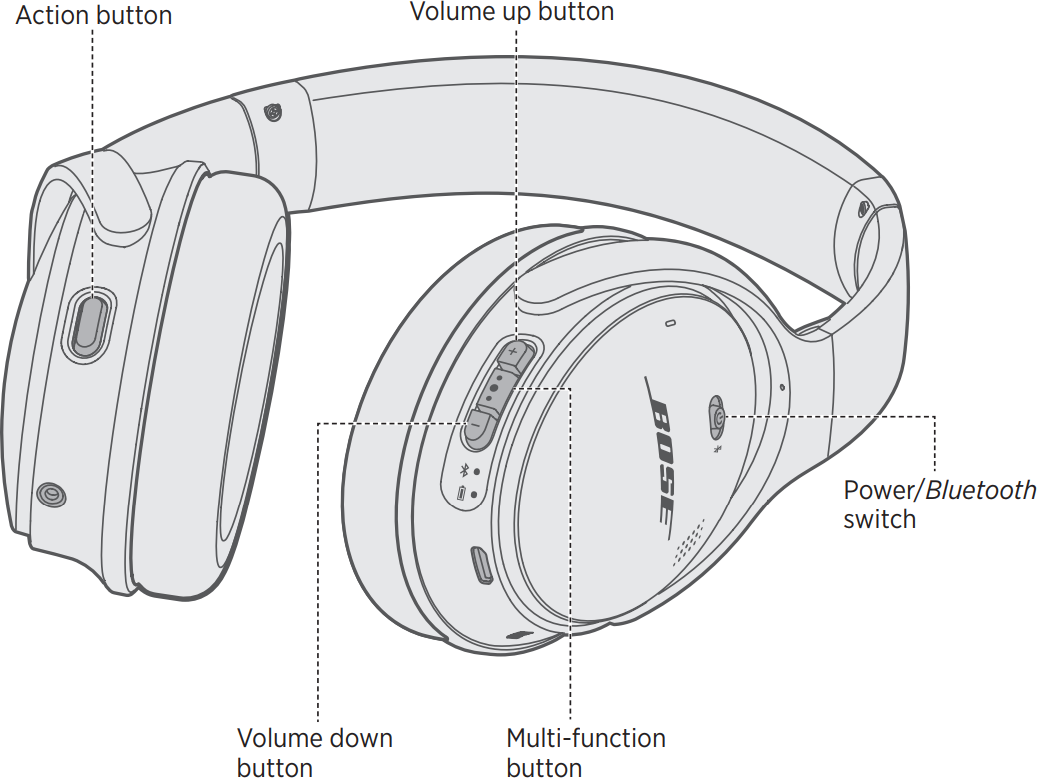
The fastest method depends on your Bose model. Most current Bose over-ear headphones use a Modes button, while older models may use an Action button or the Bose Music app.
Using the physical button
Follow these steps on models such as the Bose QuietComfort, QuietComfort 45, QuietComfort Ultra, and Noise Cancelling Headphones 700:
- Turn on your Bose headphones.
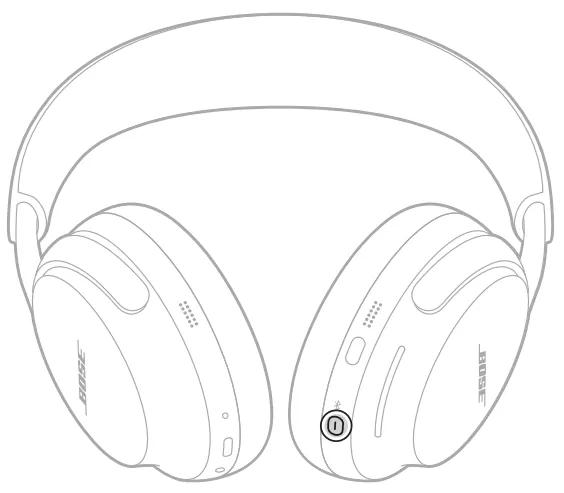
- Find the Modes button on the earcup.
- Press the button once to cycle through listening modes.
- Stop when you hear “Quiet” or see the Quiet mode indicator.
- Play music or another audio source to check the result.
On some older Bose headphones, the Action button controls noise cancellation. Press it once to switch between noise cancelling and aware listening.
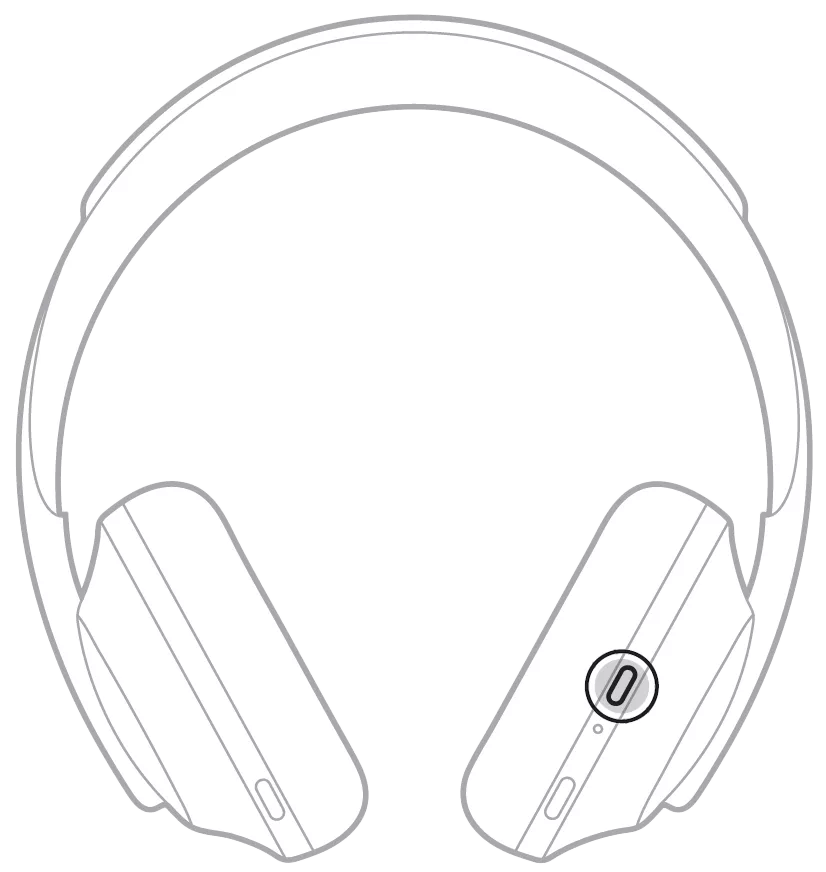
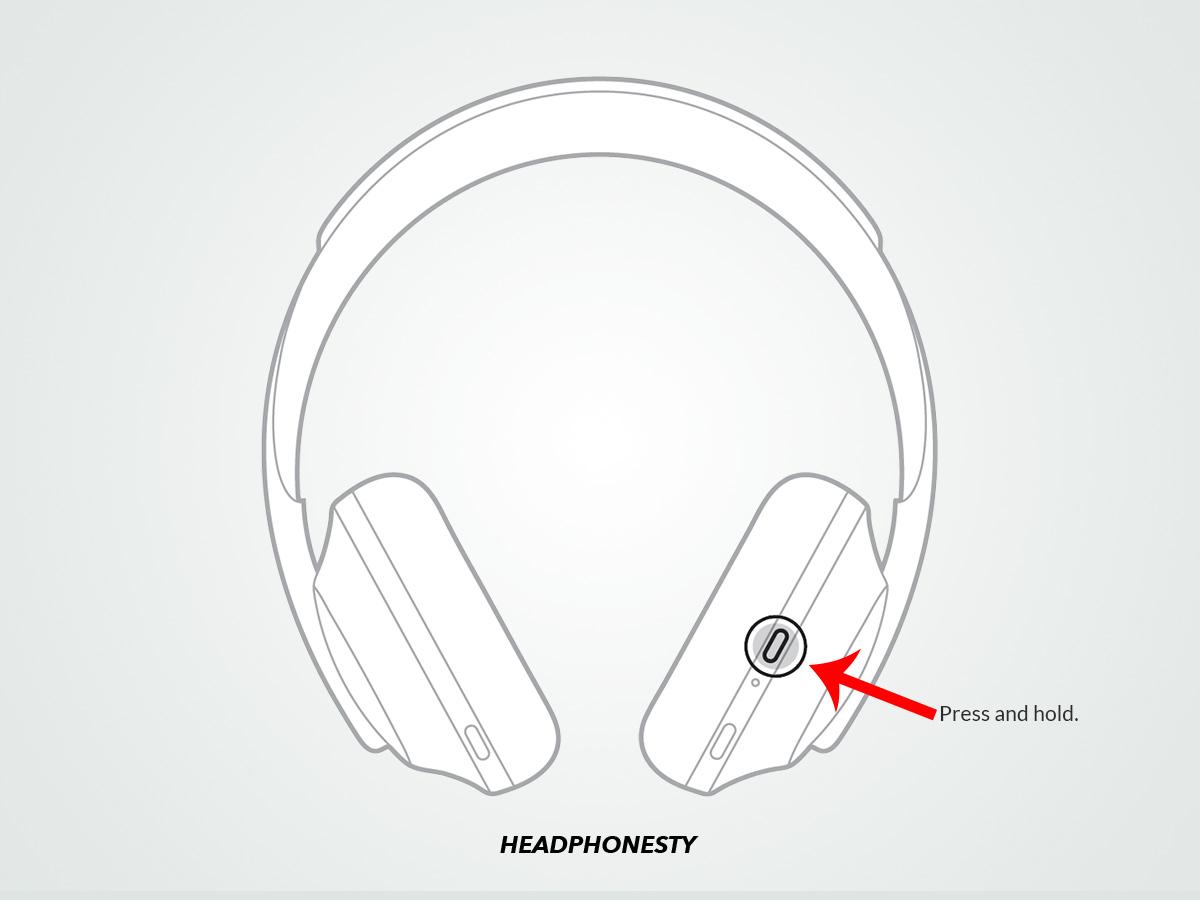
The button location can vary. On many over-ear models, it sits on the left earcup. On the Bose Headphones 700, the noise control button is also on the right side of the headphones. If you are unsure, check the small icons near each button.
Using the Bose app
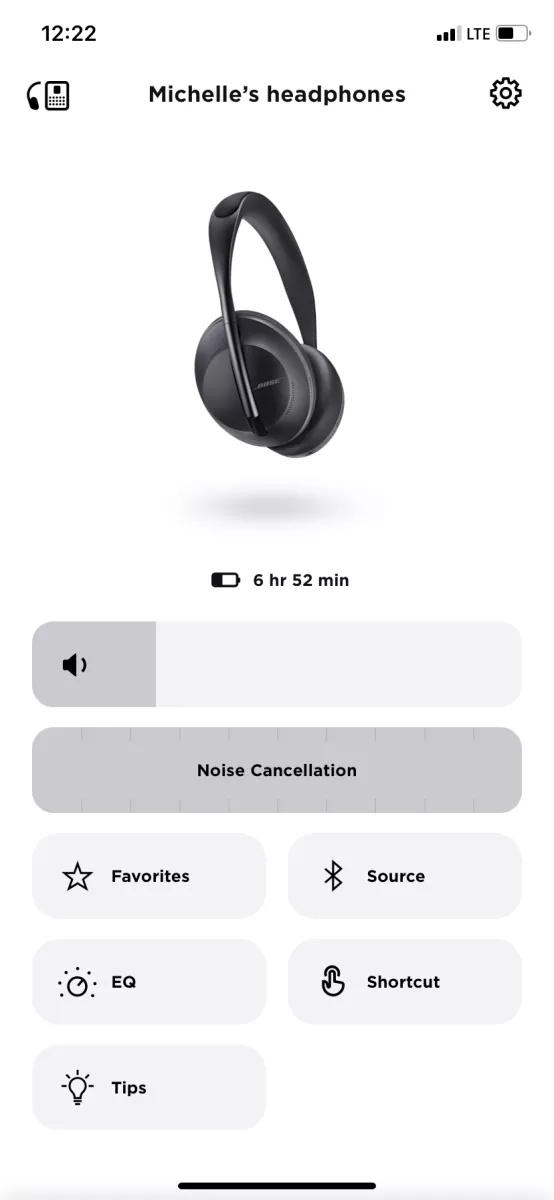
The Bose Music app gives you more control. It is useful when the button only cycles through a few saved modes.
- Open the Bose Music app on your iPhone or Android phone.
- Select your connected Bose headphones.
- Tap Modes.
- Choose Quiet for maximum noise cancellation.
- Select Custom if you want to adjust the noise control level.
- Save the setting if the app offers that option.
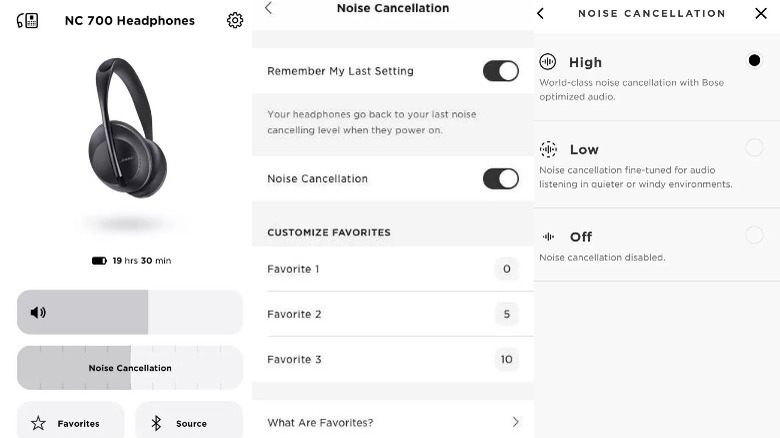
The app may show a noise cancellation slider. Move it toward the highest setting for stronger isolation, or lower it when you want to hear more of your surroundings.
If your headphones are not listed, turn on Bluetooth and keep the headphones close to your phone. You may also need to add the headphones again inside the app.
How to turn on noise cancelling on Bose earbuds
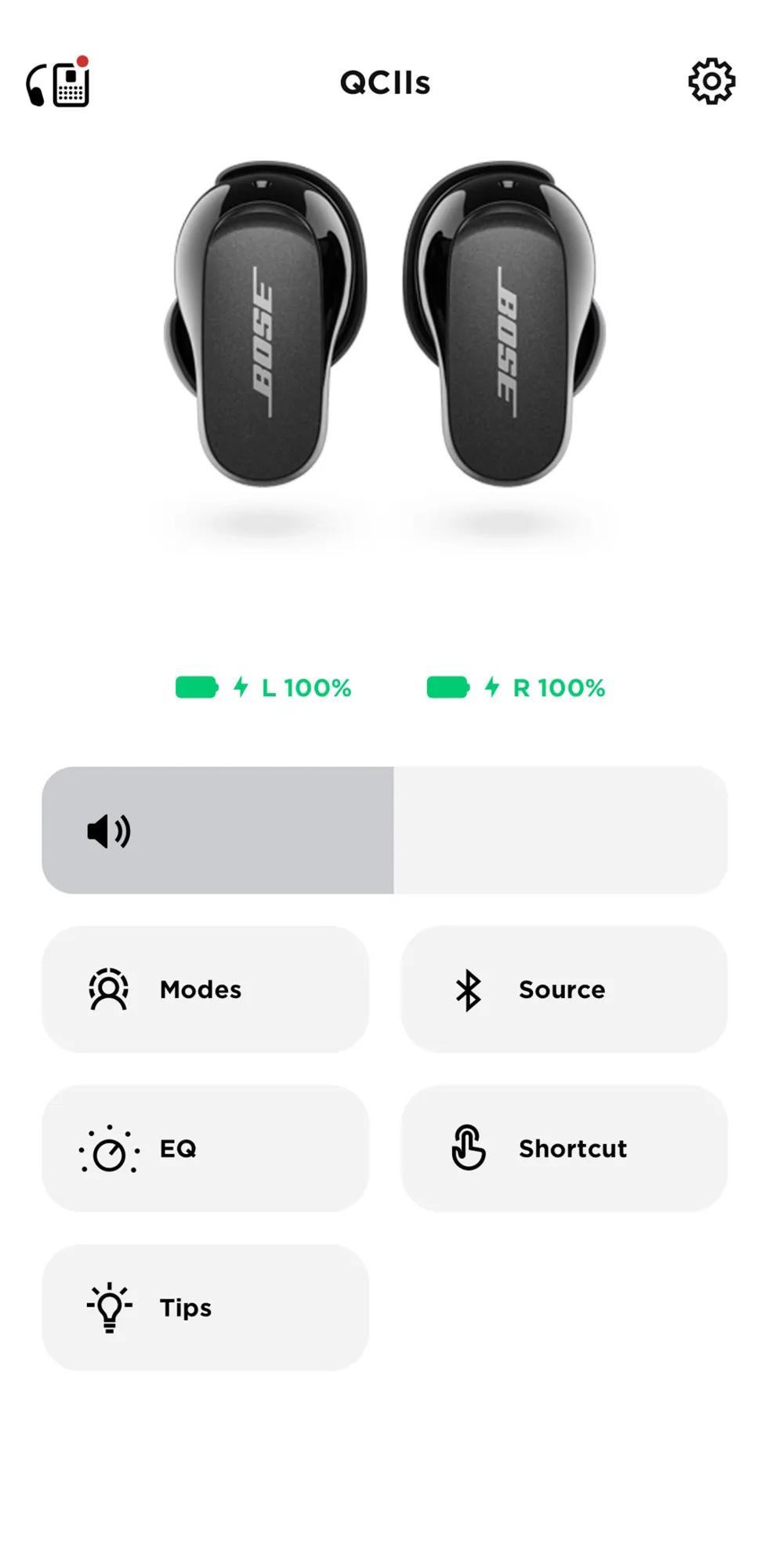
Bose QuietComfort Earbuds and Bose QuietComfort Ultra Earbuds use touch controls and the Bose app. The exact tap pattern can differ by model and software version.
With the earbuds touch controls
1. Put both earbuds in your ears.
2. Make sure they are powered on and connected.
3. Tap and hold the left earbud.
4. Release when the earbuds change modes.
5. Stop on Quiet mode.
Some Bose earbuds let you customize the left earbud shortcut. If tapping and holding does not change the mode, open the Bose app and check the shortcut settings.
With the Bose app
- Open the Bose Music app.
- Choose your earbuds from the product list.
- Tap Modes.
- Select Quiet.
- Adjust the noise cancellation level if your model provides a slider.
The earbuds may announce the mode aloud. This voice prompt is helpful when you are walking or traveling and cannot look at your phone.
A secure fit matters. If the ear tip does not seal your ear canal, noise cancelling may seem weak even when Quiet mode is active. Try another ear tip or stability band size.

How to turn on noise cancelling on popular Bose models
Bose has released several headphone families. Here is a simple guide for common models.
Bose QuietComfort Ultra Headphones
Press the Modes button to cycle between available modes. Choose Quiet for the strongest noise cancellation, or open the Bose Music app to create a Custom mode.
The Ultra model may also support immersive audio. Immersive audio changes how sound feels around you, but it is separate from noise cancellation. You can use both features at the same time.
Bose QuietComfort Headphones
Press the Modes button on the earcup. Select Quiet mode when you want the highest level of noise reduction.
If your model includes a Custom mode, use the app to choose how much outside sound enters. This is useful when you want to hear announcements without removing your headphones.
Bose Noise Cancelling Headphones 700
Press the noise control button on the right earcup. Each press moves through your selected noise control levels.
You can also use the Bose Music app to set noise cancellation from level 0 to level 10, depending on the software and saved settings. Level 10 provides the strongest reduction, while level 0 allows more outside sound.
Bose QuietComfort 45
Press the Action button or use the Bose app to switch between Quiet and Aware modes. Quiet mode turns on active noise cancellation.
The QC45 does not offer the same level of customization as some newer models. Still, its Quiet mode is simple and effective for travel, work, and study.
Bose QuietComfort Earbuds
Use the left earbud shortcut or the Bose Music app. Select Quiet mode to activate noise cancellation.
If the left earbud shortcut was changed, the app is the most reliable way to select the correct mode.
How to know if noise cancelling is on
Bose headphones may confirm the mode with a spoken message. You may hear “Quiet,” “Aware,” or the name of a custom mode.
You can also check the Bose Music app. The active mode usually appears on the main product screen.
Watch for these signs:
• Steady background noise sounds softer.
• Airplane or bus engine noise becomes less noticeable.
• You hear less fan noise in an office.
• Music sounds clearer at a lower volume.
• The app displays Quiet or a custom noise control level.
Do not use loud music as a test. Start with a low volume and listen for a fan, air conditioner, or other steady sound. This protects your hearing and makes the difference easier to notice.
What to do if Bose noise cancelling is not working
Sometimes noise cancelling is on, but the effect is weaker than expected. Fit, settings, battery life, and firmware can all affect performance.
Try these fixes in order:
- Confirm that Quiet mode is selected.
- Increase the noise cancellation level in the Bose app.
- Check that the headphones fit evenly.
- Clean the ear cushions or earbud mesh.
- Charge the headphones fully.
- Restart the headphones.
- Disconnect and reconnect Bluetooth.
- Update the Bose Music app and headphone software.
- Test the headphones in a room with steady background noise.
- Reset the headphones if other steps fail.
Ear cushions are especially important on over-ear models. If the cushions are cracked, flat, or loose, outside sound can leak around the ear. In that case, noise cancelling may appear faulty even though the electronics work correctly.
With earbuds, try a different ear tip. A small change in size can create a better seal and improve both bass and noise reduction.
Why noise cancelling may feel weak
Noise cancelling does not treat every sound in the same way. It is strongest against sounds with a constant pattern, such as engines and ventilation systems.
It is less effective against:
• Human speech
• Sudden claps or bangs
• Construction impacts
• High-pitched alarms
• Wind rushing directly across microphones
A poor seal can also reduce the benefit. Glasses, hair, masks, and loose ear cushions may create small gaps. These gaps act like open windows and allow noise to enter.
Wind can cause another issue. The microphones may pick up air movement, which can create a rushing sound. Moving indoors or lowering the noise control level may help.
How to use Bose noise cancelling safely
Noise cancelling can make travel and work more comfortable, but awareness still matters. Keep Aware mode available when walking near traffic, cycling, crossing streets, or waiting for announcements.
For safer use:
• Keep the volume at a moderate level.
• Use Aware mode outdoors when you need to hear people or vehicles.
• Remove one earbud when speaking with someone.
• Check airport, train, and workplace announcements.
• Avoid wearing headphones in situations that require full attention.
Noise cancelling does not protect your ears from every loud sound. It reduces some background noise, but it is not a replacement for certified hearing protection in loud workplaces or at concerts.
A practical habit is to create two modes in the Bose app: Quiet for focused listening and Aware for movement. Switching between them then takes only a button press.
Battery use and noise cancelling
Active noise cancellation uses microphones and internal processing. As a result, it can use more battery than simple playback.
Battery life depends on the Bose model, volume, Bluetooth connection, software, and features such as immersive audio. If battery life matters most, turn off extra features when you do not need them.
Some Bose headphones still play audio when the battery is low or empty through a wired connection. However, active noise cancellation may not work without power. Check your model’s instructions before relying on wired listening during a long trip.
Charging the headphones before travel is a simple step that prevents most problems. I also recommend carrying a charging cable and checking the battery level in the Bose app before leaving home.

Common mistakes to avoid
Many people think their headphones are defective when the wrong mode is active. Aware mode can sound like noise cancellation is off because it intentionally brings outside sounds into the mix.
Avoid these common mistakes:
• Pressing the wrong button and changing the volume instead of the listening mode.
• Testing ANC with voices only.
• Wearing earbuds with the wrong tip size.
• Covering or blocking the microphones.
• Ignoring damaged ear cushions.
• Expecting noise cancelling to remove every sound.
• Running outdated headphone software.
• Turning the volume up to cover noise instead of checking the mode.
During hands-on testing, the most common issue is not a failed ANC system. It is a poor seal or an incorrect mode. Check those two points first before resetting the headphones.
How to customize Bose noise control
Custom modes let you match noise control to the situation. For example, you might use maximum Quiet mode on a flight and a lower setting in a shared office.
To create or edit a custom mode:
- Open the Bose Music app.
- Select your headphones or earbuds.
- Tap Modes.
- Choose Create New Mode or edit an existing mode.
- Set the noise cancellation level.
- Add options such as wind blocking if your model supports them.
- Save the mode.
Some models include an adjustable wind block feature. This can reduce the effect of wind on the microphones, but it may also change how outside sound feels.
Custom modes are worth using because the best setting is not always the strongest setting. A lower level may feel more natural and help you stay aware in an office or public space.
Does noise cancelling affect sound quality?
Noise cancelling can change how music feels. With outside noise reduced, you may hear more detail without raising the volume.
Some listeners notice a slight change in bass or pressure when ANC turns on. This is normal for many active noise cancelling headphones. If the feeling is uncomfortable, lower the noise cancellation level or switch to Aware mode.
Your fit also affects sound quality. A good seal usually produces fuller bass and better isolation. If music sounds thin, test a different ear tip or adjust the earcups before changing equalizer settings.
The Bose app may include an equalizer on supported models. Use small adjustments and test familiar songs. Large boosts can make music harsh and may encourage unsafe listening levels.
Frequently asked questions about how to turn on noise cancelling on Bose headphones
How do I turn on noise cancelling on Bose headphones?
Press the Modes or Action button and select Quiet mode. You can also open the Bose Music app, choose your headphones, tap Modes, and select Quiet.
Why will my Bose headphones not switch to noise cancelling?
The headphones may be in Aware mode, out of battery, disconnected, or using a changed button shortcut. Check the Bose app, charge the headphones, and restart Bluetooth if needed.
Can I turn on noise cancelling without the Bose app?
Yes. Most Bose headphones let you use the physical Modes or Action button. Bose earbuds may also use a touch shortcut, although the shortcut can be customized or disabled.
What is the difference between Quiet and Aware mode?
Quiet mode uses active noise cancellation to reduce outside sound. Aware mode uses the microphones to let outside sound in, which is helpful for conversations and safety.
Does Bose noise cancelling block all sound?
No. It reduces many steady sounds but cannot remove every voice, sudden noise, or high-pitched sound. A proper ear seal improves the result.
How do I turn off noise cancelling on Bose headphones?
Press the Modes or Action button until you reach Aware mode, or select Aware in the Bose Music app. Aware mode lets more outside sound reach your ears.
Does noise cancelling work when Bose headphones are wired?
It depends on the model and battery level. Many Bose headphones need power for active noise cancellation, even when you use a wired audio connection.
Conclusion
Turning on noise cancelling on Bose headphones usually takes one press of the Modes or Action button, followed by selecting Quiet mode. The Bose Music app gives you more control, including custom noise levels, saved modes, and troubleshooting tools.
For the best result, check the mode, use the right ear tip or ear cushion fit, keep the headphones charged, and update the app. Try Quiet mode in loud settings and Aware mode when you need to stay alert.
Set up your preferred modes today, then explore the Bose app to make your headphones work better for travel, work, and everyday listening.
