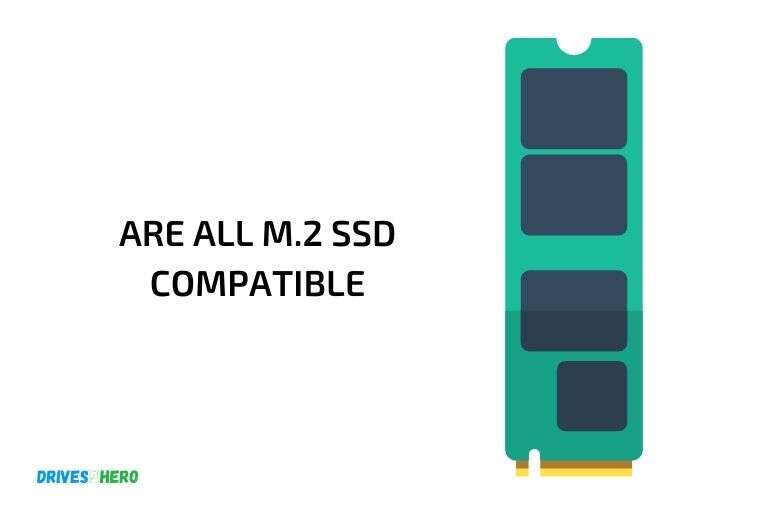
Are 2230 SSD’s Compatible With 2580 M.2: Fit Guide
Introduction
If you are upgrading a Windows laptop, Steam Deck, mini PC, or other device in the United States, you may see an SSD labeled 2230 and a slot described as 2580 M.2. The short answer is that a 2230 SSD is usually not a direct fit for a true 2580 slot.
However, “2580” may be a typing error for the much more common 2280 size. A 2230 SSD can work in some 2280 M.2 slots if the device has the correct mounting point or uses a proper adapter. Physical size is only one part of compatibility. You must also check the interface, key notch, protocol, and device support.

Quick answer: Can a 2230 SSD fit a 2580 M.2 slot?
Usually, no. A 2230 SSD measures about 22 mm wide and 30 mm long. A 2580 drive would theoretically measure about 25 mm wide and 80 mm long, but 2580 is not a common standard M.2 size in consumer computers.


Most people who search for “2580 M.2” actually mean 2280 M.2:
- 2230: 22 mm wide × 30 mm long
- 2280: 22 mm wide × 80 mm long
- 2580: 25 mm wide × 80 mm long; uncommon and not the normal M.2 size used in laptops
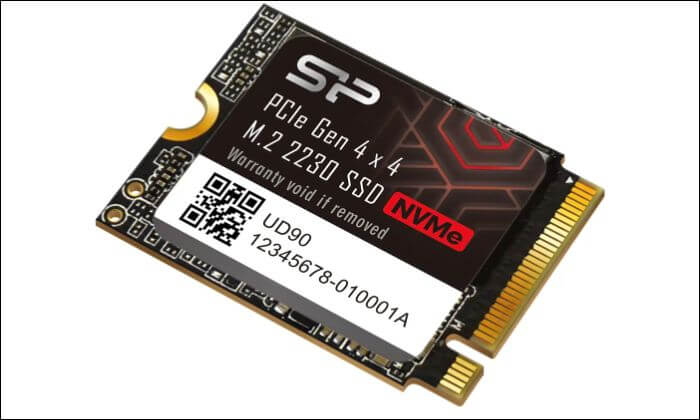
A 2230 SSD may work in a 2280 slot because both drives are about 22 mm wide. It still needs a supported screw position or a mounting bracket. A 2230 drive should not be forced into a slot designed for a wider 25 mm module.
What do the M.2 numbers mean?
The four-digit M.2 size code describes the module’s width and length in millimeters. The first two digits show the width, while the last two show the length.
| M.2 size | Approximate dimensions | Common use |
|---|---|---|
| 2230 | 22 × 30 mm | Thin laptops, handheld PCs, tablets |
| 2242 | 22 × 42 mm | Some compact laptops and embedded systems |
| 2260 | 22 × 60 mm | Less common |
| 2280 | 22 × 80 mm | Desktop PCs and most standard laptops |
| 22110 | 22 × 110 mm | Some servers and enterprise systems |
The first two digits matter because they describe the drive’s width. A 2230 and a 2280 drive are both approximately 22 mm wide. The final two digits describe the length.
The number 2580 does not follow the most common consumer M.2 pattern. A 25 mm-wide module may not align with a standard 22 mm M.2 connector, screw hole, or retention system.
Why the length is not the only issue
An M.2 slot is not simply an open space where any SSD can be placed. It includes:
- An edge connector.
- A mounting screw or threaded standoff.
- A supported key position.
- Electrical connections for a specific interface.
- Firmware support for the storage device.
A drive can have the right connector but still fail because the computer does not support its protocol. Think of the M.2 label as an address with several parts: the size tells you where the drive can sit, but the key and interface tell you whether it can communicate.

Is “2580” really 2580, or does it mean 2280?
Before buying an adapter or SSD, check the original listing, service manual, or device label. In many cases, 2580 is a mistaken reference to 2280.
A standard 2280 M.2 slot is far more common in U.S. laptops, desktops, and motherboards. If your computer manual says M.2 2280, then the real question is whether the slot can accept a shorter 2230 drive.


Look for terms such as:
- M.2 2280
- M.2 2230/2242/2260/2280
- NVMe PCIe
- SATA M.2
- 22 × 80 mm
- Multiple M.2 mounting positions
A device may have a long physical cavity but support only one mounting point. Conversely, a motherboard may include several threaded holes that allow different drive lengths.
How to verify the size
Use this order:
-
Read the device service manual.
The manual often lists the supported SSD lengths and interfaces. -
Check the motherboard or laptop markings.
Some boards label mounting points as 30, 42, 60, or 80. -
Measure the existing drive.
Measure the circuit board, not the plastic label or heatsink. -
Inspect the threaded standoffs.
A 2230 drive needs a secure mounting point near its end. -
Confirm the SSD specification.
Check whether it is NVMe over PCIe or SATA over the M.2 connector.
Do not rely on the word “M.2” alone. M.2 identifies a physical family of modules, not one universal electrical standard.

Will a 2230 SSD work in a 2280 M.2 slot?
It can work, but only when the computer supports the shorter length and the drive can be secured.
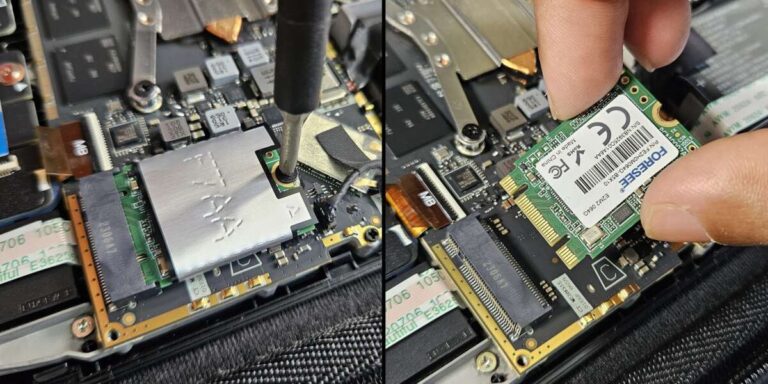
The connector is normally located at one end of the M.2 slot. A shorter 2230 drive can reach that connector, but its mounting hole sits much closer to the connector than the hole on a 2280 drive.
There are three common situations.
1. The motherboard has a 2230 mounting point
This is the easiest case. Some laptops and desktops include several standoffs for different M.2 lengths. If a 2230 position is present, install the SSD there using the correct screw.
2. The device supports only 2280 but accepts an adapter
A mounting bracket or length adapter can hold a 2230 drive in the correct position. The adapter must be designed for the correct type of M.2 SSD and must not cover the connector or interfere with nearby parts.
An adapter changes the mounting position. It does not convert:
- PCIe to SATA
- NVMe to SATA
- One key type to another
- An unsupported SSD protocol into a supported one
3. The 2230 drive is left unsecured
This is not a good installation. The SSD may appear to work while the computer is stationary, but movement can stress the connector. The drive may also lift away from the board or touch nearby components.
Do not use loose tape, a bent metal tab, or an improvised screw as the main retention method. A correct standoff, bracket, or manufacturer-approved mounting part is safer.
What else must match besides the M.2 size?
The SSD must match the computer’s interface, keying, protocol, capacity support, and firmware behavior. Physical fit does not guarantee operation.


Interface: NVMe or SATA
Most modern short 2230 SSDs are NVMe PCIe drives, but M.2 SATA SSDs also exist.
- NVMe SSDs use PCIe lanes and communicate through the NVMe protocol.
- M.2 SATA SSDs use the SATA bus and communicate through the AHCI or SATA storage system.
An NVMe drive will not normally work in an M.2 slot that supports only SATA. A SATA M.2 drive will not normally work in an NVMe-only slot.
Some M.2 slots support both types. The device manual must confirm this.
Key notch
The notch in the edge connector is called the key. Common examples include:
- B key
- M key
- B+M key
An M-key slot often indicates PCIe support, but the key alone does not prove the exact number of PCIe lanes or the supported protocol. A B+M-key drive may fit in more places, yet it may have fewer electrical contacts and different performance limits.
Never remove or modify the key notch to make a drive fit.
PCIe generation
PCIe 3.0, PCIe 4.0, and PCIe 5.0 drives may be physically similar. Newer drives often work at an older supported speed, but the computer and drive must still negotiate correctly.
A PCIe 4.0 SSD in a PCIe 3.0 system will generally operate at PCIe 3.0 limits if the platform supports the drive. That does not make every combination compatible, so verify the specific device manual.
Capacity and firmware support
Some laptops and handheld computers have limits related to:
- Maximum supported capacity
- Single-sided versus double-sided modules
- Boot support
- Thermal limits
- Vendor firmware restrictions
A drive can fit and appear in the operating system but still fail as a boot drive if the firmware does not support it.

How to install a 2230 SSD in a longer M.2 slot
Install the drive only after confirming that the system supports the SSD’s protocol and size.
Prerequisites
You may need:
- The device service manual
- The correct 2230 SSD
- A compatible mounting screw
- A 2230 standoff or approved adapter
- A small Phillips or Torx screwdriver
- A backup of important files
- An anti-static work surface or suitable grounding method
Turn the computer off, disconnect its charger, and follow the manufacturer’s instructions for battery isolation. Some systems retain power even when shut down.


Installation steps
-
Back up your data.
Do this before opening the computer or replacing a boot drive. -
Confirm the SSD type.
Verify NVMe versus SATA, key type, capacity, and supported length. -
Locate the mounting point.
Find the 2230 standoff or install the approved adapter in the correct position. -
Insert the SSD at an angle.
Slide the connector fully into the M.2 socket. Do not push down first. -
Lower the drive carefully.
The free end should rest over the correct standoff or bracket. -
Secure the drive.
Use the proper screw. Do not overtighten it. -
Reassemble and start the device.
Check the BIOS or UEFI storage screen before installing an operating system. -
Initialize or clone the drive if needed.
In Windows, a new drive may need to be initialized and partitioned in Disk Management. A replacement boot drive may require cloning or a fresh installation.
Signs of a correct installation
A successful installation usually shows these signs:
- The SSD appears in BIOS or UEFI.
- The operating system detects the drive.
- The drive stays flat and secure.
- No screw or bracket touches nearby components.
- The computer does not lose the drive after movement or restart.
If the drive appears in BIOS but not in Windows, check Disk Management, disk initialization, partitioning, and driver support. If it does not appear in BIOS, start with physical seating, protocol compatibility, and firmware support.
Troubleshooting a 2230 SSD that does not work
A failed installation does not always mean the drive is defective. Check the likely causes in a safe order.
| Symptom | Likely causes | First checks |
|---|---|---|
| Drive does not fit | Wrong width or mounting layout | Confirm 2230, 2280, or actual device size |
| Drive fits but is not detected | Wrong protocol, poor seating, unsupported key | Reseat and check NVMe/SATA support |
| BIOS sees it but Windows does not | Uninitialized or unformatted disk | Open Disk Management |
| Windows sees it but it will not boot | Missing boot files or firmware mode issue | Check boot order and clone/install process |
| Drive disconnects during use | Poor mounting or thermal problem | Secure the drive and inspect cooling |
| System works but performance is low | Older PCIe link or thermal throttling | Check negotiated link speed and temperatures |
If the SSD does not fit physically
Stop rather than forcing it. Recheck whether “2580” means 2280. A true 25 mm-wide module may not match a standard M.2 socket.
Also check whether a heatsink, shield, or battery blocks the shorter drive. Physical clearance can be different from electrical compatibility.
If the drive is not detected
Power down and reseat the SSD. Then verify:
- The connector is fully inserted.
- The key matches the slot.
- The slot supports NVMe or SATA as required.
- The device firmware is current.
- The drive is not disabled in BIOS or UEFI.
If possible, test the SSD in another known-compatible system. This can help separate a drive problem from a host-device problem.
If the computer detects the SSD but performance is poor
A shorter SSD may perform normally. Length does not determine speed. Performance is more likely affected by:
- PCIe generation
- Number of PCIe lanes
- NAND type
- Controller design
- Drive capacity
- Thermal throttling
- Sustained-write workload
A 2230 SSD can also run warmer in a compact enclosure because there is less surface area for heat dissipation. Follow the device maker’s thermal guidance, especially in handheld PCs and thin laptops.
Common mistakes to avoid
The most common mistake is treating every M.2 drive as interchangeable. M.2 describes a form factor, not one universal connection standard.
Avoid these errors:
- Assuming 2580 and 2280 mean the same thing.
- Buying a 2230 NVMe drive for an M.2 SATA-only slot.
- Assuming a drive works because its notch physically fits.
- Leaving a short SSD unsupported in a long slot.
- Using an incorrect screw that touches the circuit board.
- Installing a double-sided drive where the device has no clearance.
- Removing or cutting the connector key.
- Ignoring the manufacturer’s maximum capacity or boot restrictions.
- Installing an SSD without backing up important files.
- Assuming an adapter converts the drive’s electrical protocol.


A mechanical adapter solves only the mounting problem. It does not solve a protocol, key, firmware, or power problem.
2230 versus 2280: Which SSD size should you choose?
Choose 2230 when the computer specifically supports that size or when a verified mounting solution exists. It is useful in compact devices, but 2230 drives can offer fewer model choices and less room for cooling.
Choose 2280 when the device has a standard 2280 mounting point and you want the widest range of consumer SSD options. Desktop motherboards and many full-size laptops use this length.
If your device documentation really says 2580, confirm the specification with the manufacturer before purchasing. A 25 mm-wide module is not the same as a 22 mm-wide 2280 SSD.
| Your device specification | Best next step |
|---|---|
| M.2 2230 NVMe | Buy a compatible 2230 NVMe SSD |
| M.2 2280 NVMe with 2230 standoff | A 2230 NVMe SSD may work |
| M.2 2280 only | Use a supported bracket or choose 2280 |
| M.2 SATA | Buy an M.2 SATA drive, regardless of length |
| “2580” with no clear manual | Confirm the measurement with the manufacturer |
| Proprietary or soldered storage | Do not assume a standard M.2 upgrade is possible |
Frequently asked questions
Can I put a 2230 SSD into a 2280 slot?
Sometimes. The slot must support the SSD’s interface, and the drive must be secured with a 2230 mounting point or a compatible adapter. Do not leave the drive loose.
Is 2580 the same as 2280 M.2?
No. A 2280 module is about 22 × 80 mm. A 2580 module would be about 25 × 80 mm. “2580” is often a mistaken reference to 2280, so verify the original specification.
Will an NVMe 2230 SSD work in any M.2 slot?
No. The slot must support NVMe over PCIe and have compatible keying and firmware support. An M.2 SATA-only slot will not normally run an NVMe drive.
Do I need an adapter to install a 2230 SSD in a 2280 bay?
You may need one if the motherboard has no 2230 standoff. The adapter should hold the drive securely and align it with the existing connector. It does not change the SSD’s electrical protocol.
Is a 2230 SSD slower than a 2280 SSD?
Not necessarily. Size alone does not determine speed. Controller design, NAND, PCIe generation, capacity, cooling, and workload matter more. Some 2230 models may have lower performance because compact designs have less space for components and cooling.
Final answer
A 2230 SSD is not normally a direct replacement for a true 2580 M.2 module. More often, “2580” is an error for 2280. In that case, a 2230 SSD may work if the slot supports the correct NVMe or SATA protocol and the drive has a proper mounting point or adapter.
Before buying, confirm four things:
- The actual M.2 size: 2230, 2280, or another format.
- The interface: NVMe PCIe or SATA.
- The key and firmware support.
- The mounting method.
If any of those details are unclear, use the exact laptop or motherboard model and its U.S. service manual to verify compatibility before installing the drive.