How To Turn Off Sony Headphones: Easy Guide
Press and hold the power button for about two seconds until your Sony headphones announce that they are turning off.
Learning how to turn off Sony headphones is simple, but the exact steps depend on whether you use over-ear headphones, wireless earbuds, or a wired model. This guide covers popular Sony options, including the WH-1000XM series, WH-CH720N, WF-1000XM earbuds, and LinkBuds, so you can power down correctly, save battery, and avoid common Bluetooth problems.

How to turn off Sony headphones with a power button
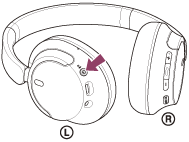
Most Sony wireless headphones turn off with the physical power button. You usually need to press and hold it for about two seconds, but the button location can vary by model.
Follow these steps:
- Remove the headphones from your ears.
- Find the power button on the ear cup.
- Press and hold the button for about two seconds.
- Release it when you hear “Power off” or see the indicator light turn off.
- Wait a few seconds before storing the headphones.


On many models, the power button is on the left ear cup. On some headphones, it sits near the USB-C charging port. The button may be labeled “POWER,” or it may use a small circle symbol.
If the headphones do not respond, hold the button for a little longer. Avoid pressing it repeatedly, since short presses may only pause audio or activate another function.
When learning how to turn off Sony headphones, listen for the voice prompt. It is more reliable than checking the light alone because some models use different light patterns.

How to turn off Sony WH-1000XM headphones
Sony WH-1000XM4 and WH-1000XM5 headphones use a simple power-button method. The power button is on the left ear cup, next to the USB-C charging port.
To turn off the WH-1000XM4 or WH-1000XM5:
- Press and hold the power button for about two seconds.
- Wait for the “Power off” voice prompt.
- Confirm that the indicator light stops flashing.
- Fold or store the headphones after they shut down.
The WH-1000XM5 may also turn off by itself after you remove it and leave it unused. This depends on the automatic power-off setting in Sony’s app. If the headphones remain on, check the Sony | Sound Connect app, formerly called Sony | Headphones Connect, and review the automatic power-off option.
The WH-1000XM4 has a similar setting. However, automatic power-off may not happen at once. Some settings use a delay to prevent the headphones from shutting down during a short break.
A useful habit is to use the button when you finish listening. This gives you a clear power-off confirmation and avoids draining the battery inside a bag.

How to turn off Sony WH-CH720N and other over-ear models
The Sony WH-CH720N, WH-CH710N, and many other wireless over-ear models turn off through the power button. The basic process is nearly the same across the range.
- Press and hold the power button for around two seconds.
- Keep holding it until the headphones announce the power status.
- Check that the blue or green indicator light turns off.
- Put the headphones away only after they power down.


Some Sony models play a sound instead of giving a spoken message. If you are in a noisy place, watch the indicator light as well.
Do not confuse the power button with the multifunction button. A short press on the wrong button may pause music, answer a call, or activate your phone’s voice assistant.
If your Sony headphones stay on after you press the button, try these checks:
• Make sure you are pressing the correct button.
• Hold the button for a full two seconds.
• Disconnect the USB charging cable before testing.
• Charge the headphones if the battery is very low.
• Restart your phone’s Bluetooth connection if the headphones keep reconnecting.
These steps solve most basic power problems without needing a reset.

How to turn off Sony wireless earbuds
Sony wireless earbuds work differently from over-ear headphones. They usually turn off when you place them inside the charging case and close the lid.
To turn off Sony WF-1000XM4, WF-1000XM5, LinkBuds, or similar earbuds:
- Stop playback on your phone.
- Remove both earbuds from your ears.
- Place each earbud into the correct slot in the charging case.
- Check that the charging contacts connect.
- Close the case lid.
The earbuds should disconnect from your phone and begin charging. In most cases, this also powers them down or places them in a low-power state.
If one earbud stays connected, remove it and place it back in the case. Clean the metal charging contacts with a soft, dry cloth. Dirt, sweat, or a poor fit can prevent the earbud from detecting the case.
Some Sony earbuds can also be controlled through the Sony | Sound Connect app. Available options differ by model and software version. The case remains the most dependable way to turn off Sony wireless earbuds.


Do not leave loose earbuds on a desk when you are finished. Even when they are not playing music, they may continue using battery while connected to your phone.

How to turn off Sony earbuds without the case
Most Sony true wireless earbuds need the charging case for a complete power-down. Still, some models let you control power through touch settings in the Sony app.
Open the app and check the controls assigned to each earbud. Depending on the model, you may find a power, pause, or disconnect option. Sony can change available controls through firmware updates, so your menu may not match an older guide.
If there is no manual power option, use this method:
- Turn off Bluetooth on your phone.
- Stop using the earbuds.
- Keep them outside your ears for a short time.
- Place them in the case as soon as possible.
Turning off Bluetooth only disconnects the earbuds. It does not always turn them off. The earbuds may continue searching for a connection, which can reduce battery life.
For this reason, the best answer to how to turn off Sony headphones or earbuds without the case is often to use the case as soon as you can. It is designed to store, charge, and manage the earbuds safely.
How to turn off Sony headphones from your phone
Your phone can disconnect Sony headphones, but disconnecting is not always the same as powering off.
On an iPhone:
- Open Settings.
- Tap Bluetooth.
- Find your Sony headphones.
- Tap the information icon.
- Choose Disconnect or Forget This Device.
On an Android phone:
- Open Settings.
- Select Connected devices or Bluetooth.
- Tap the settings icon beside your Sony headphones.
- Choose Disconnect.
This stops the phone from sending audio to the headphones. However, many Sony models remain powered on until you press the physical power button or place the earbuds in their case.
You can also turn off Bluetooth from the quick settings panel. This is useful on a plane or when switching to another audio device, but it is not the best way to save the headphones’ battery.
Think of Bluetooth as a phone conversation. Disconnecting ends the conversation, while pressing the power button turns off the phone itself.

How to use automatic power off
Automatic power off can shut down compatible Sony headphones after they remain unused for a set period. This feature is useful if you often forget to press the power button.
To check the setting:
- Open the Sony | Sound Connect app.
- Connect your headphones.
- Open the device settings.
- Look for Automatic Power Off or Power Off When Headphones Are Removed.
- Choose the available time or enable the removal option.


The exact menu name depends on the model. Some headphones support automatic power-off after a set period, while others turn off when they detect that you have removed them.
Automatic power off has limits. It may not work during a phone call, while the headphones are charging, or when sensors cannot detect that the headphones are being worn.
Use this feature as a backup, not as your only power routine. Pressing the power button remains the clearest way to confirm that the headphones are off.

What to do if Sony headphones will not turn off
Sony headphones may refuse to turn off because of a frozen control system, low battery, an active call, or a charging connection. Start with the simple checks before attempting a reset.
Try these steps:
• Disconnect the charging cable.
• End any active phone or video call.
• Pause music and close the media app.
• Press and hold the power button for at least two seconds.
• Move the headphones away from your phone.
• Charge the headphones for at least 15 minutes.
If the headphones still do not respond, restart them according to the instructions for your model. A restart is different from a factory reset. A restart normally keeps your paired devices, while a reset may erase saved settings.
Avoid holding random buttons for a long time. Button combinations vary by model, and the wrong sequence may start pairing mode or erase your settings.
A practical lesson is to check the charging cable first. A cable that is loose or damaged can make the headphones behave in an unusual way. A clean USB-C port and a known working charger can quickly rule out a power issue.

How to reset Sony headphones when power controls fail
A reset can help when your Sony headphones freeze or ignore the power button. The exact reset method differs between models, so check the manual for your specific product before using a button combination.
In general, the process may include:


- Turn off the headphones if possible.
- Disconnect the charging cable.
- Press two buttons together for several seconds.
- Wait for the indicator light or sound confirmation.
- Pair the headphones with your phone again if required.
Some Sony earbuds reset through the charging case. They may require you to place both earbuds inside, leave the lid open, and hold a case button. Other models use touch sensors.
A factory reset can remove Bluetooth pairing information, custom equalizer settings, and other preferences. Use it only after normal power steps fail.
If the headphones become hot, smell unusual, swell, or show signs of physical damage, stop using them. Do not try to repair a damaged lithium-ion battery at home. Contact Sony support or a qualified repair service.
Common mistakes when turning off Sony headphones
Knowing how to turn off Sony headphones is easy, but a few habits can cause battery drain or confusion.
• Closing the case without checking the earbuds: One earbud may miss the charging contact and stay connected.
• Tapping the power button once: A short press may not power off the headphones.
• Relying only on Bluetooth: Disconnecting your phone does not always shut down the headphones.
• Leaving headphones in a hot car: Heat can reduce battery performance and may damage electronics.
• Storing wet earbuds: Sweat and moisture can affect charging contacts and sensors.
• Resetting too soon: A factory reset may erase useful settings when a simple restart would solve the problem.
The safest routine is simple: stop playback, power off the headphones, check the indicator, and store them in a cool, dry place.
Battery-saving tips for Sony headphones
Turning off Sony headphones after every listening session is one of the easiest ways to save battery. You can also improve battery life with a few small changes.
• Use automatic power off as a backup.
• Lower the volume when practical.


• Turn off noise canceling when you do not need it.
• Keep firmware and the Sony app updated.
• Avoid leaving the headphones connected overnight.
• Store true wireless earbuds inside their charging case.
• Keep the headphones away from extreme heat and cold.
Noise canceling, Bluetooth, voice prompts, and high-quality audio modes can all affect battery life. Battery performance also declines as the battery ages. A device that once lasted 30 hours may provide less time after years of regular use.
Sony lists battery estimates under test conditions. Real use can vary based on volume, codec, calls, temperature, and features. Treat the advertised number as a guide, not a guarantee.
Frequently asked questions about how to turn off Sony headphones
How do I turn off Sony headphones?
Press and hold the power button for about two seconds. Release it after you hear the power-off message or see the indicator light turn off.
How do I turn off Sony wireless earbuds?
Place both earbuds in the charging case and close the lid. Make sure each earbud is seated correctly so the charging contacts connect.
Does disconnecting Bluetooth turn off Sony headphones?
No. Disconnecting Bluetooth usually stops the connection but may leave the headphones powered on. Use the power button or charging case to shut them down fully.
Why will my Sony headphones not turn off?
A frozen system, low battery, active call, or charging connection may prevent shutdown. Disconnect the cable, end calls, charge the headphones, and hold the power button for about two seconds.
Can Sony headphones turn off automatically?
Many Sony models support automatic power off through the Sony | Sound Connect app. The feature and available time settings vary by model.
Do Sony headphones turn off when I remove them?
Some models can turn off or enter standby after removal, but this depends on the automatic power-off setting. Check the Sony app to see whether your headphones support this feature.
Do I need to turn off wired Sony headphones?
Most wired headphones do not have a battery or wireless power system, so there is usually nothing to turn off. Unplug them from the audio device and store them safely.
Conclusion
The easiest way to turn off Sony headphones is to hold the power button for about two seconds and wait for the confirmation message. For Sony wireless earbuds, place both earbuds in the charging case and close the lid. Remember that disconnecting Bluetooth is not always the same as powering off.
Use automatic power off as a helpful backup, keep charging contacts clean, and avoid resetting the headphones unless normal steps fail. Try the method for your model today, and share your experience or model number in the comments if you need more help.