How To Insert Bose Earbuds: Easy Fit Guide
To insert Bose earbuds, first match each earbud to the correct ear, choose the right ear tip and stability band, then place the ear tip gently in your ear canal and rotate the earbud until it feels secure. Do not push it in deeply or force it into place.
This guide applies to common Bose in-ear models sold in the United States, including Bose QuietComfort Earbuds, QuietComfort Earbuds II, QuietComfort Ultra Earbuds, and Bose Sport Earbuds. Small design details may vary by model, so check the quick-start guide that came with your earbuds if a part looks different.
Introduction
Putting Bose earbuds in the right way improves comfort, sound, noise cancellation, and call quality. A poor fit can make the earbuds feel loose, reduce bass, or cause the noise cancellation to work less well.
The goal is not to seal your ear as tightly as possible. The goal is to create a light, stable seal without pain or pressure. Think of the ear tip as a soft plug and the stability band as a small anchor that keeps the earbud from moving.


Before You Insert Bose Earbuds
Check the earbud parts before you put them in. Most Bose in-ear earbuds use two parts that affect fit:
- Ear tip: The soft silicone piece that rests in the opening of your ear canal.
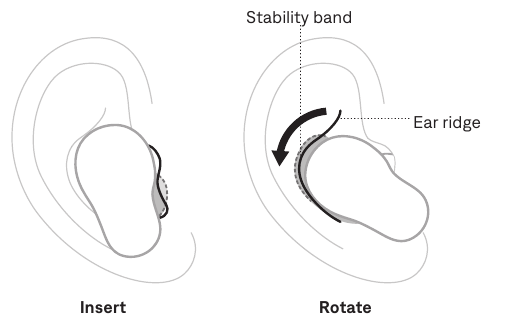
- Stability band: The silicone piece that rests in the outer ridge of your ear to hold the earbud in place.
Bose usually supplies several sizes. The left and right earbuds are marked L and R. Use the left earbud in your left ear and the right earbud in your right ear.
Before inserting the earbuds, make sure:
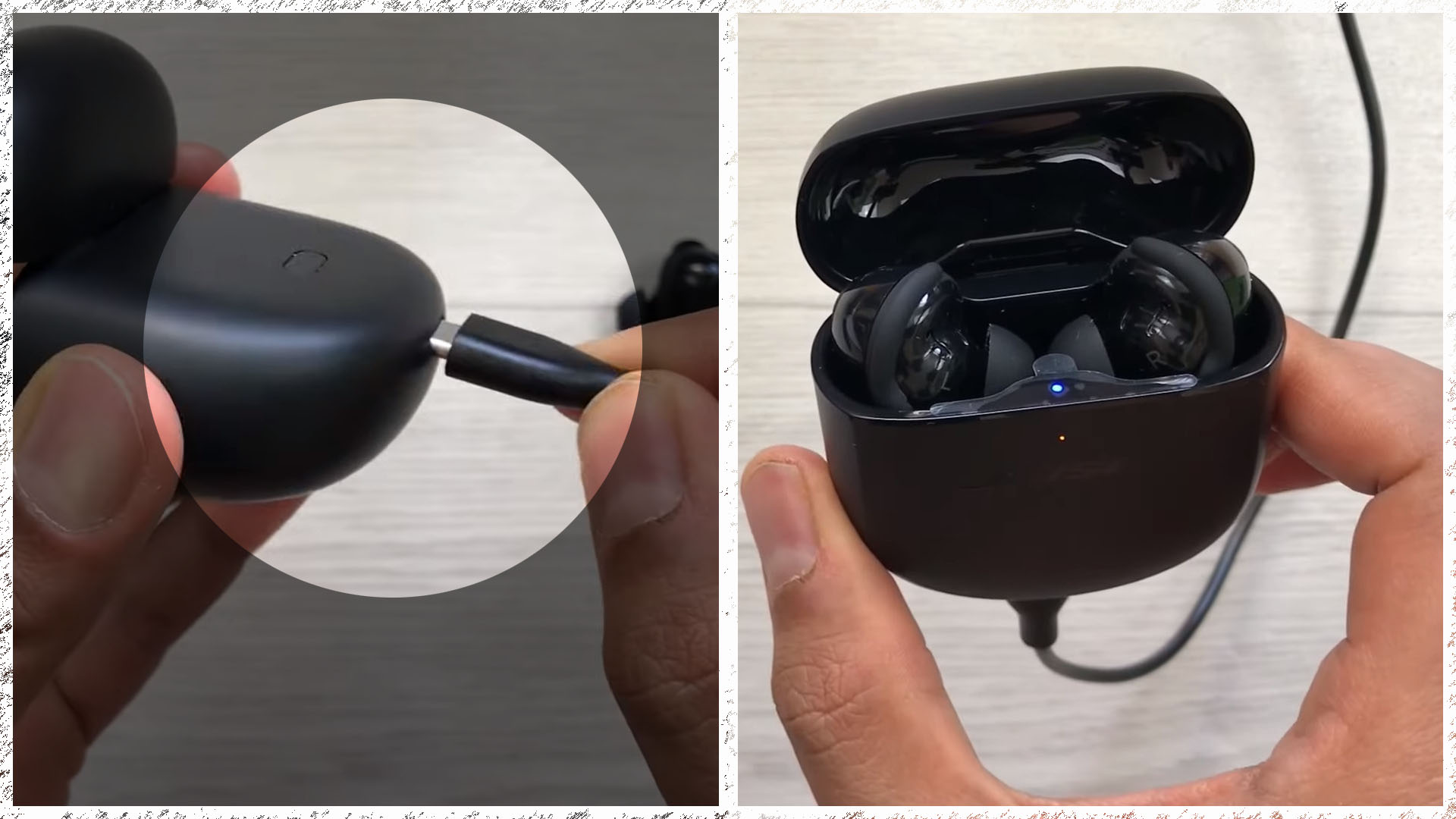
- The earbuds have enough charge.
- The ear tips and stability bands are attached securely.
- The earbuds are clean and dry.
- The earbud marked L is in your left hand, and the one marked R is in your right hand.
- Your ears are free of excess moisture, oil, or heavy earwax.
If your model has removable tips or bands, do not mix them up. Some Bose models use model-specific parts that may not fit correctly across different earbuds.
How to Insert Bose Earbuds Step by Step
Follow these steps for most Bose in-ear earbuds.
1. Hold the earbud with the ear tip facing your ear canal
Hold the earbud by its outer body. Avoid pressing the touch surface or buttons unless you need to control the earbud.
Point the ear tip toward the opening of your ear. The tip should face slightly forward and inward, not straight down.
2. Place the ear tip gently into your ear
Lift the top of your ear slightly with your other hand. This can help open the ear canal.
Place the ear tip at the entrance of your ear canal. Push it in only until it feels comfortably seated. The ear tip should make contact with the skin around the canal, but it should not cause sharp pressure.


Do not twist the earbud into place while pushing hard. A gentle motion is enough.
3. Rotate the earbud until it sits securely
turn the earbud slightly backward or upward, depending on the Bose model. The outer housing should rest naturally against your ear.
For many Bose earbuds, a small rotation helps the stability band settle into the ridge above or beside the ear canal. The correct direction may vary by model, so follow the shape of the band rather than forcing one fixed angle.
4. Tuck the stability band into the outer ear
Use one finger to guide the stability band into the bowl of your ear. It should sit under or inside the natural ridge of the outer ear.
The band should hold the earbud in place without digging into the skin. If the band folds, pinches, or presses hard, remove the earbud and try another size.
5. Repeat the process for the other ear
Insert the second earbud in the same way. The two earbuds may not need the same size tip or band. Many people have slightly different ear shapes, so it is fine to use different sizes on each side.
6. Check the fit with normal movement
Turn your head, open your mouth, and walk a few steps. The earbuds should stay in place without constant adjustment.
If your Bose earbuds support an earbud fit test in the Bose app, run it after inserting them. On supported models, the app can help identify whether the ear tips are sealing well.
How to Tell if Bose Earbuds Fit Correctly
A correct fit should feel stable, comfortable, and lightly sealed. You should not need to push the earbuds farther into your ears.
Look for these signs:
- The earbuds stay in place when you move your head.
- The sound is balanced between the left and right sides.
- Bass sounds full rather than weak or hollow.
- Outside noise becomes quieter when noise cancellation is enabled.
- Your voice does not sound excessively blocked or boomy.
- The ear tips do not cause pain after several minutes.
- The stability bands do not leave deep marks on your skin.
A good seal does not have to feel airtight. If the earbuds feel painful, numb, or overly tight, the tip or stability band is likely too large, or the earbud may be inserted too deeply.
How to check the seal
Play a familiar song or podcast at a low volume. Then gently press the earbud inward for a moment. If the sound changes greatly, the original fit may not have created a stable seal.
You can also compare the bass and outside noise with the earbuds seated correctly and then slightly loose. A secure fit usually gives clearer bass and stronger passive isolation.
This is only a practical check. It does not replace the fit test built into the Bose app when your model supports one.
Choosing the Right Bose Ear Tip and Stability Band
The right size is the one that stays in place with the least pressure. Bigger does not always mean better.


| Problem | Likely fit issue | What to try |
|---|---|---|
| Earbud feels loose | Tip or stability band is too small | Try the next larger size |
| Earbud feels painful | Tip or band is too large | Try a smaller size |
| Earbud slowly slips out | Poor seal or band placement | Reinsert and tuck the band into the ear ridge |
| Bass sounds weak | Ear tip is not sealing | Try another tip size |
| Ear feels blocked or pressured | Earbud is too deep or too large | Pull it back slightly or use a smaller size |
| One side sounds different | Uneven fit or different ear shape | Adjust each ear separately |
Try one change at a time. If you change both the tip and the stability band at once, it becomes harder to know which part fixed the problem.
For many Bose models, the ear tip and stability band are separate pieces. Make sure the band is aligned with the correct notch or groove before use. A band that is installed backward may feel loose or uncomfortable.

How to Insert Bose QuietComfort Ultra Earbuds and QuietComfort Earbuds II
Bose QuietComfort Ultra Earbuds and QuietComfort Earbuds II use a soft ear tip and a separate stability band. Their insertion method is similar:
- Select a tip and band size.
- Fit the tip and band onto the earbud.
- Place the ear tip gently into the ear canal.
- Rotate the earbud slightly until the band rests in the outer ear ridge.
- Use the Bose app to check the fit if the feature is available for your model.
Do not treat the stability band as a part that must be pushed deep into the ear. It should rest in the outer ear and keep the earbud from rotating or falling out.
The Bose app may use different names or menu locations after updates. If you cannot find a fit test, consult the support page or manual for your exact model.
How to Insert Bose Sport Earbuds
Bose Sport Earbuds are also designed to use an ear tip and stability band. Because they are made for movement, the band should sit firmly in the outer ear before you begin exercise.
Insert them in this order:
- Place the ear tip at the ear canal opening.
- Rotate the earbud until the band lines up with the upper ear ridge.
- Press the band gently into that ridge.
- Move your jaw and turn your head.
- Adjust the band if the earbud shifts.
A secure sports fit should not depend on heavy pressure. If the earbud feels tight before you start moving, it may become uncomfortable during a long workout.
Why Bose Earbuds Keep Falling Out
Bose earbuds usually fall out because of an incorrect tip size, poor stability-band placement, moisture, or movement in the ear. The solution is to correct the fit before increasing the volume or pushing the earbuds farther in.
Try this sequence:
- Remove the earbuds.
- Wipe the ear tips and stability bands with a clean, dry cloth.
- Check that the tip and band are attached fully.
- Try the next larger stability band.
- Try a different ear tip size.
- Reinsert the earbud and rotate it into place.
- Test the fit by walking and moving your head.
Sweat can reduce grip during exercise. Let the earbuds and your ears dry before reinserting them. Follow Bose cleaning instructions for your model, and do not run water into the speaker openings or charging contacts.
If only one earbud falls out, do not assume both sides need the same replacement size. The shape of the left and right ear canals can differ.
Why Bose Earbuds Sound Weak After Insertion
Weak bass or thin sound often means the ear tip is not sealing the ear canal. It can also happen when the earbud is angled away from the canal or when the tip is the wrong size.
Try these checks:
- Remove and reinsert the earbud.
- Try a larger tip if the earbud feels loose.
- Try a smaller tip if the ear feels pressured.
- Make sure the tip is not folded.
- Check that the speaker opening is not blocked by debris.
- Compare the sound with the earbud seated correctly in both ears.
- Run the Bose app’s fit test if your model includes one.


Do not solve weak sound only by raising the volume. A poor seal can make you turn the volume up, which may increase the risk of hearing damage.
If one side remains much quieter after cleaning and refitting, the issue may involve the earbud, phone settings, Bluetooth connection, or earwax. Test the earbuds with another compatible device. Seek medical advice if the volume difference continues only in one ear or occurs with other audio devices.
How to Insert Bose Open Earbuds
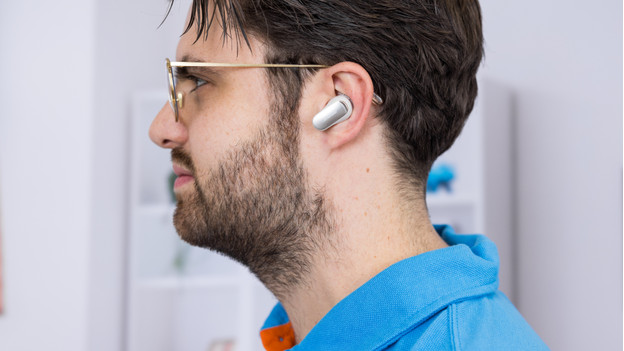
Bose Ultra Open Earbuds are different from Bose in-ear earbuds. They rest around the outer ear and do not use a tip that seals the ear canal.
To wear Bose Ultra Open Earbuds:
- Identify the left and right units.
- Place the speaker portion near the ear opening.
- Position the support arm around the back of the ear.
- Adjust the angle until the speaker points toward the ear.
- Check that the support arm feels secure without pinching.
Do not push Bose Ultra Open Earbuds into the ear canal. Their open design is intended to leave the ear canal uncovered. This design changes how they sound and how much outside noise you hear.
The insertion instructions for Ultra Open Earbuds should not be used for QuietComfort or Sport models. Always identify the model before choosing a fitting method.
Common Mistakes to Avoid
Avoid these mistakes when inserting Bose earbuds:
- Putting the left earbud in the right ear: The shape will feel wrong and the controls may be harder to use.
- Using the largest tip by default: A large tip can create pressure and may not stay in place.
- Pushing too deeply: The ear tip should sit comfortably, not create pain.
- Ignoring the stability band: A correct tip alone may not stop the earbud from rotating.
- Using wet earbuds: Moisture can affect grip and may damage electronic parts.
- Cleaning with sharp tools: Pins and similar objects can damage the mesh or silicone.
- Changing the volume to fix a poor seal: Correct the fit first.
- Mixing parts from different models: Tips and bands are not always interchangeable.
- Wearing damaged parts: Replace torn tips or bands before use.
Stop using the earbuds if you feel sharp pain, bleeding, swelling, dizziness, or a sudden change in hearing. If discomfort continues after you remove the earbuds, contact a qualified health professional.
Bose Earbud Insertion: Quick Decision Guide
Use this guide when you are unsure what to change.
- The earbud feels loose: Try a larger stability band or ear tip.
- The earbud feels tight: Try a smaller size and pull it back slightly.
- The earbud falls out during exercise: Dry the ear and earbud, then refit the stability band.
- The sound is thin: Improve the ear-tip seal.
- Noise cancellation feels weak: Refit both earbuds and check the app’s fit guidance.
- One ear sounds different: Adjust each ear separately and check for debris.
- The earbud causes pain: Remove it and try a smaller size or a different angle.
- The model has no ear tip: Check whether it is a Bose Ultra Open model and use the outer-ear method.
Frequently Asked Questions
Should Bose earbuds go deep into the ear?
No. Bose earbuds should sit securely with the ear tip sealing the canal opening. They should not cause sharp pressure or pain. If you need to push them deeply to keep them in place, use a different tip or stability-band size.
How tight should Bose earbuds feel?
They should feel stable but not tight. You should be able to wear them without pain, numbness, or strong pressure. A light seal is usually enough for good sound and noise reduction.
Can I use different ear tip sizes in each ear?
Yes. Your ears may have different shapes or canal sizes. Use the size that fits each ear securely and comfortably. The left and right earbuds do not need to use matching sizes.


Why does one Bose earbud keep falling out?
The earbud may have the wrong tip or stability band, or the band may not be seated in the outer ear ridge. Clean and dry the parts, try another size, and refit that side on its own.
How do I know whether my Bose earbuds are upside down?
The earbud should sit naturally in the shape of your outer ear, with the ear tip facing the canal and the stability band resting in the ear ridge. If the band presses against the wrong part of your ear or the controls face an awkward direction, remove the earbud and check the L/R marking.
Conclusion
To insert Bose earbuds correctly, match the left and right sides, choose a comfortable tip and stability band, place the tip gently at the ear canal opening, and rotate the earbud until the band rests in the outer ear. The earbuds should stay secure without pain or deep pressure.
If the fit fails, change one part at a time. Start with the stability band, then test another ear tip size and angle. For model-specific instructions, use the Bose support guide or manual for your exact earbuds, especially if you own Bose Ultra Open Earbuds rather than an in-ear model.