

Yes, a PS5 SSD needs a compatible heatsink to control heat and maintain steady gaming performance.
The question “does PS5 SSD need heatsink” has a clear answer: Sony recommends effective heat dissipation for every M.2 NVMe drive installed in the PS5 expansion slot. A heatsink helps prevent heat buildup, speed drops, errors, and long-term stress during large game downloads or extended play. This guide explains which heatsink works, how to install it, and the mistakes that can damage your console or SSD.
Does PS5 SSD Need a Heatsink?
Yes, a PS5 SSD needs a heatsink, or another cooling design made for the PS5 expansion bay. The console uses a fast PCIe 4.0 NVMe drive, and fast storage creates more heat than a basic SATA SSD.
A PS5 can sometimes detect and run an M.2 SSD without a heatsink. That does not make it a good setup. The drive may become hot during file transfers, game installs, updates, and long gaming sessions.
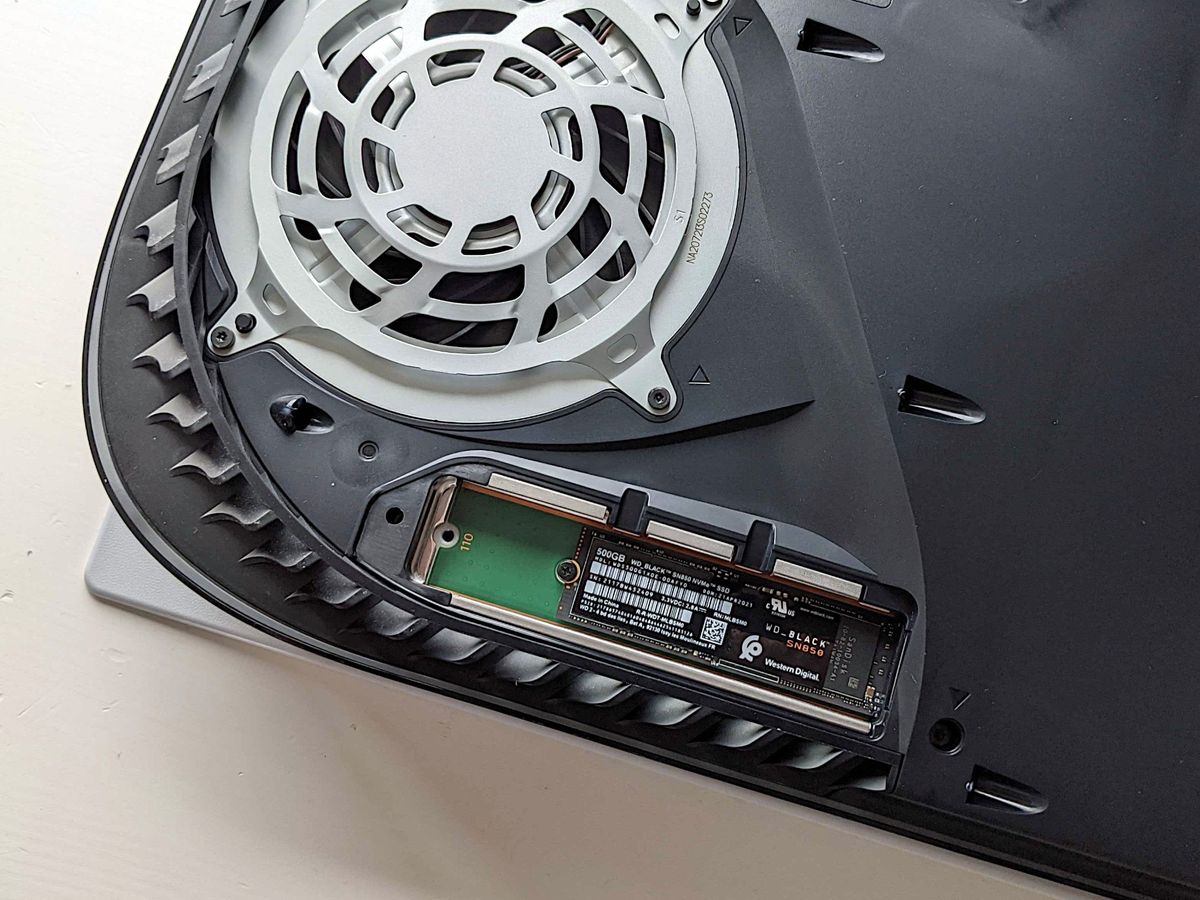
Sony’s PS5 storage guidance states that an M.2 SSD should have effective heat dissipation. In simple terms, the heatsink acts like a small metal heat sink that pulls heat away from the controller and memory chips.
A useful way to picture it is this: the SSD is the engine, and the heatsink is the radiator. The engine may run for a while without a radiator, but heat will soon become a problem.

Why Does a PS5 SSD Need a Heatsink?
An M.2 SSD contains a controller chip and flash memory. The controller manages data movement, error correction, and communication with the PS5. These tasks create heat, especially when the drive reads and writes data at high speed.
The PS5 expansion slot has limited airflow. It sits inside the console rather than in an open PC case with several fans. This makes passive cooling important.
A heatsink helps the SSD:
• Keep its temperature within a safer range
• Reduce thermal throttling
• Maintain more stable transfer speeds
• Handle large game installations with less heat buildup
• Reduce the chance of errors caused by excessive temperature
Thermal throttling is the key issue. When an SSD becomes too hot, its controller may lower its speed to protect the drive. You may not notice this during normal play, but large downloads and transfers can take longer.
The heatsink does not make the SSD faster than its rated speed. Instead, it helps the drive sustain its normal performance for longer. That difference matters when moving a 100 GB game or installing several large updates.
What SSD Specs Does the PS5 Require?
Before asking does PS5 SSD need heatsink, check whether the SSD meets the console’s basic requirements. A heatsink cannot make an incompatible drive work.
The PS5 supports an M.2 NVMe SSD with these general specifications:
• PCIe Gen4 x4 interface
• NVMe protocol
• Storage capacity from 250 GB to 8 TB
• Recommended sequential read speed of at least 5,500 MB/s
• M.2 2230, 2242, 2260, 2280, or 22110 size
• Maximum width of 22 mm
• Correct physical height for the expansion bay
The most common size is M.2 2280. This number means the drive is 22 mm wide and 80 mm long.
The read speed is a recommendation, not a promise of real game performance. A drive rated at 7,400 MB/s may not load games much faster than one rated at 5,500 MB/s. The PS5’s system, game design, and file layout also affect loading times.
A heatsinked SSD must still fit inside the PS5. The total height of the SSD and heatsink should remain within Sony’s clearance limits. A thick desktop heatsink may touch the expansion cover or prevent it from closing.
Should You Buy an SSD With a Built-In Heatsink?
For most PS5 owners, an SSD with a built-in heatsink is the simplest choice. The drive and cooler are designed to work together, so there is less risk of poor contact or incorrect installation.
A separate heatsink can also work well. This option may cost less and gives you more control, but the heatsink must be made for an M.2 2280 NVMe drive and fit the PS5’s space limits.
Compare these options:
| SSD type | Main benefit | Main concern |
|---|---|---|
| SSD with built-in heatsink | Easy installation and matched parts | Often costs more |
| SSD without heatsink | Lower price and more choice | Requires a compatible cooler |
| Double-sided SSD | More flash memory in some designs | May need extra clearance |
| Single-sided SSD | Usually easier to fit | Some models offer less capacity |
A built-in heatsink is not automatically better. Some models use a thin metal plate, while others use a larger finned design. The important points are size, contact with the chips, and compatibility with the PS5 bay.
Do not stack two heatsinks. If the SSD already has a factory heatsink, remove only packaging materials. Adding another cooler on top can make the drive too tall and may place pressure on the console cover.
How to Choose the Right PS5 SSD Heatsink
A good PS5 SSD heatsink should have enough surface area to spread heat without exceeding the console’s height limit. It should also include a thermal pad that touches the SSD chips evenly.
Look for these features:
• Compatibility with PCIe 4.0 M.2 2280 SSDs
• A thin design made for game consoles or compact systems
• A thermal pad with the right thickness
• Firm clips or screws that do not bend the SSD
• A total height within Sony’s PS5 clearance limits
• No sharp edges that could damage the drive or slot
The thermal pad matters as much as the metal body. It fills tiny gaps between the SSD chips and the heatsink. Without good contact, the metal may look impressive but remove little heat.
Avoid very thick laptop or desktop heatsinks. The PS5 expansion bay is not designed for large tower-style cooling parts. Also avoid cheap coolers with loose clips, poor pads, or unclear measurements.
The safest buying approach is to check the SSD maker’s PS5 compatibility statement and compare the complete height, not just the heatsink height.
How to Install a Heatsink on a PS5 SSD
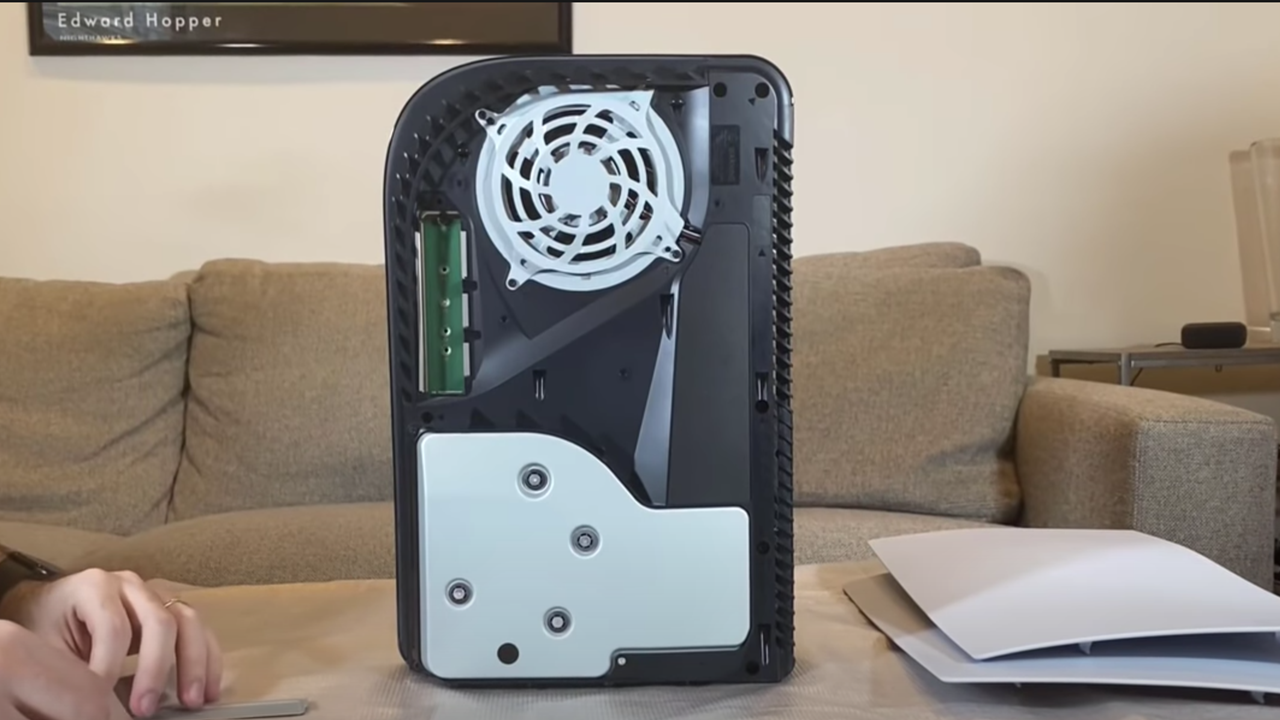
If you buy an SSD without a heatsink, install the cooler before placing the drive in the PS5. Work on a clean table and avoid touching the gold connector contacts.
Follow these steps:
Turn off the PS5 completely. Do not use Rest Mode.
Unplug the power cable and allow the console to cool.
Remove the side panel according to the console model’s instructions.
Open the metal expansion bay cover.
Remove the M.2 screw and spacer.
Place the spacer in the hole that matches the SSD length, usually 2280.
Attach the heatsink to the SSD. Remove all protective film from the thermal pad first.
Insert the SSD at an angle into the M.2 slot.
Press the drive down gently and secure it with the original screw.
Reinstall the expansion cover and PS5 side panel.
Start the console and follow the formatting prompt.
Never force the SSD into the slot. The connector has a notch, so the drive should align in only one direction. If it does not slide in smoothly, remove it and check the position.
One common installation mistake is leaving plastic film on the thermal pad. That film blocks heat transfer. Another is placing the spacer in the wrong position, which can bend the SSD or stop the screw from lining up.

How Hot Can a PS5 SSD Get?
Exact temperatures vary by SSD model, room temperature, airflow, game activity, and console position. The PS5 does not provide a simple user-facing SSD temperature reading during normal use.
Modern NVMe drives often operate at higher temperatures than older SATA drives. Many controllers begin reducing speed when temperatures become too high. The exact throttle point depends on the SSD manufacturer.
Watch for practical warning signs:
• File transfers slow down after starting quickly
• Game installations take much longer than expected
• The PS5 shows storage or read errors
• The SSD disappears from the storage menu
• The console reports a problem with the M.2 drive
These symptoms do not always mean overheating. A loose screw, poor SSD compatibility, faulty drive, or system issue can cause similar problems.
Good console placement also helps. Keep the PS5 on a hard surface with open space around its vents. Do not place it inside a tight cabinet or cover the ventilation openings.
Can You Use a PS5 SSD Without a Heatsink?
The answer to does PS5 SSD need heatsink is still yes, even if the PS5 recognizes a bare drive. A short test may work, but running the SSD this way is not a sensible long-term choice.
Without a heatsink, the drive has less ability to move heat away from its controller. It may throttle during large transfers or behave less consistently in a warm room.
You should not treat the lack of an immediate error as proof that the setup is safe. Heat damage and performance loss may develop over time rather than appear on the first day.
If you already installed a bare SSD, avoid heavy transfers until you add a compatible cooler. Shut down the PS5, remove the drive, and install the heatsink according to the manufacturer’s instructions.
Common PS5 SSD Heatsink Mistakes
Most cooling problems come from small installation errors rather than a lack of expensive hardware. A simple, correctly fitted heatsink is usually better than a large cooler installed badly.
Avoid these mistakes:
• Buying a PCIe Gen3 SSD because it is cheaper
• Using a desktop heatsink that is too tall
• Leaving protective film on the thermal pad
• Installing the SSD upside down
• Using two heatsinks on one drive
• Tightening clips or screws too hard
• Ignoring double-sided SSD clearance
• Blocking the PS5 vents with furniture or fabric
• Assuming a higher speed rating means better console performance
A heatsink should make firm contact, but it should not crush the SSD. If the clips require extreme force, stop and check whether the parts match.
From a practical installation standpoint, the most useful lesson is to measure the full assembly before closing the PS5. A drive may fit the slot but fail to fit under the expansion cover once the heatsink is attached.
Do Heatsinks Improve PS5 Game Load Times?
A heatsink usually does not create a dramatic improvement in loading times by itself. Its main job is to help the SSD maintain stable performance and avoid heat-related slowdowns.
The biggest loading improvement comes from moving from the PS5’s internal hard drive system, if applicable, to a properly rated M.2 NVMe SSD. Once you use a suitable PCIe 4.0 drive, differences between fast SSD models can be small in actual games.
A heatsink becomes more valuable during:
• Large game installations
• Frequent game transfers
• System backups
• Moving games between storage devices
• Long sessions in a warm room
For normal gameplay, the SSD may not work at its maximum speed every second. Still, proper cooling gives you a wider safety margin. It is inexpensive protection for a costly storage upgrade.
Is an SSD Heatsink Worth the Cost?
Yes, a PS5 SSD heatsink is worth the small extra cost. Even when sold separately, a compatible cooler is usually far cheaper than replacing a drive or troubleshooting unstable storage.
The best value is not the largest heatsink. It is a correctly sized model with a good thermal pad and a secure fit.
When comparing SSD prices, consider the complete cost:
• SSD
• Heatsink
• Shipping
• Storage capacity
• Warranty
• PS5 compatibility
An SSD with a factory heatsink may be the better deal if the price difference is small. It reduces installation work and removes uncertainty about matching the cooler to the drive.
Frequently Asked Questions About Does PS5 SSD Need Heatsink
Does every PS5 M.2 SSD need a heatsink?
Yes. Sony recommends effective heat dissipation for M.2 SSDs installed in the PS5 expansion slot. Use an SSD with a built-in heatsink or add a compatible low-profile cooler.
Can a PS5 SSD overheat without a heatsink?
Yes, it can become hot during sustained reads and writes. The drive may throttle its speed, show errors, or become less reliable when heat is not controlled.
Can I use any M.2 heatsink in a PS5?
No. The heatsink must fit the PS5’s limited height and width clearance. Choose a low-profile M.2 heatsink and confirm the combined SSD and heatsink size before buying.
Is a built-in SSD heatsink better for the PS5?
A built-in heatsink is often easier and safer because the drive and cooler are matched. It is not automatically better, but it reduces the chance of using the wrong thermal pad or exceeding the height limit.
Does the PS5 heatsink improve loading speed?
It usually does not make games load much faster by itself. It helps the SSD maintain stable performance and lowers the risk of thermal throttling during heavy storage tasks.
Can I remove the factory heatsink from an SSD?
You usually should not remove it unless the manufacturer specifically allows this and you need to solve a fit problem. Removing it may damage the drive, void the warranty, or expose the chips to poor cooling.
Conclusion
So, does PS5 SSD need heatsink? Yes. A compatible heatsink is an important part of a safe PS5 M.2 SSD upgrade because it helps control heat and maintain steady performance.
Choose a PCIe 4.0 NVMe SSD that meets Sony’s speed and size guidelines. Use a built-in heatsink or a thin, PS5-compatible model, and check the total height before installation. Take your time with the thermal pad, spacer, and screw.
A proper heatsink is a small investment that protects a much larger one. Check your SSD’s full specifications, install it carefully, and share your experience or questions in the comments.
