

Check the seller, inspect the drive, verify its serial number, and test its real capacity before paying.
Learning how to identify fake or counterfeit SSD before buying can save you from slow performance, lost files, and a warranty nightmare. This guide explains the warning signs, seller checks, software tests, and safe buying steps that experienced PC builders use to verify a solid-state drive.
Why counterfeit SSDs are a serious problem
A counterfeit SSD is a drive sold under a false brand, model, capacity, or performance claim. Some fake drives use cheap flash memory inside a real-looking case. Others use modified firmware that reports more storage than the drive truly has.
For example, a fake “2TB SSD” may contain only 64GB of usable flash. The drive may appear to accept 2TB of files, but old data is overwritten when the real space fills. This can corrupt photos, documents, games, and backups.
Counterfeit drives can also use:
• Reused or low-quality NAND flash
• Fake labels and copied serial numbers
• Unapproved memory controllers
• Modified firmware
• Very slow USB or SATA hardware
• Drives pulled from old computers and sold as new
• Smaller drives programmed to report a larger capacity
The most important point is simple: a low price alone does not prove that an SSD is fake. However, an unusually low price combined with weak seller details, poor packaging, and unrealistic specifications is a major warning.

How to identify fake or counterfeit SSD before buying
The safest method is to check several clues at the same time. A single clue may be harmless, but several problems together should make you walk away.
Check the seller before checking the drive
Start with the seller’s reputation. Buy from the manufacturer, an authorized retailer, or a marketplace seller with a long history of genuine electronics sales.
Look for:
• A clear business name and contact information
• A return policy that covers defective or misrepresented products
• Recent reviews from verified buyers
• Photos of the actual product
• Accurate model numbers and specifications
• A proper tax invoice or receipt
• A warranty that can be verified with the manufacturer
Be careful with listings that use stock photos only. Also question sellers who offer many popular SSD brands at prices far below normal retail prices.
A marketplace rating is not proof of authenticity. Some sellers receive good ratings for fast shipping, even when the product fails months later. Read reviews that mention capacity testing, serial number checks, and real transfer speeds.
Compare the price with normal market value
Prices change during sales, so a discount does not automatically mean fraud. Still, an SSD that costs half as much as the same model from trusted stores deserves extra care.
Compare the exact model, capacity, interface, and warranty. A budget SATA SSD should not be compared with a high-end PCIe 4.0 NVMe drive.
Watch for listings that say:
• “2TB” without a full model number
• “Up to 7,400 MB/s” without naming the PCIe generation
• “Original quality” instead of an actual brand
• “Factory direct” with no warranty details
• “New, opened box” without a reason
• “For testing only” or “engineering sample”
These phrases do not prove a fake product, but they reduce confidence.
Verify the exact model number
Search the manufacturer’s website for the model number. Check whether the listed capacity, interface, form factor, NAND type, controller, and rated speed match the product page.
A genuine model usually has a consistent code. Fake listings may mix details from several products. For example, a seller may show a PCIe 4.0 speed while listing a drive that uses a PCIe 3.0 interface.
Do not rely on the product title alone. Check the printed label, packaging, invoice, and software identification after purchase.
Inspect the packaging and label
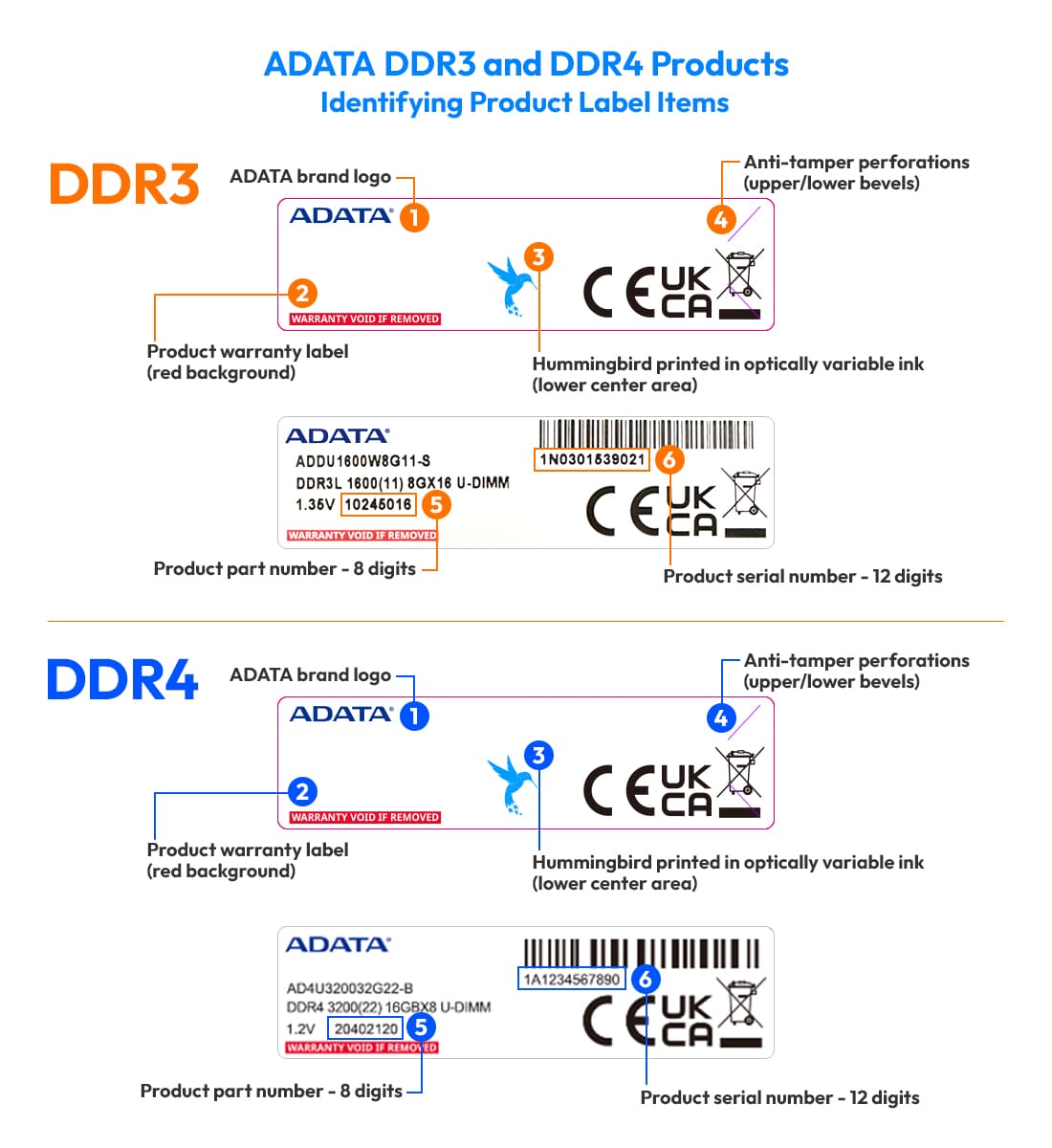
Authentic packaging normally has clean printing, correct spelling, sharp logos, and consistent colors. It may also include a barcode, serial number, regulatory marks, and a tamper seal.
Check for:
• Spelling errors
• Blurry text
• Crooked labels
• Mismatched fonts
• Missing serial numbers
• Different serial numbers on the box and drive
• Scratched or replaced labels
• Wrong connector or screw placement
• Packaging that does not match official product photos
A genuine label can still be copied, so visual inspection is only an early step. It cannot confirm the memory or controller inside the drive.

How to verify an SSD serial number and warranty
A serial number is useful, but it is not perfect. Counterfeit sellers can copy a real serial number from a genuine product. Even so, checking it can expose a fake listing or an invalid warranty.
Enter the serial number on the manufacturer’s warranty or product registration page. Check whether:
• The serial number exists
• The model matches the drive you received
• The warranty status is reasonable
• The region matches the purchase location
• The serial number has already been registered
• The product is listed as refurbished or discontinued
If the website says the serial number is invalid, contact the manufacturer before using the drive. Do not assume the website made a mistake.
Also compare the serial number in several places:
• Retail box
• SSD label
• Invoice
• Operating system information
• Manufacturer diagnostic software
A mismatch is a strong warning. If the number belongs to a different capacity or model, return the drive.
How to identify fake or counterfeit SSD before buying online
Online buying requires more care because you cannot inspect the drive in person. Use the listing, seller history, and return terms as your first line of defense.
Before ordering, follow these steps:
- Copy the full model number from the listing.
- Search for that model on the manufacturer’s official website.
- Compare the listed speed, interface, endurance, and warranty.
- Check whether the seller is authorized or well established.
- Read low-star reviews, not only positive reviews.
- Confirm that returns are allowed for “not as described” products.
- Save screenshots of the listing and advertised specifications.
- Pay with a method that offers buyer protection.
Avoid sellers who ask you to pay outside the marketplace. Do not accept a private refund promise in place of a formal return process.
Product photos can also hide important details. Some listings show a premium SSD in the main image but ship a generic drive with a similar label. Read the description and compare the item received with the exact model ordered.

How to identify fake or counterfeit SSD after delivery
Test the SSD before storing important files on it. Do not install your operating system or copy your only backup to a new drive until it passes basic checks.
Confirm the reported capacity
Connect the SSD to a computer and check how the operating system identifies it. The displayed capacity may be slightly lower than the advertised number because manufacturers use decimal units while operating systems often show binary units.
For example, a 1TB drive may appear as about 931GB in some systems. That difference is normal. A drive sold as 1TB but showing 128GB or 256GB is not normal.
You should check capacity with more than one tool. Firmware can sometimes fool a basic system screen, so a full write and read test is more reliable.
Run a full-capacity test
A full-capacity test writes data across the entire drive and reads it back. This is one of the best ways to expose a fake SSD.
Useful test options include:
• H2testw on Windows
• F3 on macOS and Linux
• A trusted full-disk verification tool
• Manufacturer diagnostic software
These tests can take hours, especially on a large drive. That time is worthwhile. A fake drive may pass a quick benchmark because the test uses only a small portion of the advertised capacity.
Back up any existing data first. A full-capacity test can erase the drive, and a new SSD should be empty before testing.
Check real-world speed
Use a reliable benchmark to test sequential and random performance. Compare the results with the manufacturer’s specifications, but do not expect every computer to reach the advertised maximum.
Speed depends on:
• PCIe or SATA generation
• USB enclosure quality
• CPU and motherboard
• Thermal throttling
• Available free space
• Test size
• Drive temperature
• Background programs
A SATA SSD cannot reach NVMe speeds. An NVMe drive in a USB enclosure may also be limited by the USB interface.
One low benchmark result does not prove fraud. But a drive advertised at 7,000 MB/s that repeatedly performs like a slow flash drive is suspicious, especially when the interface and test setup are correct.
Inspect SMART and health data
SMART data can show useful information about drive health and usage. Look for:
• Power-on hours
• Total host writes
• Drive temperature
• Percentage used
• Media errors
• Unsafe shutdowns
• Reallocated blocks
• Available spare space
A new SSD should not normally show thousands of power-on hours or an unusually high amount of written data. However, some manufacturers reset or limit SMART values, so this check is not conclusive by itself.
A drive with health warnings, media errors, or an incorrect model name should not be trusted with important data.

How to identify fake or counterfeit SSD using firmware and hardware details
Software tools can reveal the controller, NAND type, firmware version, and actual device identity. These details are often more useful than the outside label.
Use the manufacturer’s utility when available. It may show:
• Exact model name
• Firmware version
• Serial number
• Secure erase options
• Health status
• Temperature
• Supported features
• Firmware update history
A generic utility may identify a different controller than the seller claims. For example, the label may say one brand while the controller information points to an unrelated low-cost drive.
You can also inspect the SSD with care, but opening the enclosure may void the warranty. Do not remove labels or heatsinks unless you understand the risk.
Hardware inspection may reveal:
• A small flash chip on a large-capacity label
• Missing DRAM where the model should include it
• Poor soldering
• Reused circuit boards
• Unbranded memory chips
• A controller that does not match the product model
Not every budget SSD uses DRAM. Many genuine drives use host memory buffer technology. The absence of DRAM alone does not mean a drive is fake.
Common signs of a counterfeit SSD
The following warning signs deserve attention:
• The capacity is much larger than the physical flash memory suggests
• The drive fails a full write and read test
• The model number does not exist on the manufacturer’s website
• The serial number is invalid or belongs to another product
• The package has spelling errors or poor print quality
• The price is far below normal market value
• The drive has unusually slow write performance
• The seller avoids warranty questions
• The drive reports a different controller or firmware
• Files disappear after the drive reaches a certain capacity
• The SSD becomes extremely slow after a small amount of data
• The return address or invoice looks unclear
One sign may have an innocent explanation. Several signs usually mean the risk is too high.

Real SSD performance versus fake capacity
Many fake SSDs use a firmware trick. The computer sees a large capacity, but the physical storage is much smaller. The drive may work normally during a short test because the operating system has not filled the real memory yet.
Imagine a small bucket with a label claiming it holds ten gallons. You can pour water into it for a while, but once the bucket is full, the extra water spills out. A fake SSD behaves in a similar way, except the “spill” may overwrite your existing files.
A genuine SSD can also slow down during long writes. This happens when its cache fills, when it gets hot, or when it has little free space. That slowdown does not automatically mean the drive is counterfeit.
The key difference is data integrity. A genuine drive may become slower, but it should still store and retrieve data correctly across its full usable capacity.
How to identify fake or counterfeit SSD before buying from a marketplace
Marketplace buyers should use a simple risk score. Give yourself one point for each problem:
• Unknown seller
• No clear warranty
• Price far below market value
• Generic product photos
• Missing model number
• Poor reviews
• No manufacturer listing
• Weak return policy
If a listing scores three or more points, choose another seller. This is not a scientific test, but it helps prevent impulse purchases.
Prefer listings sold and shipped by trusted retailers. A marketplace may host several sellers for the same product, and the safest choice is not always the cheapest one.
Keep the original box until the SSD passes testing. Photograph the package, label, and serial number when it arrives. These records can help if you need a refund or warranty claim.

Mistakes that can lead to buying a fake SSD
The most common mistake is choosing the lowest price without comparing the full model number. Two drives may both say “1TB NVMe,” yet one may be a reliable PCIe 4.0 model and the other may be an unknown drive with poor flash memory.
Another mistake is trusting a short benchmark. A counterfeit drive can look acceptable during a one-minute test. A full-capacity test is slower, but it checks what matters most.
People also forget to test a drive before moving important files. Treat a new SSD like a used car. You would check the brakes before driving it across the country. Test the drive before trusting it with family photos, work files, or financial records.
A further mistake is assuming that a known brand guarantees authenticity. Counterfeiters often copy respected brands because buyers recognize the logo. The seller, serial number, firmware, and capacity test still matter.
A safe SSD buying and testing checklist
Use this checklist before keeping any new drive:
Before purchase
• Buy from the manufacturer or an authorized retailer
• Compare the exact model number
• Check the normal price range
• Read critical customer reviews
• Confirm warranty and return terms
• Avoid payment outside the marketplace
When it arrives
• Photograph the box and label
• Compare serial numbers
• Check seals and print quality
• Verify the model on the manufacturer’s website
• Register the product if possible
Before use
• Check reported capacity
• Review SMART information
• Run a full-capacity write and read test
• Run a performance benchmark
• Check the manufacturer’s diagnostic utility
• Keep the receipt and test results
If the drive fails any major test, stop using it. Do not format it repeatedly or try to repair it before contacting the seller. Keep evidence of the problem and request a refund.
What to do if you bought a counterfeit SSD
Stop writing important data to the drive. If you already stored files on it, copy them to a known-good drive as soon as possible, but avoid trusting the suspect SSD as the only source.
Next, collect evidence:
• Photos of the packaging
• Screenshots of the product listing
• Serial number results
• Capacity test results
• Benchmark results
• SMART information
• Order details and payment records
Contact the seller through the official marketplace system. Explain the problem clearly and request a return for a product that is not as described.
If the seller refuses, use the marketplace dispute process or payment provider protection. You can also report suspected counterfeit goods to the marketplace and the manufacturer.
Do not resell the drive as “used” unless it has been proven genuine and reliable. Passing a fake SSD to another buyer only spreads the damage.
Frequently Asked Questions
How can I tell if an SSD is fake before buying it?
Check the seller, price, model number, packaging, warranty, and manufacturer listing. You cannot prove the internal hardware until you receive and test the drive, so buy from a trusted source with a strong return policy.
Can a fake SSD show the correct capacity?
Yes. Modified firmware can make a small drive report a much larger capacity. A full-capacity write and read test is the best way to find this problem.
Is a very cheap SSD always counterfeit?
No. Genuine SSDs can be discounted during sales or when newer models replace them. However, an unusually low price combined with weak seller details, unclear warranty terms, or missing model information increases the risk.
Can CrystalDiskInfo or similar tools prove that an SSD is genuine?
These tools can show model data, SMART values, temperature, and usage. They are helpful, but they cannot always detect copied firmware or counterfeit flash, so combine them with a full-capacity test and warranty check.
Should I open an SSD to inspect the circuit board?
Usually not. Opening the drive can void the warranty and may damage it. Use official software and testing tools first, and inspect the hardware only when the warranty risk is acceptable.
What speed should a genuine SSD reach?
The answer depends on the interface, system, drive capacity, temperature, and test method. Compare results with the manufacturer’s specifications under similar conditions rather than expecting the advertised maximum in every computer.
Conclusion
The safest way to avoid a counterfeit SSD is to combine several checks. Buy from a trusted seller, verify the exact model and serial number, inspect the packaging, review SMART data, and run a full-capacity test before saving important files.
Remember that how to identify fake or counterfeit SSD before buying is not about spotting one magic clue. It is about building confidence from the seller, price, specifications, warranty, software data, and real-world performance.
Take a few extra minutes before trusting a new drive. Your files are worth far more than the small amount you may save on a risky deal. Share your SSD testing experience or explore more storage guides before your next upgrade.
