

Press and hold the power button or switch until you hear “Power off” or see the status light turn off.
Learning how to turn off Bose headphones is simple, but the exact step depends on your model. QuietComfort, Bose 700, QuietComfort Ultra, and Bose earbuds use slightly different controls. This guide explains each method, fixes common power problems, and shares practical tips to protect battery life and prevent accidental connections.
How to turn off Bose headphones
Most Bose over-ear and on-ear headphones turn off with the power button or power switch. Keep holding it until the headphones play a power-down sound or the status light goes dark.
Follow these steps:
- Remove the headphones from your ears.
- Find the power button or power/Bluetooth switch on the right earcup.
- Press and hold the button, or slide and hold the switch.
- Wait for the voice prompt or power-off tone.
- Check that the light stops blinking.
A quick press may only pause audio or activate Bluetooth pairing. The control usually needs to be held for about one second, although the exact timing can vary by model.
How to turn off different Bose headphone models
Bose has used several control designs over the years. Check the name printed inside the headband or in the Bose app if you are unsure which model you own.
Bose QuietComfort headphones
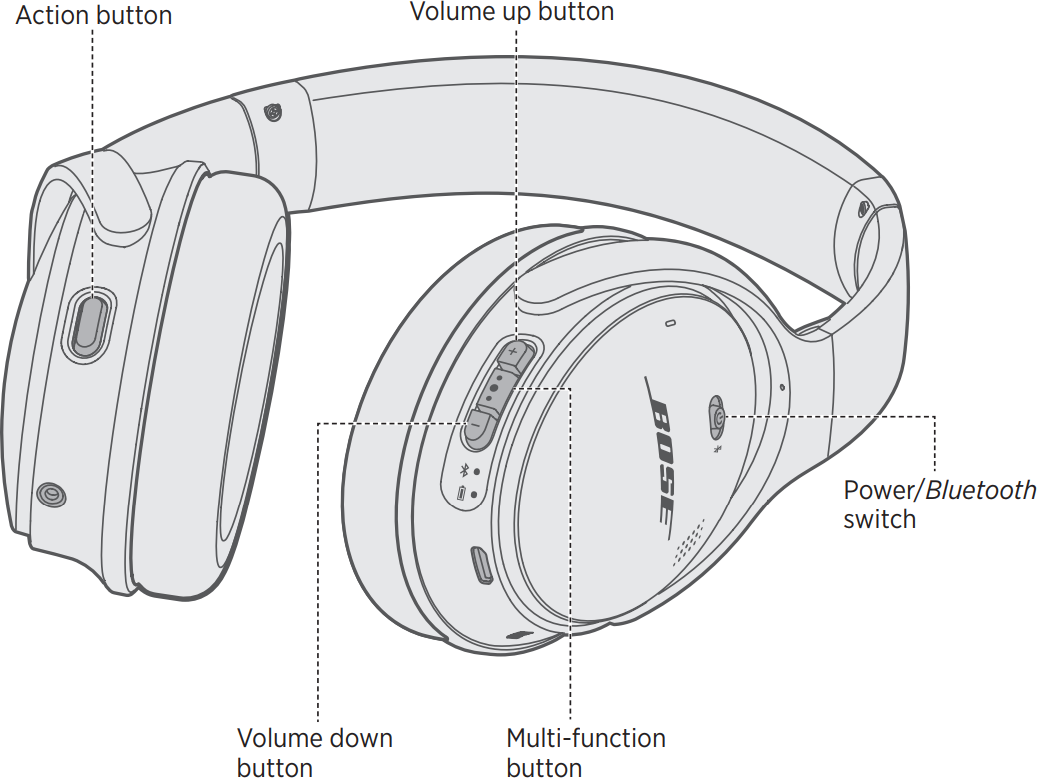
The newer Bose QuietComfort headphones use a power/Bluetooth switch on the right earcup.
- Slide the switch toward the Bluetooth symbol.
- Hold it in that position for about one second.
- Release it when you hear the power-off message.
The headphones should disconnect from your phone and stop using active noise cancellation. If the switch springs back before the headphones shut down, slide it again and hold it slightly longer.
Bose QuietComfort 45
To turn off Bose QuietComfort 45 headphones:
- Locate the power/Bluetooth switch on the right earcup.
- Slide it toward the Bluetooth icon.
- Hold it for about one second.
- Wait for the voice prompt that confirms the headphones are off.
The switch may feel more like a spring-loaded lever than a regular button. Do not force it past its normal range.
Bose QuietComfort Ultra headphones
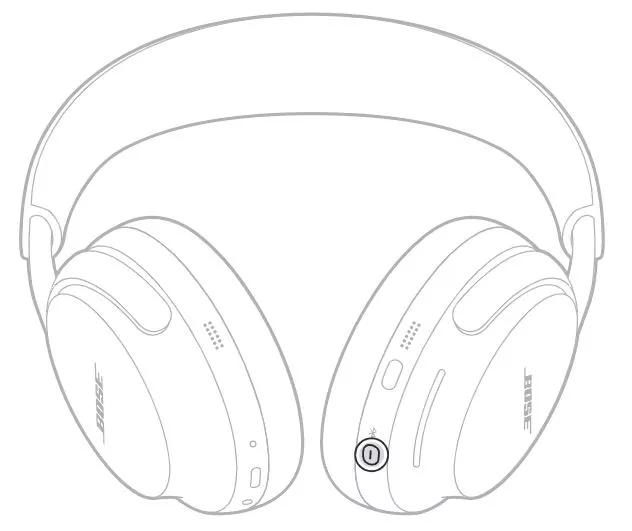
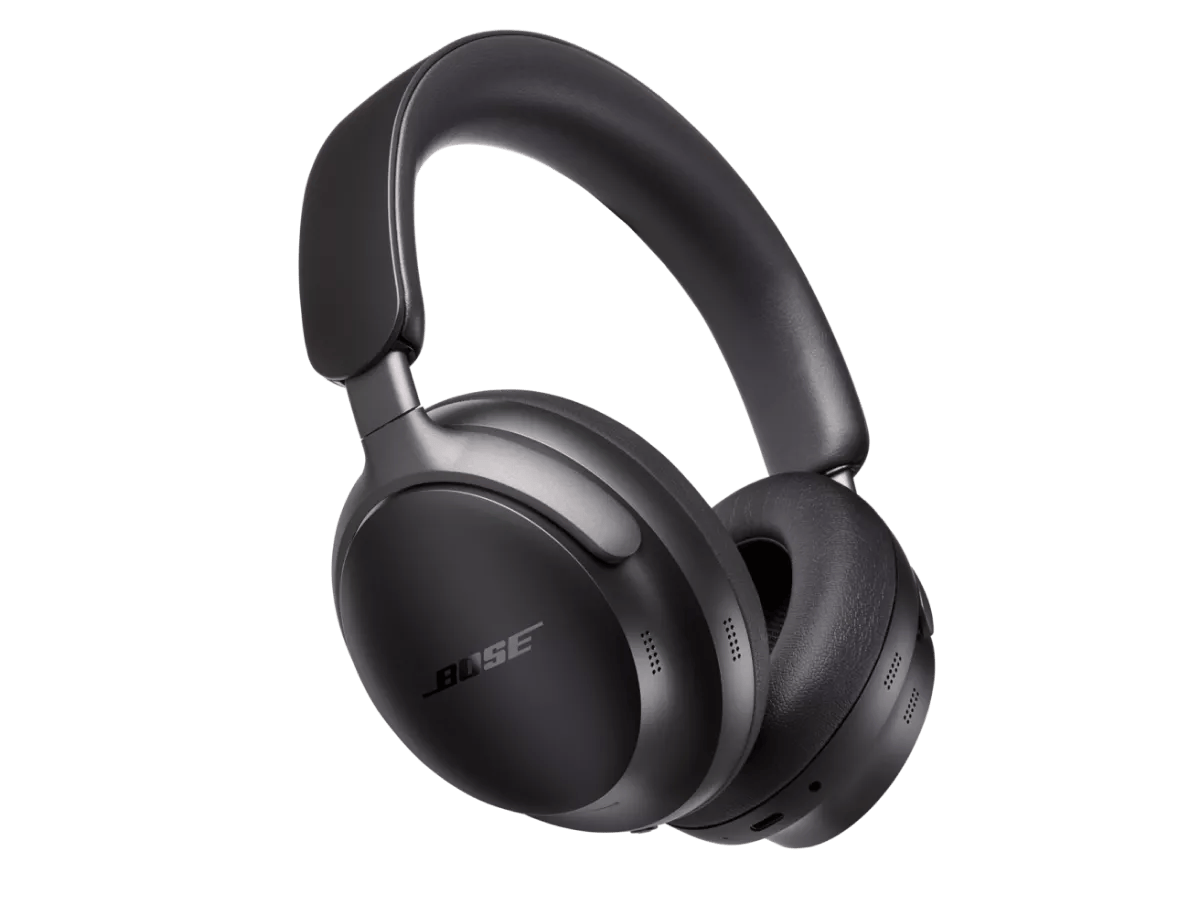
QuietComfort Ultra headphones use a power/Bluetooth button on the right earcup.
- Press and hold the power/Bluetooth button.
- Keep holding until you hear the power-off tone.
- Confirm that the status light turns off.
Some Ultra models may enter a low-power state after being placed in their case or left idle. Manual shutdown is still the best choice when you want to save battery during travel or storage.
Bose Noise Cancelling Headphones 700
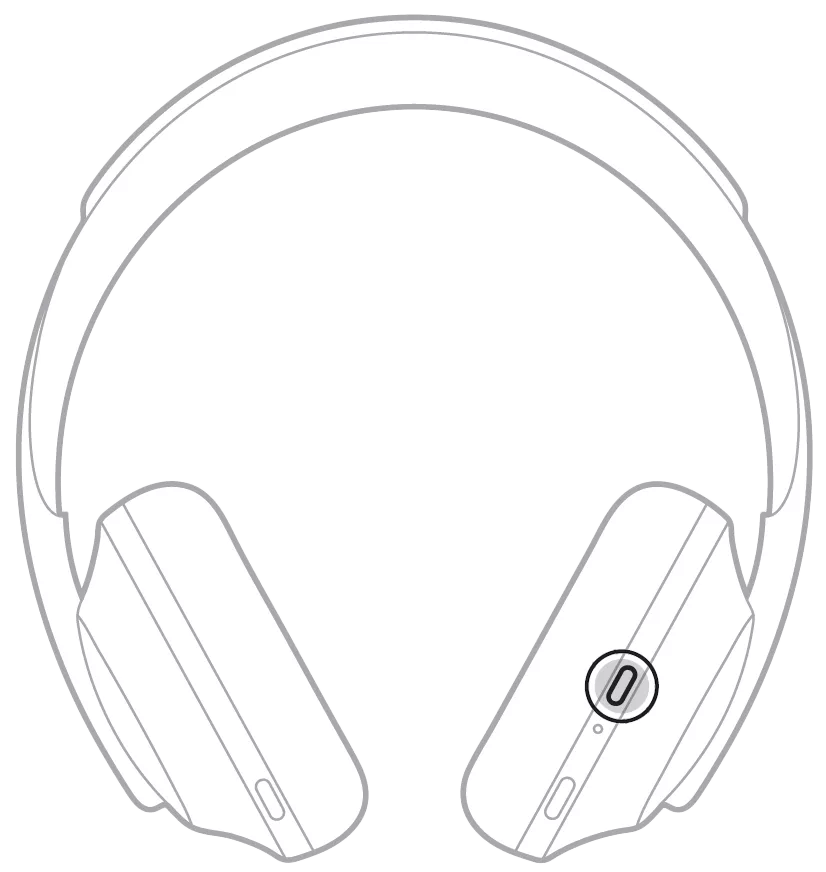
The Bose 700 has a dedicated power button on the right earcup.
- Press and hold the power button.
- Continue holding until the headphones announce that they are powering off.
- Release the button.
A short press may activate the headphones instead of turning them off. Hold the button until the audio prompt confirms the action.
Bose QuietComfort 35 and QuietComfort 35 II
The QuietComfort 35 series uses a power/Bluetooth switch.
- Slide the switch to the Bluetooth position.
- Hold it there for about one second.
- Release it after the power-off message plays.
If the headphones remain connected, repeat the step while watching the indicator light. A light that continues flashing usually means the headphones are still on or searching for a device.
Bose SoundLink around-ear headphones
Many SoundLink around-ear models have a power switch rather than a push button.
- Move the power switch to the off position.
- Wait a few seconds.
- Confirm that the Bluetooth connection ends.
Older models may not provide a voice prompt. In that case, the indicator light and loss of the Bluetooth connection are the best signs that the headphones are off.

How to turn off Bose earbuds
Bose wireless earbuds work differently from Bose over-ear headphones. Many models turn off when placed correctly in their charging case.
Bose QuietComfort Earbuds
To turn off Bose QuietComfort Earbuds:
- Put both earbuds into the charging case.
- Make sure each earbud sits in its charging slot.
- Close the lid.
- Check that the case recognizes the earbuds.
The earbuds should stop playing and enter a charging or standby state. If they remain connected, remove them and place them back in the case. Dirty charging contacts can prevent a proper shutdown.
Bose QuietComfort Earbuds II
For QuietComfort Earbuds II, place both earbuds inside the charging case and close the lid. The earbuds normally disconnect and stop operating once they make contact with the case.
If one earbud stays active, clean the small metal contacts on the earbud and inside the case with a dry, soft cotton swab. Avoid water and metal tools.
Bose Ultra Open Earbuds
Bose Ultra Open Earbuds are designed to rest outside the ear canal. Place them in the charging case when you finish using them, then close the lid.
Because the earbuds do not seal inside your ears, it can be easy to forget that they are still active. Putting them in the case is the most reliable way to stop playback and preserve battery power.
What to do if Bose headphones will not turn off
Sometimes Bose headphones appear stuck because they are still connected, frozen, or waiting for a Bluetooth command. Try these solutions in order.
Hold the power control longer
Press and hold the power button or switch for several seconds. Do not tap it repeatedly. A long press often works when a quick press does nothing.
Disconnect Bluetooth
Open your phone’s Bluetooth settings and select your Bose headphones. Choose Disconnect, not Forget, first. This does not physically turn off the headphones, but it can help confirm whether they are powered on or simply connected without playing audio.
Use the Bose app
Open the Bose app associated with your headphones. The app can show battery level, connection status, firmware information, and available device settings.
Depending on the model, the app may also let you manage auto-off or standby behavior. App features can differ by product and software version, so do not worry if your model does not show every option.
Restart the headphones
A restart can clear a temporary control or Bluetooth problem. Bose restart steps vary by model, but a common approach is to power the headphones off, wait a few seconds, and power them back on.
If the controls do not respond, consult the user guide for your exact model. Avoid holding random button combinations for long periods because some combinations erase Bluetooth pairings or start a reset.
Charge the headphones
A very low battery can cause unusual behavior. Connect the headphones to a compatible charger and allow them to charge for a few minutes before trying the power control again.
Use a clean, dry cable and a reliable USB power source. A damaged cable may show a charging light without delivering enough power.

How to turn off Bose headphones without the power button
You usually need the physical control to shut down Bose headphones completely. However, you can reduce activity in other ways when the button is hard to reach or not working.
Try these options:
• Place Bose earbuds in their charging case and close the lid.
• Turn off Bluetooth on your phone to stop the wireless connection.
• Use the Bose app to review standby or auto-off settings.
• Allow the headphones to enter their automatic power-off mode.
• Connect the headphones to a charger if the battery is too low for normal controls.
Turning off Bluetooth is not the same as powering off the headphones. The headphones may continue using battery for noise cancellation, internal controls, or standby functions.
If the power button is physically damaged, software settings may provide a temporary workaround. A repair or replacement may be needed for a complete solution.
How auto-off and standby mode work
Bose headphones may include an auto-off or standby feature. This feature turns the headphones off after a period without audio or active use.
Auto-off helps when you forget to press the power button. It is useful at work, during travel, or after falling asleep with headphones on. Still, it should not replace manual shutdown when battery life matters.
The exact timer depends on the model and firmware. Some Bose headphones allow you to change the timer in the Bose app, while others use a fixed setting.
Keep these points in mind:
• Auto-off may not begin while the headphones are actively playing audio.
• A Bluetooth connection may continue even when no sound is playing.
• Motion, button presses, or app activity may prevent standby mode.
• Earbuds normally use the charging case as their main off control.
For the longest battery life, manually turn off Bose headphones before placing them in a bag. This is like closing a laptop instead of leaving every app running in the background.

How to confirm Bose headphones are off
A few simple signs can confirm that Bose headphones have powered down.
Look for these indicators:
• The status light turns off.
• A voice prompt says “Power off.”
• The headphones disappear from the active Bluetooth connection list.
• Music no longer resumes when you move the headphones.
• The Bose app shows them as disconnected or unavailable.
One sign alone may not tell the whole story. For example, Bluetooth may disconnect while the headphones remain in a low-power state. The most reliable check is to hold the power control and wait for the shutdown prompt or indicator change.
Common mistakes when turning off Bose headphones
Many power problems come from using the correct control in the wrong way. These mistakes are easy to avoid.
Tapping instead of holding
A quick tap may pause music, activate a voice assistant, or do nothing. Hold the power button until the headphones respond.
Using the wrong button
Bose headphones may have separate buttons for volume, noise cancellation, voice assistants, and power. The power control is usually on the right earcup, but its location changes by model.
Assuming Bluetooth disconnection means power-off
Your phone may stop showing an active connection while the headphones remain in standby. Use the power control for a complete shutdown.
Storing headphones while they are still on
A headphone case protects the hardware, but it does not always turn the headphones off. Check the status light before closing the case.
Ignoring the earbuds’ charging contacts
Earbuds may not shut down if they do not sit correctly in the case. Clean contacts and a charged case help prevent this issue.
From a practical standpoint, the most common mistake is rushing the button press. Give the headphones one full second to respond. That small pause often prevents repeated attempts and unnecessary Bluetooth troubleshooting.

Why turning off Bose headphones matters
Turning off Bose headphones saves battery and reduces the chance of unwanted connections. It also prevents audio from starting when you do not expect it.
Manual shutdown is especially useful in these situations:
• Before placing headphones in luggage.
• Before storing them for several days.
• When switching between a phone and a computer.
• When the headphones keep reconnecting to an old device.
• When you want to preserve battery for a flight or workday.
Battery capacity naturally declines over time. Avoiding unnecessary standby use can help you get more useful time between charges, although it cannot stop normal battery aging.
You should also keep headphones away from extreme heat and moisture. Proper storage protects the battery, ear cushions, charging contacts, and electronic parts.
When to contact Bose support
Contact Bose support if the headphones will not turn off after charging, restarting, and following the model-specific steps. Support can confirm the correct reset process and check whether the product is covered by a warranty.
Seek help if you notice:
• A power button that feels loose or stuck.
• A status light that stays on constantly.
• A burning smell or unusual heat.
• Charging that stops or starts without reason.
• Repeated shutdowns during normal use.
Do not open the earcup or charging case yourself unless you are qualified to repair small electronics. The battery and internal parts can be damaged, and opening the product may affect warranty coverage.
Frequently asked questions about how to turn off Bose headphones
How do I turn off Bose headphones?
Press and hold the power button or slide and hold the power/Bluetooth switch until you hear a power-off message. The status light should also turn off.
Why will my Bose headphones not turn off?
The headphones may need a longer press, a charge, or a restart. Disconnect Bluetooth, charge the headphones for a few minutes, and try the power control again.
Do Bose headphones turn off automatically?
Many Bose models have an auto-off or standby feature. The timing and settings depend on the model, and some products let you adjust the timer in the Bose app.
How do I turn off Bose earbuds?
Place both earbuds into their charging case and close the lid. Make sure the earbuds sit on the charging contacts so they can disconnect and enter their charging state.
Does turning off Bluetooth turn off Bose headphones?
No. Turning off Bluetooth on your phone only ends or pauses the wireless connection. Use the headphone power button or switch for a complete shutdown.
How can I tell if my Bose headphones are off?
Listen for the power-off prompt and check that the status light is off. The Bose app should also show the headphones as disconnected or unavailable.
Can I turn off Bose headphones from the Bose app?
The app may control standby and auto-off settings, but it does not replace the physical power control on every model. App options vary by product and software version.
Conclusion
Knowing how to turn off Bose headphones takes only a few seconds once you identify the right control. Hold the power button or switch until the shutdown prompt appears, and place Bose earbuds in their charging case when you finish listening.
If the headphones do not respond, charge them, check the Bose app, and follow the model-specific restart steps. Use these habits every day to protect battery life, avoid unwanted connections, and keep your headphones ready when you need them. Explore the guide for your exact Bose model, and share your experience or question in the comments.
