

To wear Samsung earbuds well, choose the right ear tip, point the speaker inward, and seat each bud gently.
Learning how to wear Samsung earbuds is more than placing them in your ears. A good fit improves sound, comfort, call quality, and noise control. This guide explains the correct position for Galaxy Buds models, common fit problems, useful adjustments, and simple care tips based on Samsung’s fitting guidance and everyday earbud use.
How to Wear Samsung Earbuds Correctly
Most Samsung Galaxy Buds have a small speaker opening, touch area, microphone, and stabilizing wing or ridge. These parts should face the right direction before you insert the earbuds.
Follow these steps for a secure fit:
- Remove the left and right earbuds from the case.
- Check the markings on each bud. “L” means left, and “R” means right.
- Hold the earbud so the speaker points toward your ear canal.
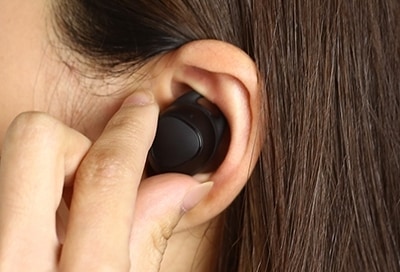
- Place the earbud into your outer ear.
- Rotate it slightly backward or forward until it feels stable.
- Press it in gently, but do not force it deep into your ear.
- Check that the touch control area remains easy to reach.
- Repeat the process with the other earbud.
The earbud should sit in the bowl of your ear, often called the concha. The silicone tip should seal the ear canal without causing pressure or pain. It should feel secure, like a small cushion resting in place, rather than like a plug pushed too far inside.
When learning how to wear Samsung earbuds, start with a light touch. Many people make the mistake of pushing the buds inward when a small rotation would create a better seal.

Choosing the Right Ear Tip Size
The ear tips have a major effect on comfort and sound. Samsung Galaxy Buds often include small, medium, and large silicone tips. Your ears may not be the same size, so you may need a small tip in one ear and a medium tip in the other.
A proper ear tip should meet three goals:
• It should stay in place when you walk or turn your head.
• It should block some outside sound without creating painful pressure.
• It should produce clear bass without sounding hollow.
If the earbud feels loose, try a larger tip. If your ear feels sore after a few minutes, try a smaller tip. A poor seal can make music sound thin, which often leads people to raise the volume more than they should.
To test the seal, play a familiar song at a low volume. Listen for bass, vocals, and detail. If the bass improves when you gently press the earbud inward, the tip may be too small or the bud may need a slight rotation.
Samsung’s fit test, available on some Galaxy Buds models through the Galaxy Wearable app, can also help. The test is useful, but comfort still matters more than a perfect app result. Ear shapes vary, and software cannot fully judge pressure or irritation.

How to Fit Different Samsung Galaxy Buds Models
The basic method for how to wear Samsung earbuds is similar across the Galaxy Buds range. However, each design has small differences.
Galaxy Buds, Buds+, and buds2
these models use silicone ear tips and may include small ear wings. Insert the tip first, then rotate the earbud until the wing rests against the upper part of your outer ear.
Do not place the touch panel toward the front of your face. The main surface should usually face outward so you can control music and calls without pressing the bud deeper.
Galaxy Buds Pro and Buds2 Pro
The Pro models have a more sealed in-ear design. Their tips may create stronger passive noise isolation, so correct sizing is especially important.
Insert the speaker tip at a slight angle. Then rotate the earbud until the outer shell follows the shape of your ear. If the fit feels tight, change the tip size rather than forcing the earbud into place.
Galaxy Buds Live
Galaxy Buds Live have an open design and do not use a traditional silicone tip. The speaker opening should point toward your ear canal, while the wider body rests in the lower part of your outer ear.
The fit may feel different from other Galaxy Buds. They should sit securely in the ear bowl, but they should not be pushed into the canal. Because the design is more open, it may allow more outside sound than sealed models.
Galaxy Buds3 and Buds3 Pro
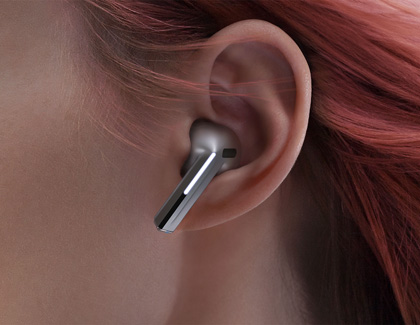
Stem-style Galaxy Buds models have a different shape. Place the speaker portion into your ear first, then let the stem point down and slightly forward or backward according to the model’s design.
Avoid twisting the stem aggressively. The goal is to align the speaker with your canal while keeping the microphones clear for calls and noise control.
Knowing your model makes how to wear Samsung earbuds much easier. Look at the model name in the Galaxy Wearable app or on the original packaging if you are unsure.
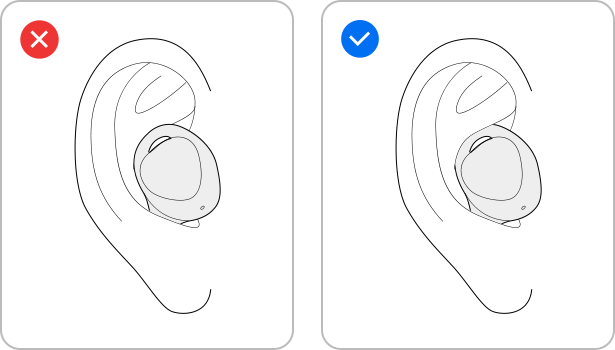
How to Know if Samsung Earbuds Fit Properly
A well-fitted earbud should stay in place during normal movement. It should not fall out when you walk, speak, or look down. You should also be able to remove it without discomfort.
Use this quick fit checklist:
• Music sounds full and balanced.
• Voices sound clear during calls.
• The earbuds do not create sharp pressure points.
• The buds remain stable while walking.
• Noise control works consistently in both ears.
• You do not need to keep pushing the buds back into place.
Try a simple movement test. Walk around your room, turn your head, smile, and open your mouth. The jaw moves near the ear canal, so talking and chewing can reveal a weak fit.
In my own earbud testing, the most common issue was not the earbud itself. It was the wrong tip size or the wrong angle. A small change often fixed the problem faster than changing settings or increasing the volume.
Pain is not a sign of a better seal. If you feel soreness, itching, numbness, or pressure, remove the earbuds and let your ears rest.
Common Mistakes to Avoid
Understanding how to wear Samsung earbuds also means knowing what not to do. Small mistakes can affect sound, comfort, and safety.
Pushing the Earbuds Too Deep
Earbuds should sit at the entrance of the ear canal, not far inside it. Pushing them too deep can cause pain and may irritate the skin.
Using the Same Tip Size in Both Ears
Many people assume both ears are identical. In reality, ear canals often differ slightly. Test each ear separately and use the size that feels best.
Wearing the Left Bud in the Right Ear
The left and right earbuds are shaped to match their intended ears. Switching them can create pressure and make the touch controls feel awkward.
Ignoring Earwax and Moisture
Earwax can block the speaker grille and reduce sound. Sweat and moisture can also affect comfort and device performance. Clean the earbuds with a dry, soft cloth and follow the manufacturer’s care instructions.
Do not insert sharp objects into the speaker mesh. Avoid soaking the earbuds, even if your model has water resistance. Water resistance also does not mean protection from swimming, soap, or long exposure to water.
Turning Up the Volume to Compensate for a Poor Fit
A loose seal can make music sound quiet. Raising the volume may solve the symptom but not the cause. Fix the position or change the ear tip first.
Hearing experts commonly recommend keeping personal audio at a moderate level and taking breaks. The World Health Organization also advises safe listening habits, including reducing volume and limiting long exposure.
How to Wear Samsung Earbuds for Exercise
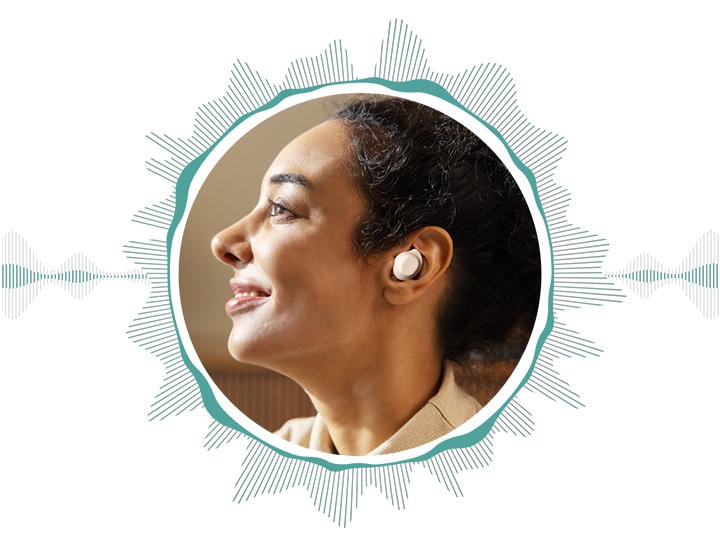
Samsung earbuds can work well for walking, commuting, and light exercise when they fit securely. Before a workout, clean moisture from your ears and the earbuds.
For a more stable fit:
- Choose the ear tip that creates a firm but comfortable seal.
- Attach the correct ear wing if your model includes one.
- Rotate each earbud until the wing rests against the outer ear.
- Test the fit with gentle head movement.
- Wipe away sweat after exercise.
Do not wear sealed earbuds when you need to hear traffic, cyclists, alarms, or people around you. Ambient sound mode can improve awareness, but it should not replace attention to your surroundings.
Water and sweat protection levels vary by Samsung model. Check the specific product rating before using earbuds in heavy rain or during intense workouts. Never charge wet earbuds or place wet earbuds inside the charging case.
Improving Sound, Calls, and Noise Cancellation
Correct placement supports more than comfort. It also helps the microphones and speakers work as designed.
For music, a good seal improves low notes and reduces the need for high volume. For calls, the microphones should remain uncovered. Hair, hats, fingers, and loose clothing can block microphone openings and make your voice sound distant.
For active noise cancellation, both earbuds need a stable seal. If one side is loose, noise may enter through that ear. Adjust the ear tip or rotate the bud before changing the noise control setting.
Use the Galaxy Wearable app to check features such as:
• Earbud fit testing, when supported
• Ambient sound
• Active noise cancellation
• Touch controls
• Equalizer settings
• Software updates
• Battery status
Settings can improve the experience, but they cannot repair a poor physical fit. Think of software as the steering wheel and fit as the tires. Both matter, but the earbuds must first sit correctly.

Cleaning and Comfort Tips
Clean Samsung earbuds regularly, especially if you use them during exercise. Dirt, skin oil, and earwax can collect around the ear tips and speaker grille.
Use this simple care routine:
• Remove the silicone tips and rinse them only if the model’s care guidance allows it.
• Dry the tips fully before putting them back on.
• Wipe the earbuds with a soft, dry, lint-free cloth.
• Use a dry cotton swab around the outer edges, not inside the mesh.
• Keep the charging contacts clean and dry.
• Store the earbuds in their case when you are not using them.
Do not share earbuds without cleaning them first. Shared earbuds can transfer oils, wax, and germs. If your ears become painful, swollen, or unusually itchy, stop using the earbuds and seek medical advice if the problem continues.
Comfort also depends on time. Even a perfect fit can become tiring after several hours. Take short breaks, especially when listening in a quiet room where high volume is unnecessary.

Troubleshooting Loose or Uncomfortable Earbuds
If your Samsung earbuds keep falling out, work through the problem in order. Start with the physical fit before changing app settings.
• Check that each bud is in the correct ear.
• Clean the earbud and ear tip.
• Try the next larger or smaller tip.
• Rotate the earbud until it rests in the ear bowl.
• Try a different wing size if your model includes wings.
• Test one ear at a time.
• Replace worn or stretched ear tips.
If only one earbud sounds quiet, inspect the speaker mesh for blockage. Also check the balance setting on your phone. A balance control shifted to one side can make one earbud seem defective.
If the earbuds cause repeated pain, stop using them. Some people have ear shapes that do not suit a certain design. In that case, a different tip, wing, or earbud model may be the better choice.
Frequently Asked Questions About How to Wear Samsung Earbuds
Should Samsung earbuds go deep inside your ears?
No. Samsung earbuds should sit securely at the entrance of the ear canal and in the outer ear. Push them in only until they feel stable and comfortable.
Which way should Samsung earbuds face?
The speaker opening should point toward your ear canal, while the outer control surface faces outward. Rotate each earbud slightly until it follows the natural shape of your ear.
Why do my Samsung earbuds keep falling out?
The ear tip may be too small, the earbuds may be in the wrong ears, or the angle may be incorrect. Try another tip size and rotate the earbuds instead of pushing them deeper.
How tight should Samsung earbuds feel?
They should feel secure without pain, sharp pressure, or numbness. A good fit creates a gentle seal and stays in place when you walk or talk.
Can I wear Samsung earbuds while exercising?
Yes, many Samsung earbuds are suitable for workouts when used within their water and sweat limits. Wipe them dry after exercise, and avoid wearing them where outside awareness is important.
How do I improve noise cancellation on Samsung earbuds?
Use the correct ear tip size and create a complete seal in both ears. If noise cancellation still seems weak, check the Galaxy Wearable app, update the earbuds, and make sure the microphones are not blocked.
Conclusion
The best way to wear Samsung earbuds is to use the correct ear tip, place each bud in the matching ear, and rotate it gently until it feels secure. A good fit should improve sound, calls, noise control, and comfort without causing pain.
Test your earbuds while sitting, walking, and speaking. Make small adjustments before raising the volume or changing advanced settings. With the right fit and regular cleaning, your Samsung earbuds can feel natural for everyday listening.
Try these steps with your own Galaxy Buds today, and share your favorite fitting tip or model in the comments.
