How To Find One Lost Earbud: Easy Tracking Tips
Losing one earbud in your home, car, office, or gym is frustrating, but you may be able to find it without buying a new pair. The fastest method is to use the tracking app made for your earbuds, play a sound if the earbud is still charged, and then search the places where a small earbud can hide.
This guide covers Apple AirPods, Samsung Galaxy Buds, Google Pixel Buds, and many other wireless earbuds used in the United States. It also explains what to do when the lost earbud is offline, dead, inside its charging case, or out of Bluetooth range.

Start With These Steps
Before searching room by room, try the tracking tools on your phone. They can show the earbud’s last known location or play a sound through it.
1. Keep the earbud you still have in the charging case
If you still have one earbud, place it in its case. This helps you avoid confusing the two earbuds and may let the app focus on the missing one.


Keep the charging case open if your app needs to detect the earbud. Do not close the case until you know whether the missing earbud is inside it.
2. Open the correct tracking app
Use the app that matches your earbuds:
- AirPods: Open the Find My app on an iPhone, iPad, or Mac.
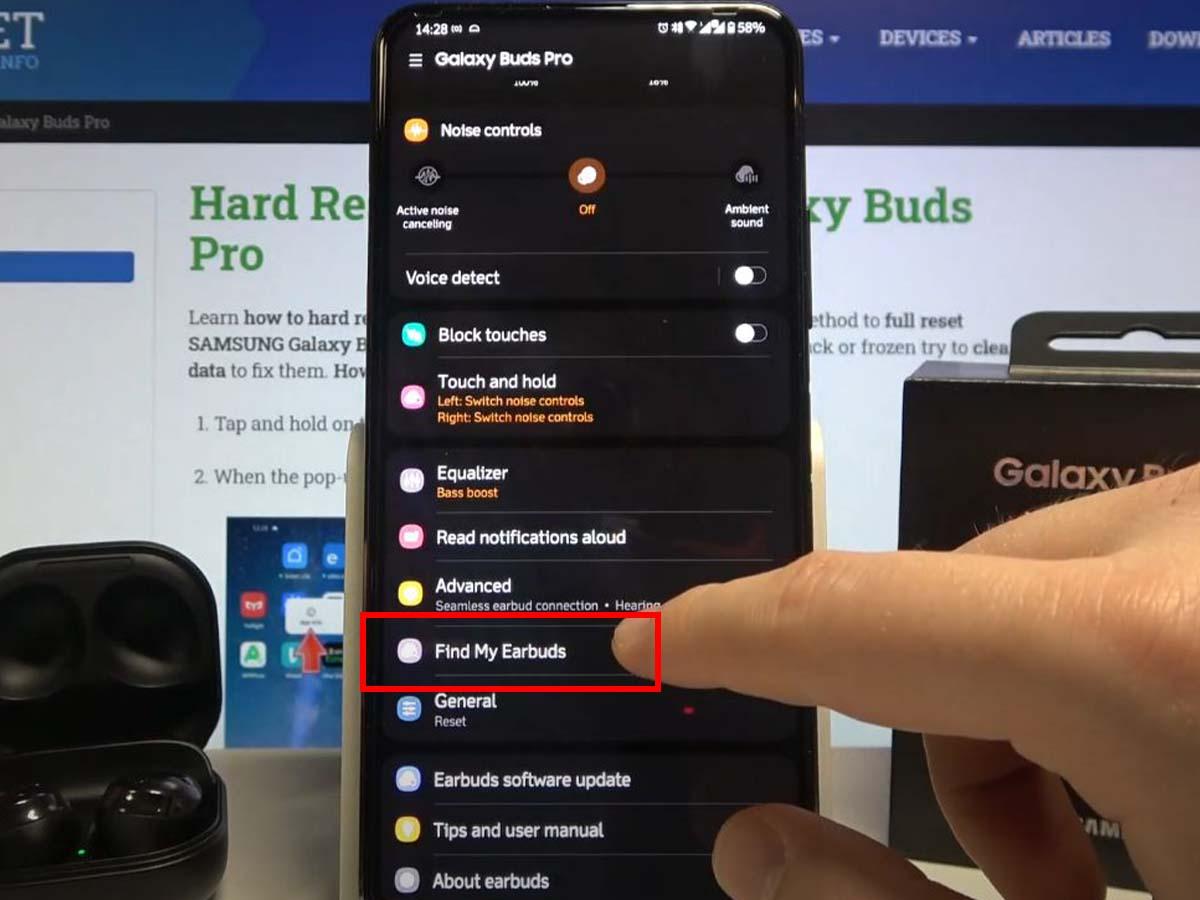
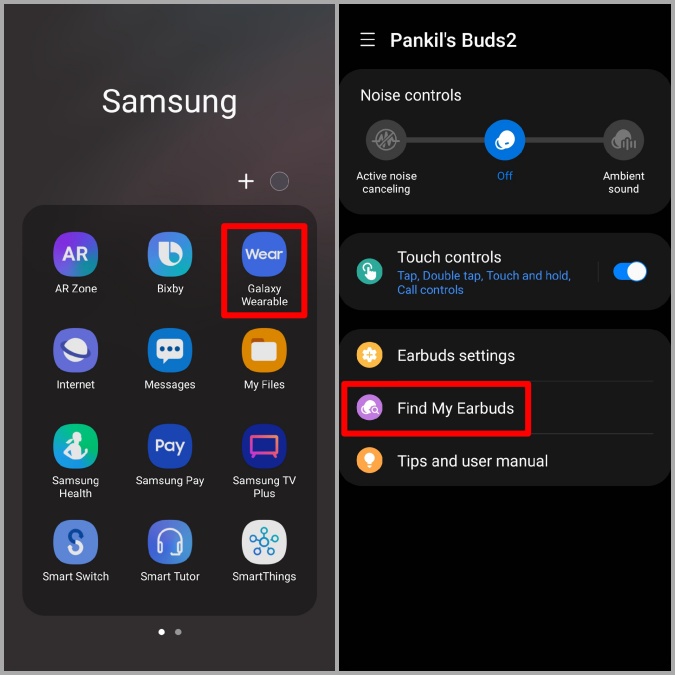
- Galaxy Buds: Open the Galaxy Wearable app or Samsung’s supported device-finding service.
- Pixel Buds: Use the Find My Device service or the Pixel Buds settings on your Android phone.
- Other Bluetooth earbuds: Check the brand’s app, such as JBL Headphones, Sony | Sound Connect, Bose, or another official app.
The exact menu names may differ by model and software version.
3. Check the map or last known location
If the app shows the missing earbud, go to that location. The map may show:
- Its current location
- Its last location before the connection ended
- The location of the charging case
- The location of the complete set rather than one individual earbud
A last known location is a clue, not proof that the earbud is still there. Someone may have moved it, or the location may reflect the last time your phone connected to it.
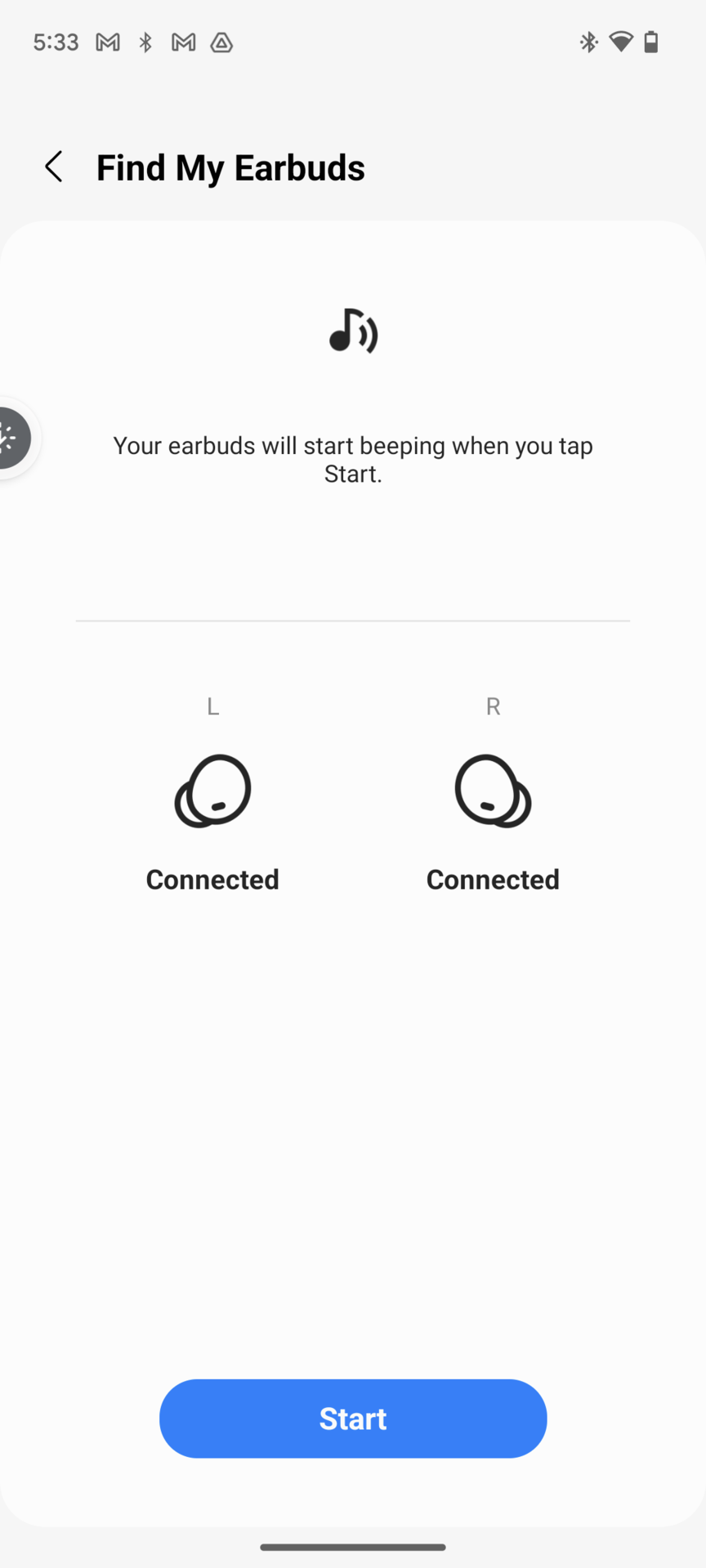
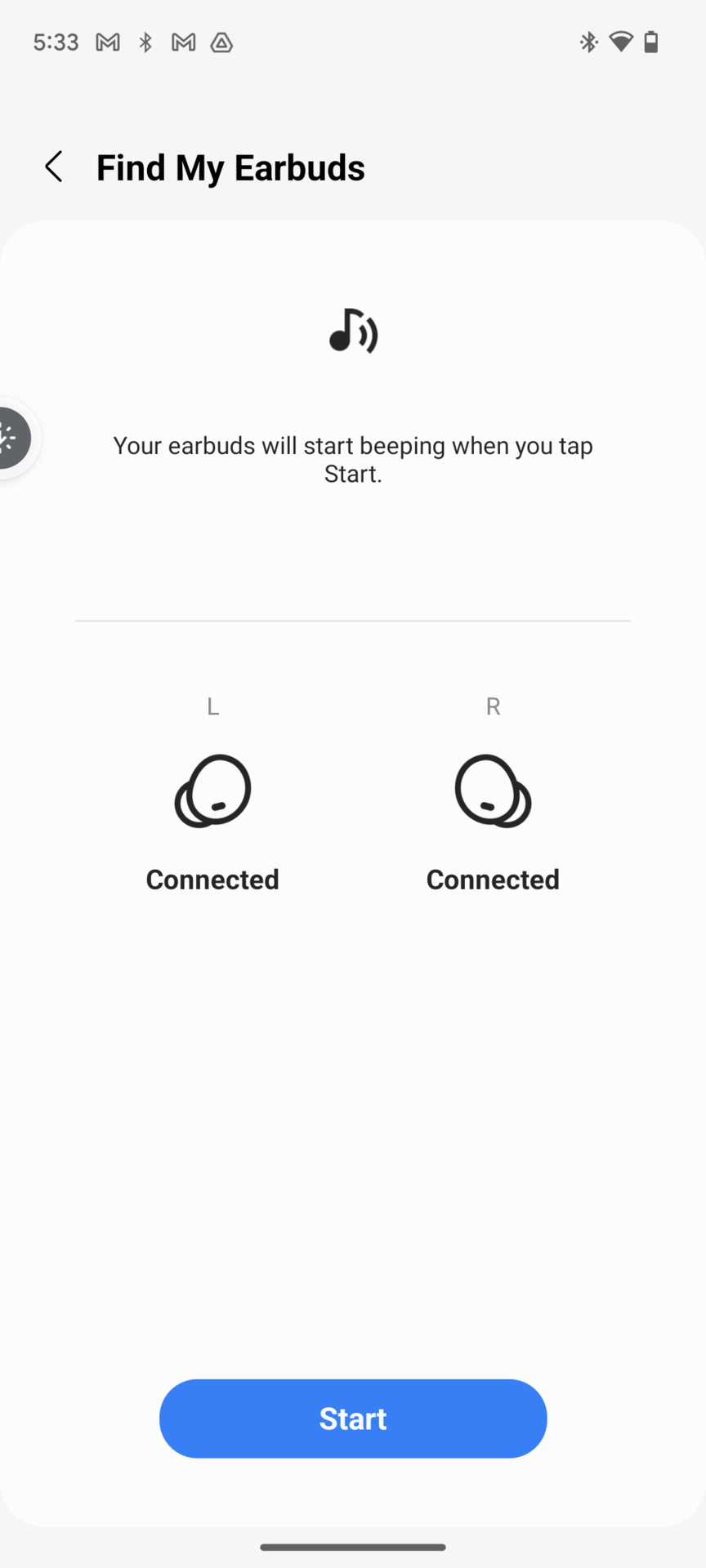
4. Use the “Play Sound” option
If the earbud is online and has enough battery, tap Play Sound, Find Nearby, or a similar option.
Turn off music and other audio first. Then listen for the alert. Search slowly because the sound may be quiet under clothing, furniture, or carpet.
5. Walk slowly around the location
Bluetooth range is often reduced by walls, cars, bags, and other objects. Walk through the area with the tracking app open.
If the app reconnects, the missing earbud may be close. Stop when the signal improves, then search within a few feet of that spot.


How Earbud Tracking Works
Earbud tracking depends on three different features: Bluetooth, a location network, and the earbud’s battery.
Bluetooth connection
Bluetooth helps your phone connect to an earbud nearby. If the missing earbud is within range and awake, your phone may show it as connected.
Bluetooth does not give the earbud its own GPS location. Your phone estimates the location based on where the phone last detected the earbud.
A device-finding network
Some earbuds can be detected by nearby phones through a wider finding network. For example, Apple’s Find My network can help locate supported AirPods through nearby Apple devices.
The same principle applies to some Android and Samsung products, but support depends on the exact model, account settings, region, and software version.
Battery status
A lost earbud can usually play a sound only when it has power. If its battery is dead, the app may show only its last known location.
This creates an important limit: a map pin can tell you where the earbud was detected, but it cannot make a dead earbud ring.
The charging case
A charging case is not always a tracker. On some models, the case can be located separately. On others, the app mainly tracks the earbuds or their last connection.
If the missing earbud is inside a closed case, it may not play a sound. Start by checking every case, pouch, pocket, and bag you used that day.
How to Find One Lost AirPod
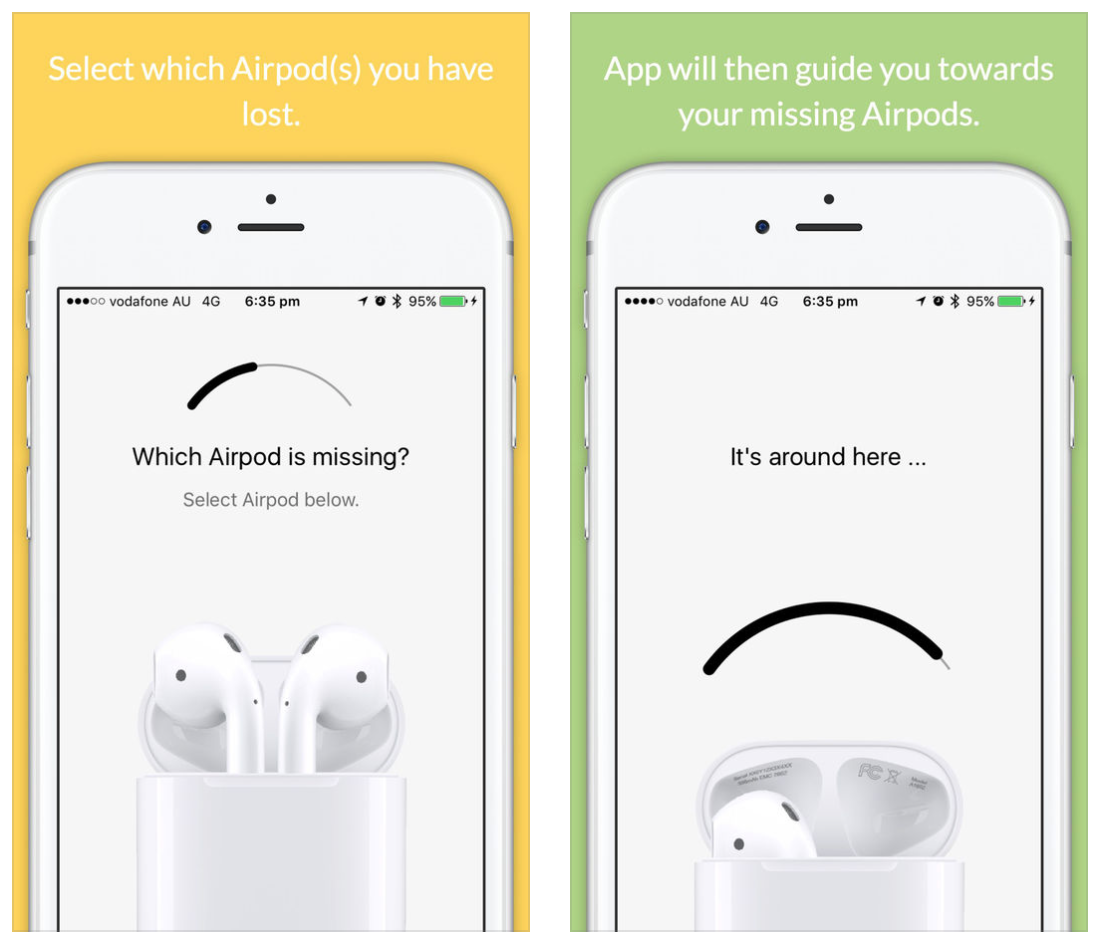
Use Apple’s Find My app first. It is usually the most useful tool for finding a missing AirPod.
- Open Find My on your iPhone.
- Tap Devices.
- Select your AirPods.
- Choose the left or right AirPod if the app displays them separately.
- Check the map.
- Tap Play Sound when the AirPod is online.
- Follow the sound and update the map as you move.
If only one AirPod appears, place the AirPod you still have in its charging case. Then refresh Find My and check again. Separating the two earbuds can help the app identify the missing one.
Some newer AirPods support nearby finding features that provide more precise directions. These features require a compatible AirPods model and compatible Apple hardware. If the option does not appear, your model or current setup may not support it.
If your AirPod is offline
An offline AirPod may be:
- Out of Bluetooth range
- Out of battery
- Inside a closed charging case
- Disconnected because of a phone or account issue
- Too far from the Apple finding network


Use the last known location as your starting point. Search nearby floors, furniture, bags, and paths between that location and where you are now.

How to Find One Lost Galaxy Bud
Samsung Galaxy Buds can often be located through Samsung’s device-finding tools or the Galaxy Wearable app.
Try these steps:
- Open the Galaxy Wearable app or Samsung’s device-finding service.
- Select your Galaxy Buds.
- Look for a map, last known location, or ring option.
- Choose the missing left or right bud if the app allows it.
- Start the sound.
- Search while moving slowly through the area.
The missing bud must usually have battery power and a connection to the phone or a supported finding network. A sealed charging case may prevent the bud from responding.
If the app shows both buds together, check the charging case first. The map may represent the last location of the set rather than the exact location of the missing side.
How to Find One Lost Pixel Bud
For Pixel Buds, start with Google’s device-finding options and the Pixel Buds settings on your Android phone.
- Open the Pixel Buds settings or Google’s device-finding service.
- Select your Pixel Buds.
- Check the last known location.
- Use the sound option if it is available.
- Search the area while keeping Bluetooth enabled.
- Refresh the app when you move to a new room or location.
A Pixel Bud may not ring if its battery is empty, it is inside the case, or it is outside the phone’s connection range. If the app cannot connect, use the last known location and search the route you took after using the earbuds.

How to Find Other Wireless Earbuds
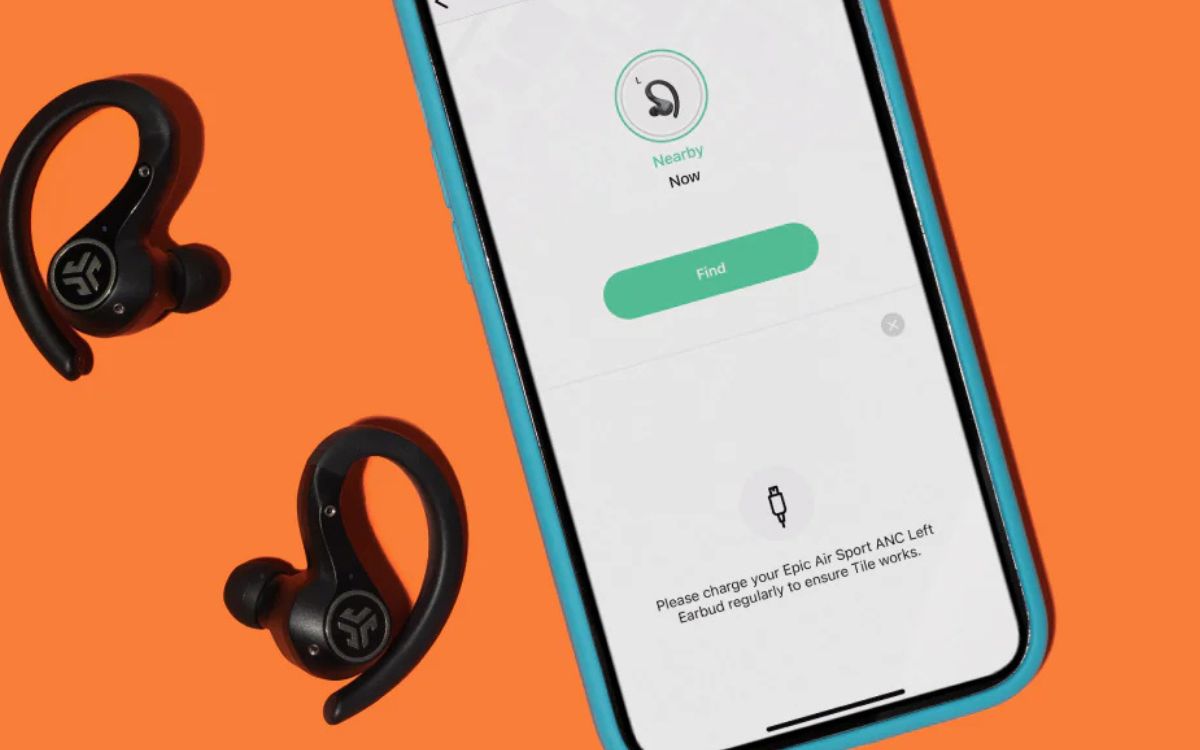
For earbuds from Sony, Bose, JBL, Beats, JLab, Anker, Sennheiser, and other brands, check the official companion app first.
Look for options named:
- Find my earbuds
- Find device
- Locate
- Play sound
- Last connected location
- Ring left or right earbud
Not every model supports tracking. Some apps can only show whether the earbuds are connected. Others may display the last connection time but not a map.
If the brand’s app has no tracking feature, use a Bluetooth scanner app with care. A stronger signal can suggest that you are getting closer, but signal strength is affected by walls, furniture, bodies, and other electronics. Treat it as a rough clue rather than an exact measurement.
Search in the Places Earbuds Commonly Hide
After using the app, search the physical area in a set order. Small earbuds often bounce, roll, or stick to fabric.
Check these places first:
- Pockets in jeans, jackets, hoodies, and work clothes
- Backpack, purse, gym bag, and laptop bag
- Bed sheets, blankets, pillows, and mattress edges
- Couch cushions and the space under the couch
- Car seats, floor mats, cup holders, and door pockets
- Bathroom counters, shelves, and floors
- Desk drawers and spaces under a desk
- Laundry baskets and clothing piles
- Around charging stations
- Under rugs and near baseboards
- Between car seats
- Inside a case that looks empty
Use a flashlight close to the floor. The plastic shell may reflect light even when the earbud is hard to see.


Move one item at a time. A rushed search can push the earbud farther away.
What to Do When the Earbud Is Dead or Offline
A dead earbud cannot usually play a sound or report a new location. Your best option is to rebuild the last-use timeline.
Ask yourself:
- Where did you last hear audio?
- When did you notice that one earbud was missing?
- Did you remove a jacket, hat, or backpack?
- Did you sit on a couch, bed, or car seat?
- Did you use a bathroom, gym, store, or office?
- Did you place the earbuds near a charger?
- Did you handle laundry or change clothes?
Then search in this order:
- The last place where both earbuds were in your ears
- The route from that place to your next stop
- Clothing and bags used during that period
- Furniture and vehicles
- The most recent location shown in the tracking app
If the earbud reconnects later, use the sound feature at once. Avoid waiting if the battery may still have some charge.

How to Use Bluetooth Signal Strength
A Bluetooth signal can help you narrow the search, but it cannot identify the exact spot.
If the earbud appears connected:
- Stand still and note the signal or connection status.
- Walk a few steps in one direction.
- Check whether the connection improves or drops.
- Return to the strongest area.
- Search low surfaces, fabric, gaps, and nearby containers.
- Repeat from another direction.
A stronger signal often means you are closer, but walls and objects can distort the result. The signal may also appear strong when the earbud is on the other side of a thin wall.
Do not spend too long using a third-party scanner if the official app offers a map or sound feature. The official app is normally better matched to the earbud’s hardware.
What Not to Do
Avoid actions that can damage the earbud or make it harder to find.
- Do not vacuum the area until you finish searching.
- Do not wash clothing that may contain the earbud.
- Do not shake blankets over a drain or balcony.
- Do not use a magnet to find the earbud. Magnets may not help and can damage some electronics.
- Do not place the earbud in water to clean it after finding it.
- Do not rely only on a map pin. It may show a past location.
- Do not play loud audio near your ears while searching.
- Do not take apart furniture or electronics unless you can do so safely.
If the earbud fell near traffic, machinery, deep water, or another hazard, do not put yourself at risk to retrieve it.

Common Problems and Fixes
| Problem | Likely cause | Best next step |
|---|---|---|
| The app cannot find the earbuds | They are offline, out of battery, or not linked to the account | Check the last known location and search manually |
| The app shows both earbuds together | The service tracks the set or case as one item | Separate the earbud you still have and refresh |
| The earbud will not play a sound | It is dead, inside the case, or disconnected | Search the last known area and check all cases |
| The map location seems wrong | It is a last known location or a broad location estimate | Rebuild your route and search nearby |
| Bluetooth connects but you cannot hear the sound | The earbud is hidden or the alert is quiet | Turn off other audio and search under fabric and furniture |
| The app lists the wrong side | The earbuds were recently separated or renamed | Confirm left and right by testing the earbud you still have |
| You found the earbud but it will not charge | Dirty contacts, moisture, or damage may be blocking charging | Let it dry, clean it gently, and inspect the case contacts |
If the earbud is wet, let it dry fully before charging it. Do not use heat from a hair dryer or place it in an oven, microwave, or other heated space.

When to Replace One Earbud
Replacement makes sense when the earbud is confirmed lost, the battery is dead, or the device is damaged beyond practical repair.
Before buying a replacement, check:


- The exact model and generation
- Whether the replacement must be paired with the original earbud
- Whether the charging case supports that model
- Whether the manufacturer sells a single replacement
- The replacement price compared with a new pair
- Any shipping, service, or pairing fee
- Whether the replacement is new, refurbished, or used
A single replacement earbud may need a reset or software update before it works with the earbud you still own. Use the manufacturer’s pairing instructions rather than relying on a generic Bluetooth reset.
Do not buy a single earbud from an unknown seller unless you can verify the model, condition, return policy, and account-lock status.

How to Prevent Losing One Earbud Again
The easiest way to prevent another loss is to create one storage habit.
Use a case every time you remove the earbuds. If you often use only one side, put the other bud in the case instead of setting it on a desk, car seat, or pocket.
Other helpful habits include:
- Turn on the manufacturer’s finding feature before you need it.
- Keep the companion app and phone software updated.
- Give the charging case a fixed place at home.
- Use a bright case that is easy to see.
- Check the case before leaving a car, gym, or workplace.
- Avoid placing earbuds on beds, sofas, or loose clothing.
- Add a short pause to your routine: ears, pockets, phone, case.
- Keep the charging case charged so tracking features can work when needed.
A simple routine is often more useful than an expensive accessory.

Frequently Asked Questions
Can I find one lost earbud if it is inside the charging case?
Sometimes, but not always. A closed case may block the earbud from connecting or playing a sound. Check whether the case itself appears in the tracking app, then search bags, pockets, and places where you normally charge the earbuds.
Can I find an earbud if its battery is dead?
You usually cannot make a dead earbud ring or send a new location. You may still see its last known location. Use that location as a starting point and search your recent route.
Can I find an earbud without its app?
You may be able to reconnect through your phone’s Bluetooth settings, but Bluetooth settings normally do not provide a map or precise location. The official app is the better option when the model supports tracking.
Will an earbud show its exact location on a map?
Not always. Some services show a current or last known location, while others show the location of the earbuds as a set. GPS is not built into most small earbuds, so the map may reflect the phone or nearby devices that detected them.
What should I do if I find only one earbud?
Put it in the charging case and check the app again. If the other earbud is still nearby and powered on, separating the found earbud may help the app identify the missing side.
Conclusion
To find one lost earbud, start with the official tracking app, separate the earbud you still have, and try the sound feature. If the earbud is offline or dead, use its last known location and search your clothing, bags, furniture, car, and recent travel path.
If the search fails, confirm the exact model before ordering a single replacement. Then keep both earbuds in their case whenever you are not using them and enable location features before the next loss happens.