Why Are SSD So Expensive: Cost Factors Explained
In the United States, SSD prices can seem high when you compare them with hard disk drives, especially for 2TB, 4TB, and larger models. The reason is not one single part. SSDs use complex NAND flash memory, controllers, firmware, circuit boards, and high-cost semiconductor manufacturing. Supply swings, storage type, speed, capacity, and warranty coverage also affect the price.
The short answer is this: an SSD costs more because it stores data on fast semiconductor memory instead of low-cost magnetic disks. SSDs are usually faster, quieter, smaller, and more resistant to shock than hard drives, but those benefits require more expensive components and manufacturing.
Key Takeaways
- SSDs use NAND flash chips, which cost more to make than hard drive platters.
- The controller and firmware are major parts of an SSD, not minor extras.
- Prices rise when NAND manufacturers reduce production or demand increases.
- TLC SSDs usually offer the best balance of cost, speed, and endurance.
- QLC SSDs are cheaper per gigabyte but may slow down during very large writes.
- Enterprise SSDs cost much more because they need higher endurance, stronger testing, and longer support.
- A larger SSD is not always a better value if you do not need the extra space.
- SSD prices change often, so compare cost per usable terabyte rather than only the sticker price.


What Makes SSDs More Expensive Than Hard Drives?
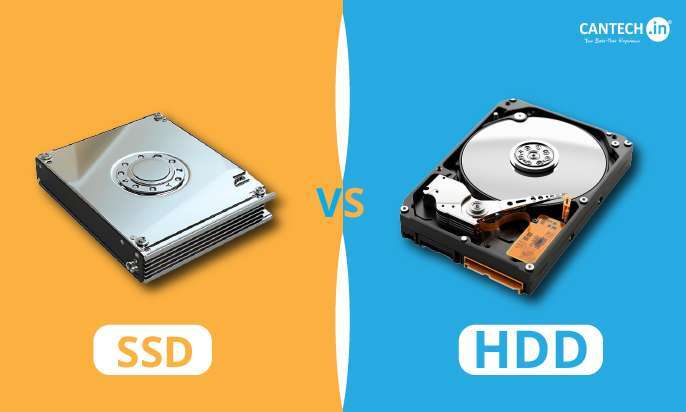
SSDs cost more because their storage cells are made with advanced semiconductor processes. A hard drive stores data by changing magnetic patterns on spinning platters. An SSD stores data by changing the electrical state of memory cells inside NAND flash chips.
A hard drive has moving parts, but its main storage material is comparatively inexpensive. An SSD needs very thin chip layers, precise manufacturing, a storage controller, firmware, and careful testing. Each part adds cost.
The price difference is easiest to see at large capacities. A hard drive can offer many terabytes at a low cost per terabyte. An SSD usually costs more for the same capacity, although SSD prices can fall sharply during sales or periods of oversupply.
The trade-off is speed. An SSD has no disk head that must move and no platter that must spin. This lets it access data with much lower delay.
The main cost factors
| Cost factor | How it affects SSD pricing |
|---|---|
| NAND flash | Stores the user’s data and often makes up the largest part of the bill of materials |
| SSD controller | Manages reads, writes, error correction, and wear leveling |
| DRAM or cache | Helps some SSDs manage data more efficiently |
| Firmware | Controls how the drive handles data and protects performance |
| PCB and power parts | Connect the chips and regulate power |
| Factory testing | Checks speed, errors, endurance, and reliability |
| Warranty and support | Adds cost to models built for long-term use |
| Distribution and retail | Adds shipping, storage, marketing, and seller margins |
Not every SSD includes the same parts. For example, some budget NVMe drives use a host memory buffer instead of dedicated DRAM. That can reduce cost, but performance may vary more during heavy workloads.
NAND Flash Is the Biggest Reason SSDs Cost More
NAND flash is the nonvolatile memory inside an SSD. “Nonvolatile” means it keeps data when the computer is turned off. Manufacturers build NAND from billions of memory cells arranged in layers.
Those layers are difficult to make. A modern NAND factory uses expensive clean rooms, specialized equipment, strict temperature control, and complex inspection systems. A small manufacturing defect can make a chip unusable or reduce its capacity.
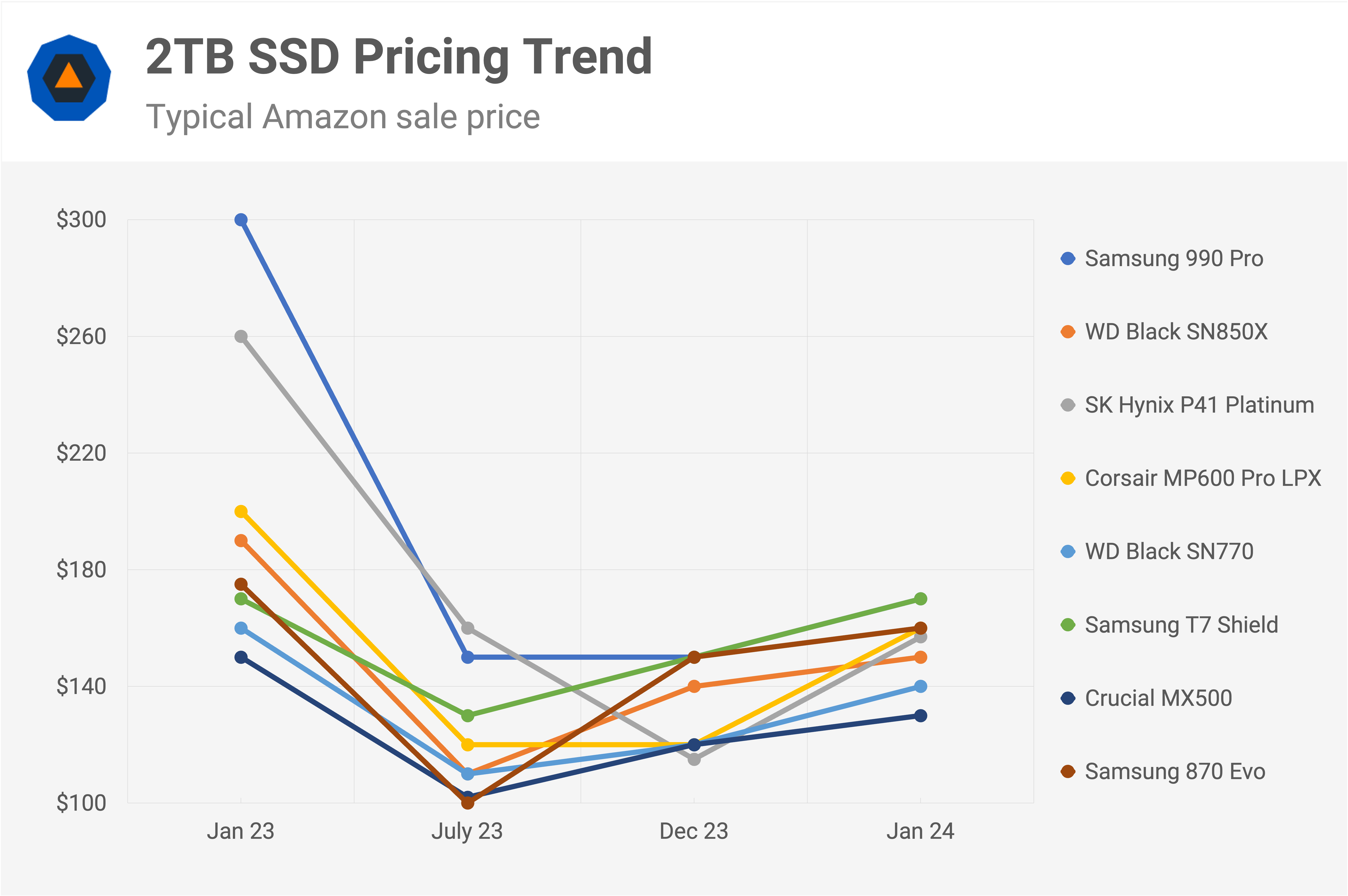
NAND is also sold in a global market. Prices change when manufacturers adjust production, computer sales rise or fall, or data center demand changes. The United States Geological Survey tracks many semiconductor-related materials, while company reports from manufacturers such as Micron, Samsung Electronics, and Kioxia show how storage companies respond to market conditions.
Why NAND prices move in cycles
NAND manufacturers cannot instantly add or remove production. Building a new fabrication plant can take years and requires billions of dollars. When demand falls, manufacturers may cut output to prevent prices from dropping too far.
When demand rises, available supply may become tight. Retail prices can then increase, especially for popular capacities such as 1TB and 2TB.
This creates a cycle:
- Manufacturers produce more NAND than buyers need.
- Wholesale prices fall.
- SSD makers discount drives.
- Manufacturers reduce production.
- Supply tightens.
- NAND and SSD prices rise again.


The final retail price does not always move at the same time as the NAND price. Stores may still have older inventory, and brands may use promotions to clear stock. That is why two similar SSDs can have very different prices in the same month.
More layers do not make every SSD cheaper
Manufacturers stack NAND cells vertically to increase capacity. This is called 3D NAND. More layers can lower the cost per gigabyte when production works well, but higher-layer designs also require complex equipment and careful manufacturing.
A newer process may eventually reduce cost, but the early production stage can be expensive. The savings depend on yield, chip density, demand, and how much usable memory each wafer produces.
SSD Type Has a Major Effect on the Price
Not all SSDs use memory cells in the same way. The most common types are SLC, MLC, TLC, and QLC. The names describe how many bits each cell stores.
| NAND type | Bits per cell | Typical position |
|---|---|---|
| SLC | 1 | Specialized industrial and cache uses |
| MLC | 2 | High-end or specialized products |
| TLC | 3 | Mainstream consumer SSDs |
| QLC | 4 | Low-cost, high-capacity consumer SSDs |
As a cell stores more bits, the drive can hold more data in the same physical space. That can reduce the cost per gigabyte. However, storing more bits in one cell makes voltage management more complex.
Why TLC SSDs often cost more than QLC SSDs
TLC stores three bits per cell. QLC stores four. QLC can offer more capacity at a lower price, but it may have lower write endurance and slower sustained write performance.
Many SSDs use a small fast cache to make normal tasks feel quick. When that cache fills during a long file transfer, the drive may write directly to slower QLC or TLC NAND. This is why a drive can appear fast in a short benchmark but slow down during a very large transfer.
TLC is often the practical middle ground for:
- Gaming PCs
- General desktop use
- Photo and video libraries
- Workstations with regular file transfers
- Upgrades from a hard drive
QLC may suit a buyer who mainly needs affordable bulk storage and does not write large amounts of data every day.
Why SLC cache can make specifications confusing
Some consumer SSDs use part of their NAND in a faster operating mode called an SLC cache. The drive temporarily treats cells as if they store one bit each. This can improve short write speeds.
The cache is not always the same size. It may be fixed, dynamic, or affected by how full the drive is. As a result, the advertised peak write speed may not represent a long, continuous transfer.
For fair comparisons, check both the short burst speed and the sustained write behavior.

SSD Controllers and Firmware Add Real Cost
The controller is the SSD’s traffic manager. It connects the computer to the NAND and decides where data goes. It also handles error correction, bad blocks, wear leveling, encryption features, and background cleanup.
A better controller can improve performance and reliability, but it costs more to design, produce, and support. It may also need more powerful error correction for high-density QLC NAND.


Firmware is just as important. It tells the controller how to:
- Spread writes across memory cells
- Recover data from weak cells
- Replace worn or damaged blocks
- Manage the cache
- Maintain performance as the drive fills
- Support features such as encryption and power-loss protection
Two SSDs can use the same type of NAND but perform differently because their controllers and firmware are different.
DRAM and DRAMless designs
Some SSDs include dedicated DRAM. DRAM can store a map of where data is located, helping the controller find information quickly.
DRAMless SSDs may use a host memory buffer. This lets the drive borrow a small amount of system memory through the NVMe interface. The design can lower price and power use, but it may not perform as well during heavy or mixed workloads.
For a basic office computer, the difference may be small. For a workstation, server, or system with frequent random writes, the controller and memory design matter much more.
Capacity, Speed, and Interface Also Change the Price
A larger SSD usually costs more, but the cost per terabyte can improve at common capacities. For example, a 2TB model may offer a lower cost per gigabyte than a 1TB model from the same product family.
That does not mean the larger drive is automatically the better deal. A 4TB SSD may cost less per gigabyte but still waste money if you only need 800GB.
SATA versus NVMe
SATA SSDs use the older SATA interface. NVMe SSDs use the PCI Express bus and are designed for flash storage.
| Feature | SATA SSD | NVMe SSD |
|---|---|---|
| Common form | 2.5-inch or M.2 SATA | M.2 PCIe |
| Interface limit | Lower | Higher |
| Typical use | Older desktops and laptops | Newer PCs, gaming, workstations |
| Price | Often lower | Ranges from budget to premium |
| Compatibility | Broad on systems with SATA support | Depends on M.2 slot and PCIe support |
An NVMe drive is not automatically expensive. Entry-level NVMe models can be affordable. Premium PCIe 4.0 or PCIe 5.0 drives cost more because they need faster controllers, faster NAND, stronger cooling, and more demanding validation.
A PCIe 5.0 SSD can also produce more heat than a basic SATA model. Some systems need a motherboard heatsink or a separate heatsink for proper operation. That adds to the total upgrade cost.
Performance is not the same as everyday speed
A high-end SSD may reach very high sequential speeds in a benchmark. In normal use, the difference between a midrange NVMe SSD and a premium model may be less noticeable than the specifications suggest.
Boot time, app loading, and game loading also depend on the processor, operating system, game design, memory, and background tasks. Paying more for peak sequential speed makes the most sense when your work actually moves large files or performs heavy data processing.
Enterprise SSDs Are Expensive for Different Reasons
Enterprise SSDs can cost far more than consumer drives because they are built for demanding workloads and business requirements.
A data center may write and read data continuously. A server failure can affect many users or interrupt a business service. Enterprise storage therefore needs more than a high speed rating.


Enterprise models may include:
- Higher write endurance
- Power-loss protection
- Consistent latency
- More extensive validation
- Error reporting and monitoring
- Longer product support
- Firmware designed for server workloads
- Stronger warranty terms
Consumer SSDs may advertise a total bytes written, or TBW, rating. TBW is an endurance estimate under defined test conditions. It is useful for comparison, but it is not a guarantee that a drive will fail at that exact number.
Power-loss protection is another major distinction. Some enterprise SSDs use capacitors to give the drive enough power to safely complete critical operations if electricity suddenly stops. Consumer drives may not include the same protection.
That is why an enterprise SSD should not be judged by capacity and advertised speed alone.

SSD Prices Also Include Reliability and Warranty Costs
The retail price pays for more than memory chips. It also pays for design work, testing, returns, technical support, and warranty service.
Manufacturers must test whether a drive can:
- Retain data
- Correct common errors
- Handle worn memory cells
- Maintain firmware stability
- Work across supported systems
- Recover from unexpected events
A cheaper model may still be reliable for normal use. However, low price can reflect simpler hardware, lower endurance, less consistent sustained performance, or shorter support.
Look at these specifications before buying:
- Warranty length
- TBW rating
- NAND type
- Controller model
- DRAM or DRAMless design
- Sustained write behavior
- Operating temperature
- Power-loss protection
- Software and firmware support
Treat these specifications as clues, not guarantees. A higher TBW rating does not prove that one drive will last longer in every computer. Actual life depends on workload, temperature, free space, power stability, and firmware.

Why SSD Prices Can Seem Unfair
SSD pricing can feel confusing because capacity and performance do not rise in a straight line. A drive with twice the storage does not always cost twice as much. A premium model may cost much more even though it offers only a small benefit in everyday use.
Several pricing effects create this confusion:
Retail promotions are temporary
SSD manufacturers and retailers often use discounts to manage inventory. A model may be cheap during a sale and return to a much higher price later.
Product names hide important differences
Two 2TB NVMe SSDs may use different NAND types, controllers, cache designs, and warranties. Capacity alone does not make them equivalent.


Usable capacity is lower than the advertised capacity
Manufacturers label storage using decimal units. Operating systems often display capacity differently. The drive also reserves some space for formatting, firmware, overprovisioning, and error management.
Full drives can slow down
An SSD needs free space for background management. When a drive becomes nearly full, performance and endurance may suffer, depending on the model and workload.
A practical rule is to leave some free space rather than filling the drive to its label capacity. The exact amount depends on the SSD and use case, so the manufacturer’s guidance is the best source.

How to Get the Best SSD Value in the United States
The best value comes from matching the SSD to your workload, not from buying the fastest model available.
For office work and web use
A basic SATA SSD or entry-level NVMe SSD is often enough. Prioritize:
- Good warranty coverage
- TLC NAND when the price difference is small
- A reputable controller
- Capacity that leaves room for future files
For gaming
A mainstream 1TB or 2TB NVMe SSD usually offers a sensible balance. Game loading times may improve over a hard drive, but the most expensive consumer SSD may not produce a matching improvement.
Check your motherboard or laptop manual before buying. An M.2 slot may support SATA, NVMe, or only one of those interfaces.
For video editing and large file work
Prioritize sustained write performance, capacity, cooling, and endurance. A drive that is fast for a short benchmark may slow during long recordings or exports.
A secondary SSD can help separate project files from the operating system. For critical work, maintain a separate backup rather than relying on the SSD alone.
For a large media library
QLC can be reasonable when most activity involves reading files. If you frequently rewrite the entire library or move large data sets, TLC may provide more consistent performance.
For servers and business systems
Use a drive designed for the workload. Consider endurance, power-loss protection, monitoring, support, and compatibility with the server platform. A consumer SSD may be cheaper but can create more risk in a system that needs steady operation.

A Simple Way to Compare SSD Prices
Use cost per terabyte as a starting point:
Cost per TB = SSD price ÷ advertised capacity in TB
Hypothetical example
- Drive A: $70 ÷ 1TB = $70 per TB
- Drive B: $115 ÷ 2TB = $57.50 per TB
- Drive C: $190 ÷ 2TB = $95 per TB
Drive B has the lowest capacity cost. Drive C may still be worth considering if it offers higher endurance, better sustained writes, power-loss protection, or a longer warranty.


Do not compare cost per terabyte without checking the following:
- NAND type
- Interface and PCIe generation
- Controller and cache design
- Endurance rating
- Warranty
- Sustained performance
- Compatibility
- Thermal requirements
A cheaper SSD can become a poor purchase if it does not fit the computer or slows during the work you need it to do.
Common Mistakes When Buying an SSD
The most common mistake is choosing by advertised speed alone. A high sequential read number does not tell you how the drive handles long writes, random access, heat, or a nearly full capacity.
Other mistakes include:
- Buying an M.2 drive without checking whether the slot supports NVMe
- Assuming every M.2 SSD uses the same interface
- Filling the drive completely
- Ignoring the warranty and TBW rating
- Paying for PCIe 5.0 when the computer supports only PCIe 3.0 or 4.0
- Using a consumer SSD for a heavy server workload
- Treating a benchmark as proof of everyday performance
- Keeping the only copy of important files on one SSD
SSDs can fail without warning, even when they have no moving parts. Keep at least one separate backup of important documents, photos, and work files. For especially valuable data, use more than one backup location.

Frequently Asked Questions
Will SSD prices go down?
They may fall when NAND supply exceeds demand, but prices can also rise when manufacturers cut production or demand increases. SSD pricing is cyclical and varies by capacity, interface, and product tier. There is no reliable fixed schedule for the next major price drop.
Are SSDs still worth buying over hard drives?
For an operating system, applications, and games, an SSD is usually worth buying because it greatly reduces access delay and improves system responsiveness. Hard drives remain useful for low-cost bulk storage and backups.
Is a cheap SSD unsafe?
Not necessarily. A budget SSD can work well for light use. Check its warranty, NAND type, endurance rating, controller information, and independent test results when available. Avoid buying a model with unclear specifications or poor support for important data.
Why is a 4TB SSD so expensive?
A 4TB SSD requires a large amount of NAND flash and may need more complex memory management. High-capacity models can also use premium controllers and stronger thermal designs. The cost per terabyte may be lower than a smaller model, but the total purchase price is still higher.
Does a more expensive SSD last longer?
Not always. Price can reflect speed, capacity, brand position, cooling, warranty, or enterprise features rather than endurance alone. Compare the TBW rating, warranty, NAND type, workload rating, and power-loss protection.
Can an SSD get cheaper after I buy it?
Yes. NAND supply changes, new models arrive, and retailers run promotions. A later price drop does not mean the earlier purchase was wrong if the SSD met your capacity and performance needs at the time.

Sources and Evidence
This article relies on documented technical information and public industry material rather than hands-on testing of one specific SSD model.
Useful primary and technical references include:
- NVM Express specifications — information about the NVMe storage protocol.
- JEDEC Solid State Technology Association — standards used across memory and storage industries.
- Micron investor relations and technology materials — public information about NAND manufacturing and market conditions.
- Kioxia flash memory technology resources — background on 3D flash memory.
- Samsung Semiconductor NAND resources — descriptions of flash storage technologies.
- SNIA Solid State Storage Technical Work Group — technical guidance on solid-state storage.
- Backblaze Drive Stats — public storage reliability data, useful for understanding why reliability claims need specific test conditions.
Prices, available models, and specifications can change. Confirm current details on the manufacturer’s product page and check compatibility with your computer before buying.

Conclusion
SSDs are expensive because they combine costly NAND flash with advanced controllers, firmware, testing, and support. Their price also changes with global supply and demand.
For most people in the United States, a mainstream TLC NVMe SSD offers a strong balance of price, speed, and endurance. Choose QLC when low-cost capacity matters more than sustained write speed. Choose an enterprise drive only when your workload requires its endurance, consistency, support, or power-loss protection.
The next step is simple: check your computer’s interface, estimate the capacity you need, compare cost per terabyte, and then review endurance and warranty before choosing the least expensive suitable model.