How To Reset Bose QuietComfort Ultra Earbuds: Easy Guide
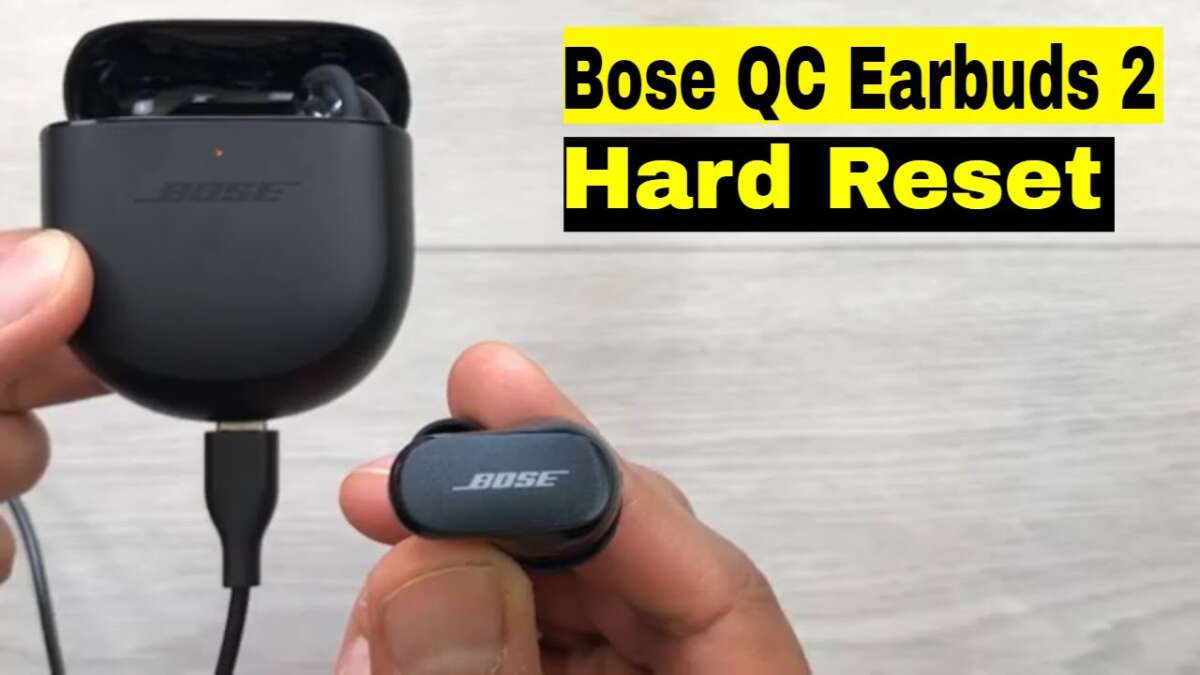
To reset Bose QuietComfort Ultra Earbuds, place both earbuds in the charging case, close the lid, wait 30 seconds, open the lid, then press and hold the Bluetooth button on the case for about 30 seconds. Release the button when the earbuds’ status light flashes white and then blue.
This guide applies to the Bose QuietComfort Ultra Earbuds sold in the United States. It does not apply to the separate Bose QuietComfort Ultra Open Earbuds, which use a different design and reset process.
Introduction
A reset can help when your Bose QuietComfort Ultra Earbuds will not connect, only one earbud works, sound cuts out, or the Bose app cannot find the earbuds. A factory reset clears saved Bluetooth connections and returns the earbuds to their original setup state.
A reset is not the same as simply turning the earbuds off or removing them from your phone. Follow the full process below for the most complete result.


Before you reset the earbuds
Check these items before starting:
- Place both earbuds in the charging case.
- Make sure the earbuds and case have some charge.
- Keep the charging case open when the steps call for it.
- Stay near your phone or other Bluetooth device.
- Be ready to remove the old Bose earbuds entry from your device’s Bluetooth menu.
- Update the Bose app if it is already installed on your phone.
If the case has no charge, connect it to power with a compatible USB-C cable. A very low battery can prevent the reset from starting.
Reset versus reconnecting
Use the lightest fix that matches the problem:
| Problem | First step to try |
|---|---|
| Your phone cannot find the earbuds | Turn Bluetooth off and on, then reconnect |
| The earbuds connect to the wrong device | Remove the old Bluetooth connection |
| Only one earbud plays sound | Place both earbuds in the case and charge them |
| The Bose app cannot detect the earbuds | Restart the app and reset the Bluetooth connection |
| The earbuds remain unresponsive | Perform the full reset below |
A factory reset deletes saved device connections. You will need to pair the earbuds again with your iPhone, Android phone, tablet, computer, or other Bluetooth device.
How to reset Bose QuietComfort Ultra Earbuds
Follow these steps in order.
-
Put both earbuds in the charging case.
Confirm that each earbud sits correctly in its charging slot. The charging contacts should line up with the contacts inside the case. -
Close the case lid.
Leave the earbuds inside the closed case for at least 30 seconds. This gives the earbuds time to shut down and end their current connection. -
Open the case lid.
Keep both earbuds inside the case. -
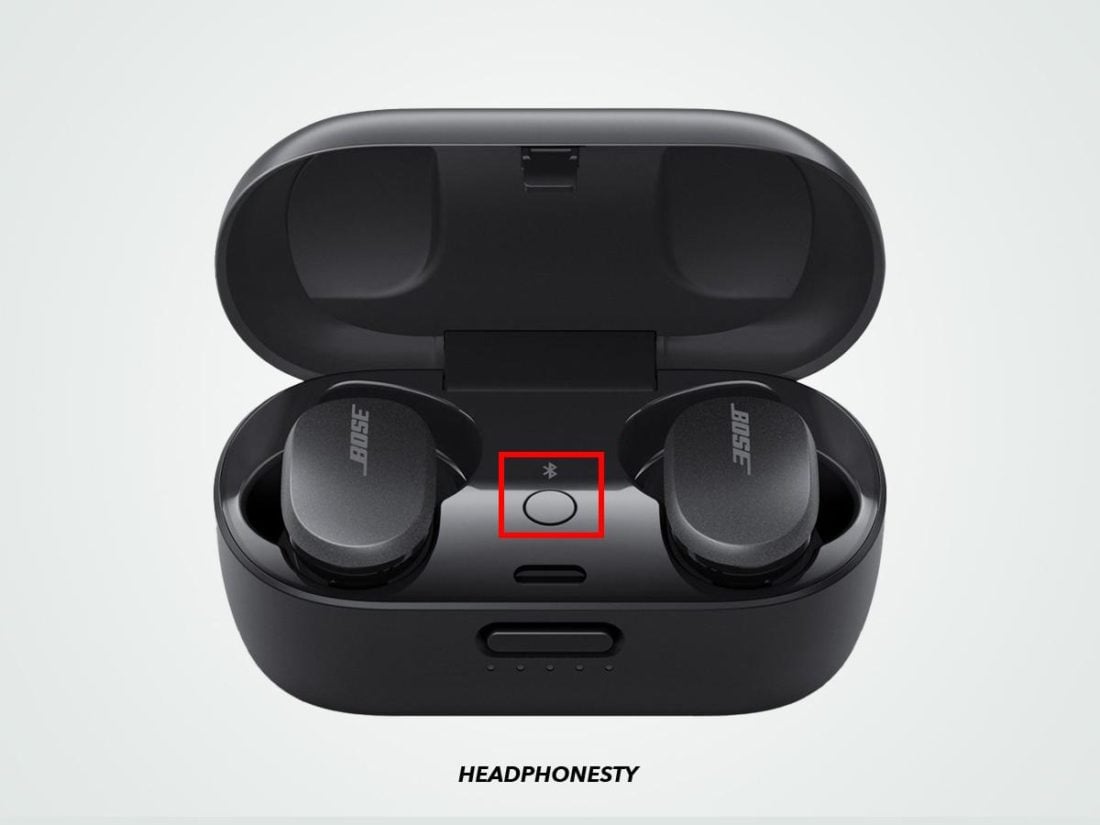
Find the Bluetooth button on the charging case.
It is located on the case and is used to place the earbuds into pairing mode. -
Press and hold the Bluetooth button for about 30 seconds.
Do not release the button too soon. The status light should flash white and then flash blue. -
Release the button when the light shows the reset sequence.
The flashing blue light indicates that the earbuds are ready to pair again. -
Remove the old Bose connection from your device.
On an iPhone, open Settings > Bluetooth, tap the information button beside the Bose earbuds, and choose Forget This Device. On Android, open Settings > Connected devices or Settings > Bluetooth, select the earbuds, and choose Forget, Unpair, or Remove. -
Pair the earbuds again.
With the case open and the earbuds inside, select the Bose QuietComfort Ultra Earbuds from your device’s Bluetooth list. -
Open the Bose app if you use it.
The app may ask you to add the earbuds again. Follow the on-screen setup steps.
Signs that the reset worked
The reset likely worked when:
- The earbuds no longer connect automatically to the old device.
- The status light flashes blue for pairing.
- Your phone lists the earbuds as a new Bluetooth device.
- The Bose app asks you to set up or add the earbuds.
- Both earbuds respond after the new pairing.
A reset does not normally repair a damaged earbud, blocked charging contact, broken case, or failed battery. It clears software and connection data; it does not repair physical faults.

What to do if the reset does not work
If nothing happens after you hold the Bluetooth button, work through these checks.


1. Charge the case and earbuds
Connect the case to power and leave it charging for a while. Then place both earbuds inside the case and try the reset again.
If the case light does not respond at all, try another compatible USB-C cable and power adapter. Inspect the charging port for dust or damage. Do not insert metal objects into the port.
2. Clean the charging contacts
The earbuds may not reset if they are not making contact with the case.
Use a dry, soft cotton swab to gently clean:
- The metal contacts on each earbud
- The matching contacts inside the charging case
- The area around each charging slot
Do not use water, spray cleaner, or sharp tools. Make sure the contacts are dry before placing the earbuds back in the case.
3. Confirm that both earbuds sit correctly
Press each earbud gently into its slot. The earbuds should rest securely in the case. If one earbud sits too high or moves around, its charging contacts may not touch the case.
Remove any ear tip or accessory that prevents the earbud from sitting fully in the slot. Do not force the earbud into the case.
4. Forget the old Bluetooth connection
A reset may succeed even if your phone still shows the old connection. Remove every saved entry for the Bose earbuds from nearby phones, tablets, and computers.
Then turn Bluetooth off on those devices. This prevents one of them from reconnecting while you try to pair the earbuds with your main device.
5. Restart your phone
Restart the iPhone, Android phone, tablet, or computer you want to use. Bluetooth problems can come from the device rather than the earbuds.
After the restart, turn Bluetooth back on and search for the earbuds again.
6. Check the Bose app
The Bose app can help complete setup and install available firmware updates. However, the app is not required to perform the basic reset with the case button.
If the app freezes or cannot find the earbuds:
- Close the app completely.
- Restart your phone.
- Turn Bluetooth off and back on.
- Open the Bose app again.
- Add the earbuds as a new product if prompted.


If the reset still fails, use the official Bose support page for the latest model-specific instructions. Bose can change app menus and firmware behavior over time.

Common Bose QuietComfort Ultra Earbuds reset problems
The earbuds keep reconnecting to the old phone
The reset does not always remove the earbuds from the Bluetooth menus of your devices. After the reset, manually choose Forget This Device, Unpair, or Remove on each device.
Then pair the earbuds again as if they were new.
Only one earbud works after the reset
First, place both earbuds in the case and check that both are charging. Clean the contacts and charge the case.
If one earbud still does not appear, repeat the reset with both earbuds in the case. A single-earbud problem can result from poor charging contact, low battery, outdated firmware, or a hardware fault.
The status light does not flash blue
The case may not have enough power, the Bluetooth button may not have been held long enough, or one earbud may not be seated correctly.
Charge the case, close the lid for 30 seconds, open it, and hold the Bluetooth button for the full reset period.
The earbuds connect but have no sound
Check the output device on your phone or computer. The device may be connected for calls but still sending music to its built-in speaker.
Also check the media volume, audio balance, and the active audio output. On a computer, select the Bose earbuds as the playback device.
The reset fixed the connection but not the noise control
A reset can clear connection and software settings, but it may not solve a blocked microphone, damaged ear tip, or hardware problem. Check that the earbud microphones are clean and that the ear tips seal correctly.
If noise cancellation remains abnormal after setup and firmware updates, contact Bose support.
When you should contact Bose support
Contact Bose support when:
- The case shows no light after charging.
- One earbud never charges.
- The earbuds become unusually hot.
- The case or earbud has physical damage.
- The reset sequence never starts.
- The earbuds reset but will not enter pairing mode.
- The earbuds connect to several devices but have no audio.
- The same fault returns after repeated resets and updates.
Stop using the earbuds if the battery swells, leaks, smells unusual, or becomes very hot. Do not open the case or attempt a battery repair. Small lithium-ion batteries should be serviced by the manufacturer or a qualified repair provider.
Do you need to reset the Bose app too?
Usually, no. Resetting the earbuds removes their stored connections, but it does not necessarily erase the Bose app’s saved product data.


If the app still shows an old setup:
- Close and reopen the Bose app.
- Remove the earbuds from the app if that option appears.
- Sign out and sign back in if needed.
- Add the earbuds again after the Bluetooth reset.
- Reinstall the app only as a last software step.
Reinstalling the app will not repair a dead battery, damaged case, or failed charging contact.
Will resetting delete firmware updates?
A reset returns the earbuds to their default connection and setup state. It is not the same as manually downgrading or erasing firmware.
After pairing, open the Bose app and check for an available firmware update. Keep the earbuds in the case or follow the app’s instructions during the update. Do not disconnect power if the app specifically requires the case to remain connected.
Can you reset the earbuds without the Bose app?
Yes. The main reset uses the charging case and its Bluetooth button. You do not need the Bose app to start the reset or pair the earbuds through your device’s Bluetooth settings.
The app is useful for product setup, controls, firmware updates, and Bose-specific settings after the reset.
Does a reset improve battery life?
Not usually. A reset can fix a software or connection issue that causes unusual behavior, but it does not increase the physical capacity of an aging battery.
If battery life remains poor after charging and resetting, check:
- Whether both earbuds are charging fully
- Whether the case is also losing charge
- Whether high-volume use or noise cancellation affects runtime
- Whether the problem affects one earbud or both
- Whether the earbuds need service
Bose’s published battery figures are test results under stated conditions. Actual battery life varies with volume, listening mode, Bluetooth use, and other settings.

Frequently asked questions
How long should I hold the Bluetooth button during a reset?
Hold the Bluetooth button for about 30 seconds. Releasing it too early may place the earbuds in pairing mode without completing the reset.
Do I have to forget the earbuds before resetting them?
You can reset the earbuds first, but removing the old Bluetooth entry afterward is strongly recommended. This prevents your phone from using a stale connection record.
Will a reset remove my Bose app settings?
A reset clears the earbuds’ stored connections and setup state. It may not remove every product entry or preference from the Bose app. If the app shows the old setup, remove and add the earbuds again.
Why will my Bose QuietComfort Ultra Earbuds not enter pairing mode?
Low battery, poor charging contact, an old Bluetooth connection, or a failed reset can prevent pairing mode. Charge the case, clean the contacts, forget the old Bluetooth entry, and repeat the full reset.


Are the Bose QuietComfort Ultra Earbuds and Ultra Open Earbuds reset the same way?
No. They are different Bose products with different controls and charging designs. Use the instructions for the exact model printed on the case, packaging, or Bose app.
Official information and final check
This guide is based on the documented reset and pairing workflow for the Bose QuietComfort Ultra Earbuds. For the most current instructions, confirm the model and check Bose’s official support resources:
After the reset, the best next action is simple: charge both earbuds, remove the old Bluetooth entry, pair them again, and test audio from both sides. If the reset sequence still does not start, the problem is more likely related to charging, the case, or hardware than to a saved Bluetooth connection.
Conclusion
To reset Bose QuietComfort Ultra Earbuds, place both earbuds in the case, close the lid for 30 seconds, open it, and hold the case’s Bluetooth button for about 30 seconds. Wait for the white and blue light sequence, forget the old Bluetooth connection, and pair the earbuds again.
If the reset fails, charge the case, clean the contacts, check that both earbuds sit correctly, and try once more. Persistent charging, pairing, or heat problems require Bose support rather than repeated resets.