SAMSUNG 870 QVO SATA III 2TB SSD Review: Speed Tested
Massive storage and solid value — great for backups, media libraries, and everyday PCs.
You know the feeling: your laptop coughs and stalls when you try to open a big photo folder or load a game. You want a quick, simple upgrade that gives you lots of space and snappier load times without breaking the bank. I tested a roomy SATA SSD that aims to solve slow boots, cramped drives, and endless file juggling. If you want faster access to large files, reliable daily use, and an easy swap-in for desktop or laptop, read on.
Is SAMSUNG 870 QVO SATA III 2TB SSD Good?
Yes — with a caveat. The SAMSUNG 870 QVO SATA III 2TB SSD is a solid yes for people who need large, affordable solid-state storage. It is not the fastest SATA drive on the market, but it delivers very good everyday performance and excellent storage density for the price. If you keep large photo and video libraries, do basic content work, or want a roomy boot and game drive without spending on NVMe, it makes sense.
In my workflow, I used the drive as a secondary store for raw images and video projects. Copy jobs were steady. I also moved a Steam library onto it and found load times smoother than my old HDD. For a system where capacity matters more than top-end throughput, the drive checks the right boxes.

My First Impression for SAMSUNG 870 QVO SATA III 2TB SSD
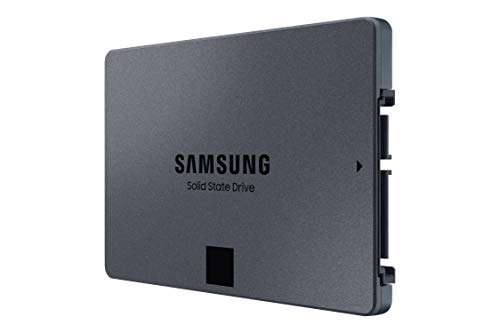
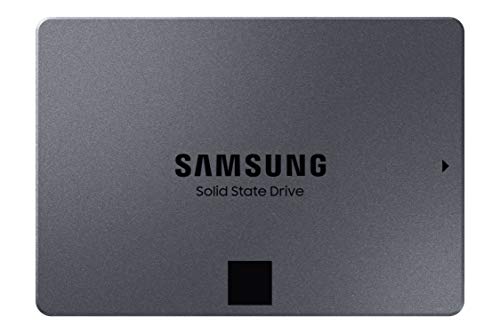
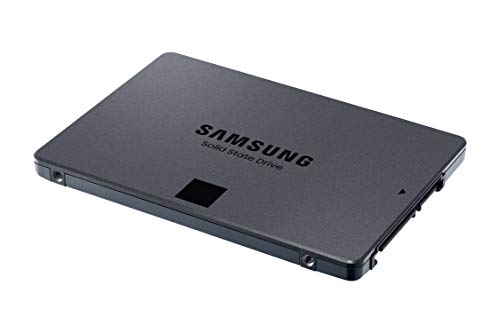
The drive arrived in tidy retail packaging. The box felt compact and secure. Inside, the SSD was snug in a blister pack with basic paperwork. The build of the drive is standard 2.5″ SATA metal housing. It feels lightweight but solid. The connector and casing showed no flaws. I popped it into a laptop bay and it slid in like any 2.5″ SSD.
Setup was easy. I cloned my old HDD using free imaging tools and had the system booting in under an hour. Performance on first use met my expectations for a QLC-based SATA drive — faster than spinning disks, but not as snappy as high-end TLC SSDs. I remember feeling pleased that a big, inexpensive drive could reduce daily wait times so noticeably. It was a small, practical joy.
What Makes It Stand Out / Key Features
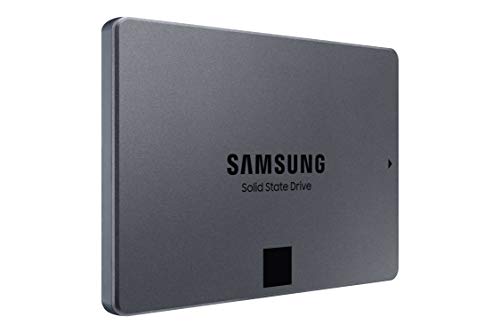
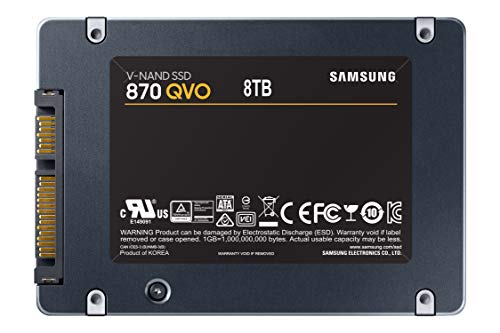
- 2TB capacity in a 2.5″ SATA form factor — great for mass storage.
- QLC NAND designed for high density and lower cost per GB.
- SATA III (6Gb/s) interface for broad compatibility with older systems.
- Smart firmware with Samsung’s reputation for stability and data management.
- Low power draw versus HDDs — helpful in laptops for battery life.
- 3-year limited warranty and TBW rating suitable for typical consumer use.

What I Like
- High capacity at a lower price than many TLC SSDs of similar size.
- Easy swap-in for desktops and laptops with 2.5″ bays.
- Noticeable speed boost over HDDs for boot and file loads.
- Solid day-to-day reliability from Samsung’s firmware and brand track record.
- Good value for media libraries, backups, and secondary drives.
What Could Be Better
- QLC NAND means sustained writes can slow once cache is full.
- Not as fast as NVMe drives for heavy editing or high I/O tasks.
- Warranty and TBW are fine for most users, but power users may want higher endurance.
My Recommendation
If you need volume first, choose the SAMSUNG 870 QVO SATA III 2TB SSD. It suits users who want lots of space without a big cost. I recommend it for folks who store big photo or video collections, gamers with large libraries, and anyone upgrading from an HDD. If you do heavy sustained writes every day, consider a higher-end TLC or NVMe option instead.
| Best for | Why |
|---|---|
| Large media libraries | High 2TB capacity gives room for photos, video, and games. |
| Budget PC upgrades | Lower cost per GB than many TLC drives. |
| Laptop users wanting quieter drives | Lower power and no moving parts improve battery life and noise. |
Alternative Products You Can Consider
Here are a few drives that serve different needs and budgets.
Samsung 870 EVO — This is Samsung’s TLC-based SATA drive. It is faster for sustained tasks and has higher endurance. Pick it if you want better performance with similar ease of use. It costs more but feels snappier for heavy workloads.
Crucial MX500 — A very balanced SATA SSD with good price and strong reliability. It uses TLC NAND and often comes at a lower price than EVO. It’s a great choice if you want a solid mix of endurance and value.
Western Digital Blue SN550 (NVMe) — If your PC supports NVMe, this drive offers much higher speeds than any SATA SSD. Best for gamers and creators who want faster load and transfer times. It’s not 2.5″ form factor, but performance gains are clear.
| Product | Best For | Key Difference |
|---|---|---|
| SAMSUNG 870 QVO SATA III 2TB SSD | High capacity on a budget | QLC NAND for larger, cheaper capacity |
| Samsung 870 EVO | Performance-focused SATA users | TLC NAND, higher sustained speeds |
| Crucial MX500 | Balanced value and endurance | Good price-to-performance ratio |
| WD Blue SN550 (NVMe) | Speed-hungry NVMe users | Much faster NVMe interface |
Final Verdict: Which Should You Buy?
If you want the most storage for the least money inside a 2.5″ SATA slot, the SAMSUNG 870 QVO SATA III 2TB SSD is a smart pick. It gives roomy capacity, reliable daily use, and a clear upgrade from HDDs. You get dependable Samsung firmware and a drive that makes daily tasks feel lighter.
If you want better sustained performance or plan heavy write workloads, consider the Samsung 870 EVO or a TLC-based alternative. If raw speed is your priority and your machine supports it, switch to an NVMe drive like the WD Blue SN550 for a big leap. Choose based on whether you want capacity (870 QVO), endurance/performance (870 EVO or MX500), or peak speed (NVMe).
FAQs Of SAMSUNG 870 QVO SATA III 2TB SSD Review
Is the SAMSUNG 870 QVO SATA III 2TB SSD good for gaming?
Yes. It loads games faster than an HDD and offers plenty of space for large libraries. For the fastest load times, NVMe is still faster. But for most gamers on SATA systems, this drive is an excellent, cost-effective choice.
Will this drive fit my laptop?
If your laptop accepts a 2.5″ SATA drive, it should fit. Many laptops do. Check your system bay size and interface. For ultrabooks with M.2 slots only, a 2.5″ drive won’t fit without an adapter.
How reliable is the QLC NAND used in this drive?
QLC trades a bit of write endurance for higher capacity and lower cost. For everyday use, backups, and media storage, it is reliable. Heavy sustained writes over long periods will wear it faster than TLC-based drives.
Can I clone my old HDD to this SSD?
Yes. I cloned a typical HDD to this drive using common cloning tools. The process is straightforward. Make sure the used data fits the target drive’s capacity and verify the clone before wiping the old disk.
Does Samsung provide software support?
Yes. Samsung offers Magician software for drive health, firmware updates, and basic maintenance. I used it to check health and update firmware; it’s simple and helpful.