What Is A TLC SSD: Benefits, Speed & Lifespan
For people shopping for a laptop, desktop, or external drive in the United States, a TLC SSD is a solid-state drive that stores three bits of data in each NAND flash memory cell. TLC means Triple-Level Cell.
TLC SSDs sit between faster, more durable SLC and MLC designs and higher-capacity QLC drives. They are popular because they offer a practical mix of speed, capacity, price, and endurance for most home, office, gaming, and creator workloads.
What does TLC mean in an SSD?
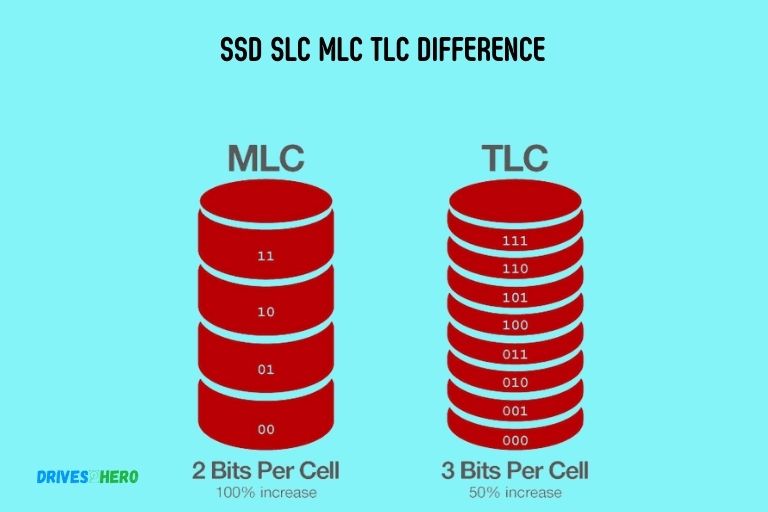
TLC means Triple-Level Cell. Each flash cell stores three bits, which creates eight possible binary values:
- 000
- 001
- 010
- 011
- 100
- 101
- 110
- 111
The SSD stores these values by placing different electrical charge levels in the cell. A controller reads the charge and translates it into data.


This design lets a manufacturer store more data in the same physical area than SLC or MLC memory. The trade-off is that the controller must distinguish between more charge levels. That can make TLC flash more sensitive to wear and can require more careful error correction.
The word “level” does not mean three physical layers. It refers to the number of bits stored in each cell. TLC memory may still use 3D NAND, which stacks memory cells vertically. These are two different features:
- TLC describes how much data each cell stores.
- 3D NAND describes how cells are arranged in the chip.
A 3D TLC SSD, for example, uses vertically stacked NAND cells, with each cell holding three bits.
How is TLC different from SLC, MLC, and QLC?
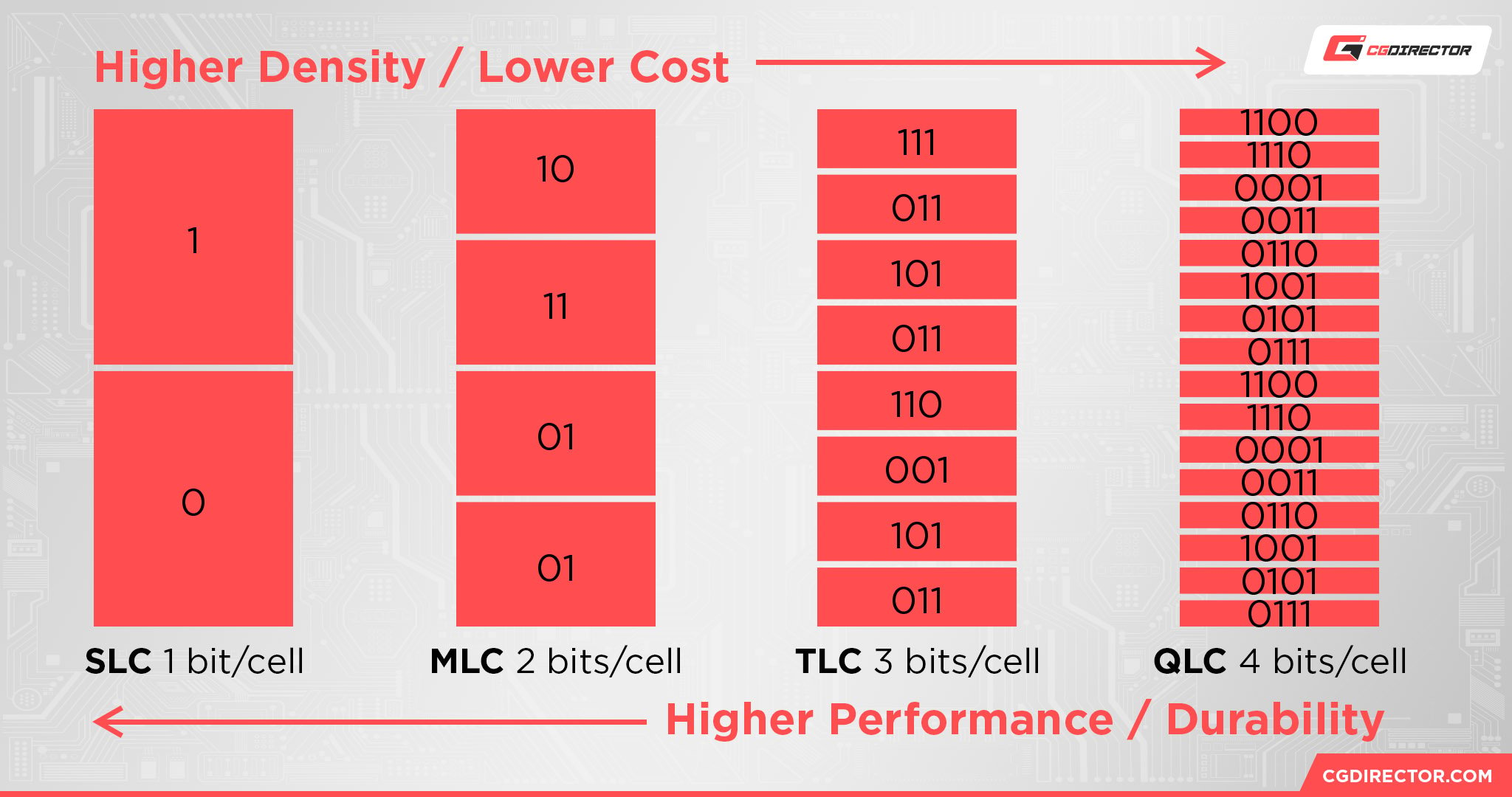
The main difference is the number of bits stored in each NAND cell. More bits per cell usually reduce the cost per gigabyte, but they also increase the challenge of maintaining speed and endurance.
| NAND type | Bits per cell | Common strengths | Common limits |
|---|---|---|---|
| SLC | 1 | Very high endurance and fast, consistent writes | Very expensive per gigabyte |
| MLC | 2 | Strong endurance and performance | Higher cost than TLC |
| TLC | 3 | Good balance of price, speed, and endurance | Write speed may drop after cache fills |
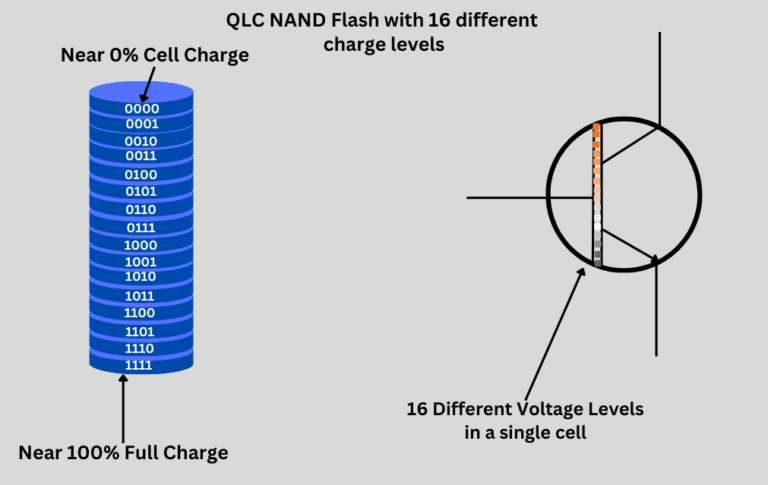
| QLC | 4 | High capacity at a lower cost | Lower write endurance and weaker sustained-write performance |
| PLC | 5 | Potentially very high density | More demanding electrical and endurance requirements |
SLC and enterprise-grade MLC are uncommon in ordinary consumer SSDs because they use storage space less efficiently. TLC has become a mainstream choice for computers sold in the U.S.
QLC can make sense when low cost and high capacity matter more than long, heavy write workloads. For example, a QLC drive may suit a media library or general file storage. TLC is often a safer choice for an operating-system drive, gaming PC, work computer, or system that regularly writes large files.
These are broad design differences, not guarantees for every product. A well-designed QLC SSD may outperform a poorly designed TLC SSD in some short tests. The controller, NAND generation, firmware, cache size, cooling, and interface also affect results.
How does a TLC SSD work?
A TLC SSD uses several parts to store and manage data:
- NAND flash memory stores the data.
- The controller coordinates reads, writes, error correction, and wear leveling.
- DRAM or an HMB system may help map logical addresses to physical flash locations.
- An SLC cache may temporarily accept writes at higher speed.
- Firmware manages the drive’s internal operations.
When your computer saves a file, the operating system sends a logical address to the SSD. The controller maps that address to a physical location in NAND flash. The controller also tracks which cells are free, which blocks contain old data, and which areas need cleanup.


Flash memory cannot overwrite a small piece of data in place in the same way as a hard drive. The SSD usually writes data to a new location and marks the old copy as invalid. Later, a process called garbage collection gathers valid data and erases blocks for reuse.
The controller also uses wear leveling. It spreads writes across the NAND cells so that one area does not wear out much faster than the rest.
Why error correction matters
TLC cells use eight charge states. The voltage levels are closer together than they are in lower-bit NAND. Over time, charge can shift because of use, temperature, and other factors.
Modern SSDs use error-correcting technology to detect and repair certain bit errors. Many current drives use LDPC, or low-density parity-check, error correction. The controller may read data more than once or apply stronger correction as the flash ages.
This does not make an SSD immune to failure. It helps the drive maintain data accuracy within its rated limits.
Are TLC SSDs fast?
TLC SSDs can be very fast, especially for short and typical consumer workloads. A TLC label alone does not determine the drive’s complete performance.
A PCIe NVMe TLC SSD can be much faster than a SATA TLC SSD because the interfaces provide different bandwidth limits. However, interface speed is only one factor. The NAND, controller, firmware, cooling, and workload all matter.
A TLC SSD may feel quick when:
- Starting Windows or another operating system
- Opening applications
- Loading games
- Copying moderate-sized files
- Browsing and working with office documents
- Editing photos
- Compiling software projects
Performance can change during a long write. Many consumer SSDs use a portion of their TLC NAND as an SLC cache. In this mode, the drive temporarily stores one bit per cell, which is faster to program.
When the cache fills, the drive may need to write data directly as TLC. Write speed can then fall. The size of the cache may also depend on how much free space remains. A nearly full SSD often has less room for dynamic caching and background operations.
This is why a drive can advertise a very high peak write speed but perform much more slowly during a long transfer. Manufacturers often measure peak performance under specific test conditions. Those figures are useful for comparison, but they are not a promise of constant speed.
TLC SSD endurance: how long does it last?
SSD endurance describes how much data a drive is rated to write before its flash reaches its specified wear limit. Manufacturers often express this rating as:
- TBW, or terabytes written
- DWPD, or drive writes per day, mainly in enterprise storage
A 1TB SSD rated at 600 TBW is designed to support up to 600 terabytes of host writes under the manufacturer’s test and warranty conditions. TBW is not a precise prediction of the day the drive will fail. Some drives may exceed the rating, while other problems can occur earlier.
For a rough hypothetical example, suppose a 1TB TLC SSD has a 600 TBW rating:


- Writing 20GB per day equals about 7.3TB per year.
- At that rate, 600TB would represent more than 80 years of host writes mathematically.
- Real use is more complex because the drive performs internal write amplification and because the warranty may impose a time limit.
This calculation is only an illustration. It does not predict service life.
What is write amplification?
Write amplification occurs when the SSD writes more data to NAND than the computer requested. It can happen during garbage collection, block management, and data movement.
If a computer writes 100GB of user data but the SSD performs 130GB of internal NAND writes, the write amplification factor is 1.3. High write amplification can reduce endurance and increase background work.
Keeping some free space can help the controller manage data more efficiently. The exact benefit depends on the drive and workload. Avoid treating a specific free-space percentage as a universal rule.
Is TLC durable enough for normal use?
For most U.S. home and office users, a quality TLC SSD provides sufficient endurance. It is usually a sensible option for:
- Operating-system storage
- Games
- Schoolwork
- Office work
- Web development
- Photo management
- General programming
- Moderate video editing
A different class of drive may be more suitable for workloads that write many terabytes repeatedly, such as:
- Continuous video recording
- Large database operations
- Heavy virtual-machine use
- Professional scratch-disk work
- Enterprise logging
- Large-scale scientific or engineering workloads
Check the manufacturer’s TBW rating, warranty terms, and workload guidance rather than judging endurance from the TLC label alone.

TLC SSD vs. QLC SSD: which should you choose?
For many buyers, the choice between TLC and QLC depends on workload rather than on a simple “good” or “bad” rating.
| Consideration | TLC SSD | QLC SSD |
|---|---|---|
| Typical price per gigabyte | Moderate | Often lower |
| Short everyday tasks | Usually strong | Usually adequate |
| Long sustained writes | Generally stronger | More likely to slow |
| Rated write endurance | Usually higher | Usually lower |
| Large game library | Strong fit | Can be a cost-focused fit |
| Operating-system drive | Strong general choice | Can work, depending on model |
| Heavy editing or scratch work | Usually preferable | Check carefully before buying |
| High-capacity archive | May cost more | Often attractive |
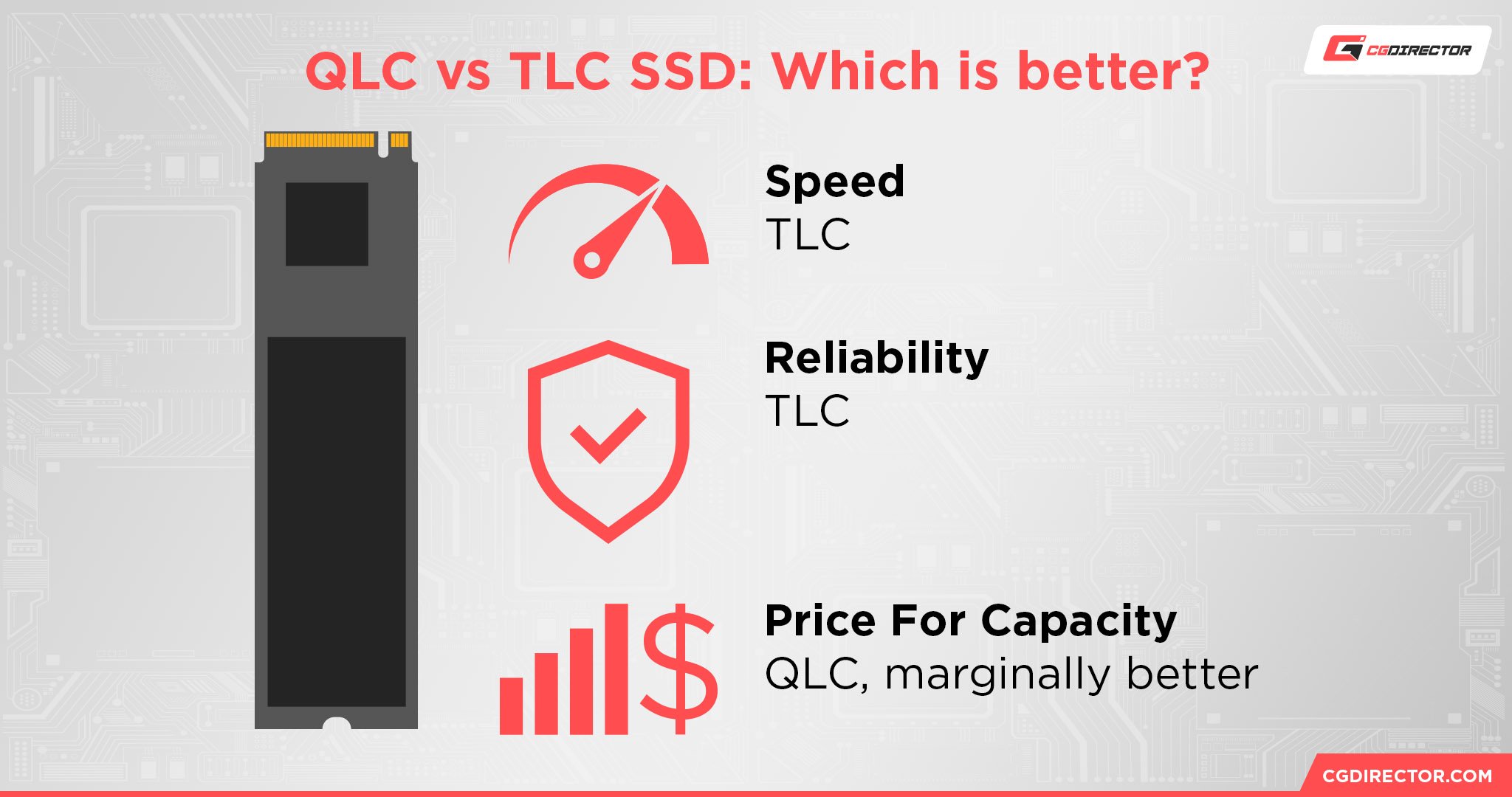
Choose TLC when you want more consistent write performance, higher endurance, or a drive for active work. Choose QLC when capacity and price are the main priorities and your workload does not involve frequent, sustained writes.
Do not assume every TLC SSD is better in every situation. A newer QLC model with a good controller and large capacity may perform well for light use. Likewise, a budget TLC drive may have a small cache, weak sustained performance, or a short warranty.
What should you check before buying a TLC SSD?
The NAND type is only one part of the buying decision. Check these specifications together.
1. Form factor and interface
Common options include:


- 2.5-inch SATA: Common in older desktops and laptops.
- M.2 SATA: Uses the small M.2 shape but communicates through SATA.
- M.2 NVMe: Uses PCIe and generally offers much higher bandwidth.
- PCIe add-in card: Used mainly in desktops and workstations.
An M.2 drive is not automatically NVMe. Confirm both the physical form factor and the supported interface in your computer’s manual.
2. Capacity
Larger SSDs often have more NAND available for caching and internal management. They may also offer better performance than smaller versions of the same product line.
Common consumer capacities include 500GB, 1TB, 2TB, and 4TB. The usable capacity shown in Windows or macOS will be lower than the advertised decimal capacity because of formatting and how operating systems display storage.
3. Sequential and random performance
Sequential speeds matter when moving large, continuous files. Random performance matters more for many small operations, such as launching programs and handling system files.
Do not compare only the largest advertised sequential number. Look for:
- Random read and write performance
- Sustained write behavior
- Performance when the drive is nearly full
- Latency
- Test conditions
- Whether the result applies to the exact capacity
4. DRAM and HMB
Some SSDs include dedicated DRAM for their mapping table. Others use Host Memory Buffer, or HMB, to use a small amount of system memory through NVMe.
A DRAM-less design is not automatically poor. It may cost less and use less power. However, performance can vary more by workload, and sustained behavior deserves closer review.
5. Endurance and warranty
Compare the TBW rating and warranty length for the exact model and capacity. Also check whether the warranty has a data-written limit, time limit, or other conditions.
A warranty does not guarantee that data can be recovered. Keep independent backups of important files.
6. Heat and cooling
Fast PCIe 4.0 and PCIe 5.0 NVMe drives can produce substantial heat during long transfers. A desktop motherboard may include an M.2 heatsink. Some laptops use a separate thermal design.
Thermal throttling lowers speed to control temperature. That behavior protects the drive, but it can affect sustained performance.
Common mistakes with TLC SSDs
Mistake 1: Assuming TLC always means high speed
TLC describes cell density, not the full drive design. SATA limits performance compared with NVMe, and a small SLC cache can affect long writes.
Mistake 2: Treating advertised speed as constant
Peak figures usually come from controlled tests. Large transfers may slow after the cache fills or when the drive heats up.


Mistake 3: Ignoring the exact capacity
A 1TB version and a 4TB version of the same SSD may use different NAND layouts and have different performance or endurance ratings.
Mistake 4: Filling the drive completely
An SSD needs free space for data movement, garbage collection, and wear leveling. A nearly full drive may lose performance and have less room for its dynamic cache.
Mistake 5: Using an SSD as a backup
An SSD is storage, not a backup plan. Hardware failure, accidental deletion, malware, theft, or file corruption can still cause data loss.
Use the 3-2-1 backup approach for important files:
- Keep at least three copies.
- Store them on at least two types of media.
- Keep at least one copy in a separate location.
Mistake 6: Confusing a health percentage with a guarantee
SSD health tools estimate wear or report SMART data. They do not prove that every stored file is safe or that the drive cannot fail suddenly.

Frequently asked questions
Is TLC better than QLC?
TLC is generally better for endurance and sustained write performance. QLC can be better for reducing the cost of high-capacity storage. The right choice depends on how often you write large amounts of data.
Is TLC good for gaming?
Yes. TLC SSDs are well suited to game storage and game loading. Game performance also depends on the system, game engine, CPU, GPU, and available memory. An SSD will not automatically increase frame rates.
Is TLC better than MLC?
MLC usually offers higher endurance and can provide strong sustained performance, but it costs more per gigabyte. For most consumer systems, TLC offers a more practical balance.
Does TLC SSD mean the drive has three layers?
No. TLC means three bits per cell. “3D NAND” refers to the vertical arrangement of memory cells. A drive can be both TLC and 3D NAND, but the terms describe different properties.
Can a TLC SSD fail suddenly?
Yes. Wear is only one possible cause of failure. Controllers, firmware, power problems, physical damage, and other components can fail without a long warning period. Maintain current backups.
Should I buy a TLC SSD for a laptop?
Usually, yes, if the laptop supports the drive’s form factor and interface. Confirm the laptop’s M.2 key type, supported PCIe generation, physical length, thickness limits, and whether the drive needs a heatsink.
Bottom line
A TLC SSD stores three bits in each NAND flash cell. It offers a useful middle ground between the high endurance and cost of lower-density NAND and the lower cost but weaker sustained-write behavior of QLC.
For most U.S. consumers, a well-reviewed TLC SSD is a strong choice for an operating-system drive, gaming PC, school computer, office system, or everyday laptop. Before buying, check the exact model’s interface, capacity, sustained-write behavior, TBW rating, warranty, thermals, and compatibility.
The next practical step is to check your computer’s manual, then compare TLC SSDs at the same capacity and interface rather than comparing the TLC label alone.


Sources and standards
- NAND Flash Memory — Kioxia
- 3D NAND Technology — Micron
- Solid State Drive Form Factors — Solid State Storage Initiative
- NVM Express Specifications
- JEDEC Solid State Drive Standards
Final recommendation
Buy TLC when you want a balanced SSD for active everyday use. Consider QLC for lower-cost bulk storage and consider enterprise or specialized drives for unusually heavy write workloads. Whatever type you choose, verify compatibility and keep a separate backup of important data.