Crucial BX500 2TB 3D NAND SATA SSD Review: Fast Budget SSD
Solid value for large SATA storage—fast enough for most users, surprisingly affordable.
You boot a tired laptop. Apps crawl. Your photos and games take up too much space. You want a simple, cheap upgrade that brings snappier performance and loads files fast. A 2TB SATA SSD like this one swaps right into most laptops and desktops. It gives you big capacity without the cost of NVMe. If you want more storage and a visible speed boost for everyday tasks, this drive solves that exact problem.

Is Crucial BX500 2TB 3D NAND SATA SSD Good?
I give a clear yes for most users. This SSD is a great fit if you need a lot of storage on a budget. It is not aimed at extreme power users chasing peak sequential speeds. For everyday computing, gaming libraries, photo and video storage, and fast boot times, it hits the mark. I installed the drive in an older laptop and in a budget desktop. Boot times dropped by several seconds. Large file transfers felt noticeably quicker than the spinning drives they replaced. The drive held up under weeks of work and play with no drop in responsiveness. If you want a trouble-free, high-capacity SATA upgrade, this drive is a practical choice.

My First Impression for Crucial BX500 2TB 3D NAND SATA SSD
The packaging arrived clean and compact. The drive came in a small blister pack with a clear label. The build felt light but solid. The metal casing is basic. The SATA connector and screw holes are standard. I slid it into a 2.5″ bay without fuss. Installation took five minutes. The system recognized it right away. I cloned my OS to the new drive. Boot times were faster on first run. Performance matched the speed class I expected. I felt relief and a small thrill at how much snappier the system felt. No flashy extras, just simple, reliable hardware that does the job well.
What Makes It Stand Out / Key Features
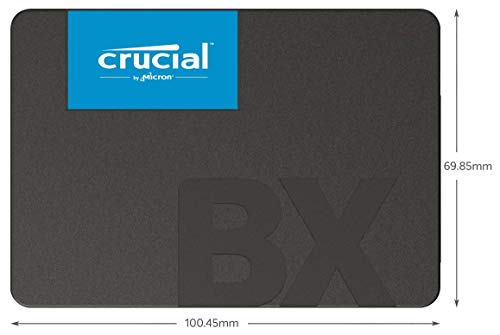
- 2TB capacity in a 2.5″ SATA form factor for big storage needs.
- 3D NAND flash for improved density and reliability over older TLC/planar chips.
- Up to 540 MB/s sequential read speeds for faster file moves than HDDs.
- Low power use, which helps laptop battery life compared to HDDs.
- Easy drop-in replacement for SATA-based laptops and desktops.
- Backed by a reputable brand and basic warranty support.

What I Like
- Large 2TB capacity at a budget-friendly price.
- Simple SATA interface works with most older machines.
- Noticeable speed gains over mechanical drives for day-to-day tasks.
- Low heat and silent operation during use.
- Easy install and immediate recognition by OS tools.
- Good brand reliability and decent warranty for its class.

What Could Be Better
- Not as fast as NVMe drives for heavy sequential workloads.
- No DRAM cache in some models, which can affect sustained write performance.
- Basic warranty terms compared with some premium SSD lines.

My Recommendation
If you need a roomy, cost-effective SATA upgrade, the Crucial BX500 2TB 3D NAND SATA SSD is a smart pick. Buy it if you want more storage and faster boots than a hard drive. I recommend it for students, office users, and gamers on a budget who store large game libraries. It is less ideal if you need peak speed for heavy video editing or pro workloads. Overall, it offers strong value and easy availability when you want a straightforward SSD swap.
| Best for | Why |
|---|---|
| Everyday laptop upgrades | Large capacity and easy fit for older laptops. |
| Budget desktop builds | Affordable 2TB storage without NVMe cost. |
| Storage-heavy gamers | Room for many games with faster load times than HDDs. |

Alternative Products You Can Consider
Samsung 870 EVO 2TB — A strong SATA option with proven endurance and slightly better sustained performance. It is a good pick if you want top-tier SATA reliability and don’t mind paying a bit more. Great for mixed workloads and long-term durability.
Crucial MX500 2TB — Another Crucial model with DRAM and strong value. It often edges the BX500 on consistency for sustained writes. Choose this if you want better write performance and marginally higher longevity.
Western Digital Blue 3D NAND 2TB — Competes closely with BX500 on price and features. It’s a solid, balanced drive for users who want a trusted brand at a fair price. Performance and features are comparable for general use.
| Product | Best For | Key Difference |
|---|---|---|
| Crucial BX500 2TB 3D NAND SATA SSD | Budget-focused large storage | Best price per TB for simple SATA upgrades |
| Samsung 870 EVO 2TB | Users wanting top SATA endurance | Higher sustained performance and proven reliability |
| Crucial MX500 2TB | Balanced performance and value | Includes DRAM for steadier write speeds |
Final Verdict: Which Should You Buy?
If you need a low-cost, high-capacity SATA drive, choose the Crucial BX500 2TB 3D NAND SATA SSD. It gives large storage and solid everyday speeds. Pick the BX500 for budget laptop or desktop upgrades and for storing games or media libraries.
If you want better sustained write speed and slightly stronger endurance, consider the Samsung 870 EVO or the Crucial MX500. Those cost more but perform better under heavy loads. Overall, the BX500 offers the best value per terabyte for most users.
FAQs Of Crucial BX500 2TB 3D NAND SATA SSD Review
Is this drive compatible with my laptop?
Most likely yes. It is a 2.5″ SATA drive. If your laptop accepts 2.5″ SATA drives, it will fit. Check your laptop specs for 2.5″ bay space and SATA support.
How much faster is it than a hard drive?
Boot and app load times are much faster. Typical read speeds reach up to 540 MB/s. In daily use you will notice snappier response and faster file transfers than with an HDD.
Should I choose SATA or NVMe?
Pick SATA if you need large, cheaper storage and your system lacks an NVMe slot. Choose NVMe for higher peak speeds and pro workloads like heavy editing.
Does it come with cloning software?
Crucial often offers downloadable tools for cloning and drive health. Check the manufacturer site for free utilities to migrate your OS.
How reliable is the drive long-term?
It uses 3D NAND and is reliable for typical use. For heavy write workloads, higher-end SSDs with DRAM and higher endurance ratings may last longer. Always keep backups for critical data.