How To Put Bose Headphones In Case: Easy Guide
To put most Bose over-ear headphones in their case, turn the headphones off, remove the cable, fold the earcups inward or flat as the case allows, and place them in the molded space with the ear cushions facing the soft lining. Do not force the hinges. If the case does not close with light pressure, take the headphones out and change their position.
This guide applies to common Bose headphones sold in the United States, including Bose QuietComfort, QuietComfort Ultra, QuietComfort 45, Noise Cancelling Headphones 700, and SoundLink models. The exact folding direction can vary by model, so the shape of the case is the best final guide.

Before You Put Bose Headphones Away
Check the model and case before folding the headphones. Bose cases are shaped for a specific headphone design, and a case for one model may not fit another model correctly.
You will need:
- The correct Bose carrying case
- The headphones
- Any detachable audio or USB cable removed from the headphones
- A clean, dry surface


A Bose over-ear case is usually for storage and travel. It may protect the headphones, but it does not normally charge them. If you have Bose wireless earbuds, use their charging case instead; the steps in this article are for full-size Bose headphones with a headband.
How the case should look
Open the case and look for:
- A recessed area shaped like two earcups
- A narrow channel for the headband
- A mesh pocket for the charging or audio cable
- Soft fabric or padding around the earcups
- A raised center area that may fit between the earcups
The molded area shows the intended position. Think of it like a fitted suitcase: the headphones should settle into the shape instead of being pressed into it.
Should you turn the headphones off?
Yes. Turning off wireless headphones helps conserve battery power and prevents them from connecting to a phone or computer while stored. It also gives you a chance to remove the audio cable before folding the headphones.
You do not need to disconnect Bluetooth before placing the headphones in the case. Bluetooth disconnects when the headphones power off, though some models may remain in a low-power state for a short time.
How to Put Bose Headphones in the Case
Follow these steps for most Bose over-ear models.
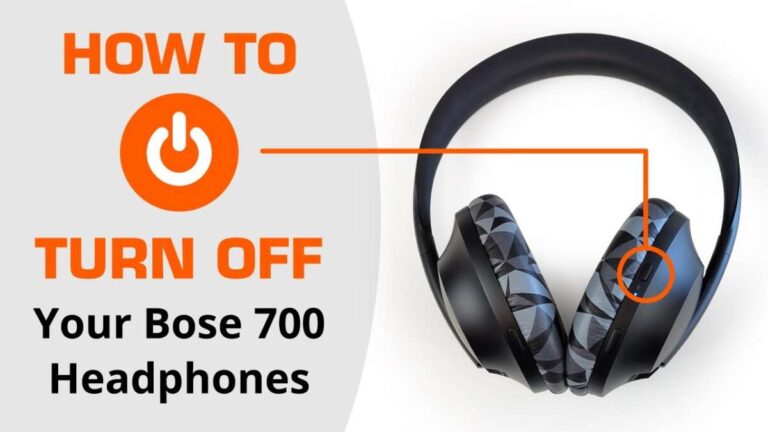
1. Turn off the headphones
Press the power button or use the model’s power control. Wait a few seconds for the status light or voice prompt to confirm that the headphones are off.
If the model has no separate power button, follow its shutdown method in the Bose app or owner’s guide.
2. Remove the cables
Unplug any cable from the headphones before folding them. This includes:
- USB charging cables
- 3.5-millimeter audio cables
- Airline adapter cables
- Any other connected accessory


Removing the cable prevents strain on the headphone port and keeps the cable from catching in the case hinge or zipper.
3. Place the headband in its smallest position
Slide both headband arms inward. Do not leave the headband fully extended unless the case specifically allows it.
Keep the adjustment arms even on both sides. Uneven adjustment can make the headphones sit crooked and may cause one earcup to press against the case.
4. Fold or rotate the earcups
Most Bose over-ear headphones fold in one of two ways:
- Fold inward: The earcups swing toward the inside of the headband.
- Fold flat: The earcups rotate so the headphones take up less space while staying open.
Use the movement that feels natural for your model. Never twist the earcups past their normal stop. If a hinge resists, check the case shape and the model guide rather than applying more force.
For many Bose QuietComfort models, the earcups fold inward for storage. Some Bose models, such as the Noise Cancelling Headphones 700, use a different folding layout. The case design should show whether the earcups belong face-to-face, face-up, or flat in separate recesses.
5. Set the headphones into the molded section
Lower the headphones into the case slowly. Match each earcup to its shaped recess.
In most cases:
- The ear cushions face the soft inside lining.
- The outside of the earcups faces the hard shell or molded base.
- The headband rests in the narrow upper channel.
- Buttons and ports should not press against a hard ridge.
If the case has a divider between the earcups, place the headphones so the divider sits between them. If it has one large cavity, let the earcups rest naturally in the deepest part.
6. Store the cable in the accessory pocket
Put the USB or audio cable in the mesh pocket. Keep the cable beside the headphones, not across the ear cushions or hinges.
Avoid overfilling the pocket. A bulky charger, adapter, or other item can push against the headphones when the case closes.
7. Close the case without force
Zip or snap the case shut with gentle pressure. The zipper should move smoothly.
Stop if:
- The lid will not meet the base
- The zipper catches on the headphones
- One earcup sits above the case rim
- The headband presses hard against the lid
- The case bends or bulges
Open the case and reposition the headphones. A properly placed pair should fit without compression.


Bose Headphone Case Position by Model Type
The correct position depends on the model and the case supplied with it. Use this table as a starting point, then confirm the fit with the case’s molded shape.
| Bose headphone type | Usual storage position | What to check |
|---|---|---|
| QuietComfort wireless models | Earcups usually fold inward | Make sure the cushions face the padded side |
| QuietComfort Ultra | Fold the earcups using their normal hinge movement | Do not force the headband or hinge past its stop |
| QuietComfort 45 | Earcups typically fold inward for the travel case | Keep the cable in the accessory pocket |
| Noise Cancelling Headphones 700 | Often stored in a flat or specially aligned position | Follow the case contour; the earcups may not fold like QuietComfort models |
| SoundLink Around-Ear models | Position varies by generation | Match the earcups to the case recesses |
| Bose earbuds | Use the charging case | Do not place earbuds in an over-ear headphone case |
This table describes common storage patterns, not a replacement for the manual for your exact model. Bose has changed hinge and case designs across product generations.
Why the case may seem too small
A Bose case can look smaller than the headphones because the headband and earcups are designed to fold. The case should still close without pressure.
If the case feels too small, check these common causes:
- The headband is still extended.
- The earcups are facing the wrong way.
- The earcups are flat when the case requires them to fold inward.
- A cable or charger is under the headphones.
- The case belongs to a different Bose model.
- A replacement ear cushion is not seated correctly.
Do not use a larger case as a fix until you confirm that the original case is the right one. A loose case may allow the headphones to move and rub during travel.
How to Tell When Bose Headphones Are Stored Correctly
The headphones are in the right position when the case closes easily and the headphones do not move much inside it.
Look for these signs:
- Both earcups sit fully inside their recesses.
- The ear cushions are not crushed against a hard edge.
- The headband is not sharply bent.
- No button is held down by the case.
- The charging port and audio port are clear.
- The cable pocket is not pressing into the headphones.
- The zipper closes without snagging.
A little movement inside a soft case is normal. Excess pressure is not. Long-term pressure can flatten ear cushions or place stress on the hinges.
What if the ear cushions touch?
Light contact with the soft case lining is normal. The cushions should not be compressed between the earcups or forced against the lid.
If the cushions touch a hard surface, rotate or fold the earcups according to the case design. Avoid storing heavy objects on top of the case.
Can you leave the headphones unfolded?
You can, if the case is designed for that position and closes without pressure. However, leaving the headband extended may waste space and can cause the case to press against the headphones.
For travel, use the smallest supported position. For short-term storage, the main goal is to avoid bending, heat, moisture, and pressure.

What to Do If the Bose Headphones Do Not Fit
If the case does not close, do not push down on the lid. Work through the following checks in order.
Check the model
Find the model name on the headphones, box, Bose app, or purchase record. A QuietComfort case may not fit a Noise Cancelling Headphones 700 model, even if both headphones look similar.


Look for the model’s official owner’s guide or case instructions on the Bose support website.
Check the folding direction
Move each hinge only along its normal path. Some models fold inward. Others rotate flat. If you try to fold a flat-storing model inward, you may put stress on the hinge.
The correct movement should feel smooth and controlled. A hinge may offer mild resistance, but it should not require strong force.
Check the headband
Retract both sides of the headband by the same amount. A fully extended headband is one of the most common reasons a travel case will not close.
Do not bend the headband backward to make it fit. That can damage the frame or change the fit on your head.
Check the accessory pocket
Remove the cable, charger, and any adapter from the case. Try closing the case with only the headphones inside.
If the case closes without accessories, move the cable to the mesh pocket and keep larger items outside the headphone case.
Check the ear cushions and hinges
Look for a cushion that has come loose or a hinge that no longer moves normally. Do not try to repair a cracked hinge with glue while the headphones are still in use. Adhesive can limit movement and may damage nearby materials.
If the headphones are under warranty, contact Bose support before opening or modifying them.
Replace the case only after confirming the cause
A replacement case can help if the original case is lost, damaged, or clearly made for another model. Choose one that supports the exact headphone dimensions and hinge movement.
A generic case may protect the headphones, but its interior may not support the earcups or headband as well as the original case.

Common Mistakes to Avoid
Avoid these storage mistakes to protect the headphones and case.
Forcing the zipper
If the zipper catches, stop and open the case. Pulling hard can damage the zipper or scratch the headphone shell.
Folding the earcups the wrong way
The earcups should rotate only through their intended range. Do not twist them to copy the position shown for another Bose model.
Storing the headphones with the cable plugged in
A cable can bend at the port when the headphones are folded. Remove it before putting the headphones away.


Packing wet headphones
Let sweat or moisture dry before closing the case for a long period. A closed case can trap moisture near the ear cushions and electronics.
Do not dry the headphones with a hair dryer or place them on a heater. Heat can damage plastics, padding, and batteries.
Placing heavy items on the case
A headphone case is not a hard equipment box unless it is specifically designed for that use. Keep heavy bags, books, and electronics from pressing on it.
Cleaning with too much liquid
Use a soft, dry cloth for routine cleaning. If the manufacturer permits a damp cloth, apply very little moisture and keep liquid away from ports, buttons, and seams.
Storage Tips for Travel and Home
Store Bose headphones in their case when you need protection from dust, impact, and pressure. For daily use, keep the case in a cool, dry place away from direct sunlight.
Before a flight or road trip:
- Charge the headphones if needed.
- Turn them off.
- Remove all cables.
- Fold them in the supported position.
- Place the headphones in the shaped compartment.
- Put cables in the accessory pocket.
- Close the case without force.
- Keep the case where it will not be crushed.
Do not leave wireless headphones in a hot vehicle. High heat can shorten battery life and damage the ear cushions or case materials.
For long-term storage, avoid storing the headphones while damp. Check them from time to time, especially if they are kept in a place with high humidity.

Frequently Asked Questions
Do Bose headphones go ear cushions up or down in the case?
The ear cushions usually face the soft, padded side of the case. The outside shells face the molded base or hard shell. The exact direction depends on the case, so use the shaped recesses as the guide.
Can I charge Bose headphones while they are in the case?
You can charge them only if the charging cable reaches the port without bending or pinching. It is usually better to charge Bose headphones outside the case so heat can escape and the cable does not strain the port.
Should I remove the Bose headphones’ cable before storing them?
Yes. Remove the charging and audio cables before folding the headphones. This reduces stress on the ports and prevents the cable from catching in the case.
Why will my Bose case not zip closed?
The headphones may be folded incorrectly, the headband may be extended, or the case may belong to another model. Remove accessories, check the hinge direction, and match the headphones to the molded case shape. Never force the zipper.
Can I use a Bose case for a different headphone model?
Only if the headphones fit without pressure and the earcups, headband, buttons, and ports are supported. A case that looks similar may still have a different interior shape. Confirm the model and dimensions before using it for travel.
Key Takeaways
- Turn off the headphones and remove all cables.
- Retract the headband evenly.
- Fold or rotate the earcups only in their normal direction.
- Match the headphones to the case’s molded recesses.
- Keep the ear cushions against the soft lining.
- Store cables in the accessory pocket.
- Never force the lid or zipper.
- If the case still does not fit, confirm that it matches the exact Bose model.
Conclusion
Putting Bose headphones in their case is simple once the hinges and molded compartments are aligned. Turn the headphones off, remove the cables, retract the headband, and place the earcups in the position shown by the case.


If the case resists closing, stop and adjust the headphones instead of applying force. The correct fit should protect the headphones without crushing the cushions, bending the headband, or stressing the hinges.